Best AI Note Taker for Apple Watch (2026)


Used by recruiters, executives, consultants, and more.
Best AI Note Taker for Apple Watch in 2026
An AI note taker for Apple Watch should do more than record. A good one takes what you say on your wrist and hands back a summary you can actually use, without opening your iPhone to make sense of it. That gap is where most Watch apps fall short. We tested and compared the top options. Here are the 7 best AI note taker apps for Apple Watch in 2026.
Several of these apps shipped Watch support only in the past year. What separates them now is what happens after you stop recording.
Best AI Note Taker for Apple Watch at a Glance (2026)
The best AI note taker for Apple Watch in 2026 is Speakwise, followed by:
- Speakwise - Best overall, with speaker labels and templated AI summaries after your recording syncs to iPhone
- Granola - Best for teams already using Granola on Mac or desktop
- Wave - Best for recognizing different voices in the room
- CraftNote - Best for combining Watch recording with video-call meeting notes
- Voicenotes - Best for organizing scattered personal ideas
- Owll - Best for turning notes into study material
- Cleft Notes - Best for verbal thinkers who need offline capture
Every app here adds AI on top of a recording. The difference is how well it works when the recording started on your wrist instead of a call.
1. Speakwise - Best Overall AI Note Taker for Apple Watch
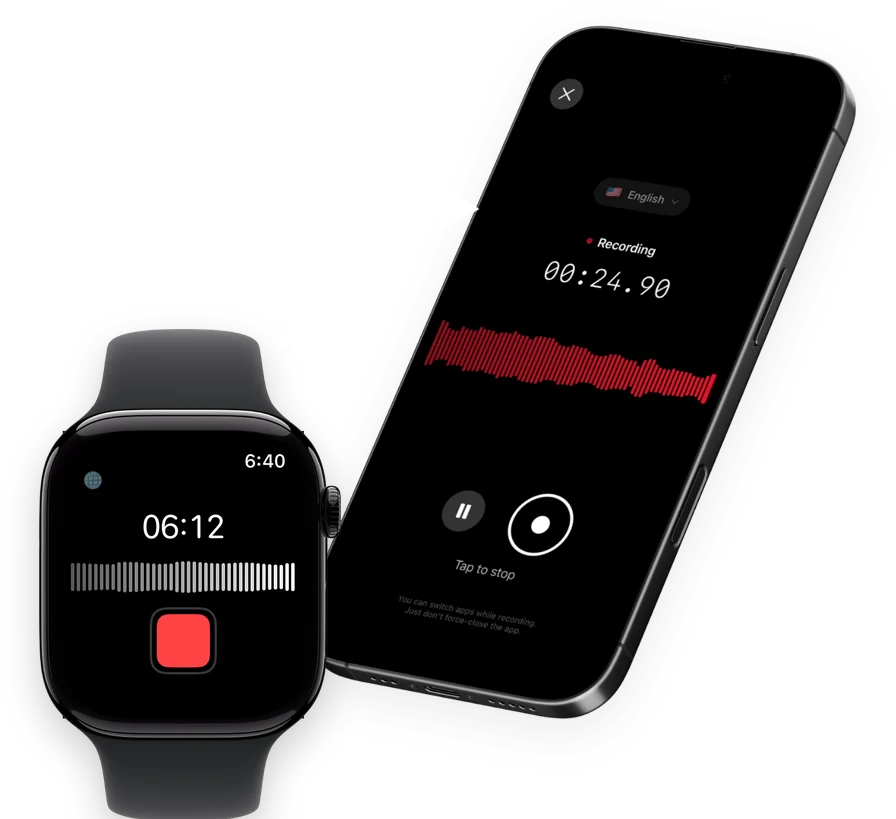
Speakwise is an AI note taker, voice recorder and voice-to-text app for iPhone with an Apple Watch companion app. Tap once on your Watch to start recording, tap again to stop, and the recording syncs to your iPhone. There, Speakwise transcribes it, labels the different speakers, and writes a summary with action items pulled out for you.
Why Speakwise Stands Out
Most AI note takers are built around a call: a bot joins Zoom and knows who's talking because the platform tells it. Speakwise is built for the opposite situation, a conversation with no call and no bot, captured from a phone or a watch on your wrist.
That means the summary has to do real work. Speakwise's templates cover meeting notes and action items, interviews, lecture and study notes, site inspection reports, clinical session notes, legal file notes, sales calls and more. The summary is shaped to match the conversation, and it syncs natively to Notion.
Key Features
- One-Tap Recording from Your Wrist: Start a recording on Apple Watch with a single tap, then let it sync to your iPhone automatically.
- Speaker Labels: The transcript shows who said what, which is what separates a usable meeting record from a wall of text.
- Templated AI Summaries: Summaries follow templates built for real situations, meetings, interviews, lectures, inspections, clinical notes, legal file notes, sales calls and more, with action items pulled out automatically.
- 100+ Languages: Transcription covers more than 100 languages, at 95%+ accuracy in good conditions and 92%+ in a noisy room.
- Long iPhone Sessions: On iPhone, recordings run up to 5 hours in a single session with no daily limit, and can continue with the screen off.
- Records Offline: Audio saves to your iPhone first, then syncs to transcribe once you're back online. Works through AirPods, Bluetooth earbuds and external mics.
- Native Notion Sync: Transcripts and summaries sync directly into Notion, no manual export needed.
Pricing
- Free Trial: Full access to try recording, transcripts and AI summaries
- Pro: Free trial, then a Pro subscription through the App Store
Best For
- In-person meetings, interviews and conversations with no call or bot involved
- Anyone who wants a templated summary instead of a raw transcript
- Notion users who want notes to sync there on their own
Limitations
- iPhone and Apple Watch only, no Android or desktop app
- The transcript and summary appear once the recording syncs to your iPhone, not on the Watch itself
- Not designed for joining virtual meetings the way a meeting bot does
Speakwise gets your hours back.
- ✓Built for in-person meetings, interviews, and site visits.
- ✓Trusted by recruiters, consultants, agents, and field pros.
- ✓One tap to record. Notion-ready summary in minutes.

2. Granola - Best for Teams Already on Granola
Granola built its name as a Mac and desktop meeting-notes tool that merges your own typed notes with the audio it hears. Its Apple Watch app, which shipped in July 2026, extends that to in-person capture, recording offline on the Watch and generating the AI note once it syncs.
Key Features
- Offline recording directly on the Apple Watch
- Merges typed notes with recorded audio into one structured summary on Mac or desktop
- Sync required to generate the finished AI note
Pricing
Free to start. Business plans run $14 per user per month for unlimited meeting history, with Enterprise at $35 per user per month.
Best For
- Teams that already run their meeting workflow through Granola on Mac
- People who like typing a few notes themselves while AI fills in the rest
Limitations
- Best experience depends on also using the Mac or desktop app
- Watch app is new, having launched in mid-2026
3. Wave - Best for Recognizing Different Voices
Wave records directly on the Apple Watch with no iPhone needed nearby, and its AI summary includes voice recognition, so it can tell different speakers apart in a recording made from a single microphone.
Key Features
- Records on the Watch without needing your iPhone close by
- AI summary generation after sync
- Recognizes distinct voices in a recording
Pricing
In-app purchases ranging from about $6 to $140, depending on the plan and billing period.
Best For
- Conversations with more than one speaker where you want voices told apart
- Capturing ideas away from your iPhone
Limitations
- Pricing structure is harder to compare at a glance than a simple monthly or yearly plan
- Newer to the AI note taker category than some competitors
4. CraftNote - Best for Combining Watch and Video-Call Notes
CraftNote records from the Apple Watch and also joins video calls on Zoom, Google Meet, Teams and Slack Huddles as a bot, so it covers both in-person and virtual meetings from one app. It detects multiple speakers and produces a summary either way.
Key Features
- Records on the Watch, even without your iPhone nearby or an internet connection
- Also joins Zoom, Google Meet, Teams and Slack Huddles as a meeting bot
- Multi-speaker detection built into the summary
Pricing
Starts at $9.99 per week, with annual plans from $49.99 to $129.99.
Best For
- People who need one app for both wrist recordings and video-call meetings
- Teams that use several different meeting platforms
Limitations
- Weekly pricing is a more expensive way to pay than an annual plan
- More features to learn than a Watch-only recorder
5. Voicenotes - Best for Organizing Personal Ideas
Voicenotes leans into capturing scattered thoughts rather than structured meetings. Its Apple Watch app records on the wrist, and the AI organizes what you say into searchable notes rather than a single long summary.
Key Features
- Records directly from the Apple Watch
- AI-organized notes rather than one long transcript
- Cloud-based transcription and summary generation
Pricing
Free to try, then $8.99 per week, $14.99 per month, or $89.99 to $99.99 per year.
Best For
- Capturing quick ideas and thoughts throughout the day
- People who want notes searchable rather than filed as one long recording
Limitations
- Not built around meeting-specific templates like action items for a client call
- Subscription cost adds up quickly on the weekly plan
6. Owll - Best for Turning Notes Into Study Material
Owll records from the Apple Watch and turns the result into a summary plus flashcards, which makes it a stronger fit for students and anyone studying from recorded material than for business meetings.
Key Features
- Records on the Watch, including without an iPhone nearby or internet connection
- AI summaries paired with generated flashcards
- Syncs across Watch, iPhone and other devices
Pricing
From $5.99 to $9.99 per week, or $69.99 to $99.99 per year.
Best For
- Students turning lecture recordings into study material
- Anyone who wants flashcards generated automatically from a recording
Limitations
- Weekly pricing options are pricier than an annual plan over time
- Less focused on business-style meeting summaries
7. Cleft Notes - Best for Verbal Thinkers Who Need Offline Capture
Cleft Notes is built for people who process ideas by talking them through. Its Apple Watch app records fully offline, queues the recording locally if your iPhone is out of range, and generates an AI summary once everything syncs.
Key Features
- Fully offline recording on the Watch, with automatic local queuing
- AI summary generated after the recording reaches your iPhone
- Syncs automatically over Bluetooth or shared WiFi
Pricing
Free with in-app purchases; Cleft Plus costs $6.99 per month or $39.99 per year.
Best For
- Talking through ideas out loud and getting them organized afterward
- Recording in places with no signal, like outdoors or on a job site
Limitations
- Fewer summary templates than a dedicated meeting-notes app
- Best suited to one or two speakers rather than a large group
How to Choose the Best AI Note Taker for Apple Watch
- Check where the summary happens. Some apps generate the note on your iPhone, others depend on a desktop app too. Confirm the desktop step isn't required if you want everything to happen from wrist and phone alone.
- Match the templates to your actual use. A real meeting, an interview or a study session benefits from a summary shaped for that purpose, which is where Speakwise's templates and Owll's flashcards each serve a different need.
- Think about how many people are usually talking. Wave and CraftNote both call out speaker recognition specifically. That feature matters less if your recordings are almost always one voice.
- Consider whether you need a meeting bot too. CraftNote covers both Watch recording and joining video calls, which is extra weight if all your meetings are in person.
- Compare the real cost over a year. Weekly pricing looks small at first glance but adds up fast.
For a broader look at AI note takers beyond the Watch, see our guides to the best AI note taker apps overall and the best AI note taker apps for iPhone. If you want a wider view of Watch-based recording beyond note-taking specifically, our review of the best Apple Watch apps for voice recording covers that ground too.
Frequently Asked Questions
What is the best AI note taker for Apple Watch?
Speakwise is the strongest overall pick. It records from your Apple Watch with one tap, syncs to your iPhone, and returns a transcript with speaker labels and a templated AI summary with action items pulled out. Granola suits teams already using it on Mac or desktop, and Wave and CraftNote both add speaker recognition for group recordings.
Is there a free AI note taker for Apple Watch?
Granola offers a free plan to start, and several other apps here, including Cleft Notes and Voicenotes, offer a free trial with in-app purchases. Speakwise offers a free trial with full access to recording, transcripts and AI summaries before its Pro subscription begins.
Can an AI note taker record a conversation with multiple speakers on Apple Watch?
Yes, several apps handle this. Speakwise labels speakers in the transcript automatically. Wave and CraftNote both call out speaker recognition as a feature. Accuracy for any of these depends on audio quality, so a quiet room with people close to the microphone gives the cleanest result.
What features should I look for in an Apple Watch AI note taker?
Look for reliable syncing from Watch to iPhone, a transcript rather than just an audio file, speaker labels if you often record more than one voice, and a summary format that matches what you actually use notes for, whether that's meetings, studying or personal ideas. Also check whether the AI summary needs a desktop app or generates on iPhone alone.
Does the AI summary happen on my Apple Watch or my iPhone?
For every app in this guide, the AI summary is generated after the recording syncs from your Apple Watch to your iPhone, not on the Watch itself. The Watch's job is capturing the audio and syncing it. Speakwise's transcript, speaker labels and summary all appear on your iPhone once that sync completes.
Final Verdict
Granola suits teams already living inside its desktop workflow, and Wave and CraftNote stand out when you need different voices told apart in a group setting.
For most people, Speakwise is the best overall pick. It records with one tap from the wrist, syncs automatically, and turns the result into a labeled transcript and a templated summary without extra steps.
Download Speakwise from the App Store and let your next Apple Watch recording write its own summary.
🎯 4.9★ App Store Rating | 📱 Built for iOS
