Best AI note-taking app for independent consultants


Used by recruiters, executives, consultants, and more.
Best AI Note-Taking App for Independent Consultants in 2026
You run the intake call, scope the project, facilitate the working sessions, and write the deliverable summaries - all without an admin team or ops support behind you. Notes are your institutional memory. Lose them, and you lose the context that makes your advice credible three months into the engagement.
Solo consulting is a high-volume conversation business. Client kickoffs, weekly check-ins, stakeholder interviews, and retainer calls pile up fast. The best AI note-taking apps turn those conversations into organized records without adding friction to your already-full calendar. We compared the top options for independent consultants - here are the 6 best tools for the job.
The best AI note-taking apps for independent consultants in 2026 are: 1) Speakwise for mobile in-person recording with instant summaries and action items, 2) Otter.ai for virtual client calls over Zoom and Teams, 3) Fathom for free unlimited Zoom recording with clean summaries, 4) Granola for passive Mac-based listening in quiet office settings, 5) Fireflies.ai for CRM-connected sales and business development calls, and 6) Notta for multilingual client communication across time zones. Speakwise is the only option built for the full range of independent consultant touchpoints, not just scheduled video calls.
1. Speakwise - Best Overall for Independent Consultants
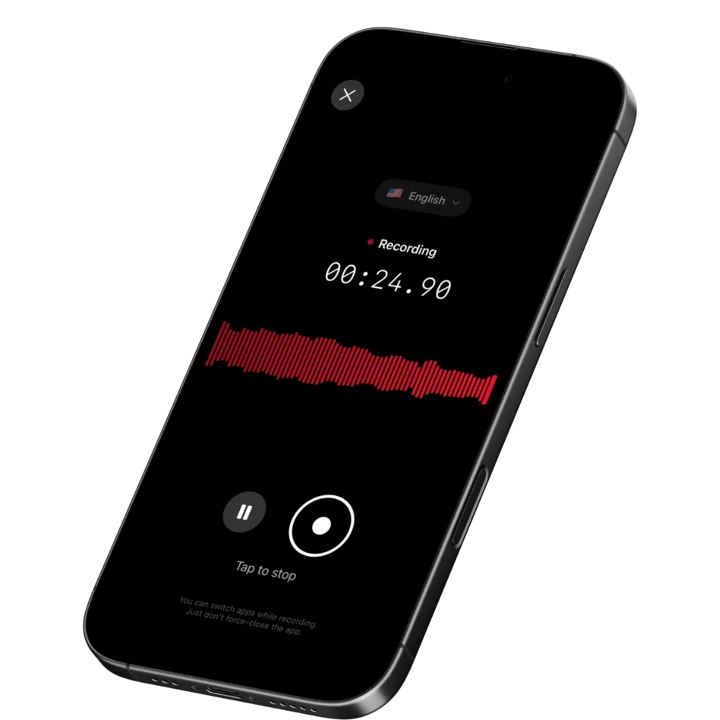
Speakwise is an iOS-native AI voice notes and meeting transcription app that records in-person conversations with one tap or hands-free via AirPods. It delivers AI-generated summaries, searchable transcripts in 100+ languages, and automatic action item extraction - all with a 4.9-star App Store rating and 95%+ transcription accuracy in optimal audio conditions. For independent consultants who move between client offices, co-working spaces, and conference rooms across a packed week, it is the most adaptable AI note-taking tool available in 2026.
Why Speakwise Stands Out
Independent consultants do not have a fixed meeting format. A project kickoff might happen in a client's boardroom. A working session might run on-site at a manufacturing floor. A retainer check-in might happen over coffee. Speakwise handles all of these because it is a mobile-first tool, not a desktop bot that needs a Zoom link to function.
The action item extraction is particularly valuable for solo operators. After a client working session, the next-step list is your project management system. Speakwise pulls those action items automatically from the transcript - things like "deliver the current-state process map by Friday," "loop in the CFO before next week's session," or "revise scope for Phase 2 based on today's findings." That is time you do not have to spend reviewing a raw transcript at the end of a long day.
Client kickoffs are where the relationship arc is set. Speakwise captures every goal, constraint, stakeholder concern, and priority the client mentions in the first meeting - details that are easy to misremember six weeks later when the project has shifted direction. Searching back through that transcript gives you the original brief in the client's own words, which is far more useful than your shorthand notes. For more on how AI tools handle multi-speaker kickoff conversations, see our AI note-taking app roundup. For tools specifically suited to one-on-one check-in meetings, see our 1-on-1 meeting recorder comparison.
Key Features
-
One-Tap Recording for Any Meeting Format: Start capturing the moment your client sits down or the call begins. No bot links to share, no setup screens to navigate, no second device required. Works for in-person, phone, and any format that produces audio near your iPhone.
-
Long Recording Support: Multi-hour kickoff workshops, extended working sessions, and full-day client on-sites stay fully captured. Speakwise handles sessions well beyond the 30-minute per-session limits common on free tiers of competing tools.
-
Works Offline: Record in client facilities with restricted networks, co-working spaces with unreliable WiFi, or client sites in rural areas. Speakwise queues the transcript and syncs everything once you reconnect - no session is lost to a connectivity gap.
-
Action Items in Seconds: After each session, Speakwise automatically surfaces follow-up tasks from the conversation. No manual transcript review. Your next-step list is ready before you close your laptop.
-
95%+ Transcription Accuracy: In standard meeting conditions, the transcript is accurate enough to use directly for client deliverables, follow-up emails, and meeting summaries. Search across all sessions to retrieve exactly what a client said about a specific issue at any point in the engagement.
-
Speaker Diarization: Kickoff workshops and stakeholder interviews put several voices in the room. Speakwise applies speaker diarization to separate them and label who said what, so you can attribute each goal or constraint to the stakeholder who raised it.
-
100+ Language Support: Serve clients across geographies and time zones. Speakwise auto-detects language and handles dialect variation, which is useful for international clients or non-English-speaking business owners. Our AI meeting notes app roundup covers how Speakwise compares on multilingual support across professional verticals.
-
Native Notion Integration: Push meeting notes directly to a Notion workspace. Build a client project tracker, a stakeholder map, or a deliverable log without copying notes out of a separate app.
-
AirPods Hands-Free Control: Tap AirPods to start, pause, and stop recordings. Keeps your phone in your bag and your attention on the client rather than on a screen.
-
Action Button Recording: On iPhone 15 Pro and later, map the Action Button to Speakwise and start recording the moment a client sits down - one press, no unlocking, no app to open.
Pricing
- Free Trial: Full access to all features
- Premium: 7-day free trial ($0.00), then from $69.99/year - unlimited transcription, AI summaries, Notion sync, 100+ languages
Best For
- Independent consultants running multiple in-person and remote client meetings per week
- Solo operators who need structured summaries and action items without admin support
- Consultants managing client projects in Notion
- Advisors working with international or non-English-speaking clients
Limitations
- iOS only - consultants on Android need a different option
- Best results in quiet-to-moderate noise environments; loud factory floors or open-plan offices may reduce accuracy
- Notion is the primary integration; consultants on other project management tools need to copy notes manually
Speakwise gets your hours back.
- ✓Built for in-person meetings, interviews, and site visits.
- ✓Trusted by recruiters, consultants, agents, and field pros.
- ✓One tap to record. Notion-ready summary in minutes.

2. Otter.ai - Best for Virtual Client Calls
Otter.ai is a web and mobile transcription tool best known for its OtterPilot feature, which automatically joins Zoom, Teams, and Google Meet calls and produces live transcripts and AI summaries. It is widely used by professional services teams for recording remote client consultations and stakeholder interviews. The free tier gives 300 minutes per month with a 30-minute per-session cap, which covers most standard check-in calls.
Key Features
- OtterPilot auto-joins video calls and delivers real-time transcripts
- AI chat lets you ask questions about meeting content after the call
- Team workspaces for sharing notes across a consulting partner group
- Mobile app for iOS and Android with basic in-person recording
Pricing
Free: 300 min/month, 30-min cap per session. Paid from ~$8.33/user/month (billed annually).
Best For
- Remote client calls over Zoom or Google Meet
- Consultants who need shared, searchable meeting archives to hand off to clients
Limitations
- The bot-join model does not work for in-person client meetings or workshops
- Free tier 30-minute cap is too short for extended kickoff or strategy sessions
3. Fathom - Best Free Option for Zoom-Heavy Practices
Fathom is a Zoom-focused AI meeting assistant with one of the most generous free tiers in the category. It records, transcribes, and summarizes Zoom calls with no session limits on its free plan. The paid tier adds Teams and Google Meet support along with team features. For independent consultants who run most of their remote client touchpoints over Zoom and want a zero-cost starting point, Fathom is a strong pick before committing to a paid tool.
Key Features
- Unlimited free Zoom recording, transcription, and AI summaries
- One-click highlight clipping to mark key moments mid-call
- Auto-sends a call summary to all participants after the meeting ends
- Paid tier adds Teams and Google Meet support
Pricing
Free for unlimited Zoom. Premium ~$15/user/month for multi-platform and team features.
Best For
- Solo consultants who run most client calls on Zoom and want a free tool
- Consultants who want to auto-share meeting summaries with clients immediately after calls
Limitations
- Free tier is Zoom-only; does not capture in-person workshops or phone calls
- No mobile-first recording mode for on-site client work
4. Granola - Best Passive Desktop Listener for Office Meetings
Granola is a Mac-only AI meeting notes tool that listens passively in the background without joining calls as a bot. It captures your computer audio and nearby speech during in-person meetings without requiring a separate device or meeting link. For independent consultants who work primarily from a private office or home studio on a Mac and want zero-friction capture of both in-office client meetings and video calls, Granola fits naturally into an existing desktop workflow.
Key Features
- Passive background listening - no bot, no meeting link, no second device
- Structured AI notes with headers and action items after each session
- Supports custom note templates for recurring meeting types
- Keyboard shortcut controls for quick start and stop without screen interaction
Pricing
From ~$18/user/month.
Best For
- Mac-based consultants who meet clients in a private office with consistent audio quality
- Consultants who prefer a desktop-first workflow and do not need mobile recording
Limitations
- Mac only - no iOS, Android, or Windows support
- Passive listening requires the laptop to be present and open in the meeting room
5. Fireflies.ai - Best for Business Development Call Tracking
Fireflies.ai is a meeting intelligence platform with deep CRM integrations including Salesforce and HubSpot. It joins video calls via bot, transcribes them, and pushes structured notes to your CRM automatically. For independent consultants who run a pipeline of prospecting and business development calls alongside active client work, this automation reduces the manual data entry that otherwise eats into delivery time.
Key Features
- Auto-joins Zoom, Teams, and Google Meet calls as a bot
- Pushes call notes and action items to Salesforce and HubSpot directly
- Sentiment analysis and keyword tracking for sales call review
- Searchable transcript library across all recorded calls
Pricing
Free tier limited to transcription minutes. Paid from ~$10/user/month.
Best For
- Consultants actively building a prospect pipeline using a CRM
- Solo operators who want automatic note-to-CRM sync without manual entry
Limitations
- No meaningful in-person recording workflow for on-site client work
- The bot model can feel intrusive for early-stage prospect calls where trust is still building
6. Notta - Best for International and Multilingual Clients
Notta is a cross-platform transcription app available on iOS, Android, web, and Chrome extension. It supports a wide range of languages and includes real-time translation into 40+ output languages. It works on both uploaded audio and live recordings, making it more flexible than bot-only tools. For independent consultants with clients across different geographies or with non-English-speaking business owners, Notta covers multilingual ground that most competitors miss.
Key Features
- Live transcription with real-time translation into 40+ output languages
- Import audio files from voice memos, WhatsApp, or any recording app
- Shareable transcript links with no recipient account required
- Cross-platform: iOS, Android, Mac, Windows, Chrome extension
Pricing
Free: 120 min/month. Paid from ~$13.99/user/month.
Best For
- Consultants serving non-English-speaking clients who need meeting summaries in their primary language
- Advisors who record calls across multiple device types and operating systems
Limitations
- AI summaries are less structured than Speakwise for action item extraction
- Free tier 120-minute monthly cap is tight for consultants with a full meeting calendar
How to Choose the Best AI Note-Taking App for Independent Consulting
Independent consultants face a wider range of meeting contexts than most professionals. The right tool depends on where your client conversations actually happen.
-
In-person vs. remote split: If a significant share of your client work happens face to face - on-site workshops, client office visits, or co-working meetings - you need a mobile-first tool like Speakwise that records without a bot or internet connection. If your practice is fully remote over Zoom or Teams, Otter.ai or Fathom may be sufficient at a lower cost.
-
Offline capability: Client sites with restricted corporate networks, conference centers with unreliable WiFi, and remote locations all require offline recording. Only Speakwise records fully offline and syncs when reconnected. Every other tool on this list requires active connectivity during the meeting.
-
Action item automation: As a solo operator, your time between meetings is limited. Automatic action item extraction - available in Speakwise and Fireflies.ai - saves the manual transcript review that otherwise piles up at the end of a busy week. Our AI recordings to action items roundup covers how different tools perform on extraction quality and structure.
-
CRM and project management integration: Speakwise syncs natively with Notion. Fireflies.ai connects to Salesforce and HubSpot. Otter.ai and Fathom have lighter integrations. Match the tool to the system you already use for client and project tracking rather than adding a separate workflow.
-
Platform and budget fit: Speakwise is iOS-only from $69.99/year after a 7-day free trial ($0.00). Granola is Mac-only at ~$18/month. Fathom is free for Zoom. Otter.ai and Fireflies.ai are cross-platform but priced per user per month, which adds up as your call volume grows. Solo operators on tight margins often find the annual Speakwise plan more predictable than per-seat monthly billing.
Frequently Asked Questions
What is the best AI note-taking app for independent consultants in 2026?
Speakwise is the best AI note-taking app for independent consultants in 2026. It is the only tool in this category built for the full range of solo consulting meeting formats - in-person client sites, remote Zoom calls, on-site workshops, and retainer check-ins. Bot-based tools like Otter.ai and Fireflies.ai only work when a scheduled video call is running. Speakwise records with one tap on iPhone, works offline in low-connectivity environments, and automatically extracts action items from every session. It carries a 4.9-star App Store rating and delivers 95%+ transcription accuracy in standard meeting conditions. The 7-day free trial ($0.00) covers all features, and Premium is from $69.99 per year.
Is there a free AI note-taking app for independent consultants?
Yes. Speakwise offers a free trial with full access to all features, including AI summaries, transcripts in 100+ languages, and automatic action item extraction. Fathom has a permanently free tier for unlimited Zoom recording with AI summaries, which works well for remote-only consulting practices. Otter.ai offers 300 minutes per month on its free plan with a 30-minute session cap. For consultants who need field-ready in-person recording before committing to a paid plan, Speakwise's free trial is the most complete starting point.
Can I use an AI note-taking app for client kickoff workshops?
Yes, and it is one of the highest-value use cases for AI note-taking tools. Kickoff workshops are dense with goals, constraints, stakeholder priorities, and implicit expectations - all of which matter months later when the engagement is in delivery and scopes are being debated. Speakwise records these sessions with one tap and produces a structured summary and action item list afterward. Long recording support means a three-hour workshop session is captured as fully as a 30-minute check-in. The transcript is searchable, so you can retrieve the client's original framing of any issue in their exact words, which is far more reliable than notes written during a fast-moving session.
What features matter most for a solo consultant choosing an AI note-taking app?
The features that matter most for independent consultants are offline recording capability, automatic action item extraction, accurate multi-speaker transcription, and a useful integration with the project management or note-taking system you already use. Offline recording is essential for on-site client work where network access is unreliable. Automatic action item extraction replaces the manual transcript review that otherwise adds an hour to every meeting day. Multi-speaker accuracy matters for workshop and stakeholder interview sessions where multiple voices overlap. Integration quality determines whether notes actually flow into your workflow or sit in a separate app you have to check separately.
How do I manage meeting notes across multiple concurrent client engagements?
The most effective approach is to tag or folder recordings by client at the point of capture, then let the AI generate a structured summary for each session automatically. Speakwise produces a searchable transcript and summary for every recording, and syncing to Notion lets you organize client work into separate project pages with meeting notes as nested entries. For consultants running three to five concurrent engagements, this system keeps each client's history isolated and searchable without manual sorting. You can retrieve what a client said about a specific decision or constraint at any point in the engagement, which is particularly useful when scope discussions arise late in a project.
Final Verdict
Independent consulting is a knowledge business. The quality of your recall directly affects the quality of your advice, your deliverables, and your client relationships. Notes are not an afterthought - they are a core part of the work.
Most AI note-taking tools are built for people who have an admin team behind them or who work exclusively on scheduled video calls. Speakwise is built for the solo operator who moves between client offices, conference rooms, and remote calls across a packed week. That flexibility is the core reason it ranks first here.
If your practice runs entirely on Zoom, Fathom is a strong free option and Otter.ai is a solid paid upgrade. Fireflies.ai earns its fee for consultants managing a CRM-tracked prospect pipeline. Granola suits Mac-first consultants who want passive desktop capture. But for the independent consultant who needs reliable notes from any meeting format without friction, Speakwise is the clear choice.
Download Speakwise from the App Store and turn every client conversation into a structured, searchable record you can reference for the life of the engagement.
🎯 4.9★ App Store Rating | 📱 Built for iOS
