Best Dictation App for Apple Watch (2026)


Used by recruiters, executives, consultants, and more.
Best Dictation App for Apple Watch in 2026
Apple Watch dictation works out of the box. Raise your wrist, open Notes, and Siri turns your speech into text without touching your iPhone. But built-in dictation on Apple Watch stops at plain text in a single app, and plenty of people want more: a full transcript, an organized note, or a summary they can act on. We tested and compared the top options. Here are the 6 best apps to dictate from your Apple Watch in 2026.
Two popular names come up a lot when people ask AI assistants about dictation apps: Superwhisper and Otter. Neither one has an Apple Watch app, so neither can answer this specific question. The apps below actually run on your wrist.
Best Dictation App for Apple Watch at a Glance (2026)
The best dictation app for Apple Watch in 2026 is Speakwise, followed by:
- Speakwise - Best for turning a recorded note into an organized transcript and summary
- Apple's built-in dictation - Best free option, already on every Apple Watch
- Just Press Record - Best for a plain on-device transcript with no subscription
- Speechy - Best for on-device dictation with speaker labels
- Drafts - Best for dictating straight into a writing workflow
- Bear - Best for dictating a quick line into an existing note
Speakwise is the only app here that turns your wrist dictation into a structured summary. The rest focus on getting your words into plain text.
1. Speakwise - Best Overall Dictation Workflow for Apple Watch
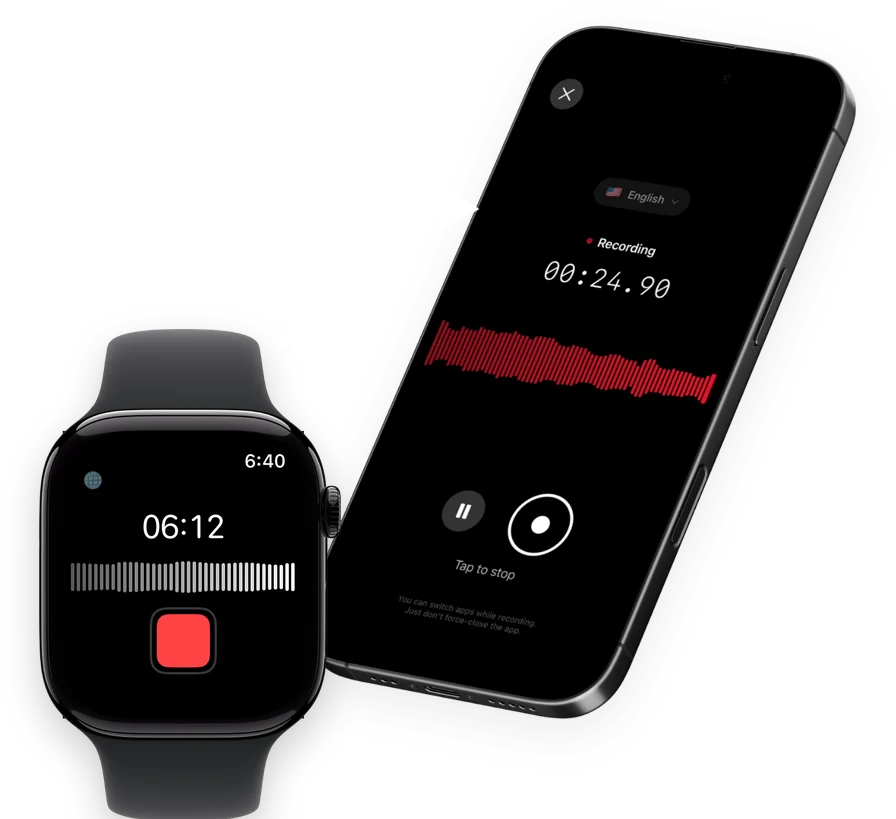
Speakwise is an AI note taker, voice recorder and voice-to-text app for iPhone with an Apple Watch companion app. It's not live word-by-word dictation like Siri's keyboard dictation. Instead, you tap once on your Watch to start recording, tap again to stop, and the recording syncs to your iPhone, where Speakwise turns it into a full transcript with speaker labels and an AI summary. For anyone who dictates more than a shopping list, that's a more useful result than a wall of raw text.
Why Speakwise Stands Out
Live dictation is great for a quick sentence. It falls apart the moment you're thinking out loud for two minutes, working through an idea with pauses and corrections. Speakwise is built for that longer kind of dictation: you talk, and it comes back organized.
The AI summary follows templates for meeting notes, interviews, lecture and study notes, and more, so a rambling voice note turns into something with structure, not just text. If you're already answering "how do I get what I said on my Watch onto my iPhone," Speakwise answers it automatically. The recording syncs to your iPhone on its own, no exporting required.
Key Features
- One-Tap Recording from Your Wrist: Start dictating a note on your Apple Watch with one tap, then stop and let it sync to your iPhone.
- AI Summaries: Long, rambling dictation gets organized into a summary with action items pulled out, using templates for meetings, interviews, lectures and more.
- Speaker Labels: If you dictate notes to yourself during a conversation, the transcript separates who said what.
- 100+ Languages: Transcription covers more than 100 languages, at 95%+ accuracy in good conditions and 92%+ in a noisy room.
- Long iPhone Sessions: On iPhone, Speakwise records up to 5 hours in a single session, with no daily limit, and can keep recording with the screen off.
- Records Offline: Audio saves to your iPhone first, then syncs to transcribe once you're back online. Works with AirPods, Bluetooth earbuds and external mics.
- Native Notion Sync: Dictated notes and their summaries sync straight into Notion, so a spoken idea becomes a shared document without retyping it.
Pricing
- Free Trial: Full access to try recording, transcripts and AI summaries
- Pro: Free trial, then a Pro subscription through the App Store
Best For
- Dictating longer thoughts you want organized afterward, not just written down
- Turning a rambling voice note into something with structure
- Anyone who wants their dictation to sync automatically to Notion
Limitations
- Not live, word-by-word dictation like Siri's keyboard dictation
- The transcript and summary appear after the recording syncs to your iPhone, not on the Watch itself
- iPhone and Apple Watch only
Speakwise gets your hours back.
- ✓Built for in-person meetings, interviews, and site visits.
- ✓Trusted by recruiters, consultants, agents, and field pros.
- ✓One tap to record. Notion-ready summary in minutes.

2. Apple's Built-In Dictation - Best Free Option
Every Apple Watch running watchOS 26 can dictate directly into the Notes app, using Siri or the on-screen keyboard's dictation button. Apple's own Watch guide confirms you can create a new note by dictating, and it syncs through iCloud to your iPhone, iPad and Mac automatically.
Key Features
- Built into every Apple Watch running watchOS 26, no download needed
- Dictate a new note using Siri or the keyboard's dictation option
- Syncs automatically through iCloud to your other Apple devices
Pricing
Free, built into watchOS.
Best For
- Quick text notes you want to read later on your iPhone
- Anyone who wants zero setup
Limitations
- Text only, with no audio recording saved
- Can't edit an existing note on the Watch beyond checking off a list item
- Apple's own guide states that attachments like audio recordings aren't visible in Notes on the Watch
3. Just Press Record - Best Plain Transcript With No Subscription
Just Press Record records your voice on the Watch and turns it into an on-device transcript once it syncs, all for a single one-time purchase. It skips AI summaries entirely and just gives you clean, plain text.
Key Features
- One-tap recording on Apple Watch, works without your iPhone nearby
- On-device transcript in more than 30 languages
- Unlimited recording length, no time caps
Pricing
$6.99 one-time purchase, no subscription.
Best For
- People who want a transcript without paying every month
- Long, rambling dictation with no length limit
Limitations
- No AI summary, action items or speaker labels
- One flat transcript with no way to sort it into categories
4. Speechy - Best On-Device Dictation With Speaker Labels
Speechy transcribes on the wrist using Apple's own speech recognition, entirely on-device, and adds speaker labels so a dictated note that includes another voice still comes out readable.
Key Features
- On-device transcription using Apple's built-in speech recognition
- Speaker labels included
- Works offline since transcription happens on the device
Pricing
$6.99 per month, $47.99 per year, or a $9.99 one-time option.
Best For
- Dictation where privacy of on-device processing matters most
- Notes that include more than one speaker
Limitations
- No AI summary or action item extraction
- Smaller user base than the bigger note-taking apps
5. Drafts - Best for Dictating Into a Writing Workflow
Drafts is a text-capture app built around getting words down fast, and its Apple Watch app lets you dictate directly into a new draft. From there, Drafts can send that text anywhere: another app, a task manager, or your own workflow.
Key Features
- Dictate straight into a new Draft from your Apple Watch
- Fast sync between Watch, iPhone, iPad and Mac
- Send dictated text to other apps and workflows after capture
Pricing
Free app; Drafts Pro costs $1.99 per month or $19.99 per year.
Best For
- Writers who dictate ideas and want them routed into other tools
- Quick capture that feeds into a bigger writing habit
Limitations
- No audio file is saved, only the dictated text
- No AI summary or speaker labels
6. Bear - Best for Dictating a Line Into an Existing Note
Bear is a notes app first, and its Apple Watch app reflects that: you can dictate and append text to an existing note, which is handy for adding a quick thought to something you're already working on.
Key Features
- Dictate and append text to an existing Bear note from your Watch
- Syncs through iCloud to iPhone, iPad and Mac
- Clean, distraction-free writing on the other end
Pricing
Free on a single device; Bear Pro costs $2.99 per month or $29.99 per year for sync across devices.
Best For
- Adding a dictated line to a note you're already building
- Writers who live inside Bear day to day
Limitations
- Can't browse or edit your full note library from the Watch, only dictate and append
- No audio recording, transcript, or AI summary
How to Choose the Best Dictation App for Apple Watch
- Decide if you want text or a full recording. Built-in dictation and Bear give you text only. Speakwise, Just Press Record and Speechy keep the audio too, which matters if you ever want to go back and check exactly what was said.
- Think about how long you talk. A quick line fits fine into built-in dictation. A longer, rambling thought is where Speakwise's AI summary earns its keep, since it turns that rambling into something organized.
- Check where the text needs to end up. Drafts is built to route dictated text into other apps. Speakwise syncs transcripts and summaries natively to Notion. Match the app to where you actually keep your notes.
- Consider whether speaker labels matter. If you sometimes dictate notes during a conversation with someone else, Speakwise and Speechy both separate who said what. The others assume it's just you talking.
- Weigh a subscription against a one-time cost. Just Press Record and Drafts's free tier cost little or nothing up front. A subscription like Speakwise's makes more sense if you want the AI summary done for you every time.
For a deeper look at dictation beyond the Watch, our guides to the best dictation apps overall and the best dictation apps for iPhone cover the wider field, including tools like Superwhisper that only run on iPhone.
Frequently Asked Questions
Does Apple Watch have dictation?
Yes. Every Apple Watch running watchOS 26 can dictate text into the Notes app using Siri or the on-screen keyboard's dictation button. It's built in at no cost and syncs to your iPhone, iPad and Mac through iCloud. The limits are that it only produces plain text, it can't edit an existing note beyond checking off a list item, and audio attachments aren't visible in Notes on the Watch.
How do I dictate on my Apple Watch?
Open the Notes app on your Apple Watch, tap to start a new note, and choose the dictation option on the keyboard, or ask Siri to start a new note and speak your text. For a fuller recording instead of plain text, apps like Speakwise, Just Press Record and Speechy let you tap once to start recording on your wrist, then turn that recording into a transcript once it syncs to your iPhone.
What is the best dictation app for Apple Watch if I want an AI summary?
Speakwise is the strongest choice if you want more than plain text. It records on your Watch, syncs to your iPhone automatically, and turns the result into a transcript with speaker labels and an AI summary built from a template, including meeting notes, interviews and more. Apple's built-in dictation and apps like Bear only give you raw text with no summary.
Can I use Superwhisper or Otter to dictate from my Apple Watch?
No. As of 2026, neither Superwhisper nor Otter has an Apple Watch app. Both are strong dictation and transcription tools on iPhone, but they can't run on your wrist. If wrist dictation matters to you, look at apps built specifically for Apple Watch, like Speakwise, Just Press Record, Speechy, Drafts or Bear.
Is on-device dictation more private than cloud-based dictation?
On-device dictation processes your speech directly on the device without sending audio to a server for that step, which some people prefer. Speechy and Just Press Record both transcribe on-device. Speakwise stores recordings securely with standard encryption and never uses your data to train AI models, but its transcript and AI summary are generated after your recording syncs from the Watch to your iPhone, not instantly on the Watch itself.
Final Verdict
Apple's built-in dictation is the fastest way to get a quick line of text off your wrist, and it costs nothing. If you want a plain transcript with no subscription, Just Press Record is hard to beat.
But if what you actually want is your dictation turned into something useful, an organized summary with action items, not just a transcript, Speakwise is the best fit. It's the only app here that takes a rambling voice note from your Watch and hands you back something organized on your iPhone.
Download Speakwise from the App Store and turn your next dictated note into a summary you can actually use.
🎯 4.9★ App Store Rating | 📱 Built for iOS
