Best App for Facilities Managers to Record Building Walkthrough Notes (2026)
Used by recruiters, executives, consultants, and more.
Best App for Facilities Managers to Record Building Walkthrough Notes in 2026
The best app for facilities managers to record building walkthrough notes is the one that still works on the roof, in the boiler room, and two levels down in the parking garage where your phone shows no bars. A quarterly walk of a 400,000 square foot property generates a hundred small observations: a chiller running loud, an exit sign out on level 3, ceiling tile staining under the fourth floor riser, a fire door that no longer latches. Each one needs to become a work order, a PM adjustment, or a line in the capital plan. Typing them into a phone while holding a flashlight and a tenant's coffee is not realistic, and by the time you are back at the desk the sequence has blurred. We tested and compared the top options - here are the 5 best tools for the job.
Best App for Facilities Managers to Record Building Walkthrough Notes at a Glance (2026)
The best app for facilities managers to record building walkthrough notes in 2026 is Speakwise, with four strong alternatives depending on whether you need capture or a full maintenance system:
- Speakwise - Best overall for narrating a full building walk and getting organized findings back (iOS, no meeting bot required)
- MaintainX - Best mobile-first CMMS for turning findings into work orders
- UpKeep - Best CMMS mobile app for technician-heavy in-house teams
- Limble CMMS - Best for asset history and preventive maintenance depth
- Apple Voice Memos - Best free built-in fallback for a quick observation
Speakwise is the only option here that takes a continuous spoken walkthrough and hands back a structured summary with action items instead of an audio file or an empty form.
1. Speakwise - Best Overall for Building Walkthrough Notes
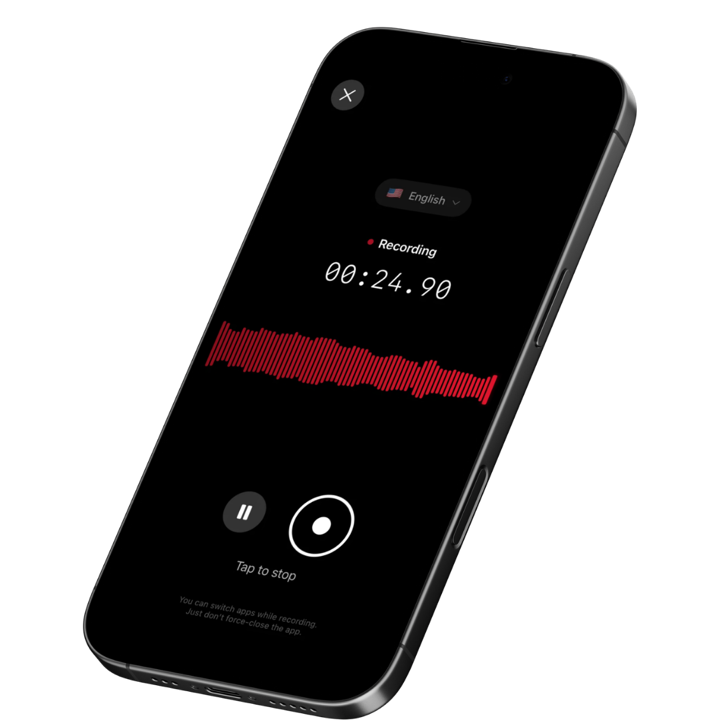
Speakwise is an iOS AI voice notes app that lets a facilities manager narrate an entire building walk and get back a clean, organized set of findings. You tap once at the loading dock, put the iPhone in your chest pocket, and talk through what you see as you move from mechanical room to roof to tenant floors. When you stop, the AI produces a summary of the walk, pulls out the items that need follow-up, and gives you text you can copy straight into a work order or a condition report. There is no bot to invite and no meeting link, which is the whole point for work that happens on foot.
Why Speakwise Stands Out
A building walkthrough is not a meeting. It is two hours of moving through spaces, opening panels, reading gauges, and reacting to what you find, with a chief engineer or a vendor rep occasionally adding context. Every note-taking tool built around Zoom is useless here. The tools that do work in the field are maintenance systems, and those want you to stop, unlock, pick an asset, and fill in fields - which is why so many walkthrough observations never get logged at all.
Speakwise inverts that. You capture first and structure later. The narration is continuous, so the observation about the condensate pan and the observation about the corridor lighting three minutes later both land in the same record, in order, with the location you spoke aloud attached to each. The AI summary groups related items so mechanical findings sit together, life-safety findings sit together, and housekeeping items sit together, even though you encountered them scattered across four floors.
Speaker labels matter more than facilities managers expect. When the building engineer walks with you and explains that the AHU belt was replaced in March, or a tenant rep describes a hot-and-cold complaint pattern, Speakwise separates their voice from yours in the transcript. The equipment history you were told stays attributed to the person who told you, which is the difference between a defensible condition record and a pile of unsourced claims. Our roundup of apps for energy auditor commercial walkthroughs covers the same capture problem from the audit side.
Because the recording happens on the iPhone microphone, connectivity is not a precondition for capturing the walk. You can record in a sub-basement switchgear room with no signal; the transcript and summary are produced once you are back in coverage. Our roundup of offline meeting recorders for iPhone covers why that behaviour matters for anyone working below grade.
Key Features
- One-Tap Continuous Capture: Start the recording at the beginning of the walk and narrate the whole route. No stopping to unlock, no asset picker, no form to open between observations.
- AI Summaries Organized by Theme: The walk comes back grouped - mechanical, electrical, life safety, envelope, janitorial - rather than as a raw wall of text in the order you happened to walk.
- Action Item Extraction: Items you flag verbally ("that needs a work order," "get the vendor back out for the VFD fault") are pulled into a discrete follow-up list you can work through the same afternoon.
- Speaker Labels: When the chief engineer, a vendor, or a tenant contact speaks during the walk, their input is labeled separately from your narration, so equipment history and complaints stay attributed.
- Long Recording Support: A full quarterly walk of a large property runs two to three hours. Speakwise handles the whole session in one recording rather than forcing you to split it.
- Records Without a Connection: Mechanical rooms, elevator machine rooms, and underground parking are cellular dead zones. Capture happens on the device; processing completes when you are back in range.
- 100+ Languages: Multilingual janitorial and vendor crews are the norm in commercial property. Speakwise transcribes what they tell you in the language they said it.
- Export and Share: Copy the summary into your CMMS work order description, paste findings into a condition report, or share the notes with an asset manager via link.
Pricing
- Paid subscription via the App Store: Speakwise is a paid iOS subscription. Current plan details are on the App Store listing.
Best For
- Facilities managers running quarterly or annual property condition walks
- In-house engineering leads documenting deficiencies ahead of a capital planning cycle
- Property teams who walk with vendors and want the vendor's commitments captured verbatim
- Anyone whose findings currently live in a notebook until Friday afternoon
Limitations
- iOS only - no Android version
- No photo capture, floor plan pinning, or asset barcode scanning
- No direct integration with CMMS platforms - you copy or paste findings across
- Does not generate work orders itself
Speakwise gets your hours back.
- ✓Built for in-person meetings, interviews, and site visits.
- ✓Trusted by recruiters, consultants, agents, and field pros.
- ✓One tap to record. Notion-ready summary in minutes.

2. MaintainX - Best Mobile-First CMMS for Turning Findings Into Work Orders
MaintainX is a maintenance and work order platform built mobile-first, which is why it has become the default for facilities teams that live on their phones. A walkthrough finding becomes a work order in a few taps, with a photo attached, assigned to a technician, and visible to the whole team immediately. Inspection procedures and recurring rounds can be templated so a monthly walk always covers the same checkpoints.
MaintainX is a system of record, not a capture tool. Everything is typed or tapped into structured fields, which is fine when you are logging one deficiency and slow when you are logging forty on the move.
Key Features
- Work orders created and assigned from the phone during the walk
- Templated inspection procedures and recurring maintenance rounds
- Photo attachment tied to the asset and work order
- Team messaging so findings reach technicians immediately
- Asset records with maintenance history
Pricing
- Basic: Free tier with unlimited work orders and limited repeating work orders
- Essential: from ~$16/user/month
- Premium: from ~$49/user/month
Best For
- Facilities teams that want walkthrough findings to become tracked work immediately
- Multi-site operations that need visibility across buildings
- Teams standardizing recurring inspection rounds
Limitations
- Typed entry only - no voice narration or AI summary of a walk
- Logging a long list of observations on the move is slow
- Per-user pricing adds up across a large in-house team
3. UpKeep - Best CMMS Mobile App for Technician-Heavy Teams
UpKeep is a CMMS with one of the more polished mobile experiences in the category, built for technicians who receive, complete, and close work in the field. For a facilities manager, the value is downstream of the walkthrough: findings entered as requests route cleanly to the right technician, and completion history builds against each asset over time.
Like MaintainX, UpKeep expects structured input. It answers "what happened to this asset" well and "what did I observe on today's walk" poorly.
Key Features
- Work order and request management from mobile
- Asset management with maintenance history per piece of equipment
- Preventive maintenance scheduling
- Inventory and parts tracking on higher tiers
- Custom checklists for inspection rounds
Pricing
- Lite: from ~$20/user/month
- Starter: from ~$45/user/month
- Professional: from ~$75/user/month
Best For
- In-house facilities teams with multiple technicians closing work daily
- Organizations that need parts and inventory tracked alongside work orders
- Teams that want walk findings converted into scheduled PM tasks
Limitations
- No voice capture or AI summarization
- Higher tiers get expensive per seat
- Checklist-driven inspections do not accommodate unstructured observations well
4. Limble CMMS - Best for Asset History and PM Depth
Limble is a CMMS known for asset hierarchy depth and preventive maintenance scheduling. For facilities managers whose walkthroughs feed a capital plan, Limble's strength is that every observation attached to an asset accumulates into a defensible history: this AHU has had four belt failures in two years, this pump has consumed X hours of labor. That history is what turns a walkthrough note into a replace-versus-repair argument.
Limble is where findings should end up. It is not where they should be captured while you are walking.
Key Features
- Deep asset hierarchies with parent and child equipment relationships
- Preventive maintenance scheduling with automated triggers
- Work request portal for tenants and staff
- Cost and labor tracking per asset for capital planning
- Reporting on downtime, cost, and maintenance backlog
Pricing
- Standard: from ~$28/user/month
- Higher tiers and enterprise pricing available on request
Best For
- Facilities managers building capital replacement cases from maintenance history
- Teams managing complex equipment hierarchies across multiple buildings
- Organizations that need cost-per-asset reporting
Limitations
- No voice recording, transcription, or AI summarization
- Setup effort is significant before the asset data becomes useful
- Field entry during a fast-moving walk is impractical
5. Apple Voice Memos - Best Free Built-In Fallback
Voice Memos ships on every iPhone and costs nothing. For a facilities manager who wants to capture a single observation - a model number off a nameplate, a description of a noise, a reminder to check a valve tag - it is the fastest tool that exists because it is already on the device. Recordings sync through iCloud and can be trimmed and shared.
The limit is what you get back. A two-hour walkthrough in Voice Memos is a two-hour audio file. There is no summary, no action item list, no speaker separation, and no way to find the one observation you need without scrubbing through the recording. Most facilities managers who try to run walkthroughs on Voice Memos stop after the first time they have to re-listen to the whole thing.
Key Features
- Built into iOS, no download or account
- Records without a connection
- iCloud sync across Apple devices
- Basic trimming and sharing
- Free
Pricing
- Free: Included with iOS
Best For
- Single quick observations rather than full walks
- A zero-cost backup when nothing else is available
- Capturing a nameplate reading or an equipment noise for later reference
Limitations
- No AI summary, no action items, no speaker labels
- No organization of a long walk into usable findings
- Searching a long recording means listening to it again
How to Choose the Best Building Walkthrough App
Facilities managers rarely have a capture problem and a tracking problem at the same time - they have one or the other. Sort out which one you have first.
-
Capture speed versus structured entry: If your issue is that observations never make it out of your head, you need fast continuous capture (Speakwise). If observations get logged but nothing gets done with them, you need a CMMS (MaintainX, UpKeep, Limble). Most teams end up using one of each.
-
Dead zones are the normal case: Switchgear rooms, elevator machine rooms, sub-basements, and stairwells have no signal. Any tool that needs a live connection to record will fail exactly where you spend the most time. Confirm the behavior before you rely on it.
-
Session length: A quarterly property walk runs two hours or more. Check that your tool records a continuous session that long without splitting the file or timing out.
-
What the output looks like: A raw transcript of a two-hour walk is barely better than a notebook. What saves time is a summary grouped by system with the follow-ups pulled out, so you can generate work orders the same day rather than the following week.
-
Consent when other people are on the walk: Engineers, vendors, and tenant reps often walk with you, and recording laws differ by jurisdiction - some places require every party to consent. Tell people at the start of the walk that you are recording your notes, and check your organization's policy before recording tenant conversations. Getting a verbal acknowledgement on the recording itself is a simple habit that removes the ambiguity later.
Frequently Asked Questions
What is the best app for facilities managers to record building walkthrough notes?
Speakwise is the best app for facilities managers to record building walkthrough notes in 2026. You narrate the full walk on your iPhone and get back an AI summary grouped by system, plus an action item list. For turning those findings into tracked work orders, pair it with a CMMS such as MaintainX, UpKeep, or Limble.
How do I take notes during a building walkthrough without stopping?
Start a continuous recording at the beginning of the route, put the phone in a chest pocket, and narrate observations as you encounter them, naming the floor or room aloud each time. Speakwise turns that narration into an organized summary with follow-ups extracted. Typing into a CMMS form between observations is what slows most walks down.
Can a facilities manager record a walkthrough with no cell signal?
Yes. Speakwise records through the iPhone microphone, so mechanical rooms, sub-basements, and parking structures with no coverage are not a problem. The transcript and AI summary are produced once the phone is back in range. Apple Voice Memos also records offline, but gives you an audio file rather than organized findings.
Should I use a CMMS or a voice app for walkthrough notes?
Use both, for different jobs. A CMMS such as Limble or UpKeep is the system of record for assets, work orders, and maintenance history. A voice app is the capture layer for the fast, unstructured observations you make while walking. Capture with voice, then move the confirmed deficiencies into the CMMS as work orders.
Do I need consent to record a walkthrough with a vendor or tenant present?
Recording laws vary by jurisdiction, and some require all parties to consent. If a vendor, engineer, or tenant is speaking during your walk, say at the start that you are recording your notes and get a verbal acknowledgement. Check your employer's policy too. Speakwise is a notes tool and does not provide legal or compliance advice.
Final Verdict
Facilities managers do not lose walkthrough findings because they are careless. They lose them because the observation rate during a real building walk is far higher than any typed form can absorb, and everything not written down within a few minutes decays.
Speakwise is the strongest option in 2026 for closing that gap. Continuous capture on the iPhone, an AI summary grouped by building system, extracted action items, and speaker labels for the engineer or vendor walking with you - all without a meeting bot, a link, or a connection. It is a paid iOS subscription and it does not replace your maintenance system, but it does replace the notebook that never gets transcribed.
For the tracking side, MaintainX is the fastest path from finding to assigned work order, UpKeep suits technician-heavy in-house teams, and Limble builds the asset history that capital plans are argued from. Voice Memos remains a reasonable free fallback for a single observation. For the tenant-facing and resident-facing side of building operations, our note-taking roundup for property managers covers the adjacent workflows.
Download Speakwise from the App Store and walk your next building with the recording running, then generate the work orders from an organized summary instead of your memory.
🎯 4.9★ App Store Rating | 📱 Built for iOS
