Best App for Home Inspectors to Record Inspection Findings (2026)
Used by recruiters, executives, consultants, and more.
Best App for Home Inspectors to Record Inspection Findings in 2026
The best app for home inspectors to record inspection findings is whichever one still works when you are on your back under a floor joist with a flashlight in your teeth. A standard three-hour inspection produces somewhere between eighty and two hundred defect observations across roof, exterior, structure, electrical, plumbing, HVAC, insulation, and interior. Every one of them has to survive the trip from the crawlspace to the written report, ideally the same day, because the buyer's inspection contingency clock is already running. Inspectors lose findings in exactly two places: the gap between seeing a defect and recording it, and the gap between raw notes and a finished narrative. We tested and compared the top options - here are the 5 best tools for the job.
Best App for Home Inspectors to Record Inspection Findings at a Glance (2026)
The best app for home inspectors to record inspection findings in 2026 is Speakwise, with four alternatives depending on whether you need capture or a full report writer:
- Speakwise - Best overall for narrating findings room by room and getting organized notes back (iOS)
- Spectora - Best modern report writer used by the largest share of working inspectors
- HomeGauge - Best template depth for inspectors who want granular control over narratives
- Palm-Tech - Best budget report software for solo inspectors
- Apple Voice Memos - Best free built-in capture for a single observation
Speakwise is the only tool here that turns three hours of continuous defect narration into a structured, section-organized set of findings rather than an audio file or an empty template.
1. Speakwise - Best Overall for Recording Inspection Findings
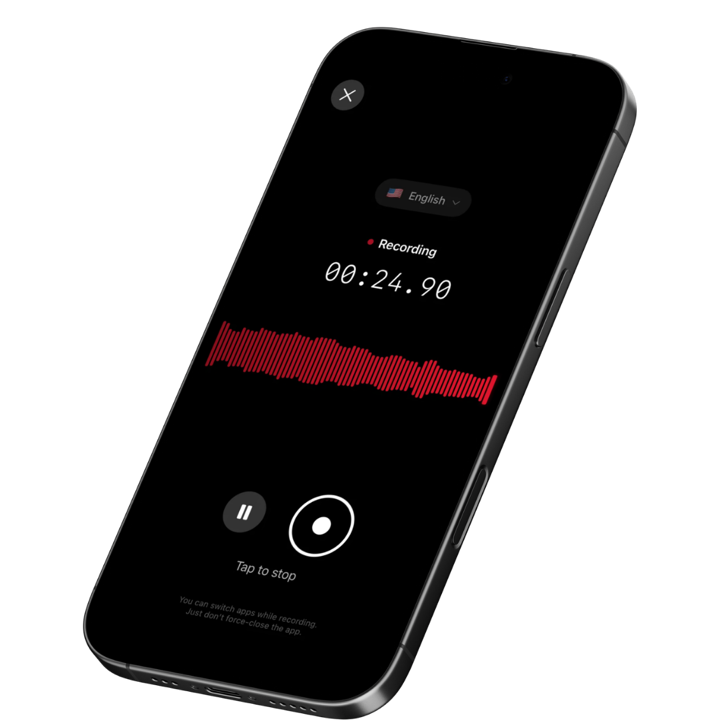
Speakwise is an iOS AI voice notes app that fits the way inspectors actually work: you start one recording when you step out of the truck and narrate everything you find until you are back in the driveway. When you stop, the AI returns a structured summary of the inspection with the defects organized rather than dumped in the order you happened to encounter them, plus a discrete list of the items you flagged for follow-up or specialist referral. There is no bot, no meeting link, and no need to hold the phone.
Why Speakwise Stands Out
Report writers are excellent at producing a finished document and terrible at capturing raw observation. Every one of them requires you to stop, unlock the phone or tablet, find the right section, choose a defect, and select a severity. That interaction is fine at the electrical panel where you are standing still. It is impossible at the ridge, in a 24-inch crawlspace, or on a wet roof.
Speakwise removes the interaction entirely. The recording runs, you talk. "North elevation, siding, moisture staining below the second floor window, recommend further evaluation." "Attic, no baffles at the eaves, insulation blocking soffit ventilation." "Main panel, double-tapped neutral on the left bus, safety." The AI then groups those into sections - structure, exterior, roofing, electrical, plumbing, HVAC, insulation and ventilation, interior - so what comes back reads like the skeleton of a report rather than a stream of consciousness. For a broader look at voice-first field capture, our dictation app comparison for home inspectors covers the input side in more depth.
Speaker labels solve a specific inspector problem. Buyers and agents follow you through the house asking questions, and homeowners volunteer history that matters: the roof was replaced in 2019, the sump pump was added after the 2023 flood, the previous owner finished the basement without permits. Speakwise separates their voice from yours, so the seller's disclosure of a past leak stays attributed to the seller and does not get folded into your own observation.
Recording happens through the iPhone microphone, so crawlspaces, basements, and rural properties with no coverage do not stop the capture. Long recording support matters here more than in most professions - a full inspection with a walkthrough summary at the end can run three to four hours in a single session.
Key Features
- Continuous Room-by-Room Narration: One recording covers the entire inspection. No stopping to open a section, pick a defect, or set a severity between observations.
- AI Summaries Organized by System: Findings come back grouped by inspection area rather than in the order you walked, which is far closer to a report draft than a flat transcript.
- Action Item Extraction: Items you call out for further evaluation, specialist referral, or safety concern are pulled into a separate list so nothing sits buried in the middle of a long narration.
- Speaker Labels: When a buyer, agent, or homeowner speaks during the walkthrough, their statements are labeled separately from your findings, keeping disclosed history distinct from observed condition.
- Long Recording Support: A full three to four hour inspection fits into one session without splitting files.
- Records Without a Connection: Crawlspaces, basements, and rural properties routinely have no signal. Capture is on the device; the transcript and summary are produced when you are back in range.
- 100+ Languages: Useful when the buyer, seller, or agent explains property history in a language other than English.
- Export and Share: Copy the organized findings into your report software's narrative fields, or share the summary with a client or agent via link.
Pricing
- Paid subscription via the App Store: Speakwise is a paid iOS subscription. Current plan details are on the App Store listing.
Best For
- Home inspectors who narrate findings continuously rather than typing them in the field
- Inspectors working crawlspaces, attics, and roofs where handling a device is not safe
- Anyone whose report writing currently starts from memory plus a photo roll
- Inspectors who want the buyer walkthrough conversation captured alongside the findings
Limitations
- iOS only - no Android version
- Does not produce a finished inspection report - it produces organized findings you move into your report writer
- No photo capture, defect library, severity ratings, or standards-of-practice templates
- No direct integration with Spectora, HomeGauge, or any inspection platform
Speakwise gets your hours back.
- ✓Built for in-person meetings, interviews, and site visits.
- ✓Trusted by recruiters, consultants, agents, and field pros.
- ✓One tap to record. Notion-ready summary in minutes.

2. Spectora - Best Modern Report Writer
Spectora is the most widely adopted home inspection report platform among working inspectors, and for good reason: the reports look modern, the web-based delivery is genuinely good for agents and buyers, and the mobile app handles on-site entry reasonably well. Defects are selected from a customizable library, photos attach directly to each finding, and the finished report publishes to a link the client opens on any device.
Spectora is a report writer, not a capture tool. Everything still goes in by tapping and typing, which is why many Spectora users capture verbally first and transfer the findings after.
Key Features
- Modern web-delivered reports with strong agent and buyer experience
- Customizable defect library with photo attachment per finding
- Mobile app for on-site entry, plus desktop editing
- Scheduling, agreements, and payment built in
- Automated agent and client communication
Pricing
- Software only: from ~$109/month, with annual billing available at a discount
- Additional inspectors billed separately
Best For
- Inspectors who want the best-looking finished report in the category
- Multi-inspector firms that need scheduling and payments in the same platform
- Inspectors whose agent relationships depend on report presentation
Limitations
- Higher monthly cost than most alternatives
- On-site entry is tap and type - no continuous voice narration or AI organization
- Template customization has a learning curve
3. HomeGauge - Best Template Depth
HomeGauge has been in the home inspection software market for over two decades and has the deepest template and narrative library of any option here. For inspectors who want tight control over exactly how each defect is worded - and who have built a personal narrative library over years - HomeGauge's flexibility is hard to match. The Create Request List feature, which lets buyers build a repair request directly from the report, remains one of the most agent-friendly tools in the category.
Key Features
- Extensive template and narrative customization
- Create Request List for buyer repair requests generated from the report
- Companion mobile app for on-site data entry
- Desktop-first workflow with offline capability
- Long-established support and training resources
Pricing
- from ~$89/month
Best For
- Experienced inspectors with an established personal narrative library
- Inspectors whose agents rely on the repair request list workflow
- Anyone who prefers a desktop-centric report writing process
Limitations
- Interface feels dated next to Spectora
- No voice narration capture or AI summarization
- Steeper setup effort to get templates the way you want them
4. Palm-Tech - Best Budget Report Software
Palm-Tech is the value option in home inspection report writing. It covers the essentials - customizable templates, photo attachment, comment libraries, and PDF report generation - at roughly half the monthly cost of the premium platforms. For a solo inspector running a handful of inspections a week where report presentation matters less than turnaround and cost, Palm-Tech does the job.
Key Features
- Customizable inspection templates and comment libraries
- Photo attachment and annotation
- PDF report output
- Works on mobile and desktop
- Lower cost than premium platforms
Pricing
- from ~$50/month
Best For
- Solo inspectors managing cost carefully
- Inspectors whose market does not demand premium report presentation
- Anyone who wants straightforward template-based reporting without extra platform features
Limitations
- Report design is plainer than Spectora or HomeGauge
- No voice capture or AI organization of findings
- Fewer business management features (scheduling, payments, agent tools)
5. Apple Voice Memos - Best Free Built-In Capture
Voice Memos is already on your iPhone and costs nothing, which makes it the fastest way to capture a single observation: a furnace serial number, a description of a noise in the ductwork, a reminder that the water heater TPR discharge terminates too high. It records without a connection and syncs through iCloud.
The problem shows up on a full inspection. Three hours of narration in Voice Memos is a three-hour audio file with no summary, no sections, no action items, and no speaker separation. Finding the one comment about the crawlspace vapor barrier means scrubbing until you hit it. Inspectors who try to run whole inspections this way usually stop after the first report they have to write by re-listening.
Key Features
- Built into iOS, no download or account
- Records with no connection required
- iCloud sync across Apple devices
- Basic trimming and sharing
- Free
Pricing
- Free: Included with iOS
Best For
- Capturing a single serial number, measurement, or observation
- A zero-cost backup when nothing else is available
- Inspectors who type their own reports and only need an audio reminder
Limitations
- No AI summary, no section organization, no action items
- No speaker labels when a client is talking
- Retrieving one finding from a long recording means listening again
How to Choose the Best App for Recording Inspection Findings
Inspectors usually shop for report software when the real bottleneck is capture. Diagnose which half is costing you time before you switch platforms.
-
Where are findings actually lost?: If defects go missing between the crawlspace and the report, you have a capture problem and need continuous voice narration (Speakwise). If findings are recorded but writing them up takes three hours, you have a report problem and need a better template library (HomeGauge, Spectora).
-
Can you operate it where you work?: Attics, crawlspaces, and roofs are where the most consequential defects live and where handling a phone or tablet is least safe. Anything that requires tapping through menus at the point of observation will get skipped in those spaces.
-
Offline capture is not optional: Crawlspaces, basements, and rural properties frequently have no signal. Confirm your tool records without a connection rather than assuming it does.
-
Session length: A full inspection plus the client walkthrough can exceed three hours. Check that your capture tool handles one continuous session that long.
-
Handling clients and disclosures on the recording: Buyers, agents, and sellers will talk while you work, and recording laws differ by jurisdiction, with some requiring all parties to consent. Say at the start of the walkthrough that you are recording your inspection notes, and check the rules in your state. Speaker labels help keep what a seller told you distinct from what you observed, but they are not a substitute for knowing the law.
Frequently Asked Questions
What is the best app for home inspectors to record inspection findings?
Speakwise is the best app for home inspectors to record inspection findings in 2026. You narrate defects continuously through a full inspection and get back a summary organized by system, with follow-up items extracted. For producing the finished report itself, pair it with a report writer such as Spectora, HomeGauge, or Palm-Tech.
How do home inspectors record findings in a crawlspace or attic?
By narrating rather than typing. Start one continuous recording before you enter, say the location and the defect aloud as you find each one, and let the app organize the results afterwards. Speakwise records through the iPhone microphone with no connection required, which matters because crawlspaces and basements rarely have signal.
Can voice notes replace home inspection report software?
No. Voice capture handles observation; report software handles the deliverable, including standards-of-practice templates, defect libraries, photo placement, severity ratings, and client delivery. The efficient workflow is to capture findings by voice during the inspection, then move the organized summary into Spectora, HomeGauge, or Palm-Tech to produce the report.
Is there a free app for recording inspection findings?
Apple Voice Memos is free, built into every iPhone, and records without a connection, which makes it a reasonable fallback for one or two observations. It gives you a raw audio file with no summary, sections, or action items. Speakwise is a paid iOS subscription and is the option built for organizing a full inspection.
Do I need consent to record during a home inspection?
Recording laws vary by state and country, and some require every party to a conversation to consent. Buyers, agents, and sellers often talk during an inspection, so tell them at the start that you are recording your findings. Check your state's rules and your association's guidance. Speakwise is a notes tool and does not provide legal advice.
Final Verdict
The report is only ever as good as what got captured on site. Inspectors who write reports from memory plus a photo roll are reconstructing three hours of observation from partial evidence, and the defects that go missing are usually the small ones spotted in the least comfortable places.
Speakwise is the strongest capture tool available to home inspectors in 2026. One continuous recording covers the whole inspection, the AI returns findings grouped by system with follow-ups pulled out, and speaker labels keep the client's disclosures separate from your own observations. It is a paid iOS subscription and it does not write your report - it makes writing your report start from organized findings instead of memory.
On the report side, Spectora remains the strongest all-round platform, HomeGauge offers the deepest narrative control for inspectors who have built their own library, and Palm-Tech is the sensible budget choice. Our roundups of tools for punch list site walks and QC inspector findings cover the same capture pattern in adjacent inspection trades.
Download Speakwise from the App Store and run your next inspection with the recording going, then write the report from an organized findings list instead of a photo roll.
🎯 4.9★ App Store Rating | 📱 Built for iOS
