Best App for Instructional Coaches to Record Classroom Observation Notes (2026)
Used by recruiters, executives, consultants, and more.
Best App for Instructional Coaches to Record Classroom Observation Notes in 2026
The best app for instructional coaches to record classroom observation notes is the one that turns twenty minutes of watching into usable feedback before the next bell rings. You sit in the back of a fourth-period algebra class with a legal pad, scripting what the teacher says, what students do, how long the wait time runs, and which three kids never got called on. The period ends. You have four minutes to cross the building for the next observation, and the debrief with that teacher is scheduled for tomorrow. By then your low-inference script has turned into half-legible fragments and a memory of "it went pretty well." We tested and compared the top options - here are the 6 best tools for capturing classroom observation notes and the coaching conversations that follow.
Best App for Instructional Coaches to Record Classroom Observation Notes at a Glance (2026)
The best app for instructional coaches to record classroom observation notes in 2026 is Speakwise, which lets you dictate a full observation write-up in the hallway between periods and records the teacher debrief so you can coach instead of transcribe. The full ranking:
- Speakwise - Best overall for dictated observation notes and in-person teacher debriefs (iPhone, no meeting bot required)
- Sibme - Best for district-wide video evidence and structured coaching cycles
- Edthena AI Coach - Best for AI-guided video reflection in teacher preparation
- TeachBoost - Best for rubric-based walkthroughs and evaluation workflows
- Otter.ai - Best for laptop transcription with shared team access
- Apple Voice Memos - Best free built-in option for raw audio capture
Speakwise is the only pick on this list built around the coach's own voice rather than around classroom video, which matters because most districts restrict video recording of students far more tightly than a coach dictating their own notes.
1. Speakwise - Best Overall for Observation Notes and Teacher Debriefs
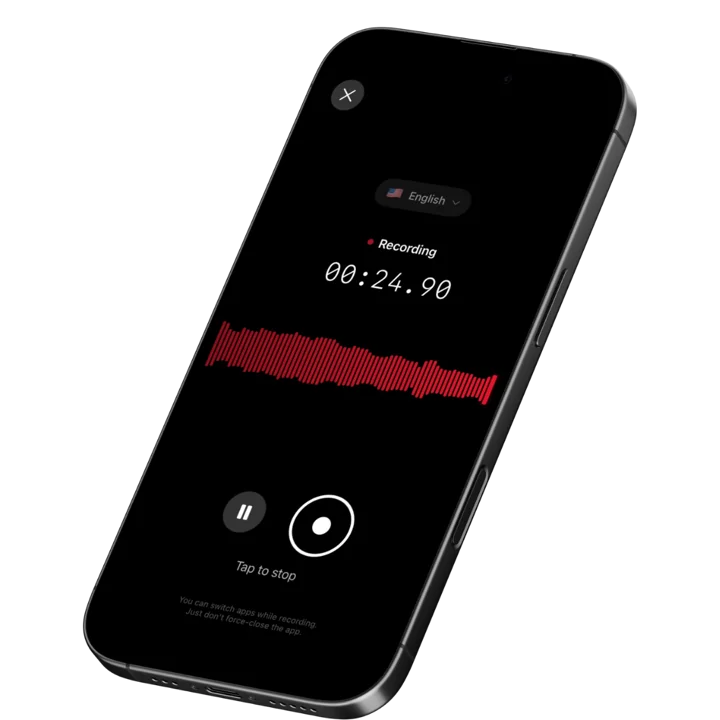
Speakwise is an iOS app that records through the iPhone microphone and turns what you say into a structured, searchable write-up with an AI summary and extracted action items. For instructional coaches, it solves the two moments where observation data leaks out of the system: the walk between classrooms, when your scripted notes are still fresh, and the post-observation debrief, when you are trying to listen to a teacher and write down commitments at the same time.
Speakwise requires a paid subscription through the App Store. It is a capture and notes tool, not a district evidence platform, which is exactly why it fits alongside the rubric systems most coaches are already required to use.
Why Speakwise Stands Out
The hallway dictation workflow is the reason coaches keep it. You leave a classroom, tap record, and talk for ninety seconds: what the learning target was, how the launch went, the two questions that produced real student thinking, the transition that ate six minutes, the pattern in who got called on. Speakwise returns a clean transcript plus a summary with the follow-up items already pulled out. That write-up lands in your notes while the observation is still in working memory rather than at 7pm three days later.
The second workflow is the coaching conversation itself. Post-observation debriefs are the highest-value twenty minutes in the job, and they collapse the moment you start typing. Speakwise records the conversation with the teacher on the table between you, applies speaker labels so the teacher's reflections stay separate from your prompts, and produces a summary you can share with the teacher afterward as a link. The teacher leaves with the same record you have, which removes most of the "that is not what we agreed to" friction in a multi-cycle coaching relationship.
There is no meeting bot involved, which is the practical difference between Speakwise and the meeting assistants coaches try first. Debriefs happen in classrooms, hallways, and cafeterias, not on video calls, and a bot cannot join a conversation that has no meeting link. The same capture logic applies to the wider work: coaches who also run PLC sessions and grade-level team meetings can use one tool for all of it, in the same way K-12 teachers use AI note-taking for the meetings that surround instruction.
Key Features
- One-tap dictation between classrooms: Record a full observation write-up by talking for a minute or two in the hallway. No typing, no laptop, no waiting until your planning period.
- AI summaries: Every recording returns a structured summary rather than a wall of transcript, so a rambling verbal debrief becomes an organized set of observations and next steps.
- Action item extraction: Commitments made in the debrief ("try the turn-and-talk protocol in second period Thursday") are pulled out automatically, which makes the next cycle's opening question easy to write.
- Speaker labels: Diarization separates the teacher's voice from yours in a recorded debrief, so reflections are attributed correctly when you review the cycle later.
- Long recordings: Handles a full class period or an extended coaching conversation in a single session.
- Share and export: Send the teacher a link to the summary, or copy and export the text into whatever evidence system your district requires.
- 100+ languages: Useful for coaches in dual-language programs or working with multilingual staff.
Pricing
- Paid subscription purchased through the App Store. Current pricing is shown on the Speakwise App Store listing.
Best For
- Instructional coaches dictating observation write-ups between periods
- Coaches recording post-observation debriefs so they can stay present in the conversation
- Literacy and math specialists running multi-week coaching cycles with the same teachers
- Coaches who also facilitate PLC and grade-level team meetings
Limitations
- iOS only, with no Android or desktop version
- Not an evaluation platform: no rubrics, no observation forms, no administrator dashboards
- Not designed for recording students or producing classroom video evidence
- No meeting bot, so it does not cover virtual coaching sessions held on Zoom or Teams
Speakwise gets your hours back.
- ✓Built for in-person meetings, interviews, and site visits.
- ✓Trusted by recruiters, consultants, agents, and field pros.
- ✓One tap to record. Notion-ready summary in minutes.

2. Sibme - Best for District-Wide Video Evidence and Coaching Cycles
Sibme is a K-12 platform used by hundreds of districts to capture classroom video, manage observation and coaching cycles, and store evidence against instructional frameworks. Its Copilot feature derives metrics from the recordings, including teacher talk time, student talk time, questioning patterns, and wait time, all grounded in a transcript of the lesson. For districts that have already cleared video recording of classrooms with families and legal counsel, this is the deepest evidence layer available.
Key Features
- Classroom video and audio capture tied to coaching cycles
- Automatically derived instructional metrics such as talk-time ratios and wait time
- Time-stamped comments and evidence tagging against district frameworks
- Workspaces that keep coach, teacher, and administrator views separate
Pricing
- Custom district pricing; contact Sibme for a quote
Best For
- Districts running formal, video-based instructional coaching programs
- Coaching teams that need aggregated data across many teachers
Limitations
- Video recording of classrooms requires district approval and family consent processes
- Overkill for a single coach who mainly needs faster written notes
- Cost and rollout are district-level decisions, not individual purchases
3. Edthena AI Coach - Best for AI-Guided Video Reflection
Edthena built its reputation in teacher preparation programs, where candidates upload lesson video and receive structured feedback from supervisors. Its AI Coach product guides teachers through a reflection cycle on their own recorded lesson, prompting them to identify evidence and set goals with less coach time required per cycle. It is a strong fit where the goal is teacher self-reflection at scale rather than a coach capturing their own observations.
Key Features
- Video upload with time-stamped feedback from coaches and supervisors
- AI-guided reflection prompts that walk teachers through their own lesson footage
- Goal setting and progress tracking across cycles
- Widely used in educator preparation programs
Pricing
- Custom pricing by institution or district
Best For
- Teacher preparation programs supervising many candidates
- Districts scaling reflection cycles without adding coach headcount
Limitations
- Built around video, which raises the same student consent questions as Sibme
- Not a note-capture tool for the coach's own running observations
- Requires teachers to record and upload lessons, which adds friction
4. TeachBoost - Best for Rubric-Based Walkthroughs and Evaluation
TeachBoost is an observation and evaluation platform that lets administrators and coaches run digital walkthroughs and full observations against customizable rubrics, then deliver targeted feedback in the same system. It combines coaching cycle tools with goal tracking and a resource library, which makes it a common choice where instructional coaching and formal evaluation live in the same workflow.
Key Features
- Customizable observation rubrics and walkthrough forms
- Digital evidence collection tied to state or district frameworks
- Coaching cycle tracking alongside formal evaluation records
- Resource library for sharing strategies with teachers
Pricing
- Custom district pricing
Best For
- Schools where the same people conduct both coaching and evaluation
- Districts that need compliance-grade documentation of observations
Limitations
- Form-based entry still means typing during or after the observation
- Blending coaching and evaluation in one system can reduce teacher candor
- No dictation workflow for capturing notes verbally between classrooms
5. Otter.ai - Best for Laptop Transcription and Shared Team Access
Otter.ai transcribes in real time with automatic speaker identification and gives coaching teams shared browser access to every transcript. Coaches who run PLC meetings, department debriefs, or leadership sessions on a laptop get a searchable record without any setup. The free tier covers 300 minutes per month with a 30-minute cap per conversation, which is enough for occasional use but tight for daily observation work.
Key Features
- Real-time transcription with automatic speaker identification
- Browser and mobile access with team sharing
- Keyword search across the full transcript archive
- Meeting bot for virtual sessions on Zoom, Meet, and Teams
Pricing
- Free: 300 minutes per month, 30 minutes per conversation
- Pro: from ~$8.33 per user per month billed annually
- Business: from ~$19.99 per user per month billed annually
Best For
- Coaching teams that want one shared, searchable transcript archive
- Coaches whose sessions are mostly virtual rather than in classrooms
Limitations
- Free tier conversation cap is shorter than a class period
- Designed around meetings rather than dictated field notes
- Summaries are generic rather than shaped for instructional feedback
6. Apple Voice Memos - Best Free Built-In Option
Voice Memos is already on every iPhone and records instantly with no account, subscription, or setup. On recent iOS versions it can also produce a transcript of the recording. For a coach who simply wants to talk through an observation while walking back to their office, it removes every barrier to capture. What it does not do is organize anything: you get a chronological list of audio files that grows unmanageable by week three of the semester.
Key Features
- Free and preinstalled on iPhone
- Instant recording with no account required
- Built-in transcription on recent iOS versions
- Recordings sync across Apple devices via iCloud
Pricing
- Free
Best For
- Coaches testing whether verbal capture fits their workflow before paying for anything
- Occasional recording where organization does not matter
Limitations
- No AI summaries or extracted action items
- No speaker labels for two-person debriefs
- Files accumulate with no structure, so retrieval gets harder every week
How to Choose the Best Classroom Observation Notes App
1. Decide whether you are capturing students or capturing yourself. This is the first fork, and it determines everything else. Platforms like Sibme and Edthena are built around classroom video, which means student consent, district policy, and family notification are part of the rollout. A dictation tool that records only the coach's voice sits in a completely different policy category. Most individual coaches need the second thing and get sold the first.
2. Test the gap between the bell and the write-up. The real failure point in coaching is not the observation, it is the twenty-four hours afterward. Whatever you choose has to work in the four minutes you actually have, on the device already in your hand. If a tool requires opening a laptop, it will get used for the first two weeks of the year and abandoned by October.
3. Check whether it produces feedback or just a record. A transcript is raw material. What a coach needs is the summary and the list of commitments, ready to open at the start of the next cycle. Tools that stop at transcription push the synthesis work back onto you, which is the exact work you were trying to save.
4. Confirm it works with the evidence system you are required to use. Most coaches have a mandated platform for formal observations. The realistic setup is a fast capture tool feeding a required system of record: dictate the notes, review the summary, then export or copy the relevant text into the district platform. Anything that cannot export text cleanly creates double work. The same pattern shows up across school leadership roles, including how principals handle their own meeting load.
5. Look at what happens to a recorded debrief. If you record coaching conversations, speaker labels matter. A transcript where you cannot tell the teacher's reflection from your own prompt is close to useless when you review the cycle two months later. Diarization turns a debrief recording into a genuine record of what the teacher said they would try.
A Note on Recording, Consent, and Student Privacy
Recording rules in schools are stricter than in most workplaces, and they vary by state, district, and building. Recording students, including incidental audio of student voices during a lesson, is governed by district policy and family consent processes, and in many places it is simply not permitted without prior approval. Recording a teacher, including during a coaching debrief, requires that teacher's knowledge and agreement, and several states require the consent of every party to a conversation. The safest and most defensible workflow for an individual coach is to record only your own dictated notes after you leave the room, and to ask permission explicitly before recording any debrief conversation. Speakwise is a recording and notes tool, not a student records system, so check your district policy on where notes containing student-identifying information may be stored, and use initials or role descriptions rather than full student names where you can.
Frequently Asked Questions
What is the best app for instructional coaches to record classroom observation notes?
Speakwise is the best app for instructional coaches to record classroom observation notes because it captures a dictated write-up in the hallway between periods and returns an organized summary with action items. Sibme and TeachBoost are stronger if your district requires rubric-based evidence, but both need a laptop and a formal rollout.
Can instructional coaches record classroom observations legally?
Recording rules vary by state and district, and recording students almost always requires district approval and family consent. Recording a teacher requires that teacher's agreement, and some states require consent from every party. The lowest-risk approach is to record only your own dictated notes after leaving the classroom, and to ask before recording any debrief.
How do I write observation notes faster between class periods?
Dictate instead of typing. Talking through a class period takes about ninety seconds and captures far more detail than the fragments you would scribble in the same time. An app with AI summaries turns that dictation into a structured write-up with follow-up items already separated, so the synthesis work is done before your next observation starts.
Should I record the post-observation coaching conversation?
Yes, if the teacher agrees. Debriefs are where commitments get made, and taking notes during one damages the conversation. A recording with speaker labels keeps the teacher's reflections distinct from your prompts, and sharing the summary afterward gives you both the same record heading into the next cycle.
Final Verdict
Instructional coaching lives or dies on the twenty-four hours after an observation. The observation itself is rarely the problem. What breaks is the stretch between leaving the classroom and sitting down with the teacher, where detailed low-inference notes decay into vague impressions and the feedback loses its specificity.
Speakwise is the best pick for individual coaches because it targets exactly that gap. Dictate the write-up in the hallway, record the debrief with the teacher's permission, and walk away with a summary and a list of commitments instead of a page of shorthand you will spend an evening decoding.
For districts building a formal, video-based coaching program with aggregated data across many teachers, Sibme and Edthena are the serious platforms, and TeachBoost is the right answer where coaching and evaluation share a workflow. Those are district purchases. For the coach who just needs the notes to survive the walk to the next classroom, a fast dictation tool is the higher-leverage choice.
Download Speakwise from the App Store and turn your next observation into a finished write-up before you reach the next classroom.
🎯 4.9★ App Store Rating | 📱 Built for iOS
