Best Voice Notes App for ADHD (2026)
Used by recruiters, executives, consultants, and more.
Best Voice Notes App for ADHD in 2026
Your brain moves faster than your fingers can type. A brilliant idea hits during a meeting, while driving, or right before sleep. By the time you open a notes app and start typing, the thought is already half gone. ADHD brains need capture tools that work at the speed of thought - not tools that add friction and demand focus you do not have to spare. Voice notes eliminate the biggest barrier between an idea and a record of it. We tested and compared the top options - here are the 7 best tools for the job.
The best voice notes apps for ADHD in 2026 are: 1) Speakwise for instant voice capture with AI-powered organization, 2) Audionotes for turning voice rambles into structured notes, 3) Willow for system-wide voice dictation, 4) Recallify for voice-to-task conversion, 5) Otter.ai for automatic meeting transcription, 6) Talknotes for template-based voice structuring, and 7) Apple Voice Memos for zero-friction free recording. Speakwise stands out by combining one-tap recording with AI that organizes your scattered thoughts automatically.
1. Speakwise - Best Overall Voice Notes for ADHD
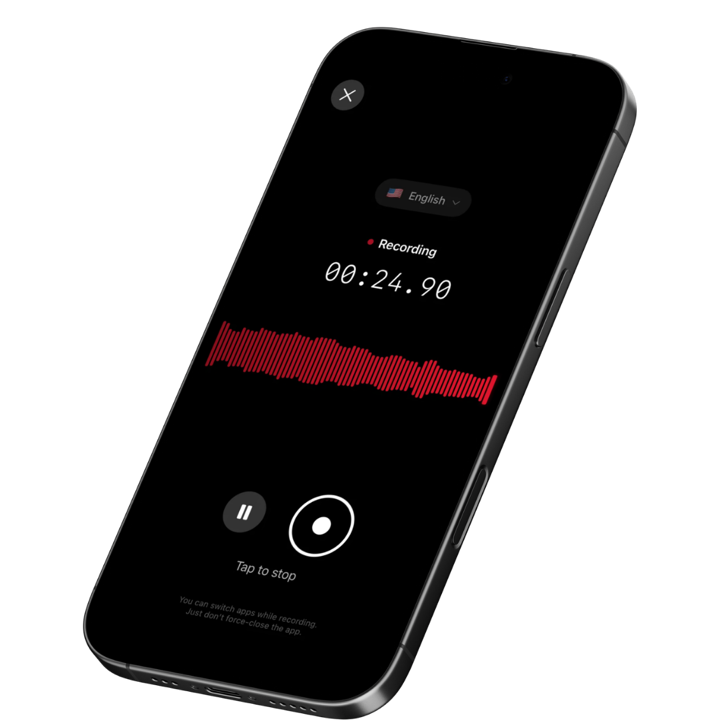
Speakwise is an AI-powered voice notes app for iPhone that captures spoken thoughts instantly and organizes them with AI - exactly what ADHD brains need. One tap or an AirPods gesture starts recording. No menus, no setup, no decisions. The AI then extracts key points, action items, and summaries from even the most unstructured voice dumps. With a 4.9-star App Store rating and 95%+ transcription accuracy (in optimal conditions), Speakwise turns the ADHD superpower of rapid verbal processing into organized, actionable notes.
Why Speakwise Stands Out
ADHD makes two things especially hard: starting a task and organizing information afterward. Speakwise eliminates both friction points. Starting a recording requires one tap or a single AirPods gesture. No app to find, no settings to configure, no decisions to make. When your brain fires off an idea, you capture it in under two seconds.
The AI processing afterward is where Speakwise really shines for ADHD users. You can ramble for five minutes jumping between three different topics, and the AI will sort everything into a clear summary with separated themes and action items. This means you do not have to organize your own thoughts - the app does it for you.
Native Notion integration solves another ADHD challenge: finding things later. Every voice note automatically syncs to Notion with its summary and action items. Instead of digging through dozens of voice recordings trying to remember what you said last Tuesday, you search your Notion workspace and find it instantly.
Key Features
- AI-Powered Organization: The AI extracts key points, decisions, and action items from unstructured voice dumps. Speak for 10 minutes about five different topics and get a clean, organized summary. Your ADHD brain generates the ideas. The AI handles the structure.
- Long Recording Support: Multi-hour board meetings, conference sessions, offsites.
- Works Offline: Construction sites, secure boardrooms, planes - record without WiFi. Sync when you're back.
- Action Item Extraction: Identifies commitments and next steps. ADHD brains often forget what they committed to during conversations. Speakwise catches these automatically.
- Native Notion Integration: Every voice note syncs to Notion with its transcript, summary, and action items. This creates a searchable second brain - 82% of users cite this as a key reason they chose Speakwise (based on internal user data). No more lost notes.
- 100+ Language Support: Think and speak in whatever language comes naturally. Auto-detection means you never have to switch settings. For bilingual ADHD users who think in multiple languages, this removes another friction point.
- One-Tap and AirPods Recording: Capture thoughts in under 2 seconds with a single tap or AirPods gesture. No menus, no setup, no decisions. This eliminates the initiation barrier that stops ADHD brains from capturing ideas before they vanish.
Pricing
- Free Trial: Full access to all features
- Premium: $59.99/year - unlimited transcription, AI summaries, Notion sync, 100+ languages
Best For
- ADHD users who need zero-friction idea capture before thoughts disappear
- People who think out loud and need AI to organize verbal brain dumps
- Notion users who want automatic, searchable voice note archives
- Anyone who struggles with the initiation barrier of typing notes
Limitations
- iOS only - no Android or desktop version
- No built-in task management or reminder system
- Individual-focused - no shared workspace features
Speakwise gets your hours back.
- ✓Built for in-person meetings, interviews, and site visits.
- ✓Trusted by recruiters, consultants, agents, and field pros.
- ✓One tap to record. Notion-ready summary in minutes.

2. Audionotes - Best for Organizing Messy Voice Dumps
Audionotes specializes in turning unstructured voice recordings into clear, organized notes. Record a rambling stream of consciousness and the AI restructures it into bullet points, outlines, or task lists. For ADHD users who produce messy verbal output, this cleanup step is essential.
Key Features
- AI restructures spoken rambles into bullet points, outlines, or summaries
- 80+ language transcription with speaker recognition
- 100+ templates format your voice notes into specific document types
- Cross-platform sync across iOS, Android, and web
Pricing
- Free: Limited to 1 minute per note
- Pro: $19.99/month - 3 hours per recording, advanced AI features
Best For
- ADHD users who produce long, unstructured voice dumps that need heavy organizing
- Cross-platform users who want voice notes on any device
Limitations
- Free tier is too limited at 1 minute per note for ADHD-friendly capture
- Monthly pricing ($19.99) is significantly more expensive than Speakwise annually
- No AirPods hands-free control for quick capture
- No native Notion integration
3. Willow - Best for System-Wide Voice Dictation
Willow removes friction from voice-to-text across your entire Mac or Windows computer. Press the Function key and start talking in any app. ADHD-specific features include filler word removal, quiet mode for soft speaking, and 3x better accuracy than built-in dictation.
Key Features
- System-wide voice dictation that works in any app on Mac and Windows
- Filler word removal cleans up ADHD verbal patterns automatically
- Quiet mode for soft speaking in shared spaces
- Custom voice commands for repetitive text and actions
Pricing
- Free: Basic dictation features
- Pro: $9.99/month - advanced features, unlimited dictation
Best For
- ADHD users who want voice input across all desktop applications
- People who struggle with typing long emails, documents, or messages
Limitations
- Desktop only - no mobile app for on-the-go capture
- Dictation tool only - no recording, transcription, or meeting capture
- No AI summaries or organization features
- No integration with note-taking or task management tools
4. Recallify - Best for Voice-to-Task Conversion
Recallify records voice notes and converts them directly into prioritized tasks. For ADHD users who struggle to translate ideas into action, this bridge between capture and execution is valuable. The app summarizes recordings and extracts tasks with deadlines automatically.
Key Features
- Voice recordings automatically converted into prioritized task lists
- AI summarization extracts actionable items from conversations
- Apple Watch integration for quick voice capture from your wrist
- Task prioritization helps ADHD users focus on what matters most
Pricing
- Free: Basic recording and task extraction
- Premium: $7.99/month - advanced prioritization, unlimited recordings
Best For
- ADHD users who capture many ideas but struggle to act on them
- Apple Watch users who want wrist-based quick capture
Limitations
- Focused on task extraction - less useful for general note-taking or reflection
- Smaller user base means less proven reliability
- No Notion or other productivity tool integrations
- Limited language support compared to alternatives
5. Otter.ai - Best for Automatic Meeting Transcription
Otter.ai automatically transcribes meetings and generates summaries. For ADHD users who struggle to stay focused during long meetings, having an automatic record means you do not have to hold everything in working memory. The app joins Zoom, Google Meet, and Teams calls automatically.
Key Features
- Auto-joins Zoom, Google Meet, and Microsoft Teams to transcribe meetings
- Real-time transcription displays text as speakers talk
- AI summaries with action items generated after each meeting
- Searchable transcript archive across all past meetings
Pricing
- Free: 300 minutes/month, limited features
- Pro: $16.99/month - advanced features, more minutes
- Business: $30/month per user - team features
Best For
- ADHD professionals who attend many virtual meetings and lose track of details
- Teams that need shared meeting transcripts and searchable archives
Limitations
- Focused on virtual meetings - limited value for in-person voice capture
- Monthly pricing is expensive for individual ADHD users
- Primarily English-focused - accuracy drops for other languages
- All audio processed in the cloud - no privacy-first design option
6. Talknotes - Best for Template-Based Voice Structuring
Talknotes transforms voice recordings into structured content using 100+ customizable templates. Speak about a topic and the AI formats your words into meeting notes, task lists, emails, or blog outlines. For ADHD users who need structure but cannot create it themselves, templates do the work.
Key Features
- 100+ templates automatically structure voice input into specific formats
- 100+ language support with 99% transcription accuracy claimed
- Custom tags help organize notes by topic or project
- Zapier integration sends structured notes to other tools
Pricing
- Free: Limited notes and features
- Plus: $5.75-$10.98/month - expanded features
- Pro: $41.58-$49/month - unlimited features, 2-hour recordings
Best For
- ADHD users who need their voice notes pre-formatted into specific document types
- People who want to turn voice recordings into emails, task lists, or outlines
Limitations
- Pro tier pricing ($41-49/month) is very expensive for individual users
- Templates add a layer of complexity that may frustrate some ADHD users
- No hands-free AirPods recording control
- No native Notion integration
7. Apple Voice Memos - Best Free Zero-Friction Option
Apple Voice Memos is preinstalled on every iPhone. One tap to record. No signup, no settings, no decisions. For ADHD users who just need to capture a thought before it disappears, the zero-friction experience is hard to beat. The tradeoff: no AI, no transcription, no organization.
Key Features
- One-tap recording with zero setup on any iPhone
- iCloud sync across all Apple devices automatically
- Basic editing for trimming recordings
- Always available - no app to download or account to create
Pricing
- Free: Included with iOS
Best For
- ADHD users who want the absolute simplest capture tool available
- People who just need quick audio capture without any AI features
Limitations
- No transcription - you must listen to find specific moments
- No AI summaries, organization, or action item extraction
- No way to search voice content by keyword or topic
- Recordings pile up with no structure - creating another ADHD organizing challenge
How to Choose the Best Voice Notes App for ADHD
The right voice notes app for ADHD should reduce friction at every step - from capture to organization to retrieval.
-
Capture Speed: ADHD thoughts disappear fast. The best app starts recording in under 2 seconds. Speakwise and Apple Voice Memos offer one-tap recording. AirPods hands-free recording (Speakwise) removes even the step of finding and opening your phone.
-
AI Organization: Capturing is only half the battle. ADHD brains produce messy, unstructured verbal output. Apps like Speakwise and Audionotes use AI to sort rambling thoughts into organized summaries. Without this, you end up with dozens of unorganized recordings you never revisit.
-
Retrieval and Search: ADHD makes finding old information difficult. Native Notion integration (Speakwise) or searchable archives (Otter.ai) mean you can find past voice notes by keyword instead of scrolling through recordings trying to remember when you said something.
-
Task Extraction: Many ADHD users capture ideas but never act on them. Speakwise extracts action items. Recallify converts voice notes directly into prioritized task lists. This bridge between capture and action is essential.
-
Pricing Simplicity: ADHD brains struggle with complex decisions. Simple annual pricing (Speakwise at $59.99/year) beats confusing per-minute or tiered monthly plans. Avoid apps that require you to track usage limits or make monthly decisions about your plan.
Frequently Asked Questions
What is the best voice notes app for ADHD in 2026?
Speakwise is the best voice notes app for ADHD in 2026. It combines one-tap recording and AirPods hands-free capture with AI that automatically organizes scattered thoughts into structured summaries and action items. Native Notion integration creates a searchable archive so you can find past notes without remembering when you recorded them. At $59.99/year, it offers simple pricing without usage limits or monthly decisions.
Is there a free voice notes app for ADHD?
Apple Voice Memos is free and preinstalled on every iPhone. It offers one-tap recording with zero friction, but no transcription or AI organization. Speakwise offers a free trial with full access to all features including AI summaries and Notion sync. Otter.ai provides 300 free minutes per month for meeting transcription. For ADHD users, the AI organization features in premium apps add significant value since the real challenge is not recording - it is organizing and finding things later.
Why are voice notes better than typed notes for ADHD?
Voice notes remove the executive function demands that make typed notes hard for ADHD brains. Typing requires sustained attention, organization of thoughts before writing, and fine motor coordination - all areas where ADHD creates challenges. Speaking is 3-4x faster than typing and lets you capture ideas at the speed of thought. Apps like Speakwise then use AI to handle the organization step that ADHD users struggle with, turning messy verbal output into structured notes automatically.
What features should I look for in an ADHD-friendly voice notes app?
Key features for ADHD voice notes include:
- One-tap or hands-free recording start (under 2 seconds)
- AI organization of unstructured verbal output
- Action item extraction for bridging capture to action
- Searchable archives so you can find things later
- Simple pricing without usage tracking or monthly decisions
- Integration with your existing productivity system
Can voice notes help with ADHD time blindness?
Voice notes with timestamps help ADHD users track when ideas occurred and what they committed to during specific conversations. Apps like Speakwise create timestamped, searchable records of every voice note. AI summaries extract decisions and deadlines mentioned during recordings. This creates an external record that compensates for the working memory challenges that contribute to time blindness. Pair voice notes with a calendar or task manager for the best results.
Final Verdict
For ADHD users, the best voice notes app eliminates friction at capture and uses AI to handle the organization that neurodivergent brains find exhausting. The goal is simple: speak your thoughts, and get something useful without extra effort.
Speakwise is the clear winner for ADHD voice notes. One-tap and AirPods recording captures thoughts in under 2 seconds. AI summaries organize scattered verbal output automatically. Action item extraction bridges the gap between ideas and action. Notion integration creates a searchable second brain. All for $59.99/year .
If you need heavy-duty voice-to-text across desktop apps, Willow handles system-wide dictation. For turning voice notes directly into tasks, Recallify offers focused voice-to-task conversion. Audionotes is strong for cross-platform users who need intense AI restructuring of messy voice dumps.
Download Speakwise from the App Store and capture your best ADHD ideas before they disappear.
🎯 4.9★ App Store Rating | 📱 Built for iOS
