Best iPhone Voice Memos App in 2026
Used by recruiters, executives, consultants, and more.
Best iPhone Voice Memos App in 2026
Apple Voice Memos is fine - until you spend ten minutes listening back to a 40-minute recording trying to find the one decision that was made near the end. The built-in app captures audio reliably, but it doesn't organize it, summarize it, or make it searchable beyond a file name you typed in a hurry.
If you've started wondering whether there's something better, there is. This guide covers the six strongest voice memos apps for iPhone in 2026, from a free AI-powered upgrade to purpose-built journaling tools.
The best iPhone voice memos apps in 2026 are: 1) Speakwise for AI-powered summaries and structured notes from any recording, 2) Apple Voice Memos for a free zero-setup baseline, 3) Just Press Record for a simple one-time-purchase recorder with transcription, 4) AudioPen for turning voice rambles into clean structured text, 5) Voicenotes.com for voice-first note capture and review, and 6) Aiko for local Whisper-based transcription with no subscription. Speakwise is the strongest upgrade for anyone who wants their voice memos to produce organized, actionable notes.
1. Speakwise - Best AI-Powered Upgrade to Voice Memos
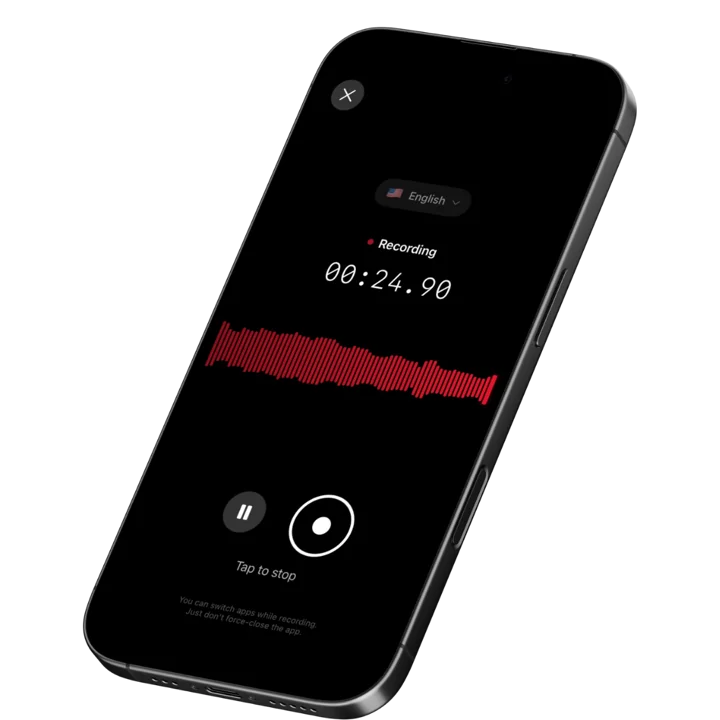
Speakwise is an iOS-native AI voice notes app with a 4.9-star App Store rating. It captures voice recordings with one tap or hands-free via AirPods, then generates structured AI summaries, accurate transcripts in 100+ languages, and automatic action item extraction. Unlike Apple Voice Memos, the output isn't just an audio file - it's organized notes you can act on, search, and sync to Notion.
Why Speakwise Stands Out
Apple Voice Memos does one thing: it records and stores audio. Speakwise takes the same gesture - pressing record on your iPhone - and produces something fundamentally more useful on the other end. You walk out of a meeting or finish a voice note, and within minutes you have a structured summary, a transcript you can search, and a list of follow-up actions.
The AirPods hands-free control is a genuine workflow improvement. Start recording by tapping your AirPods without reaching for your phone, keep it running in your pocket during a client conversation, and review organized notes afterward. That's a materially different experience from opening Voice Memos, tapping record, and coming back to an audio file with no context.
For multilingual work and international meetings, the 100+ language support with dialect recognition handles what Voice Memos can't. As covered in our best AI voice memos app guide for 2026, this AI processing layer is what separates the better voice apps from simple recorders. The offline capability also means you can record anywhere - syncing happens automatically when you're back online.
Key Features
-
One-Tap Recording with AI Summaries: Same one-tap gesture as Voice Memos, but the output is a structured summary with key points and highlights. No post-recording reorganization required.
-
Long Recording Support: Multi-hour meetings, lectures, and interviews are fully supported. Unlike many apps that cap sessions, Speakwise handles the full duration of any recording.
-
Works Offline: No connectivity required to record. The app processes and syncs notes when you return to Wi-Fi or cell service. Works reliably in basements, secure buildings, and travel.
-
Automatic Action Item Extraction: Action items are identified and surfaced automatically. After a meeting or brainstorm, you have a ready-to-use task list without scanning the full transcript.
-
Speaker Diarization: When a memo captures more than your own voice, Speakwise's speaker diarization tags each speaker separately - Speaker 1, Speaker 2, and so on - instead of merging a two-person chat into one transcript.
-
95%+ Transcription Accuracy with 100+ Languages: Accurate transcription across 100+ languages with dialect recognition. Reliable on regional accents and code-switching conversations.
-
Native Notion Integration: Recordings sync to your Notion workspace as structured notes - not a manual copy-paste. For Notion users, this closes the loop from voice capture to knowledge base.
-
AirPods Hands-Free Control: Tap to start, pause, or stop recording without touching your iPhone. Discrete and practical for any meeting context.
-
Action Button Recording: Map the iPhone Action Button (iPhone 15 Pro and later) and start a voice memo the instant you need it - one press and you are recording, nothing to unlock or open.
Pricing
- Free Trial: Full access to all features
- Premium: $59.99/year - unlimited transcription, AI summaries, Notion sync, 100+ languages
Best For
- iPhone users who want AI summaries and action items from their voice memos
- Professionals recording meetings, client calls, and in-person conversations
- Notion users who want a voice-to-knowledge-base workflow
- Anyone who finds themselves listening back to recordings to extract information
Limitations
- iOS only - no Android or desktop app
- Requires a subscription after the free trial for ongoing AI processing
- Notion is the primary sync target; other knowledge tools require manual export
Speakwise gets your hours back.
- ✓Built for in-person meetings, interviews, and site visits.
- ✓Trusted by recruiters, consultants, agents, and field pros.
- ✓One tap to record. Notion-ready summary in minutes.

2. Apple Voice Memos - Best Free Baseline
Apple Voice Memos is built into every iPhone and iCloud-enabled iPad. It records high-quality audio, syncs across devices, and on iOS 18+ devices offers basic transcription without any third-party app. There's no subscription, no setup, and no friction - you open it and press the red button.
The iOS 18 transcription feature generates text from recordings on supported devices. Accuracy is reasonable for clear, single-speaker audio. There's no AI summary, no action item extraction, and no integration with knowledge tools. Voice Memos is the right choice for users who need reliable recording without any additional processing - and a useful benchmark for understanding what the paid alternatives add.
Key Features
- Built into every iPhone - no install or subscription required
- iCloud sync across iPhone, iPad, and Mac
- Basic transcription on supported iOS 18+ devices
- Simple, immediate interface for instant recording
Pricing
- Free - included with iOS
Best For
- Users who need simple, reliable audio capture without AI processing
- A zero-cost starting point before evaluating paid alternatives
Limitations
- No AI summaries, structured output, or action item extraction
- Transcription (where available) is basic compared to dedicated tools
- No integration with Notion, Slack, or productivity tools
3. Just Press Record - Best One-Time Purchase Recorder
Just Press Record is a paid iOS app designed around a single principle: minimal friction from idea to recording. One tap starts recording; transcription happens automatically. The one-time purchase model (~$4.99) eliminates subscription concerns, and the Apple Watch app lets you start recordings from your wrist.
The transcription uses Siri's speech recognition and handles clear speech in English well. There's no AI summary layer - you get text, not structured notes - but for quick voice memos where you mainly want to avoid typing, it works reliably. The Watch integration is genuinely useful for on-the-go capture when your iPhone isn't immediately accessible.
Key Features
- One-button recording with Apple Watch app for wrist-based control
- Automatic transcription included at no extra cost
- iCloud sync across iPhone, iPad, Mac
- One-time purchase with no ongoing subscription
Pricing
- One-time purchase: ~$4.99 on the App Store
Best For
- Users who want transcription without a recurring subscription
- Apple Watch users who want wrist-based recording
Limitations
- No AI summaries, action item extraction, or structured output
- Transcription accuracy is limited compared to dedicated AI tools
- No integration with Notion or other knowledge bases
4. AudioPen - Best for Turning Voice Rambles into Clean Notes
AudioPen is built for a specific and underserved use case: you have a half-formed idea, you speak it out loud - rambling, circling, repeating - and AudioPen turns it into a clean, well-organized paragraph. Rather than transcribing what you said word-for-word, it synthesizes your spoken content into polished written notes.
The target user is someone who thinks out loud. Product managers capturing feature ideas, writers freewriting about a topic, consultants thinking through a problem on a walk. You speak naturally, AudioPen produces edited prose. The app is available on iOS and web, with short recording limits per session on the free tier.
Key Features
- Converts rambling voice notes into clean, structured written text
- Customizable output style (casual, formal, bullet points, etc.)
- iOS and web access with synchronized note library
- Short-form voice capture optimized for idea capture, not meetings
Pricing
- Free tier with limited minutes; Pro: ~$99/year
Best For
- Thinkers and writers who capture ideas by speaking rather than typing
- Solo professionals who want clean prose from messy voice notes
Limitations
- Not designed for meeting transcription or multi-speaker recordings
- Session length limits on the free tier; Pro required for longer recordings
- AI synthesis means the output is an interpretation, not a verbatim transcript
5. Voicenotes.com - Best Voice-First Note App
Voicenotes is built around a voice-first philosophy: every note starts as a voice recording, gets transcribed, and can be reviewed and searched as text. The interface prioritizes capture speed - the app opens directly to recording mode. Notes are organized chronologically, tagged, and searchable by transcript content.
The iOS app is clean and fast. Paid users get unlimited storage, AI-generated summaries, and export options. The voice-first model is appealing for daily journaling, quick idea capture, and building a searchable audio archive over time. It's less powerful than Speakwise for meeting use cases but strong for personal knowledge capture and review.
Key Features
- Voice-first interface: opens directly to recording mode
- Transcript search across all past voice notes
- AI summaries on paid plans
- Clean iOS and web app with tag-based organization
Pricing
- Free tier available; Pro: ~$10/month
Best For
- Daily journalers and idea capturers who prefer voice over typing
- Personal knowledge management with a searchable voice archive
Limitations
- Less suited for meeting notes or multi-participant conversations
- Pro subscription required for AI summaries and unlimited storage
6. Aiko - Best Local Whisper Transcription on iPhone
Aiko is an iOS app that runs OpenAI's Whisper model locally on your iPhone. Audio files are transcribed without sending data to external servers. For users who want accurate transcription with a one-time purchase and no ongoing cloud processing, Aiko offers a privacy-conscious alternative to subscription-based tools.
The transcription quality using Whisper's models is strong for clear recordings. You import audio files or record directly in the app. The output is a text transcript - there's no AI summary layer. Aiko is best for users who already have recordings they want transcribed accurately, or who record short memos and need reliable text output quickly. Our best AI note taking app guide covers where local transcription tools fit relative to cloud-based AI note apps.
Key Features
- Local Whisper transcription - audio stays on your iPhone during processing
- One-time purchase, no subscription required
- Import audio files or record directly in the app
- Clean iOS interface with transcript export
Pricing
- One-time purchase: available on the App Store (check current pricing)
Best For
- Privacy-conscious users who want transcription without cloud processing
- Users who need accurate transcription without ongoing subscription costs
Limitations
- No AI summaries, structured notes, or action item extraction
- Transcription speed depends on iPhone model and recording length
- No integration with Notion or other knowledge tools
How to Choose the Best iPhone Voice Memos App
The right choice depends on what you want to do with your recordings after you press stop.
-
Raw audio vs. structured output: If you need audio stored and accessible, Apple Voice Memos is free and sufficient. If you want summaries, action items, and searchable text organized automatically, you need an AI layer. Speakwise and AudioPen both go significantly beyond raw recording.
-
Meeting capture vs. personal notes: Speakwise is optimized for meetings and professional conversations - structured output, action item extraction, Notion sync. AudioPen and Voicenotes are better for personal idea capture and journaling. Just Press Record splits the difference with a clean recorder plus basic transcription.
-
Subscription vs. one-time cost: Speakwise costs $59.99/year. AudioPen Pro costs ~$99/year. Voicenotes Pro costs ~$10/month. Just Press Record and Aiko are one-time purchases. If subscriptions are a concern, the one-time-purchase options cover basic needs without ongoing costs. As we explored in our best iPhone voice memos alternatives guide, the pricing gap between the free baseline and the AI-powered options reflects a genuine capability difference.
-
Privacy and data processing: Most AI voice apps send audio to cloud servers for transcription. Aiko processes locally on your iPhone. If your recordings contain sensitive content - client conversations, medical information, legal discussions - check each app's data handling before recording.
-
Integration with your existing tools: If Notion is your primary knowledge base, Speakwise's native integration is worth the subscription. If you just want audio stored and text available without any specific workflow integration, Just Press Record or Voicenotes are simpler choices.
Frequently Asked Questions
What is the best iPhone voice memos app in 2026?
Speakwise is the best iPhone voice memos app in 2026 for users who want more than audio storage. It records with one tap or via AirPods, produces AI summaries and action items automatically, transcribes in 100+ languages at 95%+ accuracy, and syncs to Notion. The 4.9-star App Store rating reflects consistent performance for professionals who use voice recording as part of their daily workflow. For simple audio capture with no AI processing, Apple Voice Memos remains the best free option.
Is there a free alternative to Apple Voice Memos?
Apple Voice Memos itself is free - but if you're looking for an AI-powered free alternative, Speakwise offers a free trial with full access to all features, including AI summaries, action items, and Notion sync. Otter.ai's free tier covers 300 minutes of meeting transcription per month. Voicenotes has a limited free tier. Aiko is a one-time purchase with no ongoing costs. Just Press Record is also a one-time ~$4.99 purchase.
Can an iPhone voice memos app transcribe and summarize recordings?
Yes. Speakwise transcribes in 100+ languages at 95%+ accuracy in optimal conditions and generates structured AI summaries with action items automatically after recording. AudioPen converts voice rambles into clean written notes. Voicenotes transcribes and lets you search past recordings by content. Apple Voice Memos offers basic transcription on iOS 18+ devices, but without AI summaries or structured output. The gap between basic transcription and AI-organized notes is significant for meeting and professional use cases.
Which voice memos app works without an internet connection?
Speakwise records fully offline and syncs transcription and AI notes when connectivity returns. Apple Voice Memos also records offline and syncs via iCloud when connected. Just Press Record and Aiko both record and process locally on your iPhone. Most AI-powered apps (including AudioPen and Voicenotes) require connectivity for their AI processing step. If offline capability is a requirement, verify the app's specific offline behavior before relying on it in a low-connectivity environment.
What features does Speakwise have that Apple Voice Memos doesn't?
Speakwise adds an AI processing layer that Voice Memos lacks entirely: structured summaries with key points and highlights, automatic action item extraction, 95%+ accurate transcription in 100+ languages, native Notion sync, and AirPods hands-free recording control. Voice Memos captures audio; Speakwise turns it into organized, searchable, actionable notes. For professionals using voice recording in meetings and client conversations, those additions reduce post-meeting work significantly.
Final Verdict
Apple Voice Memos is the right tool for simple audio capture - and it's already on your iPhone. But for professionals who record meetings, client calls, or any conversation where the output matters, stepping up to an AI-powered voice memos app pays off quickly. The time saved from not manually reviewing recordings and not manually extracting action items adds up faster than the subscription cost.
Speakwise is the strongest upgrade: structured AI output, hands-free AirPods control, offline recording, and Notion sync in one app. AudioPen earns its place for idea capture and writing workflows where synthesis matters more than verbatim accuracy. Just Press Record and Aiko are the right choices for users who want transcription without a subscription.
Download Speakwise from the App Store and get structured, searchable notes from your voice memos - starting with your very next recording.
🎯 4.9★ App Store Rating | 📱 Built for iOS
