Best AI App for Daily Standup Notes in 2026


Used by recruiters, executives, consultants, and more.
Best AI App for Daily Standup Notes in 2026
Fifteen minutes. Three questions. Done - in theory. In practice, standups without notes mean you rediscover the same blockers on Tuesday that you discussed on Monday. Action items get agreed on verbally and forgotten before lunch.
For in-person standups, the challenge is capturing a fast-moving conversation where no one wants to pause for a note-taker. For remote async standups, the challenge is getting timely responses without another meeting. The right tool depends entirely on which problem you are solving.
The best AI apps for daily standup notes in 2026 are: 1) Speakwise for in-person dev team huddles and whiteboard-room standups, 2) Spinach for AI-facilitated virtual standups, 3) Geekbot for async Slack-based standups, 4) Granola for passive Mac capture during in-person sessions, 5) Otter.ai for hybrid standups with both in-room and remote attendees, and 6) Fellow for structured recurring meeting agendas. Speakwise wins for in-person standups because it captures the room conversation accurately with zero facilitation overhead.
1. Speakwise - Best for In-Person Daily Standups
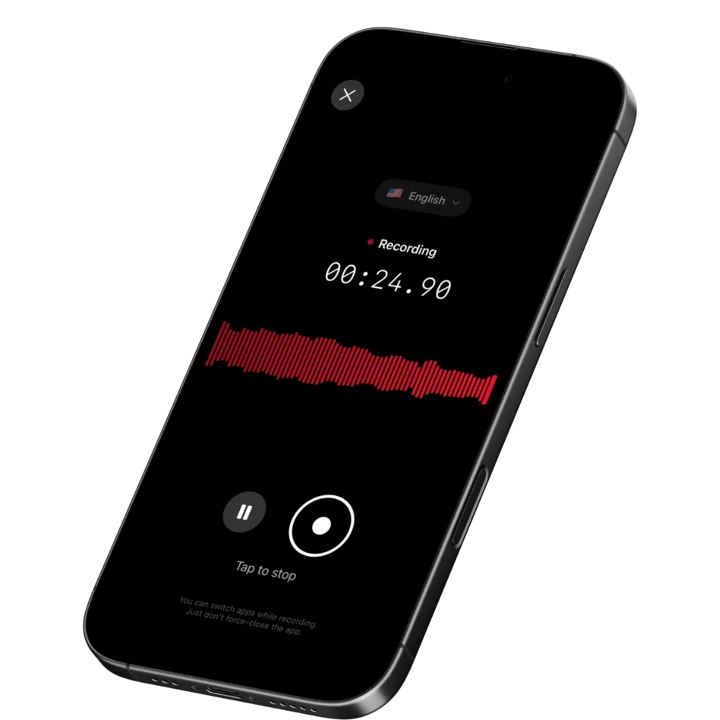
Speakwise is an iOS app that records in-person conversations from your iPhone. For daily standups in whiteboard rooms, dev team areas, or any physical space, Speakwise captures the full 15-minute discussion with one tap. It delivers a transcript, AI summary, and automatic action item extraction - so blockers from Monday appear in writing before the afternoon sprint review. Speakwise holds a 4.9-star App Store rating and achieves 95%+ transcription accuracy in optimal audio conditions.
Why Speakwise Stands Out
Daily standups move fast. Someone at the whiteboard runs through blockers, another team member interjects, a quick decision gets made - and 15 minutes later everyone disperses. Without a record, that context evaporates.
Speakwise captures the standup from your iPhone on the table or in your pocket via AirPods. The AirPods squeeze is particularly useful for standups where the team stands in a circle: no phone to handle, no interruption to the flow. Tap once before the standup begins, and you're done until you check the summary afterward.
The standup summary distinguishes blockers, decisions, and action items automatically. You can push the output to Notion, creating a daily log of standup notes without any manual entry. For teams that want a searchable history of every standup over a sprint or quarter, this builds that archive automatically.
For teams that run standups in person, see our best AI meeting notes app roundup for how Speakwise compares in the broader meeting notes category.
Key Features
- One-Tap or AirPods Recording: Start the standup recording before anyone speaks. AirPods control is ideal for standing meetings where you don't want a phone on a surface.
- Long Recording Support: Standups usually run 15 minutes, but sprint retrospectives or planning sessions that follow them can run longer. Speakwise handles both without switching tools.
- Works Offline: No WiFi on the development floor or in the secure lab? Speakwise records offline and syncs when you reconnect. Your standup notes arrive regardless.
- Automatic Action Item Extraction: Blockers, assignments, and follow-ups are pulled from the transcript automatically. For a fast standup, this is the most valuable output.
- 95%+ Transcription Accuracy: Clear audio from a nearby iPhone produces accurate transcripts. The 100+ language support handles multilingual engineering teams effectively.
- Native Notion Sync: Push standup summaries to Notion daily and build a searchable log across sprints. No manual entry required after each session.
- AirPods Hands-Free Control: For standing circle standups, control recording without touching your phone.
Pricing
- Free Trial: Full access to all features
- Premium: 7-day free trial ($0.00), then from $69.99/year - unlimited transcription, AI summaries, Notion sync, 100+ languages
Best For
- Dev teams running in-person daily standups in whiteboard rooms or open floor areas
- Engineering managers who want a log of standup blockers across sprints
- Teams that do standups outside of Zoom or Slack
- Anyone who currently loses track of standup action items before lunch
Limitations
- iOS only - no Android or desktop
- Best accuracy in quieter rooms; open-plan office noise may reduce accuracy
- Designed for in-person capture; remote async standups are better served by Spinach or Geekbot
Speakwise gets your hours back.
- ✓Built for in-person meetings, interviews, and site visits.
- ✓Trusted by recruiters, consultants, agents, and field pros.
- ✓One tap to record. Notion-ready summary in minutes.

2. Spinach - Best for AI-Facilitated Virtual Standups
Spinach is purpose-built for virtual standups. It joins your standup call, identifies blockers and updates from each participant, and generates a structured standup summary automatically. It sends the summary to Slack after the standup ends, creating a record without any manual effort from the team.
Spinach integrates with Jira, Linear, and GitHub to pull in ticket context and link standup updates to existing issues. For engineering teams that want standup notes connected directly to their issue tracker, this is the most direct integration available.
Key Features
- Purpose-built for standup format - identifies blockers, updates, and next steps per person
- Auto-posts summary to Slack after each standup session
- Jira, Linear, and GitHub integration to link updates to existing tickets
- AI facilitation to keep standups on time and on format
Pricing
Free for small teams; paid plans for larger organizations (contact for pricing)
Best For
- Remote engineering teams running virtual standups on Zoom or Google Meet
- Teams that want standup summaries linked to issue trackers automatically
Limitations
- Virtual call focused - does not capture in-person standups
- Less useful for non-engineering teams without issue tracker integration
- Requires the full team to participate on the same virtual call
3. Geekbot - Best for Async Slack Standups
Geekbot runs async standups through Slack. It pings each team member at a configured time, asks the standup questions, and compiles responses into a shared channel. No meeting required. For distributed teams across time zones, or teams that prefer async communication, Geekbot replaces the synchronous standup entirely.
Geekbot also offers analytics on response patterns and blocker frequency over time, which is useful for engineering managers tracking team health.
Key Features
- Async standup delivery via Slack DM at configured times per team member
- Responses compiled and posted to a team channel automatically
- Analytics on participation, blockers, and response trends
- Customizable standup questions beyond the standard three
Pricing
- Free for up to 10 users (1 check-in/day)
- Standard: ~$3/user/month
- Scale: ~$2.50/user/month (higher volume)
Best For
- Distributed teams across multiple time zones who cannot align on a standup time
- Teams that find synchronous standups interrupt deep work
Limitations
- Async format means no real-time discussion of blockers
- Relies on Slack; teams on other platforms need alternatives
- Less useful for teams where standup collaboration and problem-solving are important
4. Granola - Best for Passive Mac Capture at In-Person Standups
Granola runs in the background on a MacBook, picking up room audio passively without a bot or per-meeting setup. For in-person standups where someone always has a laptop open, Granola captures the session automatically. After the standup ends, it generates structured notes from what it heard.
The limitation for standups specifically is that Granola works best close to the microphone. In a large open area, laptop placement matters. It also has no native Notion sync, so notes require export or copy-paste to move into a project workspace.
Key Features
- Passive background listening - no per-standup setup or launch needed
- AI-generated structured notes with automatic structure detection
- Clean editing interface to refine or add context to notes
- Works for any audio the laptop microphone picks up
Pricing
~$18/user/month
Best For
- Mac-using teams where a laptop is always present at the standup location
- Teams who want completely automatic, zero-friction capture
Limitations
- Mac only - no iPhone, Windows, or Android
- Audio quality dependent on laptop position and room noise level
- No native Notion sync
5. Otter.ai - Best for Hybrid Standups with Remote Attendees
Otter.ai covers both virtual and in-person standup capture. OtterPilot auto-joins Zoom or Teams standup calls when some attendees are remote. The Otter mobile app records in-room audio for the in-person attendees simultaneously. For teams where some members dial in and others are in the room, Otter provides partial coverage on both sides.
The 30-minute free-tier cap is not an issue for standups, but the overall monthly minute limit can run out quickly if the team uses Otter for other meetings too. See our best meeting recorder app roundup for Otter's broader positioning.
Key Features
- OtterPilot auto-joins virtual standup calls from calendar
- Mobile app records in-person audio for hybrid setups
- Live transcript visible to all participants during the standup
- Slack integration to post standup summaries after the session
Pricing
- Free: 300 minutes/month, 30-minute per-session cap
- Pro: ~$8.33/user/month
- Business: ~$20/user/month
Best For
- Teams with a hybrid standup format - some in-room, some on Zoom
- Users who want the bot to handle virtual attendees automatically
Limitations
- In-person recording quality depends on phone placement
- Monthly minute limits on free tier run out with daily usage
- Less specialized for standup format than Spinach or Geekbot
6. Fellow - Best for Structured Recurring Standup Agendas
Fellow is a meeting management tool with built-in templates for standups, one-on-ones, and team syncs. For managers running daily standups with consistent structure, Fellow provides a shared agenda where team members fill in updates before the meeting. The AI summary captures what was discussed during the virtual call.
Fellow's value is in the pre-meeting preparation and post-meeting action item tracking, not raw transcription. For standups where accountability and follow-through matter as much as notes, Fellow's structured format helps.
Key Features
- Pre-built standup templates that team members fill out asynchronously before the call
- AI summaries generated after virtual standup sessions
- Action item tracking with assignee, due date, and status across sessions
- Slack and Zoom integrations for distributing notes automatically
Pricing
~$11/user/month (Pro)
Best For
- Managers who want consistent standup structure and accountable action items
- Teams that combine async prep with a short synchronous standup
Limitations
- No in-person audio capture for live standup recording
- AI summaries require a virtual call; in-person standups are manual
- Requires team adoption of the Fellow workspace to work well
How to Choose the Best AI App for Daily Standup Notes
The right standup tool depends on the standup format, not just the feature list.
-
In-person vs. virtual vs. async. In-person standups need a mobile recorder like Speakwise or a passive desktop listener like Granola. Virtual standups work with OtterPilot, Spinach, or Fellow. Async standups across time zones are the domain of Geekbot. Match the tool to the format.
-
Consider room noise. Open-plan office standups produce more background noise than enclosed rooms. Speakwise performs best with the iPhone close to speakers. Granola depends on laptop placement. Test in your actual standup environment before committing.
-
Decide whether you need issue tracker integration. Spinach links standup updates to Jira, Linear, and GitHub. For engineering teams that want blockers connected to tickets, this saves a step. For non-engineering teams, it is irrelevant.
-
Check where notes need to land. Speakwise syncs to Notion. Spinach posts to Slack. Geekbot posts to Slack. Fellow stays in its own system. Choose based on where your team actually reviews action items.
-
Evaluate the async option honestly. If your standups regularly go over 15 minutes or get dominated by problem-solving discussions, the meeting format may be the issue. Geekbot and async tools solve the standup time problem but require team discipline to write meaningful updates.
Frequently Asked Questions
What is the best AI app for daily standup notes in 2026?
For in-person standups, Speakwise is the best choice. It records the room from your iPhone, extracts blockers and action items automatically, and syncs notes to Notion - all with one tap to start. For virtual standups, Spinach is purpose-built for the standup format with issue tracker integration. For async distributed teams, Geekbot runs standups through Slack without a meeting. The right tool depends on whether your team meets in person, on a call, or asynchronously.
Is there a free AI app for standup notes?
Speakwise offers a free trial with full feature access. Otter.ai has a free tier with 300 minutes per month and a 30-minute per-session cap - plenty for a 15-minute standup, but the monthly limit can run out with daily use plus other meetings. Spinach is free for small teams. Geekbot is free for up to 10 users at one check-in per day. For most teams, the Speakwise free trial or Geekbot's free tier is the best starting point depending on meeting format.
Can Speakwise capture a standing in-person standup?
Yes. Speakwise records via your iPhone microphone or AirPods. For standing circle standups, the AirPods hands-free control is ideal - squeeze to start recording before the standup begins, and the phone stays in your pocket. Place your iPhone on a table nearby for even better audio pickup. The AI summary and action item extraction work the same way regardless of room layout. Speakwise handles the 15-minute format just as well as longer meetings.
What should I look for in a standup notes app?
The key features for standup notes are: fast or automatic start (you don't want setup friction for a 15-minute meeting), automatic action item extraction (the main output of a standup), and integration with where your team tracks work. For in-person standups, in-room audio capture is essential. For virtual or hybrid standups, look for auto-join from calendar. For async standups, look for Slack integration and response analytics to track team participation over time.
Should I use an async standup tool instead of a meeting AI app?
It depends on what your team values in standups. Async tools like Geekbot remove the synchronous meeting entirely, which saves time and works across time zones. But they lose the real-time discussion that helps unblock people immediately. In-person or virtual standups with AI capture (like Speakwise or Spinach) preserve the collaborative element while reducing the documentation burden. If your team's standups often turn into problem-solving sessions, keeping them synchronous with AI notes is usually more effective than going async.
Final Verdict
Daily standups are short, but the notes matter for sprint momentum and accountability. The right AI app depends on whether your standup is in a room, on a call, or happening asynchronously across time zones.
For in-person standups - the whiteboard room, the dev team area, the standing circle - Speakwise is the clear choice. One tap captures the full 15 minutes, extracts blockers and action items, and syncs to Notion. For remote virtual standups, Spinach's purpose-built standup format with issue tracker integration is hard to beat. For fully async teams, Geekbot's Slack integration runs the standup without anyone scheduling a meeting.
Most teams benefit from picking one format and optimizing for it rather than trying to cover all three. Start with your actual standup format and choose the tool built for it.
Download Speakwise from the App Store and start capturing your in-person standups with one tap - blockers and action items extracted automatically.
🎯 4.9★ App Store Rating | 📱 Built for iOS
