Best AI Voice Recorder App in 2026
Used by recruiters, executives, consultants, and more.
Best AI Voice Recorder App in 2026
A basic voice recorder captures audio. An AI voice recorder does something useful with it. The difference is significant: after a meeting, interview, or lecture, you want a summary and action items, not 45 minutes of audio to scrub through manually.
The best AI voice recorder apps combine reliable capture with intelligent processing - giving you structured output within minutes of pressing stop.
The best AI voice recorder apps in 2026 are: 1) Speakwise for iPhone hands-free capture with structured AI output, 2) Otter.ai for automatic virtual meeting recording with team features, 3) Plaud for hardware-first capture with the NotePin and NotePro devices, 4) Notta for cross-platform recording and multilingual transcription, 5) Apple Voice Memos for a free baseline without AI processing, and 6) Just Press Record for a simple one-time-purchase iOS recorder with transcription. Speakwise is the strongest all-in-one option for iPhone users who want both reliable capture and meaningful AI output.
1. Speakwise - Best Overall AI Voice Recorder for iPhone
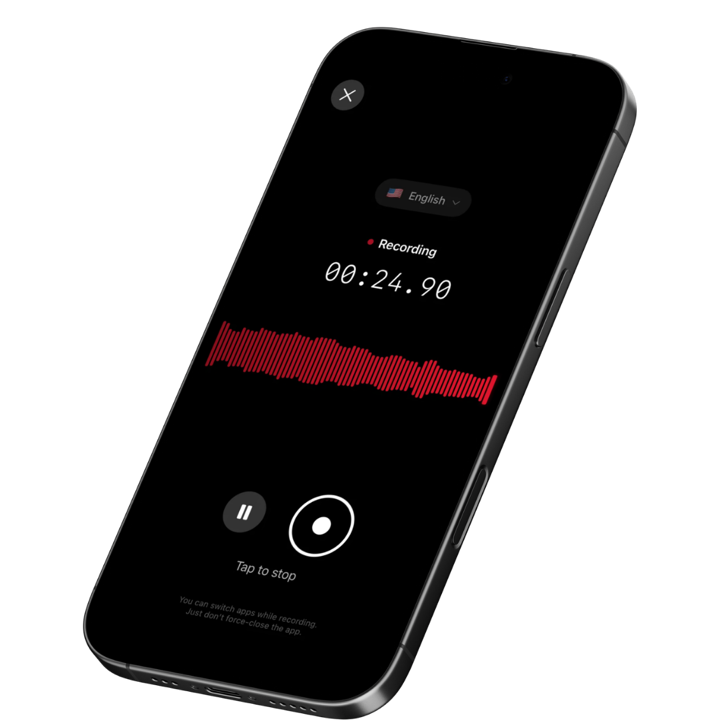
Speakwise is an iOS-native AI voice recorder with a 4.9-star App Store rating. It captures in-person conversations with one tap or hands-free via AirPods, then delivers AI summaries, accurate transcripts in 100+ languages, and automatic action item extraction - all in a single app. With 95%+ accuracy in optimal conditions and support for multi-hour recordings, it handles the full range of what professionals record.
Why Speakwise Stands Out
Most "AI voice recorder" apps either nail the recording side (basic audio capture, decent quality) or the AI side (summarization from uploaded files) but not both. Speakwise is built as a single end-to-end workflow: record, transcribe, summarize, sync. The result is that by the time you walk out of a meeting, the notes are already waiting.
The hands-free AirPods control is genuinely useful in practice. You can start a recording by tapping your AirPods without pulling out your phone, which keeps the recording discreet and your hands free. For interviews, coaching sessions, and client meetings, this matters. Our best AI voice recorder roundup for iPhone covers in more detail why this hands-free capability separates Speakwise from apps that require you to interact with the phone screen.
The offline capability is another meaningful differentiator. Record in a basement conference room, on a plane, or at a job site with no connectivity. The audio processes and syncs the moment you reconnect. No other major AI voice recorder for iPhone handles offline recording and cloud sync as seamlessly.
Key Features
-
One-Tap and Hands-Free Recording: Start recording with a single tap on the screen, or tap your AirPods to begin without touching your phone. Discreet, fast, and usable in any meeting context.
-
Action Button Recording: On iPhone 15 Pro and later, map the Action Button to Speakwise and start recording an interview or meeting with a single press - no unlocking, no app to open before the first question.
-
Long Recording Support: Multi-hour sessions are fully supported. No session caps that cut off long meetings, all-day workshops, or extended interviews. The app handles the full recording without manual restarts.
-
Works Offline: No Wi-Fi or cell signal required to capture audio. The app syncs transcription and AI notes when connectivity returns. Reliable in any environment.
-
AI Summaries and Structured Output: After recording, Speakwise generates a structured summary with key points and highlights. You don't get a raw dump of text - you get organized notes ready to use or share.
-
Automatic Action Item Extraction: Action items surface automatically from the recording. Post-meeting task lists are ready without manually scanning the transcript.
-
95%+ Transcription Accuracy with 100+ Languages: High accuracy across 100+ languages with dialect recognition. International interviews, multilingual team meetings, and foreign-language client calls are all handled reliably.
-
Speaker Diarization: For a multi-person meeting or an interview, Speakwise applies speaker diarization to tell each voice on the recording apart and tag every segment by speaker, so a group discussion doesn't blur into a single stream.
-
Native Notion Integration: Structured notes sync directly to your Notion workspace. For knowledge workers who organize in Notion, this closes the loop from recording to knowledge base automatically.
Pricing
- Free Trial: Full access to all features
- Premium: $59.99/year - unlimited transcription, AI summaries, Notion sync, 100+ languages
Best For
- iPhone users who want hands-free recording with structured AI output
- Professionals with in-person meetings that need to become organized notes
- Multilingual or international work
- Teams using Notion as their knowledge base
Limitations
- iOS only - no Android or desktop app
- Audio quality depends on iPhone microphone placement relative to speakers
- Notion is the primary integration; other tools require manual export
Speakwise gets your hours back.
- ✓Built for in-person meetings, interviews, and site visits.
- ✓Trusted by recruiters, consultants, agents, and field pros.
- ✓One tap to record. Notion-ready summary in minutes.

2. Otter.ai - Best for Virtual Meeting Recording with Team Features
Otter.ai is the most widely deployed AI voice recorder for virtual meetings. Its OtterPilot feature auto-joins Zoom, Teams, and Google Meet calls from your calendar, records the session, and delivers a transcript and AI summary automatically post-call. The free tier covers 300 minutes per month with a 30-minute session cap - enough for most short virtual meeting workflows.
At team level, Otter adds shared workspaces, admin controls, and centralized transcript management. Speakers are automatically labeled, timestamps are searchable, and the full recording library is accessible to authorized team members. It's the go-to choice for remote teams who want meeting capture without any per-meeting manual setup.
Key Features
- OtterPilot auto-joins calendar-linked Zoom, Teams, and Meet calls
- Speaker identification with searchable, timestamped transcripts
- Shared workspaces for team-level transcript access and management
- Automated meeting summary and follow-up email post-call
Pricing
- Free: 300 min/month, 30-min cap per session
- Pro: ~$8.33/user/month (annual); Business: ~$20/user/month
Best For
- Remote teams running most meetings on video platforms
- Managers who want automated post-meeting summaries without manual recording
Limitations
- Bot joining is visible to participants - not ideal for sensitive conversations
- In-person and phone recording is limited compared to dedicated mobile tools
3. Plaud - Best Hardware-First AI Voice Recorder
Plaud makes physical AI recording hardware: the NotePin (a card-shaped device that clips to your pocket) and the NotePro (a larger device with extended battery). Both pair with the Plaud app to deliver transcription and AI summaries. If you want purpose-built recording hardware rather than relying on your phone, Plaud is the category leader.
The hardware-first approach has real advantages. The microphones are tuned specifically for voice capture. The devices run independently from your phone battery. The NotePin in particular has become popular among professionals who attend a lot of meetings and want a discrete dedicated recorder that doesn't drain their iPhone. The app handles transcription and summarization after capture.
Key Features
- Dedicated hardware optimized for voice capture (NotePin and NotePro)
- Companion app with AI transcription and summary
- Long battery life independent of your smartphone
- Magnetic attachment options for discrete placement
Pricing
- NotePin hardware: ~$159; NotePro hardware: ~$169
- App subscription required for full AI features (varies by plan)
Best For
- Heavy recorders who want purpose-built hardware for meetings
- Professionals who need a device dedicated to recording, separate from their phone
Limitations
- Hardware cost on top of app subscription
- Transcription still requires app processing - not fully offline-capable
- Larger form factor than a phone for in-pocket carry
4. Notta - Best Cross-Platform AI Voice Recorder
Notta is available on iOS, Android, web, and Mac - making it the strongest cross-platform option in this category. It records audio, transcribes in 58+ languages with real-time translation, and produces a searchable transcript. Uploaded audio and video files are also supported, so you can centralize existing recordings alongside new ones.
The interface is clean and the transcript library is easy to search. Real-time translation is useful for multilingual workflows where you need a quick read in another language without a separate translation step. The free tier is limited at 120 minutes per month, but the paid plan is competitively priced for teams that need cross-platform consistency.
Key Features
- Available on iOS, Android, Mac, and web
- 58+ languages with real-time translation
- Upload and transcribe existing audio and video files
- Export to Word, PDF, SRT, and other formats
Pricing
- Free: 120 min/month; Pro: ~$13.99/month or ~$8.25/month (annual)
Best For
- Teams using a mix of iPhone, Android, and desktop devices
- Multilingual projects needing real-time translation alongside transcription
Limitations
- No AI-structured summaries with action item extraction
- Free tier is restrictive at 120 min/month
5. Apple Voice Memos - Best Free Baseline
Apple Voice Memos is built into every iPhone and iPad. It records high-quality audio, stores files in iCloud, and on newer devices (iOS 18+) offers basic transcription. There's no AI summary layer and no action item extraction - what you record is what you get. But for users who need a simple, reliable recorder without any subscription or processing step, it remains the best free option.
The iOS 18 transcription feature generates text from recordings on supported devices. The accuracy is decent for clear speech but lacks the advanced AI processing that turns a transcript into useful notes. Voice Memos is the right starting point for anyone new to voice recording - and a clear illustration of what you gain by stepping up to a dedicated AI voice recorder.
Key Features
- Built-in, free on all iPhones and iPads
- High-quality audio recording with iCloud sync
- Basic transcription on supported iOS 18+ devices
- Simple, no-setup interface for instant recording
Pricing
- Free - included with iOS
Best For
- Users who need simple, reliable audio capture without any AI processing
- A free baseline before committing to a paid AI voice recorder
Limitations
- No AI summaries, action items, or structured output
- Transcription (where available) is basic compared to dedicated apps
- No sharing or integration with knowledge tools like Notion
6. Just Press Record - Best One-Time Purchase iOS Recorder
Just Press Record is a paid iOS app designed for simplicity: one button, instant recording, and transcription included at no ongoing cost. The one-time purchase model ($4.99 on the App Store) makes it appealing to users who are skeptical of subscriptions but want more than Apple Voice Memos.
The transcription engine is Siri-based and handles clear speech well. It's not as accurate as dedicated AI tools and lacks structured AI summarization, but for quick voice notes and short recordings, the workflow is fast and friction-free. The Apple Watch app lets you start recordings from your wrist.
Key Features
- One-tap recording with Apple Watch app support
- Built-in transcription included at no extra cost
- iCloud sync across iPhone, iPad, and Mac
- One-time purchase - no subscription required
Pricing
- One-time purchase: ~$4.99 on the App Store
Best For
- Users who want transcription without a subscription
- Apple Watch users who want wrist-based recording control
Limitations
- No AI summaries, structured notes, or action item extraction
- Transcription accuracy is limited compared to dedicated AI tools
- No Notion or third-party knowledge base integration
How to Choose the Best AI Voice Recorder App
The gap between a basic voice recorder and a strong AI voice recorder comes down to what happens after you press stop.
-
Recording context: Where do your meetings happen? For in-person conversations, you need a mobile app that records from your phone's microphone - Speakwise is the strongest iPhone option. For virtual meetings exclusively, Otter.ai's bot-based recording is more automated. For hardware-first capture, Plaud offers dedicated devices.
-
AI output quality: Check whether the app delivers raw transcripts or structured notes. Speakwise produces AI summaries and extracts action items. Otter.ai provides summaries and speaker labels. Notta and Just Press Record give you text without meaningful AI organization. As covered in our best AI meeting recorder roundup, this distinction between raw transcript and structured output is the most important differentiator.
-
Recording length: Many apps cap sessions at 30-60 minutes on free and entry plans. If you record long meetings, conferences, or extended interviews, verify there's no cap. Speakwise and Plaud both handle multi-hour sessions without interruption.
-
Platform and device coverage: Speakwise is iOS-only. Notta and Otter.ai cover iOS, Android, and web. If your team includes Android users or you need desktop access, check platform availability before committing to a single tool.
-
Subscription vs. one-time cost: Speakwise costs $59.99/year. Otter.ai runs ~$8-20/user/month depending on tier. Just Press Record is a one-time $4.99 purchase. Plaud adds hardware cost on top of a subscription. Match the pricing model to how frequently you'll actually use the app.
Frequently Asked Questions
What is the best AI voice recorder app for iPhone in 2026?
Speakwise is the best AI voice recorder app for iPhone in 2026 for users who need structured output from their recordings. It records in-person conversations with one tap or via AirPods, produces AI summaries and action items automatically, and transcribes in 100+ languages at 95%+ accuracy in optimal conditions. With a 4.9-star App Store rating and native Notion integration, it covers the full workflow from recording to structured notes. For a free-only baseline, Apple Voice Memos remains the simplest starting point.
Is there a free AI voice recorder app?
Apple Voice Memos is free and built into every iPhone, but it lacks AI summaries and structured note output. Otter.ai's free tier covers 300 minutes per month with 30-minute session caps - enough for short virtual meeting transcription. Speakwise offers a free trial with full access to all AI features, including summaries, action item extraction, and Notion sync. For a no-cost test of what AI voice recording can do, Speakwise's free trial is the most complete free option.
Can an AI voice recorder app work without internet?
Speakwise records offline and syncs when connectivity returns - making it reliable in basements, secure facilities, job sites, and anywhere with unreliable cell or Wi-Fi coverage. Most other AI voice recorder apps require an internet connection for transcription, which happens server-side. If offline recording is a requirement, verify explicitly that the app supports it before relying on it in a low-connectivity environment.
What should I look for in an AI voice recorder app?
Look for: recording quality (microphone handling, noise tolerance), AI output quality (raw transcript vs. structured summaries with action items), session length limits, offline capability, multilingual support, and integration with your existing tools (Notion, Slack, CRM). For iPhone users, also check whether the app supports AirPods hands-free control - useful in meetings where reaching for your phone would be disruptive. Speakwise covers all of these.
Does the Plaud NotePin replace an AI voice recorder app?
Plaud NotePin is a hardware complement to an app, not a full standalone solution. The device captures audio with dedicated hardware, but transcription and AI summaries still happen in the Plaud app - which requires a subscription. The hardware advantage is dedicated microphones, independent battery life, and a discrete form factor. For users who record multiple hours of meetings daily and want purpose-built hardware, Plaud is worth the investment. For most professionals, an iPhone with Speakwise covers the same use cases without the hardware cost.
Final Verdict
For iPhone users, Speakwise is the strongest all-in-one AI voice recorder. The combination of hands-free AirPods capture, offline recording, multi-hour session support, and structured AI output sets it apart from tools that handle only part of the workflow. The $59.99/year pricing is significantly lower than team-focused alternatives.
For virtual-meeting-heavy workflows, Otter.ai's automated bot recording and team features are hard to beat at scale. For users on multiple platforms, Notta's cross-device consistency is a meaningful advantage. For those who dislike subscriptions, Just Press Record's one-time purchase covers the basics without an ongoing cost.
Download Speakwise from the App Store and go from recording to structured notes in minutes - hands-free, with or without internet.
🎯 4.9★ App Store Rating | 📱 Built for iOS
