Best App for Interior Designers to Record Client Consultations (2026)
TL;DR
The best app for interior designers to record client consultations in 2026 is Speakwise. The iPhone app turns a walkthrough into a summary of the client's preferences and your follow-ups, with a 7-day free trial. Houzz Pro suits all-in-one platforms, and Programa suits boutique studios.
Used by recruiters, executives, consultants, and more.
Best App for Interior Designers to Record Client Consultations in 2026
Recording client consultations is the hardest part of an interior designer's job to document well. The client moves room to room, naming a non-negotiable table, a hated color, and a budget that depends on the kitchen. Whatever you miss becomes a revision later, on your own time. Here are six tools compared for the job.
Best App for Interior Designers to Record Client Consultations at a Glance (2026)
The best app for interior designers to record client consultations in 2026 is Speakwise, with five alternatives depending on whether you need capture or a full design business platform:
- Speakwise - Best overall for capturing an in-person walkthrough consultation (iOS, no bot required)
- Houzz Pro - Best all-in-one design business platform with lead generation
- Studio Designer - Best for full-service residential with procurement and accounting
- Programa - Best modern interface for boutique studios
- Otter.ai - Best for virtual e-design consultations on Zoom
- Apple Voice Memos - Best free built-in fallback for a quick note
Speakwise is the only option here that turns a room-by-room in-person consultation into a speaker-labeled summary with the client's stated preferences and your follow-ups pulled out.
1. Speakwise - Best Overall for In-Person Client Consultations
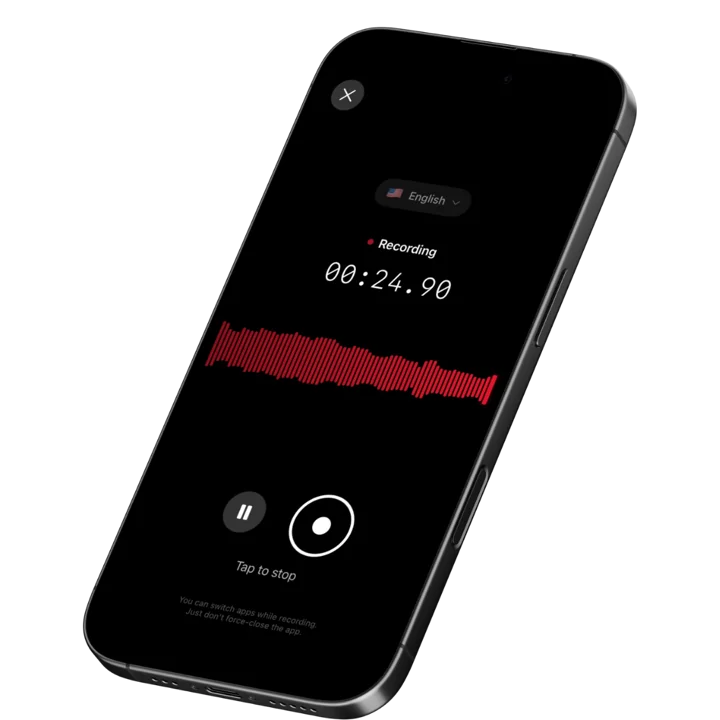
Speakwise is an iOS AI voice notes app designed for conversations that happen in a room rather than on a call. You tap once in the entry hall, walk the house with the client, and let it capture the whole consultation. When you stop, the AI returns a summary of what was discussed, a list of the follow-ups you committed to, and speaker labels separating your questions from the client's answers. There is no bot to invite and no meeting link, which is the entire reason it works for a job that happens on foot in someone's home.
Why Speakwise Stands Out
Design software is built around what happens after the consultation: the FF&E schedule, the purchase orders, the client portal, the invoicing. All of it assumes you already know the brief. But the brief is created during that first walkthrough, in fragments, out of order, mixed in with small talk, and most of it is never written down.
Speakwise captures that raw material intact. The client's exact words are worth more than your paraphrase, because "I want it to feel calm" and "I want it to feel serene but not cold" lead to different palettes, and because six weeks later when a selection is questioned you can point to what they actually said. The AI summary organizes the consultation into themes - rooms, budget, timeline, pieces to keep, must-haves, hard vetoes - even though the conversation jumped between them constantly.
Speaker labels matter more in residential work than anywhere else, because you are almost always consulting with a couple. Speakwise separates the voices in the transcript, so when one partner says the sectional stays and the other says it goes, you have a record of who said what rather than an averaged memory. That is the difference between navigating a disagreement gracefully and walking into it during the presentation. Our roundup of apps for recording client consultations in person covers the same problem across other consulting professions.
Practical details help too. Houses under renovation, basements, and rural properties often have no usable signal - capture happens on the device and the transcript is produced when you are back in range. Long recording support covers a two-hour first consultation in a single session. And with 100+ language support, a consultation held in the client's first language is documented in their words.
Key Features
- One-Tap In-Person Capture: Start in the entry hall, walk the whole house, stop at the door. No bot, no link, no setup while a client waits.
- AI Summaries Organized by Theme: The consultation comes back grouped by room, budget, timeline, keep list, and non-negotiables rather than in the order the conversation wandered.
- Action Item Extraction: Everything you promised on the walk - source a runner for the hall, get the contractor's number, price the millwork option, confirm lead times on the sofa - is pulled into a follow-up list.
- Speaker Labels: Separates your voice from the client's, and separates one partner from the other, so preferences and vetoes stay attributed to the person who voiced them.
- Long Recording Support: A full first consultation plus a walk of the property runs well over an hour in one session.
- Records Without a Connection: Renovation sites, basements, and rural properties often have no signal. Capture is local; processing completes when you reconnect.
- 100+ Languages: Consultations held in the client's first language are transcribed in that language.
- Export and Share: Copy the summary into your design brief or scope of work, paste the keep list into your project software, or share the recap with the client via link.
Pricing
- Paid subscription via the App Store: Speakwise is a paid iOS subscription. Current plan details are on the App Store listing.
Best For
- Designers running in-home initial consultations and site measures
- Studios that write a design brief or scope of work from the first meeting
- Anyone consulting with couples who disagree about the keep list
- Designers who want the client's own words on record before selections are questioned
Limitations
- iOS only - no Android version
- No FF&E schedules, purchase orders, invoicing, or client portal
- No photo capture, floor plans, measurement, or mood boarding
- No integration with Houzz Pro, Studio Designer, or any design platform - you copy findings across
Speakwise gets your hours back.
- ✓Built for in-person meetings, interviews, and site visits.
- ✓Trusted by recruiters, consultants, agents, and field pros.
- ✓One tap to record. Notion-ready summary in minutes.

2. Houzz Pro - Best All-in-One Design Business Platform
Houzz Pro combines project management, estimating, invoicing, 3D visualization, product clipping, and a client portal with lead generation from the Houzz marketplace. For designers who get a meaningful share of new business through Houzz, the lead flow alone justifies the subscription, and having proposals, selections, and payments in one place removes a lot of tool sprawl.
Houzz Pro is a business platform, not a capture tool. Consultation notes go into a typed field like any other CRM, which means they are as complete as whatever you can type after the meeting.
Key Features
- Lead generation through the Houzz marketplace
- Estimates, proposals, invoicing, and payments
- 3D floor plans and visualization
- Product clipping from any website into your project
- Client portal for approvals and communication
Pricing
- from ~$99/month billed annually, or ~$149/month billed monthly
Best For
- Designers who source new clients through Houzz
- Studios wanting proposals, selections, and billing in one system
- Designers who need 3D visualization included
Limitations
- No voice capture or AI summarization of a consultation
- Marketplace lead quality varies by market
- Procurement depth is lighter than Studio Designer
3. Studio Designer - Best for Full-Service Residential Procurement
Studio Designer is the long-standing choice for full-service residential firms where procurement is the operational core: purchase orders, expediting, vendor deposits, freight, and client billing all tied to specification records. It includes proper accounting rather than a light billing module, which is why larger studios with dedicated bookkeepers tend to land here.
The consultation itself sits outside the system. Studio Designer starts being useful once the brief exists and selections begin.
Key Features
- Purchase orders, expediting, and vendor management
- Full accounting with client billing and deposits
- Specification and FF&E schedule management
- Client portal for selection approvals
- Time billing for hourly design work
Pricing
- from ~$72 to ~$109/user/month depending on tier
Best For
- Full-service residential studios where procurement drives the business
- Firms with multiple designers and dedicated bookkeeping
- Projects with heavy custom orders and freight coordination
Limitations
- No voice capture or AI summarization
- Interface is dense and takes time to learn
- Overbuilt for e-design or consultation-only practices
4. Programa - Best Modern Interface for Boutique Studios
Programa is the newer generation of design studio software, built around a clean interface and a workflow that boutique studios recognize: schedules, mood boards, product libraries, and client-facing presentations that look designed rather than accounting-shaped. For studios where presentation quality is part of the brand, that matters.
Like the other platforms, it holds project artifacts rather than raw conversation. The brief still has to arrive from somewhere.
Key Features
- Schedules and specification management
- Mood boards and client presentations
- Product library with team sharing
- Project management and task tracking
- Modern interface designed for small studios
Pricing
- from ~$59/user/month, with pricing tiers by seat count
Best For
- Boutique studios prioritizing presentation quality
- Designers who find legacy platforms overbuilt
- Small teams sharing product libraries
Limitations
- No voice capture or AI summarization
- Lighter accounting and procurement than Studio Designer
- Smaller ecosystem than Houzz Pro
5. Otter.ai - Best for Virtual E-Design Consultations
Otter.ai auto-joins Zoom, Teams, and Google Meet through its meeting bot, transcribes in real time, and produces a summary afterwards. For designers running e-design consultations, remote client check-ins, or trade calls with vendors, that automation is genuinely useful - the bot shows up whether or not you remember it.
For the in-home consultation that defines residential design work, Otter does not apply. There is no meeting to join, and a bot-based tool has nothing to attach to when the meeting is two people walking through a kitchen.
Key Features
- Meeting bot auto-joins Zoom, Teams, and Google Meet
- Real-time transcription with speaker identification
- AI summaries and action items after each call
- Searchable archive across all recorded meetings
- Shared workspace for teams
Pricing
- Free: 300 minutes/month with a 30-minute per-conversation cap
- Pro: from ~$8.33/user/month billed annually
- Business: from ~$20/user/month billed annually
Best For
- E-design practices that consult primarily over video
- Designers documenting vendor and trade calls
- Studios needing a searchable archive of remote client meetings
Limitations
- Built around a meeting bot - not usable for in-home consultations
- Free tier caps conversations at 30 minutes, shorter than most consultations
- No offline capture
6. Apple Voice Memos - Best Free Built-In Fallback
Voice Memos is on every iPhone, costs nothing, and starts instantly. For capturing one specific thing - a paint code the client mentions, a dimension, the name of the contractor they liked - it is the fastest tool available because there is nothing to open or log into.
For a ninety-minute consultation it produces a ninety-minute audio file. No summary, no themes, no follow-up list, and no separation between the two partners talking over each other. Most designers who try it once end up scrubbing through the recording looking for one sentence about the guest bathroom.
Key Features
- Built into iOS, no download or account
- Records with no connection required
- iCloud sync across Apple devices
- Basic trimming and sharing
- Free
Pricing
- Free: Included with iOS
Best For
- One-off notes, dimensions, and paint codes
- A zero-cost backup when nothing else is available
- Designers who write their own brief and only need an audio reminder
Limitations
- No AI summary, no theme organization, no action items
- No speaker labels when consulting with a couple
- Finding one detail means listening to the whole recording
How to Choose the Best App for Recording Client Consultations
Design software and consultation capture solve different problems, and buying one expecting it to do the other is the most common mistake in this category.
-
In-person versus virtual is the first fork: If your consultations happen in the client's home, meeting-bot tools like Otter cannot help you and a device-based recorder is the only option. If you run e-design over video, a bot is the lower-friction choice. Studios doing both usually run one of each.
-
What you need back: A transcript of a ninety-minute walkthrough is not much easier to work from than memory. What actually saves time is a summary grouped by room and topic with the follow-ups extracted, so the design brief can be drafted the same evening.
-
Couples and attribution: Residential consultations are usually with two people who do not agree. Speaker labels turn "they said" into "she said, he said," which is what you need when presenting selections that favor one preference over another.
-
Where the notes have to end up: None of the voice tools integrate with Houzz Pro, Studio Designer, or Programa. Plan for a copy-and-paste step from summary into brief, scope of work, or project notes, and pick a tool whose output is clean enough to paste without editing.
-
Consent: You are recording a client in their own home, and recording laws vary by jurisdiction, with some requiring all parties to consent. Ask at the start: "Do you mind if I record my notes so I do not miss anything?" Clients almost always say yes and often appreciate the diligence. Get the acknowledgement on the recording and check your local rules.
Frequently Asked Questions
What is the best app for interior designers to record client consultations?
Speakwise is the best app for interior designers to record client consultations in 2026. It captures the in-home walkthrough through the iPhone microphone and returns a themed summary with follow-ups extracted and speaker labels separating each partner. Pair it with Houzz Pro, Studio Designer, or Programa for proposals, procurement, and client portals.
How do designers take notes during an in-home consultation?
Record rather than write. Start one recording in the entry hall, walk the house with the client, and let the app capture preferences, budget, keep list, and timeline while your hands stay free for measuring and photographing. Speakwise organizes the result by theme and pulls out the follow-ups you committed to during the walk.
Can I record a consultation with a couple and tell them apart?
Yes. Speakwise applies speaker labels, so one partner's comments are distinguished from the other's in the transcript. That matters when one wants the sectional gone and the other wants it kept, because the record shows who said what rather than an averaged recollection you have to defend during the presentation.
Is there a free app for recording design consultations?
Apple Voice Memos is free, built into every iPhone, and records without a connection, which works for a single note or dimension. It returns raw audio with no summary, themes, or speaker labels. Otter.ai has a free tier but caps conversations at 30 minutes and requires a meeting bot. Speakwise is a paid iOS subscription.
Do I need permission to record a client consultation?
Recording laws vary by state and country, and some require every party to consent. Ask before you start: most clients agree readily when you explain it is so their preferences are captured accurately. Get the acknowledgement on the recording itself and check your local rules. Speakwise is a notes tool and does not provide legal advice.
Final Verdict
The initial consultation is where the entire project is defined, and it is the least documented meeting in the design process. Designers write beautiful briefs from partial memory and then absorb the cost of the revisions when the memory turns out to be wrong.
Speakwise is the strongest option in 2026 for capturing that conversation as it happens. In-person recording on the iPhone with no bot required, AI summaries grouped by room and topic, extracted follow-ups, and speaker labels that keep two partners' preferences distinct. It is a paid iOS subscription and it does not run your business - it makes the brief you write afterwards match what the client actually said.
For the business layer, Houzz Pro is the strongest all-in-one if you draw leads from the marketplace, Studio Designer remains the standard for procurement-heavy full-service work, and Programa suits boutique studios who want a modern interface. Otter covers e-design consultations held over video. Our guides to in-person meeting transcription on iPhone and recording in-person meetings cover the capture side across other client-facing work.
Download Speakwise from the App Store and record your next in-home consultation, then write the brief from what the client actually said.
🎯 4.9★ App Store Rating | 📱 Built for iOS
