Best Meeting Notes App for Remote Teams (2026)
TL;DR
The best meeting notes app for remote teams in 2026 is Speakwise. The iPhone app covers in-person and hybrid meetings that video-only tools miss, syncing summaries straight to Notion, with a 7-day free trial. Fathom suits free individual Zoom notes, and Fireflies.ai suits CRM integrations.
Used by recruiters, executives, consultants, and more.
Best Meeting Notes App for Remote Teams in 2026
Remote teams live and die by their meetings, from standups across time zones to brainstorms that produce action items nobody writes down. Without reliable notes, work turns into asking what the group decided. Speakwise stands out here for covering in-person and hybrid meetings too, with 100+ languages and native Notion integration, among the seven tools compared below.
1. Speakwise - Best Overall for In-Person and Hybrid Meeting Notes
Speakwise is an AI-powered meeting notes app for iPhone that captures in-person and hybrid meetings with 95%+ transcription accuracy (in optimal conditions). While most remote meeting tools focus exclusively on virtual calls, Speakwise fills the gap for teams that also meet in person - offsite gatherings, client visits, and hybrid meetings where some people are in the room. With AI summaries, action item extraction, and native Notion integration, it delivers complete meeting documentation. The 4.9-star App Store rating reflects its reliability across different meeting environments.
Why Speakwise Stands Out
Remote teams are not 100% virtual. Offsites, client meetings, co-working sessions, and hybrid calls with some people in a room happen regularly. Most meeting notes tools ignore these scenarios entirely because they are built to join Zoom calls as bots. Speakwise handles both: record an in-person meeting with your iPhone, or use it alongside virtual calls for superior audio capture.
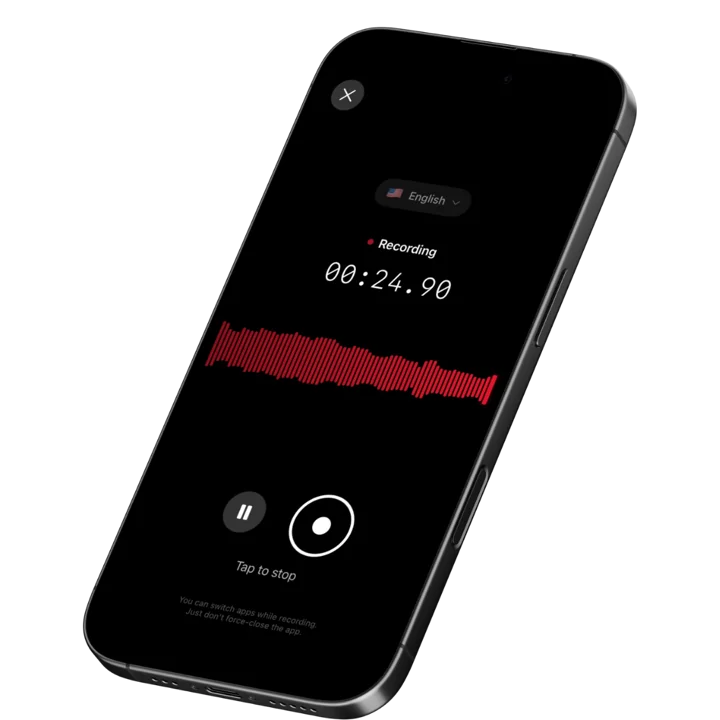
AirPods hands-free recording lets you capture meetings without anyone noticing a recording setup. Start recording with an AirPods gesture, and your phone stays in your pocket or on the table. The meeting flows naturally while Speakwise captures every word.
For remote teams using Notion as their workspace, Speakwise's native integration is transformative. Every meeting automatically generates a Notion page with the transcript, AI summary, and extracted action items. Team members who missed the meeting get a complete record without anyone having to write up notes manually.
Key Features
- AI Meeting Summaries: After each meeting, get a structured summary with key decisions, discussion highlights, and outcomes. Remote team members who could not attend get the full picture in 30 seconds instead of watching a 60-minute recording.
- Long Recording Support: Multi-hour board meetings, conference sessions, offsites.
- Works Offline: Construction sites, secure boardrooms, planes - record without WiFi. Sync when you're back.
- Action Item Extraction: The AI identifies action items, decisions, and commitments. No more "who was supposed to do that?" confusion. Each action item is clearly captured and attributed.
- Speaker Diarization: Speakwise uses speaker diarization to label who said what, so teammates who could not attend can see exactly which attendee raised each decision, blocker, or action item.
- Native Notion Integration: Meeting notes automatically sync to your team's Notion workspace as organized pages. 82% of users cite this as a key reason they chose Speakwise (based on internal user data). For remote teams already in Notion, this creates an automatic meeting archive.
- 100+ Language Support: Record meetings in over 100 languages with auto-detection. For international remote teams with members speaking different languages, this eliminates the English-only limitation of most alternatives.
- One-Tap and AirPods Recording: Start meeting recording with a single tap or AirPods gesture. No meeting bot required. Your phone sits on the table or stays in your pocket while Speakwise captures the conversation.
- Action Button Recording: On iPhone 15 Pro and later, map the Action Button so one press starts recording an offsite, client visit, or hybrid room — no unlocking, no app to open, and no bot in the call.
Pricing
- Free Trial: Full access to all features
- Premium: $59.99/year - unlimited transcription, AI summaries, Notion sync, 100+ languages
Best For
- Remote teams that also have in-person or hybrid meetings
- Notion-based teams who want automatic meeting documentation
- International teams conducting meetings in multiple languages
Limitations
- iOS only - no Android or desktop version
- No Zoom/Teams bot integration (captures audio from room, not virtual call)
- Individual-focused - no team admin dashboard or shared workspace
Speakwise gets your hours back.
- ✓Built for in-person meetings, interviews, and site visits.
- ✓Trusted by recruiters, consultants, agents, and field pros.
- ✓One tap to record. Notion-ready summary in minutes.

2. Fathom - Best Free Individual Meeting Transcription
Fathom provides unlimited meeting recording and transcription for free on individual plans. It connects to Zoom, Google Meet, and Microsoft Teams to capture virtual meetings automatically. The free tier is generous enough for most individual remote workers, making it the best no-cost option for virtual meeting notes.
Key Features
- Unlimited free recording and transcription for individual users
- Auto-joins Zoom, Google Meet, and Microsoft Teams calls
- 15+ AI summary templates for different meeting types
- Highlight and clip key moments during meetings
Pricing
- Free: Unlimited recordings, 5 AI summaries/month
- Premium: $19/month ($15/month annual) - unlimited AI summaries
- Team: $29/month ($19/month annual) - shared libraries, collaboration
Best For
- Individual remote workers who want free meeting transcription
- Teams on a budget that need basic meeting capture without per-seat costs
Limitations
- Free tier limits AI summaries to 5 per month
- Virtual meetings only - no in-person or hybrid capture
- 28 languages supported - fewer than some alternatives
- Team features require paid plans at $19-29/month per user
3. Krisp - Best for Bot-Free Recording With Noise Cancellation
Krisp records meetings from system audio without joining as a bot participant. No "Krisp has joined the meeting" notification. Combined with industry-leading noise cancellation that removes over 40 decibels of background noise, it delivers clean recordings from noisy remote work environments - home offices, co-working spaces, coffee shops.
Key Features
- Bot-free recording captures system audio silently without participant alerts
- Noise cancellation removes 40+ dB of background noise in real time
- AI meeting notes with action items in 16 languages
- Real-time accent conversion helps global teams understand each other
Pricing
- Free: 60 minutes/day noise cancellation, 2 AI notes/day
- Core: $16/month ($8/month annual) - unlimited features
- Advanced: $30/month ($15/month annual) - accent conversion, CRM integrations
Best For
- Remote workers in noisy environments who need clean meeting audio
- Teams that want meeting recording without intrusive bot notifications
Limitations
- Desktop only - no mobile app for in-person meeting capture
- 16 languages is significantly fewer than alternatives like Speakwise
- All audio still processed on device, but transcription storage is cloud-based
- Advanced features require $15-30/month per user
4. MeetGeek - Best for Team-Wide Meeting Intelligence
MeetGeek automatically records, transcribes, and summarizes meetings across Zoom, Microsoft Teams, and Google Meet. Its strength is team-wide meeting intelligence - searchable archives, meeting metrics, and shared summaries that keep distributed teams aligned. It supports 100+ languages and generates structured summaries with action items.
Key Features
- Auto-joins Zoom, Google Meet, and Microsoft Teams calls
- Shared meeting repository searchable by keyword, speaker, or topic
- Meeting metrics track talk time, engagement, and patterns
- 100+ language transcription with AI summaries
Pricing
- Free: 5 hours/month recording, basic transcription
- Pro: $19/month ($15/month annual) - unlimited recording, AI summaries
- Business: $29/month ($19/month annual) - team features, integrations
Best For
- Remote teams that want a shared, searchable meeting knowledge base
- Managers who want to track meeting patterns and team engagement
Limitations
- Virtual meetings only - no in-person or hybrid meeting support
- Meeting bot joins calls visibly, which some participants find intrusive
- Pro and Business pricing can scale quickly for large teams
5. Fireflies.ai - Best for CRM and Tool Integrations
Fireflies.ai connects meeting notes to your entire remote team's tool stack. With integrations for Salesforce, HubSpot, Slack, Notion, Asana, Jira, and many more, meeting outcomes flow directly into your team's workflows. The AI search feature lets you query transcripts conversationally.
Key Features
- 40+ integrations including Salesforce, HubSpot, Slack, Notion, and Jira
- Conversational AI search across all meeting transcripts
- Auto-joins Zoom, Google Meet, Microsoft Teams, and other platforms
- Custom meeting templates for different meeting types
Pricing
- Free: Limited transcription credits
- Pro: $18/month ($10/month annual) - unlimited transcription
- Business: $29/month ($19/month annual) - advanced integrations, analytics
Best For
- Sales and customer-facing remote teams using CRM systems
- Teams that need meeting outcomes pushed automatically into project tools
Limitations
- Bot joins meetings visibly, requiring team buy-in
- Free tier is very limited in transcription credits
- Integration depth varies - some connections are basic
- No in-person or hybrid meeting support
6. Fellow - Best for Meeting Agendas and Action Tracking
Fellow combines meeting agendas, notes, and action items in one platform. Remote teams create collaborative agendas before meetings, capture notes during, and track action items afterward. Deep integrations with Jira, Asana, Slack, and 50+ other tools keep meeting outcomes connected to work.
Key Features
- Collaborative meeting agendas created before each meeting
- AI meeting notes with automatic action item extraction
- 50+ integrations including Jira, Asana, Salesforce, and Slack
- Action item tracking with deadlines and ownership across meetings
Pricing
- Free: 10 meeting notes/month
- Pro: $13/month ($7/month annual) - unlimited notes, integrations
- Business: Contact sales - advanced features, SSO, analytics
Best For
- Remote teams that want structured meeting workflows from agenda to action items
- Organizations using Jira or Asana for project management
Limitations
- Free tier limited to 10 meeting notes per month
- Agenda-first approach adds preparation overhead before every meeting
- Primary focus is virtual meetings - limited in-person support
- Enterprise features require contacting sales with no public pricing
7. Bluedot - Best for Privacy-First Bot-Free Capture
Bluedot captures meetings without joining as a bot participant, using a Chrome extension or desktop app to record system audio. It works across Google Meet, Zoom, Microsoft Teams, and Webex. The mobile app also supports in-person meeting recording, making it one of the few tools covering both virtual and physical meetings.
Key Features
- Bot-free recording via Chrome extension or desktop app
- Works across Google Meet, Zoom, Teams, and Webex
- Mobile app supports in-person meeting recording
- AI summaries with key topics, decisions, and action items
Pricing
- Free: 5 meetings/month with basic features
- Plus: $18/month ($14/month annual) - unlimited meetings
- Pro: $25/month ($20/month annual) - advanced AI features, integrations
Best For
- Teams that want meeting recording without bot intrusion
- Remote teams that also need in-person meeting capture
Limitations
- Free tier limited to 5 meetings per month
- Chrome extension approach may not work for all browsers or setups
- Newer tool with a smaller user base than established alternatives
- Mobile in-person recording features are less mature than Speakwise
How to Choose the Best Meeting Notes App for Remote Teams
The right meeting notes app depends on your team's meeting patterns, tool stack, and privacy requirements.
-
Virtual vs. In-Person Coverage: Most remote meeting tools only handle Zoom, Teams, and Meet. If your team also meets in person for offsites, client visits, or co-working sessions, you need a tool that covers both. Speakwise and Bluedot handle in-person recording. Most others are virtual-only.
-
Bot vs. Bot-Free Recording: Meeting bots that join as participants can feel intrusive. Some clients or partners object to visible recording indicators. Krisp and Bluedot record from system audio without bots. Speakwise avoids the issue entirely by capturing room audio. Consider your team's comfort level and any client-facing requirements.
-
Integration Depth: Remote teams use multiple tools. Meeting notes are only useful if they connect to where work happens. Speakwise syncs natively with Notion. Fireflies.ai connects to 40+ tools. Fellow integrates with Jira and Asana. Match the app to your existing stack.
-
Language Support: International remote teams need multilingual transcription. Speakwise and MeetGeek support 100+ languages. Krisp supports 16. Fathom supports 28. If your team conducts meetings in multiple languages, wider coverage matters.
-
Privacy and Compliance: Remote meetings often cover sensitive topics. Speakwise stores audio securely with standard encryption. Krisp processes noise cancellation locally. Cloud-based tools like MeetGeek and Fireflies.ai send audio to external servers. Check compliance requirements before choosing.
Frequently Asked Questions
What is the best meeting notes app for remote teams in 2026?
Speakwise is the best meeting notes app for remote teams that need in-person and hybrid meeting coverage alongside virtual calls. It delivers 95%+ transcription accuracy, AI summaries, action item extraction, and native Notion integration for privacy. For teams that are 100% virtual, Fathom offers the best free option. Krisp is ideal for noisy remote environments. The best choice depends on your meeting mix and privacy needs.
Is there a free meeting notes app for remote teams?
Fathom offers unlimited free recording and transcription for individual users on Zoom, Google Meet, and Microsoft Teams, with 5 AI summaries per month. Speakwise offers a free trial with full access to all features. Krisp provides 60 minutes per day of free noise cancellation with 2 AI notes per day. MeetGeek offers 5 hours per month free. For most remote teams, the free tiers are enough to evaluate before committing to a paid plan.
Can I use a meeting notes app without a recording bot?
Yes. Krisp and Bluedot record from system audio without joining meetings as a bot participant. No one in the meeting sees a recording notification. Speakwise captures room audio through your iPhone microphone, avoiding the bot issue entirely. These bot-free approaches are important for client-facing meetings where visible recording can create discomfort or require explicit consent from participants.
What features should I look for in a remote team meeting notes app?
Key features for remote team meeting notes include:
- Automatic recording and transcription of virtual meetings
- AI summaries with action items and decisions
- Integration with your team's productivity stack (Notion, Slack, Jira)
- Searchable meeting archive for async access
- Multi-language support for international teams
- Privacy controls for sensitive discussions
- Both virtual and in-person meeting support
How do meeting notes apps handle different time zones?
Most meeting notes apps record and transcribe meetings in real time, then make the recording, transcript, and summary available asynchronously. Team members in different time zones access the meeting archive when convenient. Speakwise syncs summaries and action items to Notion, where team members find them during their work hours. MeetGeek and Fireflies.ai offer searchable repositories. The key is that nobody needs to attend live to get the full meeting context.
Final Verdict
Remote teams need meeting notes that capture everything, distribute outcomes automatically, and work across both virtual and in-person settings. The best tool reduces the burden of meeting documentation to zero while keeping distributed team members aligned.
Speakwise is the best meeting notes app for remote teams that value privacy, multilingual support, and coverage beyond virtual calls. Its, 100+ language support, AI summaries, and native Notion integration create a complete meeting documentation workflow. At $59.99/year, it costs less than monthly alternatives while delivering in-person and hybrid meeting coverage that most tools lack entirely.
For purely virtual teams, Fathom's free tier is hard to beat for individual use. Krisp is the top choice for noisy remote environments. MeetGeek offers the best team-wide meeting intelligence platform.
Download Speakwise from the App Store and give your remote team complete meeting notes for in-person, hybrid, and virtual meetings.
🎯 4.9★ App Store Rating | 📱 Built for iOS
