Best App for Service Tech Diagnostic Recordings
Used by recruiters, executives, consultants, and more.
Best App for Service Tech Diagnostic Recordings (2026)
You are half-inside an engine bay with both hands on a torque wrench when you isolate the intermittent fault. You know exactly what caused the misfire, which components need replacement, and what the customer needs to understand before they authorize the repair. But you cannot type. Your gloves are on, your hands are greasy, and your phone is in your back pocket. By the time you clean up and reach for a pen, the diagnostic clarity starts to blur. Service technicians lose precise diagnostic observations every day because their documentation tools were built for office workers, not the shop floor. We tested and compared the top options - here are the 6 best apps for recording under-the-hood diagnostic conversations.
The best apps for service tech diagnostic recordings in 2026 are: 1) Speakwise for hands-free AirPods recording with AI summaries built for active technicians, 2) Rev Voice Recorder for high-quality audio with optional human transcription, 3) Otter.ai for real-time transcription with team sharing, 4) SafetyCulture (iAuditor) for structured inspection workflows and compliance documentation, 5) Fulcrum for AI-powered form completion from voice input, and 6) GoCanvas for customizable digital work orders with offline sync. Speakwise stands out because it captures verbal diagnostics hands-free while your tools stay in the vehicle, then converts your spoken observations into structured notes automatically.
1. Speakwise - Best Overall for Service Tech Diagnostics
Speakwise is an iOS-native AI voice notes app that turns your iPhone and AirPods into a complete diagnostic documentation system. With a 4.9-star App Store rating and 95%+ transcription accuracy, it captures fault observations, repair sequences, and customer communication notes without requiring you to touch your phone. For service technicians who work inside vehicles and under equipment all day, Speakwise delivers structured, searchable diagnostic notes from spoken observations that would otherwise evaporate between the bay and the service desk.
Why Speakwise Stands Out
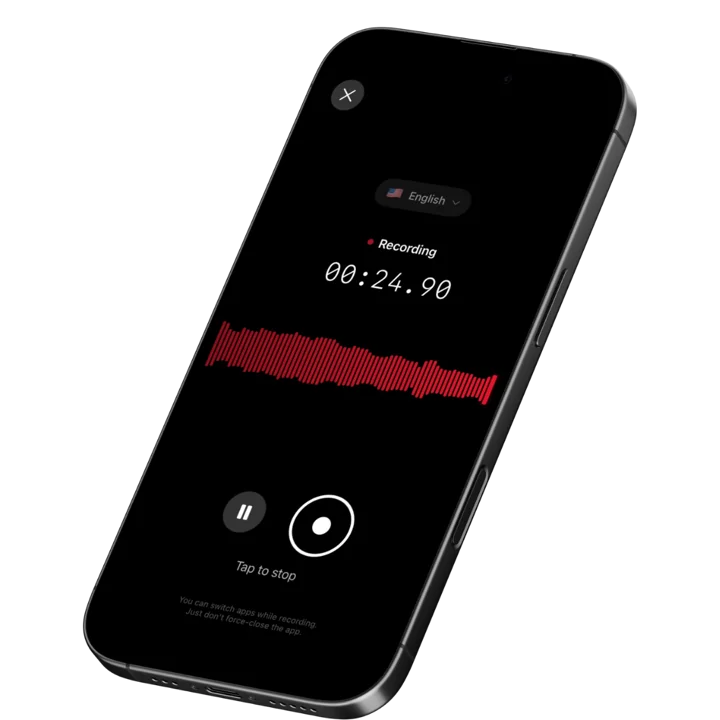
Diagnostic work demands full physical attention. You are listening to engine sounds, feeling for vibrations, reading sensor data, and holding scanning equipment simultaneously. Speakwise handles documentation in the background via AirPods hands-free recording. Tap your AirPod when you spot the fault, narrate your findings while your hands stay on the job, and tap again when you are done. Your phone never leaves your pocket.
The AI processing turns raw verbal diagnostics into usable service documentation. A two-minute verbal walkthrough covering DTC codes, probable causes, and recommended repairs becomes a clean summary with the key findings and next steps extracted automatically. This eliminates the re-keying step that consumes technician time at the service counter after every completed vehicle inspection.
Noise cancellation handles the acoustic reality of active shop floors. Air compressors, pneumatic tools, running engines, and radio noise create constant interference that defeats basic voice memo apps. Speakwise isolates your voice from shop background noise, maintaining 92%+ accuracy even next to running equipment. The app also works for field technician documentation of all kinds with the same noise-handling capability.
Key Features
- AI-Powered Summaries: Convert a spoken diagnostic rundown into a structured summary with fault description, likely causes, repair recommendations, and parts needed. Users save 73% of documentation time compared to manual note-writing (according to Speakwise user surveys). Review your clean summary at the service desk instead of reconstructing from spotty memory.
- Long Recording Support: Multi-hour board meetings, conference sessions, offsites.
- Works Offline: Construction sites, secure boardrooms, planes - record without WiFi. Sync when you're back.
- Action Item Extraction: Speakwise identifies follow-up tasks, parts to order, and customer approvals needed. Say "need to order a new O2 sensor for bay 3 before Thursday" during your diagnostic recording and it appears as an extracted action item automatically.
- Speaker Diarization: When a walkthrough involves a customer or a second technician, Speakwise separates the voices and labels who said what, keeping the customer's described symptoms distinct from your own diagnostic findings.
- Advanced Noise Cancellation: Maintains 92%+ transcription accuracy in noisy shop environments with running air tools, compressors, and adjacent bays. The gap between a usable transcript and garbled audio on an active shop floor comes down entirely to noise cancellation quality.
- 100+ Language Support: Shop teams and technicians frequently work across language boundaries. Speakwise transcribes in 100+ languages with auto-detection, capturing diagnostics in English, Spanish, or any other language without manual settings changes.
- Native Notion Integration: Sync diagnostic notes to Notion automatically, organized by vehicle, customer, or date. Technicians who track service records in Notion get automatic, searchable documentation for every job. 82% of users cite this integration as a key reason they chose Speakwise (based on internal user data).
- AirPods Hands-Free Recording: Start and stop recording from your AirPods without removing gloves or pulling out your phone. Tap once to start capturing your diagnostic narrative, tap again to stop. Your hands stay exactly where the job needs them throughout the entire inspection sequence.
- Action Button Recording: Map the iPhone Action Button and kick off a diagnostic recording with one press before your hands are full — no unlocking, no app to open, and a double-tap on AirPods takes over once you're under the hood.
Pricing
- Free Trial: Full access to all features
- Premium: $59.99/year - unlimited transcription, AI summaries, Notion sync, 100+ languages
Best For
- Service technicians recording under-the-hood findings hands-free during active inspections
- Shop foremen capturing verbal diagnostic walkthroughs for service advisors
- Independent mechanics documenting repair sequences for customer authorization
- Fleet service teams who track maintenance records and need searchable documentation
Limitations
- iOS only - no Android or desktop version
- No Zoom/Teams bot integration (designed for in-person recording)
- Individual-focused - no multi-technician team dashboards
Speakwise gets your hours back.
- ✓Built for in-person meetings, interviews, and site visits.
- ✓Trusted by recruiters, consultants, agents, and field pros.
- ✓One tap to record. Notion-ready summary in minutes.

2. Rev Voice Recorder - Best for High-Quality Audio in Noisy Shops
Rev Voice Recorder focuses on capturing the cleanest possible audio from your iPhone, which matters when you are recording next to a running engine or open exhaust. The app records fully offline and offers optional human transcription at $1.99/minute for audio that automated systems struggle with. For service technicians at remote fleet yards or out-of-coverage shop locations, the offline recording capability is essential. The free recording with pay-per-use transcription model suits technicians who record occasionally rather than every shift.
Key Features
- Optimized audio capture engine for challenging acoustic environments
- Full offline recording without internet connectivity
- Human transcription at $1.99/minute for complex or noisy audio
- AI transcription at $0.25/minute for cleaner recordings
- Simple interface requiring no learning curve
Pricing
- Recording: Free
- AI Transcription: $0.25/audio minute
- Human Transcription: $1.99/audio minute
- Pro Plan: $14.99/user/month for 20 hours AI transcription
Best For
- Technicians needing occasional transcription for specific diagnostic recordings
- Fleet service teams with recordings that need certified-accurate documentation
Limitations
- No AirPods hands-free recording
- AI summaries and action item extraction not included
- Cost adds up quickly with daily recording volume
3. Otter.ai - Best for Team Sharing and Real-Time Transcription
Otter.ai provides real-time transcription with automatic speaker identification, which helps when multiple technicians are discussing a diagnostic finding together. The free tier offers 300 minutes per month, making it accessible for lower-volume users. Service advisors and shop managers can view transcriptions from their browser while technicians record on the phone. The platform suits teams that need shared access to recorded diagnostic conversations rather than individual hands-free capture.
Key Features
- Real-time transcription as you speak
- Automatic speaker labeling for multi-person conversations
- Team sharing with browser and mobile access
- 300 free minutes per month on the free tier
- Integrations with Slack and Notion for note distribution
Pricing
- Free: 300 minutes/month
- Pro: $16.99/month or $8.33/month billed annually
- Business: $30/user/month or $19.99/month billed annually
Best For
- Service advisors capturing diagnostic briefings from multiple technicians
- Shop teams that need shared access to recorded conversations
Limitations
- No AirPods hands-free recording
- No noise cancellation built for heavy shop environments
- Free tier limits hit quickly with daily diagnostic recording
4. SafetyCulture (iAuditor) - Best for Structured Inspection Workflows
SafetyCulture (formerly iAuditor) is a comprehensive mobile inspection platform used by over 70,000 organizations. For service shops, it offers customizable digital inspection checklists, photo evidence capture, and automatic PDF report generation. Technicians can attach voice notes to specific checklist items during vehicle inspections, and the offline mode ensures full functionality in poor-signal shop locations. The platform is better suited for structured inspection forms than free-form diagnostic narration, but it handles compliance-driven documentation well.
Key Features
- Customizable digital inspection checklists with branching logic
- Photo and voice note capture attached to checklist items
- Full offline mode with automatic cloud sync
- Automatic PDF report generation for customer delivery
- Corrective action assignment with due dates and priority levels
Pricing
- Free: Up to 10 users, basic inspections
- Premium: $29/user/month billed annually
- Lite Seat: $5/user/month for view-only access
Best For
- Service shops needing standardized inspection forms with compliance records
- Fleet managers who need consistent technician reporting formats
Limitations
- Not built for free-form diagnostic narration or verbal observation capture
- Per-user pricing makes it expensive for large shop teams
- No AirPods hands-free recording or AI summary generation
5. Fulcrum - Best for AI-Powered Form Completion from Voice
Fulcrum is a field data collection platform with an AI-powered feature called FastFill that automatically populates form fields from voice input, photos, and text. For service technicians who already use structured work order forms, FastFill reduces manual data entry by letting you speak the answers into the right fields rather than type them. The platform supports full offline data collection with automatic sync when connectivity returns. Pricing is on the higher end for individual technicians.
Key Features
- AI FastFill: voice input auto-populates form fields
- Full offline data collection with auto-sync on reconnect
- iOS and Android native apps with GPS capture
- Barcode scanning and digital signature collection
- Customizable forms with branching logic and photo capture
Pricing
- Monthly: $55/user/month
- Annual: $43/user/month
Best For
- Service operations using structured work order forms that benefit from voice-to-field completion
- Multi-technician teams needing shared form infrastructure
Limitations
- Expensive for independent technicians or small shops
- Voice feature fills forms rather than generating narrative summaries
- No AirPods hands-free recording
6. GoCanvas - Best for Customizable Digital Work Orders
GoCanvas provides a library of 30,000+ pre-built form templates with a drag-and-drop builder for creating custom digital work orders and inspection reports. Service technicians can capture photos, GPS location, and notes offline and sync automatically when connectivity returns. The platform integrates with common shop management systems and accounting tools. GoCanvas focuses on replacing paper forms with digital equivalents rather than providing AI-driven diagnostic narration, making it a solid process digitization tool but not a voice-first documentation solution.
Key Features
- 30,000+ pre-built form templates including automotive work orders
- Offline data capture with automatic sync on reconnect
- Photo and video attachment to specific form fields
- GPS location logging and barcode scanning
- Integration with QuickBooks and major shop management platforms
Pricing
- Professional: $55/user/month billed annually
- Business: Custom pricing for advanced workflow automation
Best For
- Service shops replacing paper work orders with digital forms
- Technicians who need structured inspection forms with photo documentation
Limitations
- No native voice-to-summary generation
- No hands-free recording capability
- Form-first design requires structured input rather than free-form diagnostic narration
How to Choose the Best Diagnostic Recording App
1. Can you actually use it while your hands are busy? Most recording apps require you to pull out your phone, unlock it, tap a button, and manage settings. For service technicians in the middle of an inspection, that workflow breaks down entirely. Look for hands-free initiation via AirPods or voice commands. The ability to start recording without phone interaction is the single biggest factor separating useful field recording apps from ones that get abandoned after day two.
2. Does it handle shop noise? A basic voice memo app in an active shop produces garbled, nearly unusable audio. Compressors, impact wrenches, and running engines create a noise floor that overwhelms basic recording quality. Dedicated noise cancellation built for industrial environments is essential. Test any app you consider in the actual shop conditions where you will use it, not in a quiet office.
3. Does it turn your recording into something usable? Raw audio is only half the value. The best apps convert spoken observations into structured notes with key findings, recommended repairs, and follow-up items already organized. AI summaries that extract action items from a diagnostic recording eliminate the post-inspection re-keying step that technicians often delay or skip entirely.
4. Does it work offline? Shop Wi-Fi coverage is inconsistent, and some fleet service locations have no connectivity at all. Apps that require a live internet connection for recording or transcription are a reliability risk in field service environments. Confirm offline recording capability before committing to any platform.
5. Where does the data go? Diagnostic observations, customer vehicle information, and proprietary repair procedures are sensitive. Understand whether recordings are stored on the device, in the cloud, or transmitted to third-party AI processing servers. Secure storage with standard encryption provides strong data protection for shops with strict information handling policies.
Frequently Asked Questions
Can I record diagnostic conversations while I am working under the hood? Yes, with the right app. Speakwise supports AirPods hands-free recording, which means you tap your AirPod to start capturing audio and your phone stays in your pocket the entire time. This is the only practical approach for technicians who cannot spare a hand to manage a phone during active inspections. Apps that require phone interaction are not workable in hands-busy diagnostic scenarios.
Will background shop noise ruin the transcription? It depends on the app. Basic voice memo apps and general transcription tools produce unreliable results next to running engines, air compressors, and impact wrenches. Speakwise uses advanced noise cancellation that maintains 92%+ accuracy even in noisy shop conditions. If you are evaluating any app for shop use, test it with your actual equipment running in the background before relying on it for critical diagnostic records.
Is it legal to record diagnostic conversations with a customer present? Recording laws vary by state and country. Single-party consent states allow recording if one participant (you) consents. Two-party consent states require all parties to consent. For customer-facing diagnostic walkthroughs, best practice is to inform the customer you are recording the conversation for your own service records. Check your local recording consent laws and your shop's customer communication policies before recording in the presence of customers.
How does AI summary generation work for technical diagnostic content? AI summaries analyze the transcript of your recording and identify the most important technical observations, fault descriptions, repair recommendations, and action items. Speakwise achieves 94% action item extraction. The result is a structured summary you can review at the service desk or attach to the work order, rather than a raw audio file you have to play back and interpret under time pressure.
What happens to my diagnostic recordings and customer information? Speakwise stores your recordings and transcriptions securely with standard encryption, and Speakwise never trains AI on your data. This is important for shops handling proprietary diagnostic information or customer vehicle data. Other apps like Otter.ai and Rev process audio in the cloud, which may conflict with some shop data handling policies. Review each app's privacy policy before recording sensitive repair information.
Final Verdict
The right recording app for service technicians depends on what happens after you stop speaking. Any app can capture audio. The meaningful difference is whether your recording becomes a structured, usable diagnostic record automatically, or whether you have to do that work yourself after the job is done.
Speakwise is the best overall option because it solves the hands-free problem first - you can start and stop recording without ever touching your phone - and then delivers AI-generated summaries that turn raw diagnostic narration into organized service documentation. For technicians who record multiple vehicles per shift, that combination of hands-free capture and automatic structuring eliminates the biggest productivity bottleneck in shop documentation.
For teams that need structured inspection forms with photo evidence and compliance records, SafetyCulture (iAuditor) handles that workflow well at a reasonable per-user price. If you need occasional professional-quality transcription of specific complex recordings, Rev's human transcription option at $1.99/minute produces reliable results for difficult audio.
Download Speakwise from the App Store and start capturing hands-free diagnostic recordings that turn into structured service notes automatically - no typing, no re-keying, and no lost observations between the bay and the service desk.
🎯 4.9★ App Store Rating | 📱 Built for iOS
