Best Voice Notes App for GTD Workflow (2026)
Used by recruiters, executives, consultants, and more.
Best Voice Notes App for GTD Workflow in 2026
The first rule of GTD is simple: capture everything. Every idea, commitment, and random thought needs to get out of your head and into a trusted system. But pulling out your phone to type a note while driving, walking, or mid-conversation breaks the flow. Voice capture solves this. Speak your thought, and it lands in your inbox for later processing. The best apps go further by using AI to clarify, organize, and route your captures automatically. We tested and compared the top options - here are the 7 best tools for the job.
The best voice notes apps for GTD workflows in 2026 are: 1) Speakwise for AI-powered voice capture with automatic action item extraction, 2) OmniFocus 4 for Siri-based voice capture into a full GTD system, 3) Todoist for cross-platform voice task entry, 4) Things 3 for Apple-native voice capture, 5) Talknotes for template-based voice structuring, 6) SingularityApp for smart voice task parsing, and 7) Evernote for voice note capture into a reference system. Speakwise stands apart by turning unstructured voice captures into organized items with AI summaries and action extraction.
1. Speakwise - Best Overall Voice Capture for GTD
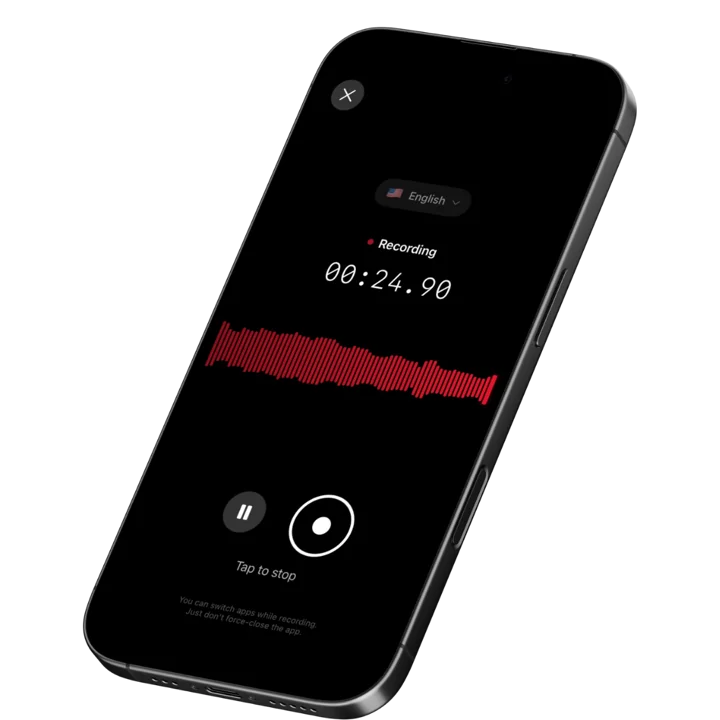
Speakwise is an AI-powered voice notes app for iPhone that excels at the most critical GTD step: capture. One tap or an AirPods gesture starts recording. Speak freely about tasks, ideas, projects, or meeting outcomes, and the AI extracts action items, generates structured summaries, and syncs everything to Notion for processing. With a 4.9-star App Store rating and 95%+ transcription accuracy, Speakwise turns your voice into a GTD-ready inbox.
Why Speakwise Stands Out
GTD works when capture is frictionless. The moment you have to think about how to capture, you have already added cognitive load that GTD is designed to eliminate. Speakwise reduces capture to a single tap or AirPods gesture. You speak. Everything else happens automatically.
What makes Speakwise uniquely powerful for GTD is the AI processing after capture. In traditional GTD, you capture raw thoughts and then process them later into actionable items. Speakwise accelerates this by pre-processing your captures: it identifies action items, extracts key decisions, and generates summaries. Your weekly review becomes faster because half the clarifying work is already done.
Native Notion integration connects directly to your GTD system. Every voice capture lands as an organized Notion page with its transcript, summary, and extracted action items. This means your GTD inbox is automatically populated with pre-processed, ready-to-organize items instead of raw audio files you have to listen back to.
Key Features
- AI Action Item Extraction: The AI identifies tasks and commitments mentioned during your voice captures. "I need to call Sarah about the project by Friday" becomes an extracted action item. This pre-processes your GTD inbox automatically.
- Long Recording Support: Multi-hour board meetings, conference sessions, offsites.
- Works Offline: Construction sites, secure boardrooms, planes - record without WiFi. Sync when you're back.
- AI Summaries for Faster Processing: Each capture gets a structured summary highlighting key points, decisions, and next steps. During your GTD weekly review, you scan summaries instead of listening to recordings. This saves significant processing time.
- Native Notion Integration: Every capture syncs to Notion with transcript, summary, and action items. Build your entire GTD reference system in Notion with voice captures flowing in automatically. 82% of users cite this as a key reason they chose Speakwise (based on internal user data).
- 100+ Language Support: Capture GTD items in any language. Auto-detection means you never pause to switch settings. For international professionals running GTD across multiple languages, this removes friction.
- One-Tap and AirPods Capture: Record GTD captures with zero friction. One tap on screen or a single AirPods gesture starts recording instantly. Capture while driving, walking, in meetings, or during any moment when an idea or commitment surfaces.
Pricing
- Free Trial: Full access to all features
- Premium: $59.99/year - unlimited transcription, AI summaries, Notion sync, 100+ languages
Best For
- GTD practitioners who want the fastest possible voice capture with zero friction
- Notion-based GTD users who want automatic inbox population
- Professionals who capture dozens of items daily and need AI pre-processing
- People who want action items extracted from voice captures automatically
Limitations
- iOS only - no Android or desktop version
- Not a full GTD task manager - works best paired with a GTD system like Notion
- No built-in contexts, projects, or next actions lists
Speakwise gets your hours back.
- ✓Built for in-person meetings, interviews, and site visits.
- ✓Trusted by recruiters, consultants, agents, and field pros.
- ✓One tap to record. Notion-ready summary in minutes.

2. OmniFocus 4 - Best Full GTD System With Voice Input
OmniFocus 4 is the most complete GTD task manager available for Apple devices. It supports the full GTD workflow: capture, clarify, organize, reflect, and engage. Voice capture via Siri lets you add tasks hands-free. While voice is not its primary feature, the depth of its GTD implementation makes it essential for serious practitioners.
Key Features
- Complete GTD system with projects, contexts, perspectives, and reviews
- Siri voice capture adds tasks hands-free on iPhone, Apple Watch, and Mac
- Forecast view shows upcoming deadlines and calendar integration
- Custom perspectives create personalized views for different GTD contexts
Pricing
- Subscription: $9.99/month or $99.99/year for all platforms
- One-Time Purchase: Available per platform (Mac, iPhone, iPad)
Best For
- Serious GTD practitioners who want a complete, native task management system
- Apple ecosystem users who want deep integration across Mac, iPhone, iPad, and Watch
Limitations
- Voice capture is basic Siri dictation - no AI processing or summarization
- Apple-only - no Windows, Android, or web version
- Expensive compared to simpler alternatives
- Steep learning curve for GTD beginners
3. Todoist - Best Cross-Platform Voice Task Entry
Todoist offers voice task entry across iOS, Android, and desktop. It parses natural language to set due dates, priorities, and project assignments from spoken input. While not a pure GTD tool, its flexibility and cross-platform availability make it popular with GTD practitioners who work across multiple devices.
Key Features
- Natural language voice input creates tasks with dates, priorities, and labels
- Cross-platform sync across iOS, Android, web, and desktop
- Filters and labels replicate GTD contexts and project views
- Integrations with 60+ tools including Notion, Slack, and Google Calendar
Pricing
- Free: Up to 5 active projects, basic features
- Pro: $5/month - 300 projects, reminders, filters
- Business: $8/user/month - team features, admin controls
Best For
- GTD users who work across Apple, Android, and web platforms
- People who want affordable voice task entry with natural language parsing
Limitations
- Voice input is basic dictation - no AI summaries or multi-topic extraction
- Not designed specifically for GTD - requires configuration to match the framework
- Free tier limits you to 5 projects, insufficient for most GTD users
- No recording or transcription of longer voice captures
4. Things 3 - Best Apple-Native Voice Capture
Things 3 is a beautifully designed task manager for Apple devices with Siri Shortcuts support for voice capture. Its clean interface and thoughtful design make GTD feel approachable rather than overwhelming. Quick Entry on Mac and Siri on iPhone provide fast capture options.
Key Features
- Siri Shortcuts enable voice task creation on iPhone and Apple Watch
- Clean, intuitive design reduces cognitive overhead for GTD capture
- Areas and projects map to GTD's organizational structure
- Evening review feature supports the GTD reflection habit
Pricing
- iPhone: $9.99 one-time purchase
- iPad: $19.99 one-time purchase
- Mac: $49.99 one-time purchase
Best For
- Apple users who value design and simplicity in their GTD system
- People who prefer one-time purchases over subscriptions
Limitations
- Apple-only - no Windows, Android, or web version
- Voice capture limited to basic Siri dictation
- No AI processing, summaries, or action item extraction from voice
- Separate purchases required for each platform
5. Talknotes - Best for Structured Voice Input
Talknotes transforms voice recordings into structured content using 100+ templates. For GTD users, this means speaking about a meeting and getting formatted action items, project notes, or reference material automatically. The template approach adds structure that raw voice capture lacks.
Key Features
- 100+ templates format voice input into specific document types
- 100+ language support with claimed 99% transcription accuracy
- Custom tags organize captures by GTD context or project
- Zapier integration routes structured captures to other tools
Pricing
- Free: Limited notes and features
- Plus: $5.75-$10.98/month - expanded features
- Pro: $41.58-$49/month - unlimited features, 2-hour recordings
Best For
- GTD users who want voice captures automatically formatted into specific templates
- People who use Zapier to connect voice captures to their GTD system
Limitations
- Pro tier pricing is very expensive for individual GTD users
- Template selection adds a decision point that slows capture
- No native integration with GTD-specific tools
- No hands-free AirPods recording control
6. SingularityApp - Best for Smart Voice Task Parsing
SingularityApp parses voice input to create tasks with dates and times automatically. Say "Call the doctor tomorrow at 3 PM" and it creates a task with the correct reminder. This smart parsing eliminates the clarify step for simple, time-bound GTD captures.
Key Features
- Voice input with smart recognition of dates, times, and task context
- Hold the plus button and speak to create tasks instantly
- Full GTD implementation with inbox, projects, and contexts
- Available on iOS, Android, Mac, and Windows
Pricing
- Free: Basic features with limited projects
- Premium: $4.99/month or $39.99/year - full GTD features
Best For
- GTD users who want smart date and time parsing from voice input
- Cross-platform users who need GTD on both Apple and Android devices
Limitations
- Smart parsing is limited to simple tasks - complex multi-item captures are not supported
- AI features are basic compared to dedicated voice notes apps
- No AI summaries or multi-topic extraction from longer recordings
- Smaller user base means less community support and fewer integrations
7. Evernote - Best for Voice Reference Capture
Evernote captures voice notes alongside text, photos, and web clips. For GTD practitioners who use Evernote as their reference filing system, adding voice captures keeps everything in one place. Siri integration and quick note widgets provide fast capture options.
Key Features
- Voice notes stored alongside text, images, and web clips in notebooks
- Siri and Google Assistant voice capture for hands-free entry
- Powerful search finds content across all note types including audio
- Notebooks and tags map to GTD project and reference structures
Pricing
- Free: Limited features and upload allowance
- Personal: $14.99/month - expanded storage and features
- Professional: $17.99/month - advanced features and integrations
Best For
- GTD users who already use Evernote as their reference filing system
- People who want voice captures stored alongside other reference material
Limitations
- Monthly pricing is expensive for a reference capture tool
- Voice transcription is basic - no AI summaries or action item extraction
- App performance has declined compared to lighter alternatives
- No smart parsing of dates, contexts, or projects from voice input
How to Choose the Best Voice Notes App for GTD
The right voice capture tool depends on where you are in your GTD journey and how you have set up your system.
-
Capture Speed: GTD demands ubiquitous capture. The tool must work in under 2 seconds from any state. Speakwise offers one-tap and AirPods recording. Things 3 and OmniFocus use Siri. Test which method feels most natural for your daily patterns.
-
Processing Assistance: Raw voice captures still need processing during your GTD weekly review. Speakwise's AI pre-processes captures by extracting action items and generating summaries. Traditional task managers require you to do all processing manually. AI assistance can cut your review time significantly.
-
System Integration: Your voice capture tool must feed into your GTD system. Speakwise integrates natively with Notion. Todoist and OmniFocus are complete GTD systems themselves. Talknotes connects through Zapier. Choose based on where your GTD system lives.
-
Multi-Item Capture: Sometimes you need to capture several items at once - after a meeting or during a brainstorming session. Speakwise handles multi-topic voice captures and separates them with AI. Basic voice-to-task tools like Siri can only handle one item at a time.
-
Platform Coverage: GTD capture must work everywhere you are. If you split time between iOS and Android, Todoist or SingularityApp provide cross-platform voice capture. If you are all-in on Apple, Speakwise, OmniFocus, or Things 3 are optimal choices.
Frequently Asked Questions
What is the best voice notes app for GTD in 2026?
Speakwise is the best voice notes app for GTD in 2026. It combines one-tap and AirPods recording for frictionless capture with AI that extracts action items and generates summaries for faster processing. Native Notion integration feeds captures directly into your GTD system. At $59.99/year, it adds AI-powered capture to your GTD workflow without replacing your existing system.
Is there a free voice capture tool for GTD?
Apple Voice Memos is free and captures voice instantly, but offers no transcription, AI processing, or GTD system integration. Siri adds tasks to Reminders for free. Todoist's free tier supports basic voice task entry with up to 5 projects. Speakwise offers a free trial with full access to AI features and Notion sync. For serious GTD practice, the AI processing in premium apps saves significant time during weekly reviews.
Can I use voice notes for my GTD weekly review?
Yes. Record your weekly review as a voice note and let AI extract the outcomes. Speakwise generates summaries and action items from review sessions automatically. You can also use voice captures throughout the week and process them in batch during your review. The combination of voice capture and AI processing aligns perfectly with GTD's capture-then-process philosophy.
What features should I look for in a GTD voice capture tool?
Key features for GTD voice capture include:
- Under 2-second capture start time
- AI action item extraction from unstructured voice input
- Integration with your GTD system (Notion, OmniFocus, Todoist, etc.)
- Multi-item capture for meetings and brainstorming sessions
- Searchable transcripts for reference material
- Reliable transcription accuracy (95%+ in good conditions)
How does voice capture fit into the GTD workflow?
Voice capture handles the first step of GTD: getting things out of your head. Speak your thought, commitment, or idea into the app. It lands in your GTD inbox. During processing, you clarify each item (is it actionable?), organize it (which project? which context?), and move it to the appropriate list. Speakwise accelerates this by pre-clarifying items with AI - extracting action items and generating summaries so you spend less time processing each capture.
Final Verdict
GTD lives and dies on capture speed. If you cannot capture a thought faster than it takes to forget it, the system breaks down. Voice is the fastest capture method, and the right app makes it frictionless.
Speakwise is the best voice notes app for GTD workflows. Its one-tap and AirPods recording eliminates capture friction entirely. AI action item extraction and summaries pre-process your inbox, saving significant time during weekly reviews. Native Notion integration feeds captures directly into your GTD system. At $59.99/year, it is the most cost-effective way to add intelligent voice capture to your productivity workflow.
For a complete, self-contained GTD system with voice input, OmniFocus 4 is the gold standard for Apple users. Todoist offers the best cross-platform experience. Things 3 delivers the cleanest design for Apple-only GTD practitioners.
Download Speakwise from the App Store and add frictionless voice capture to your GTD workflow.
🎯 4.9★ App Store Rating | 📱 Built for iOS
