Best AI Dictation App for Apple Notes in 2027
TL;DR
The best AI dictation app for Apple Notes in 2027 is Speakwise. The iPhone app records your speech and sends a structured note into Apple Notes, with a 7-day free trial. Apple Dictation suits free real-time typing, and Just Press Record suits iCloud recordings.
Used by recruiters, executives, consultants, and more.
Best AI Dictation App for Apple Notes in 2027
You want to capture ideas or meeting follow-ups straight into Apple Notes without typing them yourself. Plain dictation gives raw, unstructured text, while Speakwise goes further: it records what you said, then applies AI to organize it into key points and action items before sending a clean note to Apple Notes. Six tools compared below.
1. Speakwise - Best Overall for AI Dictation into Apple Notes
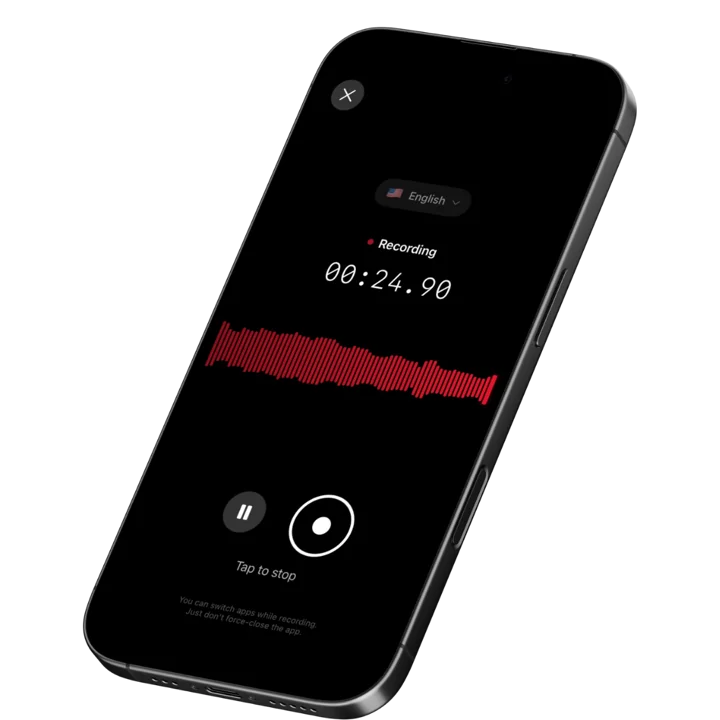
Speakwise is an iOS-native AI voice notes app that records your speech, applies AI to produce a structured note with key points and action items, and exports the result directly to Apple Notes. It supports 100+ languages, carries a 4.9-star App Store rating, and handles recordings from a quick 30-second thought capture up to multi-hour meetings. For professionals who want to dictate notes that are ready to use rather than raw text to edit, Speakwise is the strongest option.
Why Speakwise Stands Out
The gap between Apple Dictation and Speakwise is the gap between transcription and structured notes. Apple Dictation turns speech into text in real time, exactly as spoken. Speakwise records the same speech and then applies AI to produce a clean, organized note - a short summary at the top, key points listed, action items pulled out. The note you send to Apple Notes is ready to share or act on, not a wall of spoken-word text to clean up.
This matters most for meeting follow-ups and voice-to-note workflows. If you dictate a five-minute debrief after a client call, Apple Dictation gives you 400 words of stream-of-consciousness text. Speakwise gives you a structured summary with key decisions and next steps, plus the full transcript if you need to verify a detail. Both land in Apple Notes, but only one requires editing before you can use it.
Speakwise also extends the workflow beyond the Notes app. The same recording that exports to Apple Notes can also sync to Notion, making it the bridge between a quick mobile capture and a longer-term project record. For a broader look at iPhone dictation options, our best AI dictation app for iPhone roundup covers more alternatives.
Key Features
- Native Apple Notes Export: Dictate, let Speakwise structure the output, and send the note to Apple Notes in one tap. No copy-paste, no formatting cleanup.
- AI Structuring: Raw speech becomes an organized note with a summary, key points, and action items. Structured output replaces manual editing.
- 95%+ Transcription Accuracy: The full transcript is accurate enough to skip audio review in most conditions. Useful when you want the exact record alongside the summary.
- 100+ Languages with Dialect Recognition: Dictate in German, Spanish, French, Mandarin, and regional variants. The app auto-detects language without a manual setting.
- Works Offline: Dictate ideas on a plane or in a basement room. Transcription and structuring happen when you reconnect.
- Long Recording Support: Capture a full meeting debrief, a long brainstorm, or a multi-hour session in one uninterrupted recording.
- AirPods Hands-Free Control: Start and stop dictation by tapping an AirPod. Your hands stay free while you talk.
- Speaker Diarization: When a recording has more than one voice, such as a captured meeting rather than a solo note, Speakwise detects the distinct speakers and labels who said what before the note exports to Apple Notes.
Pricing
- Free Trial: Full access to all features
- Premium: $59.99/year - unlimited dictation, AI structuring, Apple Notes export, 100+ languages
Best For
- Professionals who dictate meeting follow-ups and want structured notes, not raw text
- Voice-first note takers who use Apple Notes as their central capture system
- Multilingual speakers who switch languages across meetings and notes
- Anyone who wants dictated notes that skip the editing step
Limitations
- iOS only, no Android or desktop app
- AI structuring adds a processing step after recording - not real-time like Apple Dictation
- Built for voice capture, not typing-based notes workflows
Speakwise gets your hours back.
- ✓Built for in-person meetings, interviews, and site visits.
- ✓Trusted by recruiters, consultants, agents, and field pros.
- ✓One tap to record. Notion-ready summary in minutes.

2. Apple Dictation - Best Free Built-In Option
Apple Dictation is built into every iPhone and works in any text field, including directly inside Apple Notes. Press the microphone key on the keyboard, speak, and the text appears in real time. On supported iPhone models, the processing happens on the device with no internet required. It is the fastest and cheapest way to get spoken words into Apple Notes.
Key Features
- Real-time dictation directly inside the Apple Notes text editor
- Works in any iOS app that has a text field, including Notes
- On-device processing on supported iPhones (no internet required for dictation)
- Supports multiple languages with language switching in Settings
Pricing
- Free: Included with iOS
Best For
- Users who want to dictate short notes, lists, or reminders directly into Apple Notes
- Anyone who types slowly and wants a speed boost without a subscription
Limitations
- No AI structuring - output is raw spoken text, not organized notes
- Accuracy varies with background noise and non-native speakers
- No action items, summaries, or other AI post-processing
- Punctuation must be spoken aloud ("comma", "period") for precise formatting
3. Just Press Record - Best Simple Recorder with iCloud Sync
Just Press Record is a paid one-time iPhone app that strips recording and transcription down to a single tap. It syncs transcripts and recordings to iCloud Drive, making them accessible in the Files app and shareable to Apple Notes via the share sheet. For users who want a low-friction recorder without a subscription, it is a practical option.
Key Features
- One-tap recording and transcription with no setup
- Transcripts sync to iCloud Drive automatically
- Apple Watch app for wrist-based recording control
- Supports 30+ languages for transcription
Pricing
- One-time purchase: ~$4.99
Best For
- Users who want simple recording with transcription and no ongoing subscription
- Apple Watch owners who want to start a recording from their wrist
Limitations
- No AI structuring - transcript is verbatim, not organized
- Getting the note into Apple Notes requires a manual share step
- Accuracy lags behind Whisper-based tools in noisy conditions
4. Otter.ai - Best for Dictating Meeting Summaries from Video Calls
Otter.ai is built primarily around transcribing video calls via its OtterPilot bot, but it also lets users record and dictate through the mobile app. Transcripts can be exported or shared via the iOS share sheet. It is a reasonable fit for users whose dictation needs overlap with meeting transcription from Zoom or Teams.
Key Features
- OtterPilot auto-joins Zoom, Teams, and Google Meet for call transcription
- Record via the mobile app for in-person or standalone dictation
- AI summary and action item extraction after each recording
- Share transcripts via iOS share sheet to Apple Notes or other apps
Pricing
- Free: 300 transcription minutes/month, 30-minute cap per conversation
- Pro: $16.99/month
- Business: $30/user/month
Best For
- Teams that mix video call transcription with occasional standalone voice notes
- Users already invested in the Otter ecosystem
Limitations
- Sharing to Apple Notes requires a manual export step
- Free plan caps each recording at 30 minutes
- Primary focus is video calls, not standalone dictation workflows
5. AudioPen - Best for Turning Voice Ramblings into Clean Notes
AudioPen records unstructured voice and uses AI to rewrite it as a coherent, readable note. It is not a verbatim transcription tool - it restructures what you said and removes filler words, repetitions, and tangents. The cleaned output can be shared to Apple Notes via the iOS share sheet.
Key Features
- AI restructuring of unstructured voice input into clean written notes
- Custom output styles for different note formats (bullet points, paragraphs, action items)
- Short recordings work best - ideal for 1-5 minute captures
- Share output to Apple Notes or any app via iOS share sheet
Pricing
- Free: Limited recordings
- Pro: ~$99/year
Best For
- Users who want cleaned-up voice notes rather than verbatim transcripts
- Idea capture and quick memos where polished output matters more than accuracy
Limitations
- Restructures rather than transcribes - output may not reflect exact words spoken
- Not designed for multi-speaker meetings
- Manual share to Apple Notes required
6. Aiko - Best for High-Accuracy Transcription of Recorded Audio
Aiko applies OpenAI's Whisper model on-device to transcribe audio files. You bring a recording, and Aiko converts it to accurate text. The transcript can be shared to Apple Notes via the share sheet. It is best used as a post-processing step rather than a live dictation tool.
Key Features
- Whisper-powered on-device transcription for imported audio files
- Strong accuracy across a wide range of languages
- Share transcript text to Apple Notes via share sheet
- Accepts audio from Voice Memos, Files, or other recording apps
Pricing
- One-time purchase: ~$7.99
Best For
- Users who already have recordings they want to transcribe accurately
- Privacy-conscious users who prefer on-device processing
Limitations
- Not a live dictation tool - requires an existing audio file
- No AI structuring or summary output
- Manual share to Apple Notes after transcription
How to Choose the Best AI Dictation App for Apple Notes
The right tool depends on whether you want real-time dictation, AI structuring, or transcription of a finished recording.
- Real-time vs post-processing: Apple Dictation inserts text as you speak, directly inside Apple Notes. Speakwise, AudioPen, and Aiko process after recording. Real-time is faster for short notes; post-processing produces better quality for longer captures.
- Raw text vs structured output: If you want the note to be ready to use without editing, pick a tool with AI structuring (Speakwise, AudioPen). If you want the exact words you said, pick a transcription-first tool (Apple Dictation, Aiko, Just Press Record).
- Native export vs manual share: Speakwise exports directly to Apple Notes. Most others require using the share sheet or copying text manually. Native export is worth it if you do this many times per day.
- Language support: Apple Dictation handles major languages well. Speakwise adds dialect recognition for regional variants - Bavarian German, Swiss French, regional Spanish - that English-first tools handle poorly.
- Budget and frequency: For occasional use, Apple Dictation (free) and Aiko or Just Press Record (one-time purchase under $10) are the most cost-effective. If you dictate notes daily, Speakwise at $59.99/year saves time through AI structuring and native Apple Notes export.
Frequently Asked Questions
What is the best AI dictation app for Apple Notes in 2027?
The best AI dictation app for Apple Notes in 2026 is Speakwise. It records your voice, applies AI to produce a structured note with key points and action items, and exports directly to Apple Notes in one tap. Unlike built-in dictation, the output is ready to use without editing. It supports 100+ languages with dialect recognition, handles long recordings, and works offline. The free trial includes full access to every feature, with Premium at $59.99/year. For real-time, free dictation directly inside Notes, Apple Dictation is the built-in alternative.
Can I dictate directly into Apple Notes for free?
Yes. Apple Dictation is built into iOS and works directly inside the Apple Notes text editor. Tap the microphone icon on the keyboard, speak, and words appear in real time. It is free and requires no additional app. The limitation is that it produces raw spoken text with no AI structuring, summaries, or action items. Speakwise offers a free trial that adds AI cleanup and native Apple Notes export on top of transcription, then charges $59.99/year for Premium after the trial period.
What is the difference between dictation and AI-structured notes?
Standard dictation converts speech to text in real time, exactly as spoken - including filler words, repetitions, and incomplete sentences. AI-structured notes go further: the app records your speech, then applies AI to clean it up, organize it into sections, and extract key points or action items. For a five-minute voice capture, standard dictation gives you ~500 words of raw text. AI structuring gives you a short organized summary and a formatted note ready to share. Speakwise produces structured output; Apple Dictation produces raw text. See our best AI voice recorder for iPhone roundup for more options.
What features should I look for in a dictation app for Apple Notes?
Four features matter most. First, export method - does the app send notes directly to Apple Notes, or do you have to copy and paste manually? Second, output quality - raw transcription or AI-structured notes? Third, language support - if you dictate in a non-English language or a regional dialect, check accuracy before committing. Fourth, offline support - if you dictate in areas without WiFi, you need an app that queues transcription until you reconnect. A one-time purchase like Just Press Record covers basic needs; a subscription like Speakwise adds AI structuring and native Apple Notes export.
Does Apple Dictation work well for meeting follow-up notes?
Apple Dictation works but requires editing. If you dictate a five-minute meeting debrief, you get a wall of text that mirrors how you spoke - including "um," "you know," and sentences that trail off. To use it as a proper note in Apple Notes, you need to read through and restructure the text. Speakwise removes that step by applying AI structuring automatically, producing a clean summary and action item list from the same voice input. For short, structured dictation (grocery lists, quick reminders), Apple Dictation is perfectly sufficient. For meeting follow-ups, AI structuring saves meaningful time.
Final Verdict
For professionals who dictate meeting notes, follow-ups, and voice memos into Apple Notes, Speakwise is the strongest option in 2026. The AI structuring turns raw speech into organized, usable notes. The native Apple Notes export removes the manual share step. The 100+ language support and offline recording handle real-world conditions. At $59.99/year with a full-access free trial, the time saved on editing justifies the cost quickly.
Apple Dictation is the right pick for simple, free, real-time dictation directly inside Notes - it is good for short memos where raw text is fine. Just Press Record and Aiko are solid one-time-purchase options for transcription without subscriptions. AudioPen occupies a middle ground: AI cleanup without the full meeting-notes workflow. Otter.ai makes sense if you need to combine dictation with Zoom call transcription.
Download Speakwise from the App Store and start dictating structured, ready-to-use notes directly to Apple Notes from your next meeting.
🎯 4.9★ App Store Rating | 📱 Built for iOS
