Best App for Insurance Adjusters to Record Claim Site Notes (2026)
TL;DR
The best app for insurance adjusters to record claim site notes in 2026 is Speakwise. The iPhone app works offline and turns a claim walk into a Site & inspection report, with a 7-day free trial. Encircle suits photo documentation, and Xactimate suits on-site estimating.
Used by recruiters, executives, consultants, and more.
Best App for Insurance Adjusters to Record Claim Site Notes in 2026
Insurance adjusters need an app that can record claim site notes without losing details from a long day of inspections. A single day might include a roof measurement, a flooded-basement explanation, and a contractor already discussing cost. Writing it all up from memory that night produces a thinner file than capturing it on site. Here are six tools compared for the job.
Best App for Insurance Adjusters to Record Claim Site Notes at a Glance (2026)
The best app for insurance adjusters to record claim site notes in 2026 is Speakwise, with five alternatives covering photo documentation, scope, and estimating:
- Speakwise - Best overall for capturing the in-person site visit and the insured's account (iOS, no bot required)
- Encircle - Best field documentation platform for photos, sketches and property claim reports
- Xactimate - Best for on-site scope and estimate building, the carrier standard
- CompanyCam - Best for time-stamped, location-tagged photo documentation
- CoreLogic Symbility - Best carrier-integrated alternative to Xactimate
- Apple Voice Memos - Best free built-in fallback for a single observation
Speakwise is the only tool here that turns a spoken site walk and an in-person conversation with the insured into an organized, speaker-labeled summary instead of an audio file, a photo set, or an empty estimate.
1. Speakwise - Best Overall for Claim Site Notes
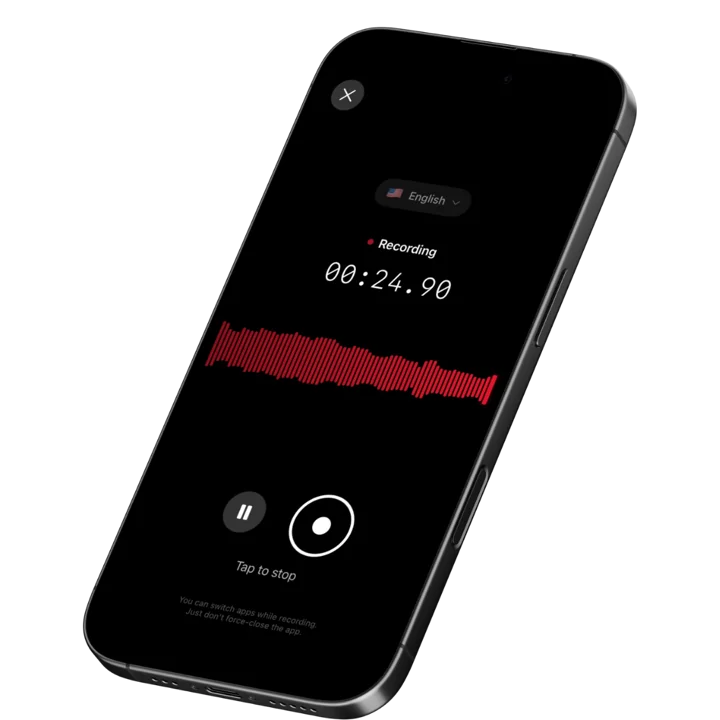
Speakwise is an iOS AI voice notes app built for in-person capture, which is exactly the part of the adjusting workflow that nothing else covers. You tap once when you get out of the car, narrate the loss as you inspect it, and keep the recording running through the conversation with the insured. When you stop, the AI hands back a summary of what you observed, the points the insured raised, and the follow-up items you flagged - ready to copy into the claim file narrative or your diary notes.
To be clear about scope: Speakwise records in person, through the iPhone microphone. It is for the site visit, the walk with the contractor, and the face-to-face conversation on the property. It is not a call recorder and should not be used for anything that happens over the phone.
Why Speakwise Stands Out
Adjusting is a documentation job disguised as a field job. The estimate is the deliverable everyone talks about, but the file is what gets defended, and the file is built from diary notes and the scope narrative. Estimating platforms are outstanding at line items and terrible at everything surrounding them: the homeowner's timeline of events, the contractor's explanation of what he already tore out, the neighbor who mentioned the storm date, the reason you scoped a full roof replacement instead of a repair.
Speakwise captures that layer. You narrate cause and origin as you form the opinion, on site, in your own words: "Impact marks on the north and west slopes, consistent directionality, soft metals show matching strikes, no marks on the south or east." That level of detail rarely survives to a nine p.m. write-up. Recorded on site, it becomes the backbone of the scope narrative.
Speaker labels are the feature adjusters underestimate. During a property inspection, the insured, a public adjuster, a contractor, and sometimes a tenant are all talking. Speakwise separates the voices in the transcript, so what the insured stated about the date of loss stays attributed to the insured and does not blur into the contractor's version of events. That attribution is what makes an in-person conversation useful in the file rather than a liability. Our roundup of apps for recording field interviews covers the same attribution problem across other investigative roles.
Rural losses, basements, and steel-framed commercial buildings routinely have no signal. Capture happens on the device; the transcript and summary are produced once you are back in coverage. And with catastrophe deployments in mind, the 100+ language support means an insured who explains their loss in Spanish is documented in their own words rather than through a summarizing intermediary.
Key Features
- One-Tap In-Person Capture: Start at the car, narrate through the inspection, keep it running for the conversation with the insured. No app to invite, no link, no setup.
- AI Summaries Organized by Topic: The visit comes back grouped - observed damage, cause and origin, insured statements, coverage questions, next steps - rather than as one flat transcript.
- Action Item Extraction: Follow-ups you call out on site (order an engineer, request the roofer's invoice, confirm the mortgagee, verify contents inventory) are pulled into a discrete list.
- Speaker Labels: Keeps the insured, the contractor, and the public adjuster distinct in the transcript so statements stay attributed to the person who made them.
- Long Recording Support: A large commercial loss inspection with a contractor walk runs hours. One session covers it.
- Records Without a Connection: Rural CAT deployments, basements, and interior commercial spaces have no coverage. Capture is local; processing completes when you reconnect.
- 100+ Languages: Documents an insured's account in the language they actually speak, which matters in CAT work.
- Export and Share: Copy the summary into the claim file narrative or your diary notes, or share the notes with a desk adjuster or supervisor via link.
Pricing
- Paid subscription via the App Store: Speakwise is a paid iOS subscription. Current plan details are on the App Store listing.
Best For
- Field adjusters running multiple property inspections a day
- CAT adjusters who need site detail captured before the write-up backlog builds
- Independent adjusters documenting scope narrative and cause and origin observations
- Anyone walking a loss with a contractor or public adjuster who wants both sides attributed
Limitations
- iOS only - no Android version
- In-person recording only. It is not a call recorder and must not be used for telephone conversations
- No photo capture, sketching, measurement, or estimate line items
- No integration with Xactimate, Symbility, or carrier claim systems - you copy findings across
- Not a compliance tool. Recorded statement rules and carrier procedure still apply
Speakwise gets your hours back.
- ✓Built for in-person meetings, interviews, and site visits.
- ✓Trusted by recruiters, consultants, agents, and field pros.
- ✓One tap to record. Notion-ready summary in minutes.

2. Encircle - Best Field Documentation Platform
Encircle is purpose-built for property claim documentation and is widely used by both adjusters and restoration contractors. The mobile app captures photos, video, notes, floor plan sketches, and moisture readings, then assembles them into a formatted property claim report. Its sketching and room-by-room documentation flow is fast enough to use during an actual inspection, and output exports in formats that feed estimating platforms.
Encircle handles the visual and structured record extremely well. It does not capture the conversational layer - the insured's account of events, the contractor's explanations - which stays in your head or your notepad.
Key Features
- Photo and video capture organized room by room
- Floor plan sketching and measurement on mobile
- Moisture and equipment readings for water losses
- Automated property claim report generation
- Export that feeds estimating workflows
Pricing
- Subscription pricing by user and plan; contact Encircle for a current quote
Best For
- Property adjusters who need photo, sketch, and reading documentation in one place
- Water and fire losses where readings and room-level detail drive the file
- Teams sharing documentation with restoration contractors
Limitations
- No voice narration capture or AI summarization of a site visit
- Structured entry takes time on the property
- Overlaps with contractor tooling, which can create duplicate records
3. Xactimate - Best for On-Site Scope and Estimating
Xactimate is the property estimating standard in North America, and for most carrier work it is not optional. The mobile version lets adjusters sketch the structure, capture photos against rooms, and build line-item scope on site against current regional pricing. Because carriers consume Xactimate output directly, an estimate built on the property is an estimate that does not need to be rebuilt at the desk.
Xactimate is an estimating tool. Notes fields exist, but nothing about the interface encourages capturing a homeowner's timeline or a contractor's explanation, and nothing summarizes them.
Key Features
- Sketch and scope the structure on site
- Line-item estimating against regional price lists
- Photo capture attached to rooms and line items
- Carrier system integration for direct claim submission
- Desktop and mobile parity for later editing
Pricing
- Subscription tiers vary; commonly quoted in the range of ~$250 to ~$350/month depending on plan and access
Best For
- Adjusters producing carrier-consumable estimates as the primary deliverable
- Property losses where scope accuracy drives the outcome
- Independent adjusters working carrier assignments that require Xactimate output
Limitations
- Expensive relative to every other tool on this list
- Steep learning curve, especially for sketch and macros
- No voice capture, transcription, or narrative summarization
4. CompanyCam - Best for Photo Documentation
CompanyCam solves one problem completely: every photo is time-stamped, location-tagged, and filed against the correct project the moment it is taken. For adjusters, that removes the most common documentation failure in the category, which is a camera roll of two hundred photos from four different losses with no reliable way to prove which house each one came from. Photos are shareable with contractors and desk staff in real time.
It is a photo system with notes attached, not a notes system. Written and voice annotation exist but there is no summarization of a site visit.
Key Features
- Time-stamped and GPS-tagged photos filed by project automatically
- Unlimited photo storage with team-wide access
- Annotation, checklists, and photo comparison
- Real-time sharing with contractors and office staff
- Report generation from photo sets
Pricing
- from ~$19/user/month for standard tiers, with higher tiers adding reporting features
- Some plans carry a multi-seat minimum
Best For
- Adjusters who need irrefutable photo provenance per loss
- Teams coordinating visual documentation with restoration contractors
- High-volume CAT work where photo organization breaks down first
Limitations
- No AI summary of a site visit or an insured conversation
- Seat minimums make it awkward for solo independent adjusters
- Duplicates functionality if you already use Encircle
5. CoreLogic Symbility - Best Carrier-Integrated Alternative to Xactimate
Symbility, part of CoreLogic, is the main alternative estimating platform to Xactimate, and some carriers standardize on it. Adjusters build line-item estimates, sketch structures, and capture field photos through the mobile app, with the file flowing back into the carrier's claim system. For adjusters working assignments from carriers on Symbility, the platform choice is usually made for you.
Like Xactimate, it is a scope and pricing tool. The conversational and observational layer of a site visit lives elsewhere.
Key Features
- Line-item estimating with carrier-approved pricing
- Mobile sketching and measurement
- Field photo capture attached to the claim
- Direct integration with carrier claim systems
- Collaboration between field and desk adjusters on the same file
Pricing
- Enterprise and per-user pricing by arrangement; commonly quoted starting around ~$100/user/month
Best For
- Adjusters working carrier programs standardized on Symbility
- Teams needing tight field-to-desk handoff inside the carrier's system
- Independent adjusters who take assignments from Symbility carriers
Limitations
- Platform choice is usually dictated by the carrier, not the adjuster
- No voice capture or AI summarization
- Less third-party ecosystem support than Xactimate
6. Apple Voice Memos - Best Free Built-In Fallback
Voice Memos is on every iPhone, records without a connection, and starts instantly. For an adjuster who wants to capture one thing - a serial number off a compressor, a quick description of the debris field, a note about which slope showed impact - it is the fastest option available because it requires nothing.
For a full site visit, it produces an audio file and nothing else. No summary, no action items, no speaker separation between the insured and the contractor, and no way to find the one statement you need without listening to the whole recording. Adjusters carrying six inspections a day cannot re-listen to six recordings.
Key Features
- Built into iOS, no download or account
- Records with no connection required
- iCloud sync across Apple devices
- Basic trimming and sharing
- Free
Pricing
- Free: Included with iOS
Best For
- Single quick observations and serial numbers
- A zero-cost backup when nothing else is available
- Adjusters who type their own diary notes and want an audio reminder
Limitations
- No AI summary, no action items, no speaker labels
- No structure for a multi-hour or multi-property day
- Retrieving one statement means listening to the whole file
How to Choose the Best App for Claim Site Notes
Most adjusters already have an estimating platform chosen for them. The real decision is what fills the gaps around it.
-
Separate the three layers: Scope and pricing belong in Xactimate or Symbility. Photos and sketches belong in Encircle or CompanyCam. The narrative layer - what you observed and what people told you on site - has no default home, which is why it usually ends up reconstructed at night. That is the gap a voice capture tool fills.
-
In-person versus telephone: Recorded statements taken by phone are governed by carrier procedure and state rules and require purpose-built systems and disclosures. A phone-based statement is not something to improvise with a notes app. Keep in-person site capture and telephone recorded statements strictly separate.
-
Consent and disclosure: Recording laws vary by state and country, and several require every party to consent. Tell the insured and any contractor present that you are recording your site notes, get a verbal acknowledgement on the recording, and follow your carrier's or firm's policy. None of these tools provide legal advice or a compliance guarantee.
-
Offline reliability: CAT deployments happen in areas with damaged infrastructure and no coverage. Anything that needs a live connection to record will fail at the worst possible moment. Confirm the behavior before deployment.
-
Time from site to file: The measure that matters is how long after the inspection your notes are complete. Photo tools and estimating platforms both shorten that. A capture tool that returns an organized summary before you reach the next address shortens it more. For adjusters on the agency side of the business, our note-taking roundup for insurance agents and our insurance transcription overview cover the adjacent workflows.
Frequently Asked Questions
What is the best app for insurance adjusters to record claim site notes?
Speakwise is the best app for insurance adjusters to record claim site notes in 2026. It captures the in-person site visit through the iPhone microphone and returns a speaker-labeled summary with follow-up items extracted. Pair it with Encircle or CompanyCam for photo documentation and Xactimate or Symbility for scope and estimating.
How do adjusters document a property inspection without stopping to type?
Narrate instead. Start one recording when you arrive, describe the damage and your cause and origin reasoning aloud as you inspect, and keep it running for the conversation with the insured. Speakwise returns an organized summary with action items. Photos and sketches still go into Encircle, CompanyCam, or your estimating platform separately.
Can adjusters use a notes app to take a recorded statement?
Not for telephone statements. Recorded statements are governed by carrier procedure and state law and require purpose-built systems and proper disclosures. Speakwise records in person through the iPhone microphone only and is not a call recorder. Treat in-person site notes and formal recorded statements as separate processes, and follow your carrier's requirements.
Do I need the insured's consent to record at a loss site?
Recording rules vary by state and country, and several require all parties to consent. Tell the insured and any contractor present at the start that you are recording your site notes, and capture a verbal acknowledgement. Follow your carrier's or firm's policy as well. Speakwise is a notes tool and does not provide legal or compliance advice.
Will a recording app work on a CAT deployment with no signal?
Yes for capture. Speakwise records through the iPhone microphone with no connection required, so rural losses, basements, and damaged infrastructure areas are not a problem. The transcript and AI summary are produced once the phone is back in coverage. Apple Voice Memos also records offline but returns only an audio file.
Final Verdict
Adjusters do not lose claims on the estimate. They lose them on the file - a thin scope narrative, a cause and origin opinion written from memory a week later, an insured statement nobody wrote down accurately.
Speakwise is the strongest tool in 2026 for the layer that estimating and photo platforms leave uncovered. In-person capture on the iPhone, AI summaries grouped by observation and statement, extracted follow-ups, and speaker labels that keep the insured, the contractor, and the public adjuster distinct in the record. It is a paid iOS subscription, it is strictly for in-person capture rather than phone calls, and it is a notes tool rather than a compliance system.
Around it, the stack stays the same. Encircle for room-by-room documentation and readings, CompanyCam for photo provenance, Xactimate or Symbility for scope depending on the carrier. What changes is that the write-up starts from an organized record of the visit instead of the end of a long day and a fading memory.
Download Speakwise from the App Store and capture your next property inspection in person, then write the file from an organized summary rather than from memory.
🎯 4.9★ App Store Rating | 📱 Built for iOS
