Best App for Mediators to Record Session Notes (2027)
TL;DR
The best app for mediators to record session notes in 2027 is Speakwise. The iPhone app turns the mediator's own dictated notes into a summary with open points listed, with a 7-day free trial. Just Press Record suits low-cost recording, and Otter.ai suits online mediations.
Used by recruiters, executives, consultants, and more.
Best App for Mediators to Record Session Notes in 2027
Recording session notes is usually not what a mediator needs, since most mediation agreements and several state laws protect confidentiality and forbid recording the session itself. What helps is a fast way to capture a private summary after a caucus or a dictated memory of the day. Here are six tools compared for a mediator's own notes.
Best App for Mediators to Record Session Notes at a Glance (2027)
The best app for mediators to record session notes in 2026 is Speakwise, used for the mediator's own dictated notes between and after sessions rather than for recording the parties. The full ranking:
- Speakwise - Best overall for a mediator's own dictated session notes on iPhone, with AI summaries and action items
- Just Press Record - Best low-cost private recorder with a one-time purchase
- Apple Voice Memos - Best free built-in option, transcribed on-device
- Otter.ai - Best for online mediation platforms where all parties have agreed to recording
- Sonix - Best for transcribing an agreed recording with speaker labels
- Notta - Best for multilingual parties and mixed iPhone/Android practices
Speakwise leads because it turns a five-minute dictation into a structured summary with the open points listed, which is what a mediator's file actually needs.
1. Speakwise - Best Overall for a Mediator's Session Notes
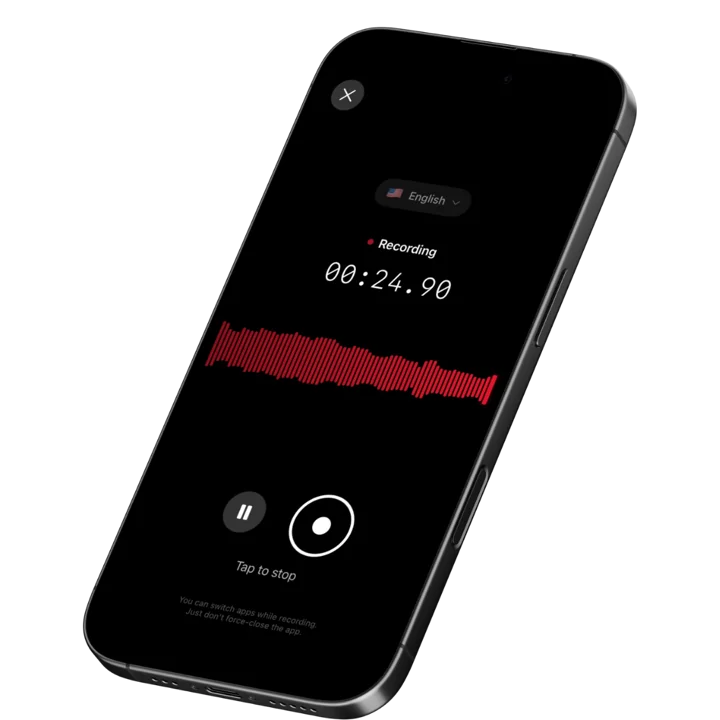
Speakwise is an iOS app that records through the iPhone microphone and returns a full transcript, an AI summary, and an extracted list of action items. For a mediator, the natural use is your own voice: step out after a caucus, talk for four minutes about where each side is, what moved, and what you want to test next, and get back a structured note instead of a raw audio file.
Why Speakwise Stands Out
Mediators lose more to delay than to bad notes. The session ends at six, you drive home, and the detailed memory of who conceded what and in which order fades before you write it up. Dictating while it is fresh preserves the sequence, and Speakwise turns that dictation into a summary with the open points separated out rather than a wall of text you still have to organize.
Because Speakwise records through the phone rather than by joining a meeting, nothing appears in the room. No bot, no participant notification, no visible recording indicator to a party who has not consented. That matters in a practice where the appearance of recording can derail the process on its own.
Speakwise also produces speaker labels, which is only relevant in the narrow case where the parties have agreed in writing to a recording, or in a co-mediation debrief with your colleague. Our comparison of transcription apps with speaker labels covers how well that separation holds up in practice. For everything else, treat this as a dictation tool, not a session recorder.
Key Features
- One-Tap Voice Notes: Dictate a caucus summary or a post-session note the moment you step out. One tap, no setup.
- AI Summaries: Your dictation comes back as a structured summary rather than a raw block of text, which is the difference between a note you file and a recording you never replay.
- Automatic Action Items: The follow-ups get separated out: the document one party agreed to produce, the figure you want to test, the date for the next session, the draft term sheet you owe them.
- Speaker Labels: Where a recording is agreed in writing by all parties, or in a co-mediation debrief, voices are separated in the transcript.
- 100+ Languages: Auto-detection across 100+ languages, useful in cross-border commercial mediation and community mediation with multilingual parties.
- Share and Export: Copy the transcript or summary as text, or share a link. That is how a note reaches your own file or a co-mediator, under whatever confidentiality terms you have agreed.
Pricing
Speakwise is a paid subscription through the App Store. Check the current price on the listing before you commit.
Best For
- Dictated caucus and post-session notes captured while memory is fresh
- Co-mediation debriefs between practitioners
- Drafting settlement terms and next-step lists from your own narration
- Multilingual and cross-border practices
Limitations
- iOS only, so mediators on Android need something else
- Not a confidentiality or compliance product; the confidentiality obligation is yours and is governed by your agreement to mediate and applicable law
- No integration with case management systems; you copy or export
- Recording the parties themselves is usually prohibited by the mediation agreement, which is a process constraint no app changes
Speakwise gets your hours back.
- ✓Built for in-person meetings, interviews, and site visits.
- ✓Trusted by recruiters, consultants, agents, and field pros.
- ✓One tap to record. Notion-ready summary in minutes.

2. Just Press Record - Best Low-Cost Private Recorder
Just Press Record is a straightforward iOS recorder with automatic transcription in 30+ languages and iCloud sync across iPhone, iPad, Mac, and Apple Watch. It is a one-time purchase of around $4.99 with no subscription, which makes it the cheapest serious option here.
It does exactly one thing well: record and transcribe. There is no AI summary, no action item extraction, and no meeting features, which some mediators will consider a feature rather than a gap.
Key Features
- One-time purchase with no subscription
- Automatic transcription in 30+ languages
- iCloud sync across iPhone, iPad, Mac, and Apple Watch
- Apple Watch recording for hands-free capture
Pricing
~$4.99 one-time purchase on the App Store.
Best For
- Mediators who want a private recorder and will write their own notes
- Practitioners who prefer a one-time purchase to a subscription
Limitations
- No AI summaries or action item extraction
- No speaker separation
- Transcription quality is below the AI-first tools on difficult audio
3. Apple Voice Memos - Best Free Built-In Option
Voice Memos ships with every iPhone and has produced on-device transcripts since iOS 18, on a faster engine in iOS 26. Nothing is uploaded for transcription, which is an honest advantage for a sensitive dictated note. It costs nothing and needs no account.
It will not summarize, extract action items, or separate speakers, and transcription supports English variants only.
Key Features
- Built into iOS with no subscription or account
- On-device transcription from iOS 18 onward
- Searchable across recordings by transcript text
- Works on iPhone 12 and later
Pricing
Free with iOS.
Best For
- Occasional dictated notes where you do the writing
- Mediators who want the smallest possible tool footprint
Limitations
- No AI summary and no action item extraction
- No speaker labels
- English variants only, with no standard transcript export formats
4. Otter.ai - Best for Agreed Online Mediation Recordings
Otter.ai transcribes meetings and its OtterPilot bot joins scheduled Zoom, Teams, and Google Meet calls automatically. Online mediation is now routine, and where the parties have expressly agreed in writing to a recording, Otter produces a transcript and summary with no manual setup.
The visible bot is worth thinking about carefully. It announces the recording to everyone present, which is appropriate when consent has been given and a problem when it has not.
The free Basic plan gives 300 minutes per month, caps each conversation at 30 minutes, and permits three lifetime file imports.
Key Features
- OtterPilot auto-joins Zoom, Teams, and Google Meet sessions
- Live transcript during the session
- Shared workspace with access controls
- AI summaries after each meeting
Pricing
- Free: 300 minutes/month, 30-minute per-conversation cap, 3 lifetime imports
- Pro:
$8.33/user/month billed annually ($16.99 monthly) - Business: ~$19.99/user/month billed annually
Best For
- Online mediation where all parties have agreed to a recording in writing
- Practices that want an automated workflow for agreed recordings
Limitations
- The bot is visible to everyone, so it is unsuitable for anything short of full consent
- The 30-minute free cap ends long before a mediation session does
5. Sonix - Best for Transcribing an Agreed Recording
Sonix is a file-based transcription service. You upload audio and get back a transcript with speaker diarization and AI summaries, across 53+ languages. It does not record; you bring the file.
For the narrow case where a recording exists with everyone's written agreement, such as a recorded settlement term readback or an agreed record of a final session, Sonix produces the cleanest multi-speaker transcript of the tools here.
Key Features
- Speaker diarization and AI summaries on every plan
- 53+ languages supported
- Timestamped transcripts with in-browser editing
- Standard export formats for a case file
Pricing
- Pay-as-you-go: ~$10 per audio hour
- Premium: ~$22/user/month plus ~$5 per audio hour
Best For
- Transcribing an agreed recording with several speakers
- Practices that need a clean, editable transcript for the file
Limitations
- No recording function; you supply the audio
- Hybrid subscription plus per-hour pricing is hard to predict for occasional use
6. Notta - Best for Multilingual and Mixed-Device Practices
Notta runs on iOS, Android, and the web, with automatic language detection and speaker-labeled transcripts. Community mediation programs and cross-border commercial practices often involve parties who are more precise in their first language, and co-mediators rarely all carry the same phone.
The free tier gives 120 minutes per month with a 3-minute cap per file, enough to test output quality and nothing more.
Key Features
- iOS, Android, web, and Chrome extension
- Automatic language detection with speaker separation
- Export to Word, PDF, TXT, and SRT
- Zoom and Google Meet integrations
Pricing
- Free: 120 minutes/month, 3-minute per-file cap
- Paid plans from ~$8 to ~$14/user/month depending on tier and billing
Best For
- Multilingual mediation and cross-border matters
- Co-mediation teams split across iPhone and Android
Limitations
- The 3-minute free file cap is unusable for real work
- Summaries need more editing than Speakwise output
How to Choose an App for Mediation Session Notes
Confidentiality comes before features here, and it narrows the field fast.
-
Start with your agreement to mediate: Most standard agreements prohibit recording by anyone. Court-connected and community programs frequently add their own prohibition. If recording is not expressly permitted in writing by every party, the answer is a dictation tool for your own notes, not a session recorder.
-
Consent and recording law: Where recording is contemplated, several US states require all parties to consent, and mediation confidentiality statutes may restrict what can later be disclosed regardless of consent. Our iOS meeting recording privacy and legal guide explains how consent rules vary. Take your own legal advice; nothing here is legal advice.
-
Think about discoverability: A recording or transcript that exists may become the subject of a later dispute about what was said in mediation, which is precisely what mediation privilege is designed to prevent. Many experienced mediators keep minimal notes deliberately. Decide your retention and deletion practice before you record anything. Our roundup on recording depositions covers the opposite case, where a verbatim record is the point.
-
Dictation quality over meeting features: If the honest use is your own voice after a session, the features that matter are summary quality and speed, not bot integrations. Test whether the summary organizes your rambling five-minute dictation into something you would actually file.
-
Where your notes live: Mediator notes are sensitive. Decide which device and which account hold them, who else can access them, and how long they are kept. Our roundup for marriage and family therapists covers similar handling questions in another confidential practice.
Frequently Asked Questions
What is the best app for mediators to record session notes?
Speakwise is the best app for mediators to record session notes in 2026, used for the mediator's own dictated notes rather than recording the parties. You talk for a few minutes after a caucus and get back a structured summary with open points and next steps separated out, which is faster and more complete than writing up hours later.
Can a mediator record a mediation session?
Usually not. Most agreements to mediate prohibit recording, many court-connected programs forbid it, and mediation confidentiality statutes in several states restrict later disclosure. Recording requires express written agreement from every party, and even then it may create a record that undermines the process. Dictating your own notes avoids the issue entirely.
What is the safest way to use a voice app in mediation?
Record only your own voice, alone, after the session or between caucuses. No party is recorded, no consent question arises, and you still capture the sequence of concessions while it is fresh. Set a retention rule for those notes and delete them on schedule, the same way you would treat any sensitive file material.
Is there a free app for mediation session notes?
Apple Voice Memos is free with iOS and transcribes on-device from iOS 18 onward, though it produces no summaries or action items. Just Press Record is a one-time purchase of around $4.99 with transcription in 30+ languages. Speakwise is a paid subscription through the App Store and adds AI summaries and action item extraction.
Do these apps make a mediation confidential?
No. Confidentiality in mediation comes from your agreement to mediate, applicable statutes, and court rules, not from software. No app on this list carries a compliance certification or changes your obligations. Treat any tool as a place where sensitive notes are stored, and apply the same care you would to any other part of your file.
Final Verdict
For mediators, the useful recommendation is narrow. Use a voice app for your own notes, not for the room.
Within that scope, Speakwise is the strongest option: it turns a four-minute dictation after a caucus into a structured summary with the open points and next steps listed, which is exactly the note most mediators write badly or late. Just Press Record is the best cheap alternative if you want a plain recorder with a one-time price, and Voice Memos is the free version of the same idea.
Otter and Sonix earn their place only in the narrow case where every party has agreed in writing to a recording, with Sonix producing the cleaner multi-speaker transcript. Notta covers multilingual and mixed-device practices.
Your agreement to mediate decides what is allowed here, not the app store. Read it before you record anything.
Download Speakwise from the App Store and capture your next post-session note before the details fade.
🎯 4.9★ App Store Rating | 📱 Built for iOS
