Best App for Optometrists to Record Exam Notes (2027)
TL;DR
The best app for optometrists to record exam notes in 2027 is Speakwise. The iPhone app turns a quick spoken note between lanes into a summary with action items, with a 7-day free trial. RevolutionEHR suits an optometry-native EHR, and Doctora suits ambient AI scribing.
Used by recruiters, executives, consultants, and more.
Best App for Optometrists to Record Exam Notes in 2027
Twenty-four exams in a day leaves seconds, not minutes, for documentation between patients. After a comprehensive exam you may have a fundus finding to flag and a counseling conversation about screen time, then the next patient is already in the lane. By evening, the morning's notes are noticeably thinner than the afternoon's. Six tools compared below, from EHRs to fast voice capture.
Best App for Optometrists to Record Exam Notes at a Glance (2027)
The best app for optometrists to record exam notes in 2026 falls into three groups, and most practices need more than one:
- Speakwise - Best for capturing spoken notes fast between lanes on your iPhone
- RevolutionEHR - Best optometry-native EHR with practice and optical integration
- Crystal Practice Management - Best combined EHR and practice management for independents
- My Vision Express - Best for optical-retail-heavy practices
- Doctora - Best ambient AI scribe built for eye care EHRs
- Apple Voice Memos - Best free built-in fallback for quick dictation
Your patient record lives in your EHR, and an ambient scribe writes into it. Speakwise sits outside that: it is a recording and notes app for getting your own spoken thoughts into text quickly, not a clinical documentation system.
1. Speakwise - Best for Fast Spoken Notes Between Lanes
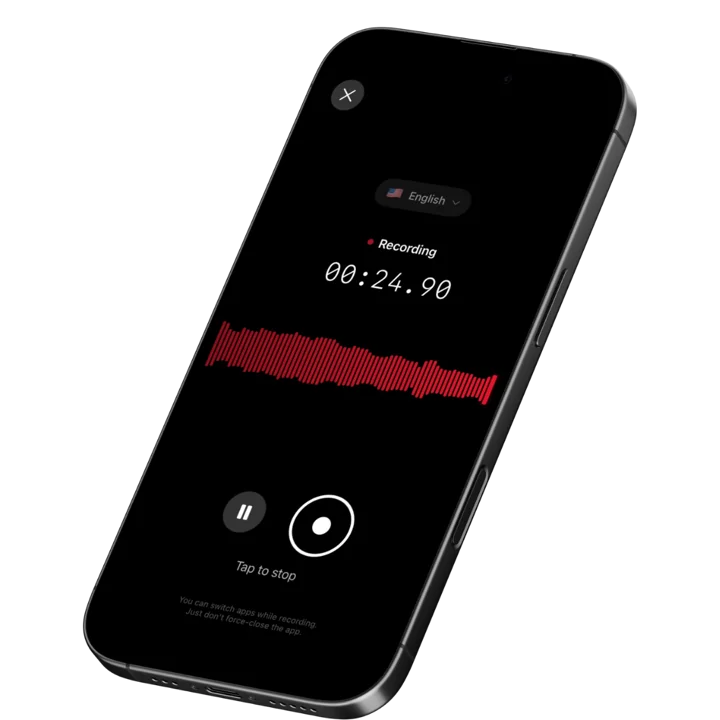
Speakwise is an iOS recording and AI notes app. You talk, it transcribes, and it returns a structured summary with action items pulled out. For an optometrist, the practical use is narrow: in the ten seconds after you leave a lane, you say out loud what you want to remember, and it becomes text you can work from when you chart. It is the difference between charting from memory at 6:40pm and charting from a written account of what you actually thought at 10:15am.
Why Speakwise Stands Out
Start with what it is not, because in a clinical setting that matters more than the feature list. Speakwise is not an EHR. It does not write to the chart, it does not suggest codes, it does not integrate with RevolutionEHR or OfficeMate or MaximEyes, and it is not a clinical documentation system or a place to store a patient record. All of that belongs in your practice's EHR under whatever vendor agreements your practice holds. Speakwise is a general-purpose recording and notes app that happens to be very fast at one specific job.
That job is closing the gap between thinking something and writing it down. High-volume optometry compresses documentation into whatever minutes are left after clinic, and detail degrades in direct proportion to the delay. What survives to 6:40pm is the exam findings, because those are numbers you wrote on a workup sheet. What does not survive is the reasoning, the counseling conversation, the specific thing the patient said about their symptoms, and the follow-up you told yourself to remember. A ten second spoken note preserves it.
The second use is everything around the exam lane: staff huddles, a conversation with a rep about a new lens design, a training session with a new tech, a discussion with an associate about a referral. Speakwise applies speaker labels so a multi-person conversation reads as a dialogue, and it extracts action items automatically. Adjacent chairside specialties run into the same documentation compression, which our guide to note-taking apps for dentists covers in detail.
If you are specifically evaluating ambient documentation of the patient encounter itself, that is a different product category with different requirements, and our roundup of AI medical scribe apps on iPhone is the more relevant comparison.
Key Features
- One-tap voice capture: Record a spoken note in the seconds between lanes without opening a chart or finding a keyboard.
- AI summaries: A rushed spoken account becomes a clean, structured summary you can read at a glance when you sit down to chart.
- Action item extraction: Follow-ups you mention out loud, such as ordering a specific test, calling a patient back, or checking a referral, come back as a list.
- Speaker labels: Staff huddles, training sessions, and rep meetings are separated by speaker, so commitments stay attributable.
- 100+ languages: Automatic language detection, useful in practices serving multilingual patient populations.
- Long recordings: Handles full staff meetings, CE sessions, and training blocks, not just short memos.
- Export and share: Copy or export the transcript and summary into your own documents. Share notes by link with colleagues.
Pricing
- Paid subscription via the App Store. Speakwise is a paid iOS app with no free tier. Check the current price on the App Store listing before subscribing.
Best For
- Capturing your own spoken clinical reasoning between lanes
- Practices where charting drifts to the end of the day
- Staff huddles, training sessions, and vendor conversations
- Multilingual practices where patient conversations cross languages
Limitations
- iOS only, with no Android or desktop version
- Not an EHR: no charting, no chart write-back, no coding, no billing, no imaging
- Not a clinical documentation system or a system of record for patient information
- Paid subscription with no free tier
Consent and Recording
Recording a patient requires their explicit agreement, and recording consent laws vary by country and by US state. Ask directly, explain that the recording is only used to help you write notes, and get a clear yes before you start. Follow your practice's policy and your state board's guidance on recording, storage, and retention of patient information, and confirm with your practice what may and may not be recorded on a general-purpose app. Where recording patients is not permitted, record only your own spoken observations after the encounter, with no patient audio involved.
Speakwise gets your hours back.
- ✓Built for in-person meetings, interviews, and site visits.
- ✓Trusted by recruiters, consultants, agents, and field pros.
- ✓One tap to record. Notion-ready summary in minutes.

2. RevolutionEHR - Best Optometry-Native EHR
RevolutionEHR is a cloud-based platform built specifically for optometry, unifying the clinical exam with the optical dispensary so a prescription entered in the lane appears immediately for the optician. Charting templates adapt to individual exam styles, and the practice management side covers scheduling, billing, and inventory. It is one of the most commonly recommended systems for independent optometric practices.
Key Features
- Optometry-specific exam templates and charting workflows
- Integrated optical dispensary and prescription fulfillment
- Scheduling, billing, claims, and inventory management
- Cloud-based with no on-premise server required
- Integrations with ambient AI scribes including Doctora
Pricing
- From ~$319 per month, scaling with practice size and modules
Best For
- Independent optometry practices wanting exam and optical in one system
- Practices moving from server-based software to cloud
Limitations
- Higher monthly cost than general-purpose EHRs
- Charting is still typing and clicking unless paired with a scribe
- Customization takes setup time to fit your exam style
3. Crystal Practice Management - Best Combined EHR and PM for Independents
Crystal Practice Management, widely known as Crystal PM, combines EHR and practice management for eye care practices, with templates covering comprehensive eye exams, contact lens fittings across modalities, dry eye evaluations, and vision therapy. It has a long-standing reputation among independent practices for flexibility and comparatively approachable pricing.
Key Features
- Exam templates for comprehensive, contact lens, dry eye, and vision therapy visits
- Combined EHR and practice management in one system
- Imaging and device integration
- Recall and patient communication tools
- Supported by ambient scribe integrations including Doctora
Pricing
- Quote-based. Crystal PM does not publish standard list pricing publicly.
Best For
- Independent practices wanting broad template coverage
- Practices with vision therapy or specialty contact lens services
Limitations
- Interface is more dated than newer cloud-first competitors
- Pricing requires a sales conversation
- Server and IT considerations depending on deployment
4. My Vision Express - Best for Optical-Retail-Heavy Practices
My Vision Express is a cloud-based EHR and practice management system for optometrists and ophthalmologists with unusually strong optical point-of-sale roots. If a large share of your revenue comes through the dispensary, the retail side is more developed than in exam-first systems, and the EHR side has been steadily expanded. Doctora's ambient scribe is available in standalone mode alongside it while direct write-back is developed.
Key Features
- Strong optical point-of-sale, inventory, and lab order management
- Cloud-based EHR with exam charting
- Patient recall, marketing, and communication tools
- Multi-location support for practice groups
Pricing
- Quote-based, varying by locations and modules
Best For
- Practices where optical retail is a major revenue driver
- Multi-location groups needing centralized inventory
Limitations
- Clinical charting is less refined than exam-first competitors
- Pricing is not published
- Scribe write-back support lags other eye care EHRs
5. Doctora - Best Ambient AI Scribe for Eye Care
Doctora is an ambient AI scribe built for eye care rather than adapted from general medicine, which matters because ophthalmic exam documentation has its own structure and vocabulary. It integrates with RevolutionEHR, Crystal PM, OfficeMate and ExamWRITER, Eyefinity, and MaximEyes, with more EHR adapters in development, and it can run standalone for practices whose EHR write-back is not yet supported. This is the category to look at if you want the encounter itself documented automatically.
Key Features
- Ambient documentation of the patient encounter in eye care language
- Direct integration with major optometry and ophthalmology EHRs
- Structured note output matched to exam documentation conventions
- Standalone mode for EHRs without a completed write-back adapter
Pricing
- Quote-based, typically per provider per month. Contact Doctora for current pricing.
Best For
- High-volume practices wanting the encounter documented automatically
- Optometrists whose charting regularly runs past clinic hours
Limitations
- Per-provider cost on top of your EHR subscription
- EHR write-back coverage varies by platform
- Requires patient consent and practice-level agreements before use
6. Apple Voice Memos - Best Free Built-In Fallback
Voice Memos is already on every iPhone and costs nothing. Tap, dictate the thing you want to remember, done. On iPhone 12 and later it produces a transcript in supported languages. It has no summaries, no action items, no speaker labels, and no organization, so a busy month leaves you with a long list of files you will not go back through. For testing whether the between-lanes voice habit sticks, it is a reasonable free start.
Key Features
- Free and pre-installed on every iPhone
- One-tap recording with iCloud sync
- Transcripts on iPhone 12 and later in supported languages
- No account, no setup
Pricing
- Free, included with iOS
Best For
- Testing the between-lanes dictation habit at zero cost
- Occasional notes where raw audio is enough
Limitations
- No summaries, action items, or speaker labels
- No organization or search across recordings
- Nothing that turns audio into a usable note
How to Choose an Exam Notes App as an Optometrist
- Know which layer you are shopping for. EHR, ambient scribe, and voice capture are three different products. Confusing them wastes evaluation time. The EHR is the record, the scribe writes into it, and a voice app captures your own thinking before either.
- Measure your actual charting lag. If you finish notes within the visit, your EHR alone is enough. If you routinely chart after clinic, either an ambient scribe or a fast capture habit will recover more than any template redesign.
- Verify EHR integration before you buy a scribe. Write-back support varies by platform, and standalone mode means someone still copies the note across. Confirm your specific EHR is supported today, not on a roadmap.
- Handle patient consent and practice policy first. Any tool that touches patient encounters requires explicit patient agreement and the right agreements at practice level. Sort that before you evaluate features.
- Test in the lane, not at a desk. Pre-test room noise, autorefractors, and a patient waiting change how usable a tool feels. Anything that adds friction inside the lane will be abandoned within a week.
Frequently Asked Questions
What is the best app for optometrists to record exam notes?
For capturing your own spoken notes fast between lanes, Speakwise is the strongest pick: record on your iPhone and get a transcript, summary, and action items back. For the patient record itself, an optometry EHR such as RevolutionEHR, Crystal PM, or My Vision Express is the appropriate system, optionally paired with an ambient scribe.
Can optometrists use an AI scribe for eye exams?
Yes. Doctora, EVAA, and Moyae are ambient scribes built for eye care, and several integrate directly with optometry EHRs including RevolutionEHR, Crystal PM, OfficeMate, Eyefinity, and MaximEyes. They require patient consent and practice-level vendor agreements, and write-back support varies by EHR, so confirm your platform is supported.
Do I need patient consent to record an eye exam?
Yes. Recording a patient requires their explicit agreement, and consent laws differ by country and US state. Explain what the recording is used for, get a clear yes, and follow your practice policy and state board guidance on storage and retention. Where recording is not permitted, dictate your own observations afterward instead.
How do optometrists finish charting before the end of clinic?
Two things move the needle: reducing the delay between the exam and the note, and reducing typing. A ten second spoken note between lanes preserves reasoning that otherwise fades. An ambient scribe removes the typing entirely for the encounter itself. Template tuning inside the EHR helps least.
Is a voice recording app a replacement for an optometry EHR?
No. A voice app captures spoken notes and turns them into text. It has no charting, coding, billing, imaging, or optical integration, and it is not a system of record for patient information. Use it as a capture step that feeds the note you write in your EHR, never as the chart itself.
Final Verdict
Optometry documentation is a timing problem before it is a software problem. Exam findings survive because they get written on a workup sheet in the moment. Clinical reasoning, counseling detail, and follow-up intentions do not, because nothing captures them until hours later.
Speakwise is the best pick for closing that specific gap. Ten seconds of spoken note between lanes gives you a written, structured account with action items already extracted, and you chart from that rather than from recall. It is explicitly not an EHR, not a scribe, and not a clinical record system, and it should not be used as one.
For the record itself, RevolutionEHR is the strongest optometry-native cloud platform, Crystal PM is the flexible independent favorite, and My Vision Express suits optical-retail-heavy practices. If the goal is to eliminate charting rather than accelerate it, Doctora is the eye-care-specific ambient scribe worth evaluating against your EHR's integration list.
Download Speakwise from the App Store and capture the thought you had in the lane before the next patient makes you forget it.
🎯 4.9★ App Store Rating | 📱 Built for iOS
