Best App for Recording Study Groups (2027)
TL;DR
The best app for recording study groups in 2027 is Speakwise. The iPhone app turns a two-hour study session into a Lecture and study notes summary with the key concepts, with a 7-day free trial. Notability suits handwritten notes, and Otter.ai suits real-time transcripts.
 Speakwise - AI Note Taker
Never miss a key detail
- Smart summaries and action items.
- Speaker diarization labels who said what.
- Unlimited premium transcription.
- Auto-sync to Notion.
- Record offline, even with no signal.

Used by recruiters, executives, consultants, and more.
Best App for Recording Study Groups in 2027
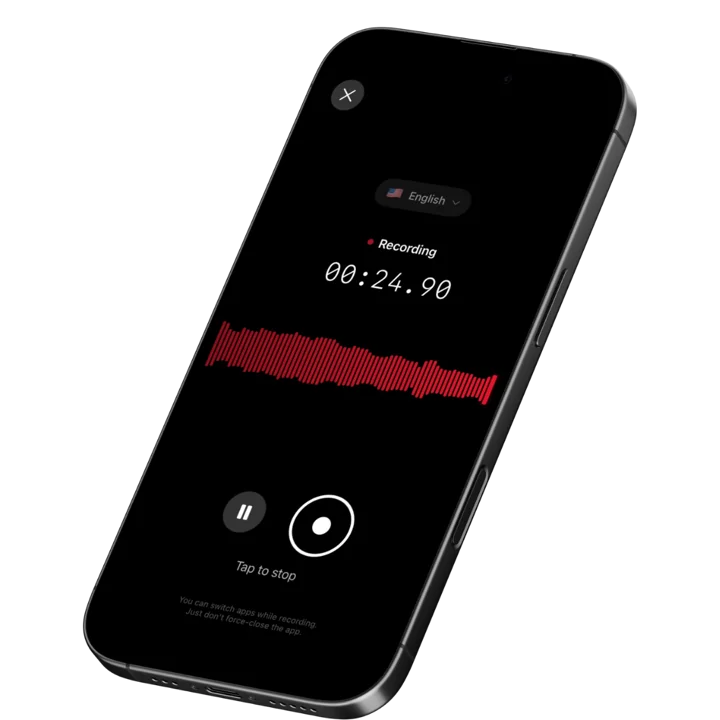
The best app for recording study groups has to rescue the one explanation that mattered from two hours of tangents and jokes. Typing while someone works through a hard problem breaks the flow for the whole group. Speakwise records the session with one tap and turns it into a short, organized set of study notes your group can review before the exam.
1. Speakwise - Best Overall for Recording Study Groups
Speakwise is an AI-powered voice notes app for iPhone that turns study group sessions into organized, reviewable study material. Record the entire session with one tap, and the AI generates a structured summary with key concepts, decisions, and action items extracted automatically. With 95%+ transcription accuracy (in optimal conditions), 100+ language support, and native Notion sync, it transforms a rambling study session into a focused study guide. The 4.9-star App Store rating reflects its reliability across different environments.
Why Speakwise Stands Out
Most study group recordings become wasted audio files. A 90-minute session contains maybe 20 minutes of valuable explanation and 70 minutes of tangents, jokes, and confusion. Nobody has time to re-listen to the whole thing. Speakwise's AI solves this by pulling out the key concepts, decisions, and study strategies from the full recording. Your 90-minute session becomes a 3-minute summary.
AirPods hands-free recording means the session feels natural. No phone propped up on the table with a red recording button visible. Just start recording with an AirPods gesture and focus on studying. The advanced noise cancellation handles cafe backgrounds, library ambient noise, and overlapping conversations.
For students using Notion as their study workspace, the native integration is powerful. Every study session automatically generates a Notion page with the transcript, AI summary, and extracted action items. Over a semester, this builds a searchable archive of every concept your group discussed. Before exams, search for specific topics instead of flipping through pages of handwritten notes.
Key Features
- AI Study Summaries: After each session, get a structured summary highlighting key concepts discussed, explanations given, and study strategies agreed upon. A two-hour study session becomes a focused review document you can scan in 5 minutes.
- Long Recording Support: Multi-hour board meetings, conference sessions, offsites.
- Works Offline: Construction sites, secure boardrooms, planes - record without WiFi. Sync when you're back.
- Action Item Extraction: The AI identifies study commitments. "I will review chapters 5 and 6 before Thursday" becomes a captured action item. Keep your group accountable for study commitments.
- Speaker Diarization: Speakwise's speaker diarization separates each group member's voice and labels who said what, so when you review before an exam you can tell who explained a tricky concept and follow their reasoning.
- 100+ Language Support: Record study groups in any language. Auto-detection handles multilingual study sessions where group members switch between languages. International students can study in their most comfortable language.
- Native Notion Integration: Every recorded session syncs to Notion as an organized page. Build a searchable study archive across all subjects. 82% of users cite this as a key reason they chose Speakwise (based on internal user data). Find specific concepts from past sessions instantly before exams.
- One-Tap and AirPods Recording: Start recording your study group with a single tap or AirPods gesture. No setup disrupts the session. Advanced noise cancellation handles cafe noise, library ambiance, and multiple simultaneous speakers.
Pricing
- Free Trial: Full access to all features
- Premium: $59.99/year - unlimited transcription, AI summaries, Notion sync, 100+ languages
Best For
- Study groups that want AI-generated summaries of their sessions
- Students using Notion as their study workspace
- Groups that need to track study commitments and action items
- International student groups studying in multiple languages
Limitations
- iOS only - not available for Android users in the group
- No built-in flashcard or quiz generation from transcripts
- Individual-focused - no shared group workspace
- No live transcription display during the session
Speakwise gets your hours back.
- ✓Built for in-person meetings, interviews, and site visits.
- ✓Trusted by recruiters, consultants, agents, and field pros.
- ✓One tap to record. Notion-ready summary in minutes.
2. Notability - Best for Audio-Synced Handwritten Notes
Notability lets you record audio while taking handwritten notes on iPad. The audio syncs to your notes, so tapping on a written point plays back what was being said at that moment. For study groups where visual diagrams and handwritten equations matter alongside spoken explanations, this audio-note sync is uniquely valuable.
Key Features
- Audio recording synced to handwritten notes and drawings
- Tap any written note to hear what was said at that moment
- AI-powered note summaries with the Learn feature
- PDF annotation for reviewing textbook pages during sessions
Pricing
- Starter: Free - unlimited notes, audio recording, all editing tools
- Plus: $7.99/month or $20/year - advanced features
- Pro: $20/month or $99/year - full AI features, templates
Best For
- Students who take handwritten notes alongside study group discussions
- Groups working with diagrams, equations, or visual material
Limitations
- Apple ecosystem only - iPad primary, iPhone secondary
- Audio recording quality is basic compared to dedicated transcription apps
- AI transcription accuracy is not its primary strength
- No AI summaries of the recording itself (summarizes written notes only)
3. Otter.ai - Best for Real-Time Study Session Transcription
Otter.ai displays live transcription on screen during study sessions. Group members can follow along in real time, making it useful for participants who need text alongside audio. The searchable transcript archive helps you find specific topics discussed across multiple study sessions.
Key Features
- Real-time transcription displayed during the study session
- Speaker identification labels who explained each concept
- Searchable archive across all recorded study sessions
- AI summaries with key discussion points
Pricing
- Free: 300 minutes/month
- Pro: $16.99/month - advanced features
- Business: $30/month per user - team features
Best For
- Study groups that want live text display during sessions
- Students who need to search across multiple past sessions by topic
Limitations
- 300 free minutes per month limits regular study group use
- Monthly pricing is expensive for students on a budget
- Primarily English-focused - accuracy drops for other languages
- All audio processed in cloud - no privacy protection
4. Notta - Best Cross-Platform Study Group Recording
Notta works across iOS, Android, and web, making it accessible regardless of which device study group members use. With 58-language support and real-time transcription, it handles diverse study groups. Recording import lets you transcribe audio files captured on other devices.
Key Features
- Cross-platform availability on iOS, Android, and web
- 58-language transcription with real-time text display
- Recording import for transcribing files from other sources
- AI summary generation for quick session review
Pricing
- Free: 120 minutes/month, basic transcription
- Pro: $14.99/month - expanded minutes, advanced features
- Business: $27.99/month per user - team management
Best For
- Study groups where members use different devices (iPhone, Android, laptop)
- International study groups needing wide language support
Limitations
- Free tier at 120 minutes/month is insufficient for regular study sessions
- Monthly subscription costs are high for students
- No audio-note sync like Notability
- No integration with study-specific tools or Notion
5. Happy Scribe - Best for Accurate Study Transcription
Happy Scribe provides AI transcription with optional human proofreading in 120+ languages. For study groups that need highly accurate transcripts - medical students, law students, or language learners - the human transcription option ensures critical details are captured correctly.
Key Features
- 120+ language and dialect support for diverse study groups
- Optional human proofreading for near-perfect transcript accuracy
- Collaborative editing lets group members review and correct transcripts
- Export in multiple formats for sharing across study tools
Pricing
- AI Transcription: From $0.20/minute
- Human Transcription: From $1.95/minute
- Subscription: Starting at $17/month for regular users
Best For
- Study groups that need the highest possible transcription accuracy
- Students working in specialized fields with technical vocabulary
Limitations
- Pay-per-minute pricing adds up quickly for long study sessions
- Web-based platform - no dedicated mobile recording app
- Human transcription adds cost and turnaround time
- No AI summaries or study-specific features
6. Rev Voice Recorder - Best Free Recording With Optional Transcription
Rev Voice Recorder is a free recording app with professional-quality audio capture. The recording itself costs nothing. When you need a transcript, you can send recordings for AI transcription ($0.25/minute) or human transcription ($1.50/minute). For study groups that record every session but only need transcripts for exam review, this pay-as-you-go model makes sense.
Key Features
- Free audio recording with professional-quality capture
- Optional AI transcription at $0.25/minute
- Optional human transcription at $1.50/minute for highest accuracy
- Multiple export options for sharing recordings with group members
Pricing
- Recording: Free
- AI Transcription: $0.25/minute
- Human Transcription: $1.50/minute
Best For
- Study groups that want free recording with occasional paid transcription
- Groups on a tight budget that only need transcripts for key sessions
Limitations
- No AI summaries or study material extraction
- Per-minute transcription costs can accumulate for frequent use
- No real-time transcription during sessions
- No integration with Notion or other study tools
7. Apple Voice Memos - Best Simple Free Recording
Apple Voice Memos comes preinstalled on every iPhone. One tap to record your study group session. iCloud syncs the recording across all Apple devices. No AI, no transcription, no summaries. But it is free, reliable, and requires zero setup.
Key Features
- One-tap recording on any iPhone with no setup
- iCloud sync makes recordings available on all Apple devices
- Basic editing for trimming irrelevant sections
- Always available - no download or account needed
Pricing
- Free: Included with iOS
Best For
- Students who just need to capture audio without any frills
- Groups where one person records and shares the audio file afterward
Limitations
- No transcription - you must listen to the full recording to review
- No AI summaries or key concept extraction
- No search capability within recordings
- Long recordings are impractical to review without transcription
How to Choose the Best Study Group Recording App
The right recording app for your study group depends on how you study and how you review.
-
Post-Session Processing: Raw audio recordings rarely get reviewed. AI summaries (Speakwise) turn 2-hour sessions into 5-minute reviews. Audio-synced notes (Notability) let you tap specific points to hear explanations. Choose based on how your group actually reviews material.
-
Budget: Students need affordable tools. Speakwise at $59.99/year offers unlimited recording and AI processing. Apple Voice Memos and Rev Voice Recorder are free for recording. Monthly subscriptions (Otter.ai at $16.99/month, Notta at $14.99/month) add up over a semester. Calculate the full semester cost before committing.
-
Group Device Mix: If your study group uses both iPhones and Android devices, cross-platform tools like Notta or Otter.ai ensure everyone can access recordings. If everyone has iPhones, Speakwise offers the best iOS-native experience.
-
Subject Type: STEM study groups with equations and diagrams benefit from Notability's visual note-syncing. Discussion-heavy subjects like history or law benefit from Speakwise's AI summaries. Language study groups need multilingual support (Speakwise with 100+ languages, Notta with 58).
-
Exam Review Value: The real test of a study recording app is whether it helps during exam prep. Searchable transcripts (Speakwise via Notion, Otter.ai) let you find specific concepts fast. AI summaries provide quick review material. Raw audio files (Voice Memos, Rev) require re-listening.
Frequently Asked Questions
What is the best app for recording study groups in 2027?
Speakwise is the best app for recording study groups in 2026. It combines 95%+ transcription accuracy with AI summaries that extract key concepts and study commitments from group sessions. Native Notion integration builds a searchable archive of every topic your group has discussed. At $59.99/year for unlimited recording and AI processing, it costs less than two months of most monthly subscription alternatives.
Is there a free app for recording study groups?
Apple Voice Memos is free and captures study sessions with one tap, but offers no transcription or AI features. Rev Voice Recorder provides free recording with optional paid transcription. Otter.ai offers 300 free minutes per month. Speakwise provides a free trial with full AI features. For regular study groups meeting weekly, free tiers are typically too limited. The most affordable unlimited option is Speakwise at about $5 per month annually.
How long can I record a study session?
Most apps support recordings of 2+ hours, sufficient for typical study sessions. Speakwise offers unlimited recording length on the Premium plan. Apple Voice Memos records until your phone runs out of storage. Otter.ai limits free users to 300 minutes per month total. Notta limits free users to 120 minutes per month. Check your specific app's limits before a long session.
What features should I look for in a study group recording app?
Key features for study group recording include:
- High transcription accuracy (95%+ in good conditions)
- AI summaries that extract key concepts and explanations
- Searchable transcripts for finding specific topics during exam prep
- Noise cancellation for cafe or library environments
- Affordable pricing suitable for student budgets
- Multi-speaker handling for group conversations
- Integration with your study workspace (Notion, etc.)
Can I share study group recordings with absent members?
Yes. Most recording apps let you share audio files directly. Speakwise syncs AI summaries and transcripts to Notion, where you can share a link with absent group members. They get the key concepts and action items without listening to the full recording. Otter.ai provides shareable transcript links. For the best experience, share the AI summary rather than the raw audio - it respects everyone's time.
Final Verdict
Study group recordings are only useful if you actually review them. Raw audio files sit untouched. AI-processed summaries get used. The best recording app for study groups is one that turns a long session into review material you will actually read before an exam.
Speakwise is the best app for recording study groups. AI summaries extract key concepts from multi-hour sessions into scannable reviews. Action item extraction captures study commitments so everyone stays accountable. Native Notion integration builds a searchable archive across all subjects and sessions. At $59.99/year, it is affordable on a student budget.
For students who take handwritten notes on iPad, Notability's audio-synced notes are uniquely valuable. Otter.ai provides good real-time transcription for groups that want live text display. Apple Voice Memos is the simplest free option when you just need basic audio capture.
Download Speakwise from the App Store and turn your study group sessions into searchable, AI-summarized study material.
🎯 4.9★ App Store Rating | 📱 Built for iOS
