Best App for School Counselors to Record Student Session Notes (2027)
TL;DR
The best app for school counselors to record student session notes in 2027 is Speakwise. Open the iPhone app when the door closes, and it turns your spoken recap into a structured summary, with a 7-day free trial. SCUTA suits the documentation system of record.
 Speakwise - AI Note Taker
Never miss a key detail
- Smart summaries and action items.
- Speaker diarization labels who said what.
- Unlimited premium transcription.
- Auto-sync to Notion.
- Record offline, even with no signal.

Used by recruiters, executives, consultants, and more.
Best App for School Counselors to Record Student Session Notes in 2027
A school counselor might see fourteen students in a day, and every single one of them needs a note written afterward. Reconstructing six conversations from memory at 3:15 while a parent waits on hold is how detail gets lost. Speakwise lets you dictate the note in the ninety seconds after the door closes, then turns your own spoken recap into a structured, organized summary.
Best App for School Counselors to Record Student Session Notes at a Glance (2027)
The best app for school counselors to record student session notes in 2027 is Speakwise for dictating the note immediately after a session, paired with SCUTA as the documentation system of record. The full ranking:
- Speakwise - Best overall for dictating a session note in the minute after the student leaves
- SCUTA - Best documentation system of record with ASCA-aligned time analysis
- Panorama Education - Best for SEL screening data and intervention tracking at the district level
- Apple Voice Memos and iOS Dictation - Best free built-in option
- Otter.ai - Best for transcribing adult meetings such as SST, 504, and IEP sessions
- Google Docs Voice Typing - Best free option for districts already on Google Workspace
One point shapes this entire list: recording a student counseling session is a different activity from recording your own note about it, with completely different consent, policy, and privacy implications. Every recommendation here is built around the second one.
1. Speakwise - Best Overall for Dictated Post-Session Notes
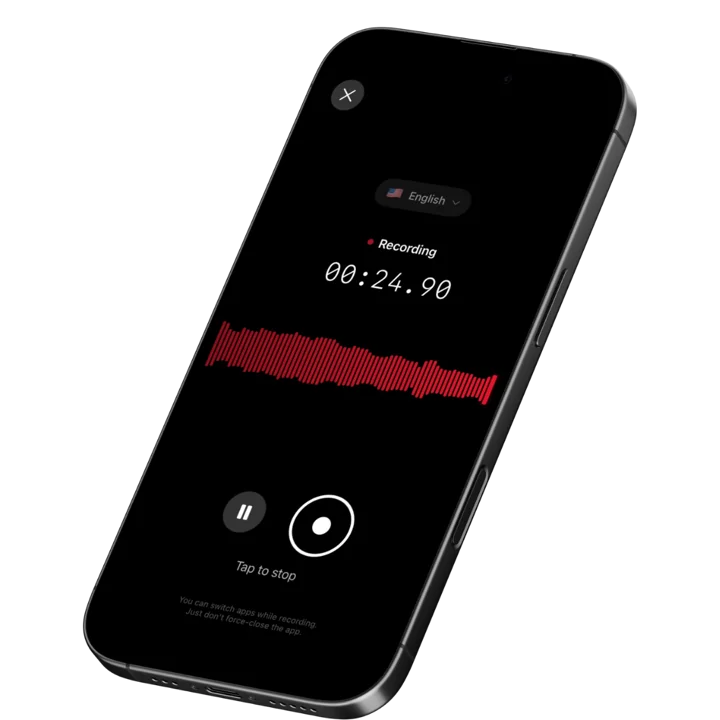
Speakwise is an iOS app that records through the iPhone microphone and converts what you say into a structured note with an AI summary and extracted follow-up items. For a school counselor, it is a dictation tool, not a session recorder. The student leaves, you close the door, you talk for sixty to ninety seconds about what came up and what happens next, and the note is written before the next knock.
Speakwise runs on a paid subscription through the App Store. It is a recording and notes tool with no education-specific compliance certification, so treat it the way you would treat any personal device workflow: follow your district's policy on where student-identifying information may live, and de-identify where you reasonably can.
Why Speakwise Stands Out
Counselors do not lose notes because they are disorganized. They lose notes because the documentation window is four minutes long and typing takes eight. Speaking is roughly three times faster than typing, and the gap is wider when you are describing something nuanced. A dictated note captures the presenting concern, the intervention you used, the student's affect, and the follow-up plan in the time it takes to walk back to your desk.
The AI summary is what separates dictation from a pile of audio files. A rambling verbal note becomes an organized summary, and the follow-ups are pulled out on their own: call the parent, loop in the school psychologist, check attendance Friday, schedule the next check-in. Those extracted items are the part that actually falls through the cracks in a busy week, and they are the part a counselor is professionally accountable for. The same capture pattern is why social workers use dictated documentation to survive high caseloads.
Speakwise also handles the adult side of the job, where recording is a normal and consented practice. SST meetings, 504 meetings, transition planning, and parent conferences involve several speakers and produce commitments that everyone needs a record of. Speaker labels separate voices in the transcript so it is clear who agreed to what, and you can share a summary link with the team afterward. That is the same problem school principals face across their meeting load, and it is where a recording tool genuinely belongs in a school building.
For multilingual campuses, transcription in 100+ languages covers parent meetings conducted in a family's home language.
Key Features
- One-tap dictation: Record your session note by talking, immediately after the student leaves, on the phone already in your pocket.
- AI summaries: Turns a verbal note into an organized summary rather than an audio file you have to listen back to.
- Action item extraction: Pulls out the calls, referrals, and check-ins you committed to, which is the part that gets lost across a fourteen-student day.
- Speaker labels: In consented adult meetings such as 504 or SST sessions, diarization keeps each participant's contributions distinct.
- Long recordings: Handles a full team meeting in a single session.
- Share and export: Copy or export the text into SCUTA, your student information system, or your own documentation of record. Share a summary link with colleagues where appropriate.
- 100+ languages: Supports parent conferences conducted in the family's home language.
Pricing
- Paid subscription purchased through the App Store. Current pricing is shown on the Speakwise App Store listing.
Best For
- Counselors dictating session notes between students
- Documenting SST, 504, and IEP meetings where all adults have consented
- Parent conferences that produce commitments needing a shared record
- Counselors with caseloads large enough that same-day documentation is otherwise impossible
Limitations
- iOS only, with no Android or desktop version
- Not a student records system and not your documentation of record
- No ASCA time analysis, caseload reporting, or intervention tracking
- Not appropriate for recording counseling sessions with students
Speakwise gets your hours back.
- ✓Built for in-person meetings, interviews, and site visits.
- ✓Trusted by recruiters, consultants, agents, and field pros.
- ✓One tap to record. Notion-ready summary in minutes.
2. SCUTA - Best Documentation System of Record
SCUTA, the School Counselor's Uniform Tracking and Accountability tool, was built specifically for the documentation problem counselors face: recording what services you provided, to whom, and how long they took, in a structure that maps to the ASCA National Model. It holds student case notes alongside use-of-time analysis and generates the reports counselors need when a board or principal asks what the counseling program actually does. It eliminates the double documentation problem of keeping personal notes in one place and accountability data in another.
Key Features
- Confidential student case notes tied to individual students
- ASCA National Model aligned use-of-time tracking
- More than 200 built-in reports for program accountability
- Designed around counselor workflows rather than adapted from generic case management
Pricing
- Annual per-user pricing with volume discounts for districts; free for university counselor education programs. Contact SCUTA for current rates.
Best For
- Counselors who need one system for both case notes and ASCA accountability data
- Departments defending program value with hard use-of-time numbers
Limitations
- Data entry is still typing, which is the bottleneck during a full caseload day
- No voice capture or dictation workflow
- Reporting depth is more than a solo counselor at a small school needs
3. Panorama Education - Best for SEL Data and Intervention Tracking
Panorama is a district-level platform for social-emotional learning surveys, early warning indicators, and intervention tracking. It answers questions a note-taking tool cannot: which students are flagged across attendance, behavior, and course performance, and whether the interventions assigned to them are working. Counselors use it to prioritize a caseload rather than to write up individual sessions.
Key Features
- SEL and school climate surveys with benchmarked results
- Early warning indicators combining attendance, behavior, and grades
- Intervention assignment and progress monitoring
- District and school level dashboards
Pricing
- Custom district pricing
Best For
- Districts running MTSS with structured intervention tracking
- Counseling departments that need data to target limited time
Limitations
- District purchase, not something an individual counselor can adopt
- Not a session note tool
- Survey and dashboard focused rather than documentation focused
4. Apple Voice Memos and iOS Dictation - Best Free Built-In Option
Every iPhone already has two ways to turn speech into a note. Voice Memos records audio instantly with no account or setup, and recent iOS versions add a transcript. Keyboard dictation types directly into any text field, including a browser tab open to your documentation system, which means you can speak a note straight into the system of record without a second app. Neither costs anything, and for a counselor who wants to test whether verbal capture fits their day, that is the right starting point.
Key Features
- Free and preinstalled on every iPhone
- Voice Memos records instantly, with transcription on recent iOS versions
- Keyboard dictation types into any app or web form
- Syncs across Apple devices via iCloud
Pricing
- Free
Best For
- Counselors testing dictation before committing to any paid tool
- Speaking notes directly into an existing documentation platform
Limitations
- No AI summaries and no extracted follow-up items
- Voice Memos produces an unorganized chronological list of recordings
- Dictation accuracy drops in noisy hallways and offices
5. Otter.ai - Best for Adult Team Meetings
Otter.ai transcribes in real time with automatic speaker identification, which fits the meeting side of a counselor's job rather than the session side. SST, 504, IEP, and department meetings all involve multiple adults and produce decisions everyone needs recorded accurately. The free tier gives 300 minutes per month with a 30-minute cap per conversation, which covers a light meeting load but not much more.
Key Features
- Real-time transcription with automatic speaker identification
- Searchable archive shared across a team
- Browser and mobile access
- Meeting bot for virtual meetings on Zoom, Meet, and Teams
Pricing
- Free: 300 minutes per month, 30 minutes per conversation
- Pro: from ~$8.33 per user per month billed annually
- Business: from ~$19.99 per user per month billed annually
Best For
- Documenting consented adult meetings with several participants
- Counseling departments that want a shared searchable meeting archive
Limitations
- Free tier conversation limit is shorter than most IEP meetings
- Built for meetings, so summaries are shaped around business decisions
- Cloud-based transcription requires a district privacy review before use with any student information
6. Google Docs Voice Typing - Best Free Option on Google Workspace
Most districts already run Google Workspace for Education, which makes voice typing in Google Docs the lowest-friction paid-for-already option in the building. Open a doc, turn on voice typing, and speak your note. It lands inside an environment your district has already vetted and where sharing permissions are already governed. There is no summarization and no structure, but the privacy conversation is usually already settled.
Key Features
- Voice typing built into Google Docs at no additional cost
- Operates inside the district's existing Workspace tenant
- Sharing and retention governed by existing district settings
- Works on any device with Chrome
Pricing
- Included with Google Workspace for Education
Best For
- Districts that have already standardized on Google Workspace
- Counselors who need the simplest possible privacy answer
Limitations
- Requires a browser and a stable connection, so it is a desk tool
- No summaries, no structure, no extracted follow-ups
- Accuracy is noticeably behind dedicated transcription tools
How to Choose the Best School Counselor Session Notes App
1. Start from the recording question, not the app question. Recording a counseling session with a minor is not a documentation choice, it is a policy and consent question that in most districts has already been answered with no. Dictating your own note about the session afterward is ordinary professional documentation. Any tool evaluation that skips this distinction will lead you somewhere you do not want to be.
2. Measure the tool against a four-minute window. The realistic gap between one student leaving and the next arriving is a few minutes, in a hallway or a shared office. A tool that requires a laptop, a login, and a form will lose to memory every time. It has to work on the device in your pocket, in under two minutes, or it does not get used past September.
3. Separate the capture layer from the system of record. SCUTA, your SIS, or your district's platform is where the official note lives. That is not going to change and should not. The question is what feeds it. A dictation tool that produces clean, exportable text solves the capture problem without asking your district to adopt anything new.
4. Check whether follow-ups come out separately. The professional risk in this job is rarely a missing narrative note. It is the referral you meant to make, the parent you meant to call, the check-in you meant to schedule. Tools that extract commitments as a distinct list are managing the part that carries actual consequences.
5. Ask where the data goes and confirm it against district policy. Any cloud tool processing student-identifying information needs a privacy review, and that review is your district's to make, not a vendor's to assert. The practical mitigation available to you today is de-identification: use initials, student ID numbers, or role descriptions rather than full names in anything outside the official system.
A Note on Consent, Minors, and Student Privacy
Recording students is governed by a stricter set of rules than recording adults, and for good reason. School districts set their own policies on recording minors, many prohibit it outright without prior written parental consent, and separately, recording law in several US states requires the consent of every party to a conversation. A minor generally cannot provide that consent alone. Beyond the legal layer, a recording device changes what a student is willing to say, which undermines the entire purpose of the session. The professional standard, and the workflow this article recommends, is that you do not record counseling sessions with students. You dictate your own note afterward.
For adult meetings such as SST, 504, IEP, and parent conferences, recording is common and appropriate, but announce it at the start and get agreement from everyone present. On storage: student notes are education records under FERPA, and where they may be stored is set by your district. Speakwise is a recording and notes tool with no education-specific compliance certification and is not a student information system, so keep the official record in your district's approved platform and use de-identified language in anything else. The same caution applies to any tool on this list that processes information outside district-controlled systems, including the general-purpose transcription services listed above. Similar practices apply across school roles, including special education teachers documenting student support.
Frequently Asked Questions
What is the best app for school counselors to record student session notes?
Speakwise is the best app for school counselors to record student session notes, used as a dictation tool immediately after the student leaves rather than during the session. It converts a ninety-second spoken note into an organized summary with follow-ups extracted. Pair it with SCUTA, which remains the strongest ASCA-aligned documentation system of record.
Can school counselors record sessions with students?
Generally no. Most districts prohibit recording minors without prior written parental consent, and some states require every party to a conversation to consent, which a minor cannot give alone. A recording device also changes what a student is willing to disclose. The accepted practice is to dictate your own note after the session ends.
How do counselors write session notes faster between students?
Dictate instead of typing. Speaking a note takes roughly sixty to ninety seconds versus several minutes of typing, and it captures more nuance. Apps with AI summaries convert the spoken note into structured text with referrals and check-ins pulled out separately, then export that text into SCUTA or your student information system.
Are counselor session notes covered by FERPA?
Student records maintained by a school are education records under FERPA, and your district sets the rules on where they may be stored and who may access them. Sole-possession notes kept only by the counselor are treated differently in some interpretations. Follow your district policy, and keep the official record in the district-approved system.
Final Verdict
The documentation problem in school counseling is not a discipline problem. It is an arithmetic problem: fourteen students, four minutes between each, and a note required for every one. Something has to give, and what usually gives is the note quality, then the follow-up, then the evening.
Speakwise is the best pick for the capture side because it fits the actual gap. Dictate for ninety seconds after the student leaves and you have a structured note with the referrals and check-ins pulled out, ready to export into your system of record. It is deliberately not a session recorder, and for work with minors that is the correct design.
SCUTA is where the note belongs once it is written, and it is the strongest system of record in the category because it was built by and for school counselors rather than adapted from clinical software. Panorama answers the population-level question of who needs your time most. Used together, the capture layer, the documentation layer, and the data layer cover the job. Used alone, any one of them leaves you doing the rest at 6pm.
Download Speakwise from the App Store and dictate your next session note before the following student knocks.
🎯 4.9★ App Store Rating | 📱 Built for iOS
