Best App to Turn Voice Recordings into Content Drafts (2027)
TL;DR
The best app to turn voice recordings into content drafts in 2027 is Speakwise. The iPhone app captures a conversation and returns a clean transcript to shape into a draft, free to try for 7 days. AudioPen suits rambling notes, and Descript suits reusing audio.
 Speakwise - AI Note Taker
Never miss a key detail
- Smart summaries and action items.
- Speaker diarization labels who said what.
- Unlimited premium transcription.
- Auto-sync to Notion.
- Record offline, even with no signal.


Used by recruiters, executives, consultants, and more.
Best App to Turn Voice Recordings into Content Drafts in 2027
Most people can explain an idea out loud in minutes, then stare at a blank page for an hour trying to write the same thing down. An app that can turn voice recordings into content drafts skips that step: talk through the idea once, and get it back as clean text to edit. This guide compares 7 tools for different parts of that job.
Turn Voice Recording into Blog Post or Content: Best Apps at a Glance (2027)
To turn voice recording into blog post or content drafts in 2027, these are the tools worth using:
- Speakwise - Best overall for capturing the raw material, including in-person conversations
- AudioPen - Best for turning a rambling solo voice note into clean prose
- Descript - Best for repurposing existing podcast or video audio
- Podsqueeze - Best for podcasters who want show notes and posts from every episode
- Castmagic - Best for high-volume repurposing across many content formats
- Taskade - Best free option for converting an audio file into a structured outline
- Voice Memos plus an AI assistant - Best zero-cost do-it-yourself route
The split matters. Speakwise is a capture tool that gives you an accurate transcript and a structured summary. AudioPen, Podsqueeze, and Castmagic generate the draft itself. Most working content pipelines use one of each.
1. Speakwise - Best Overall for Capturing the Raw Material
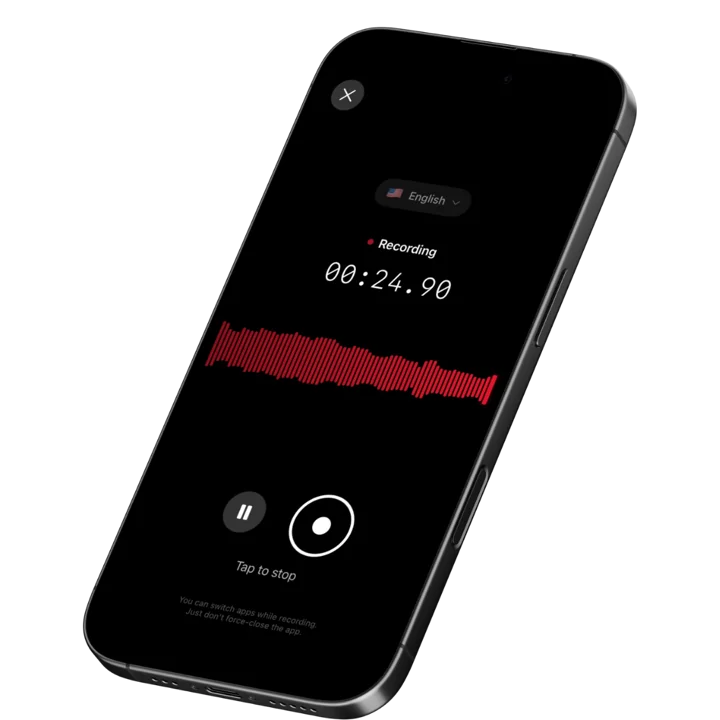
Speakwise is an iOS app that records conversations through the iPhone microphone and returns a full transcript, an AI summary, and extracted action items. It is not an article generator, and that is the point: it produces accurate, structured source material that you or an AI writing tool then shape into a draft.
Why Speakwise Stands Out
The scarce input in content work is not writing time. It is original material. The best posts come from a client conversation, a customer interview, a conference hallway argument, or ten minutes of thinking out loud on a walk. All of those are in-person, and all of them are gone unless something recorded them.
Speakwise covers exactly that gap. There is no bot to invite and no laptop to open, so it works in a coffee shop, a workshop, or a car park after a client meeting. The AI summary then gives you the structure: the themes that came up, the questions asked, the commitments made. That summary is usually closer to a post outline than anything you would write from memory an hour later.
The workflow from there is simple. Copy or export the transcript and summary into your editor, your notes app, or an AI assistant with your own prompt and style guide. Our roundup of apps for capturing ideas by voice covers the capture side in more depth, and the same pipeline works for turning recordings into structured documents.
Key Features
- One-Tap Recording: Capture an idea, a client conversation, or a customer interview the moment it happens rather than trying to reconstruct it later.
- AI Summaries: A structured summary of what was said, which often maps directly onto section headings for a draft.
- Automatic Action Items: Commitments and open questions surface on their own, which is useful when the recording is an interview you plan to quote.
- Speaker Labels: Interviews and multi-person conversations stay attributable, so quotes are assigned to the right person.
- Long Recording Support: A 90-minute workshop or a long interview records in one continuous file.
- 100+ Languages: Auto-detected transcription across 100+ languages for multilingual interviews and international research.
- Share and Export: Copy the transcript, export the text, or share notes via a link so the material moves straight into your writing tool.
- AirPods Hands-Free Control: Start, pause, and stop from your AirPods, which makes walk-and-talk idea capture practical.
Pricing
- Paid subscription via the App Store, with no free tier
Best For
- Writers whose best material comes from real conversations rather than desk research
- Founders and consultants turning client calls and workshops into posts
- Interview-based content where accurate quotes and speaker attribution matter
- Thinking out loud on a walk and getting a usable structure back
Limitations
- It does not write the article; it produces the transcript and summary you write from
- iOS only
- Records through the iPhone microphone rather than importing existing files
- Paid subscription with no free tier
Speakwise gets your hours back.
- ✓Built for in-person meetings, interviews, and site visits.
- ✓Trusted by recruiters, consultants, agents, and field pros.
- ✓One tap to record. Notion-ready summary in minutes.
2. AudioPen - Best for Cleaning Up a Rambling Voice Note
AudioPen takes an unstructured spoken ramble and returns readable prose. You talk for two to five minutes without planning, and it strips the false starts, reorders the thoughts, and produces a coherent note. For a writer who thinks best while talking, it is the shortest distance between a half-formed idea and a paragraph you can edit.
Key Features
- Converts unscripted speech into structured, readable prose
- Custom style and length settings so output matches your voice
- Custom vocabulary so names and jargon come through correctly
- Web and iOS apps with cloud sync
Pricing
- Free tier with short recordings and basic output
- Paid: from ~$99 for one year, with 3-month and 2-year options
Best For
- Solo idea capture where you are the only speaker
- Writers whose first drafts come out better spoken than typed
Limitations
- Built for your own voice, not for recording a two-person conversation
- No speaker separation, so interviews come back as a single block
- Output length is capped, so it produces notes rather than long-form drafts
3. Descript - Best for Repurposing Existing Audio and Video
Descript transcribes audio and video, then lets you edit the media by editing the text. For content teams sitting on podcast episodes, webinar recordings, or video interviews, it is the fastest route from a long recording to both a cut and a written draft. Its AI assistant will generate summaries, show notes, and social copy from the transcript.
Key Features
- Text-based editing of audio and video on the transcript
- Filler word removal and studio sound cleanup
- AI generation of show notes, summaries, and clips
- Collaborative editing with comments across a team
Pricing
- Free tier with limited minutes
- Hobbyist: ~$16/user/month billed annually
- Creator: ~$24/user/month billed annually
- Business: ~$50/user/month billed annually
Best For
- Podcast and video teams repurposing every episode into written content
- Anyone who needs both the edit and the draft from one recording
Limitations
- Metered AI credits and media minutes can push the real cost above the plan price
- Substantial learning curve for people who only want text
- Not a capture tool for in-person conversations
4. Podsqueeze - Best for Podcasters Who Publish Every Episode
Podsqueeze is built around one workflow: feed it a podcast episode, get back show notes, timestamps, a blog post, newsletter copy, and social posts. It identifies topics and key points from the transcript and shapes them into search-friendly written formats. For a weekly show, it removes an entire recurring production task.
Key Features
- Automatic show notes, chapters, and timestamps per episode
- Blog post generation from the episode transcript
- Newsletter and social copy generated from the same source
- RSS import so new episodes process automatically
Pricing
- Starter: from ~$8.99/month
- Pro: from ~$49/month
Best For
- Podcasters publishing on a regular schedule
- Shows that want written companion content without hiring an editor
Limitations
- Built for podcast episodes specifically, not general voice notes
- Generated posts need real editing before they read like a human wrote them
5. Castmagic - Best for High-Volume Repurposing
Castmagic processes long-form audio into dozens of content assets at once: summaries, quote cards, LinkedIn posts, newsletters, blog drafts, and clips. Its pricing is built around monthly audio hours rather than seats, which suits agencies and teams handling several shows or a heavy interview schedule.
Key Features
- Bulk generation of many content formats from one recording
- Custom prompt templates so output matches a brand voice
- Monthly audio hour allowances rather than per-seat pricing
- API access on higher tiers
Pricing
- Free: 3 files per month
- Starter: ~$39/month for around 40 audio hours
- Pro: ~$99/month for around 100 audio hours
Best For
- Agencies and content teams repurposing at volume
- Interview-heavy shows that need many derivative assets per episode
Limitations
- Expensive for individual creators publishing occasionally
- Volume output means more editing, not less, if quality standards are high
6. Taskade - Best Free Structured Outline From Audio
Taskade includes a free audio-to-blog converter that takes an uploaded recording and returns a structured draft with headings and organized paragraphs. It is not a specialist audio tool, but for a one-off file and a rough outline it costs nothing and requires no setup.
Key Features
- Free audio to blog post converter with heading structure
- Works from uploaded recordings, interviews, and voice memos
- Output lands inside a broader project and task workspace
- Templates for different content formats
Pricing
- Free tier with usage limits
- Paid plans from ~$8/user/month
Best For
- One-off conversions where a rough outline is enough
- Teams already using Taskade for project work
Limitations
- Generic output that reads like a template unless heavily edited
- No recording capability of its own
- Audio handling is a feature, not the product
7. Voice Memos Plus an AI Assistant - Best Zero-Cost Route
The do-it-yourself version costs nothing. Record in Apple Voice Memos, open the transcript on iOS 18 or later, copy the text, and paste it into an AI assistant with a prompt describing the format and voice you want. For occasional posts, this is genuinely competitive with paid tools.
Key Features
- Free recording and transcription already on your iPhone
- Full control over the prompt, so output matches your style guide
- No new subscription and no new app to learn
- Works with whichever assistant you already pay for
Pricing
- Free, aside from any AI assistant subscription you already have
Best For
- Occasional content rather than a weekly publishing schedule
- Writers with a strong prompt they already trust
Limitations
- Manual copy and paste every single time
- No speaker labels, so interviews come back as an undifferentiated block
- Voice Memos summaries are short bullets, not a usable outline
How to Choose a Voice-to-Content Tool
-
Where does your material come from? If your best ideas surface in conversations with clients, customers, or colleagues, prioritize capture quality and speaker separation. If you generate ideas alone while walking, prioritize prose cleanup instead.
-
Do you want a draft or an outline? Generators like Podsqueeze and Castmagic produce something publishable-shaped that still needs editing. Capture tools like Speakwise produce accurate raw material and leave the writing to you. The second option preserves your voice; the first saves more time.
-
How often do you publish? Weekly output justifies an automated pipeline. Monthly output rarely justifies a ~$39/month repurposing subscription; the free route plus an AI assistant is usually enough.
-
Does attribution matter? Interview-based content lives or dies on getting quotes right. Speaker labels turn a transcript into something you can quote confidently. Solo-voice tools cannot help here.
-
Whose voice ends up on the page? The more a tool generates, the more it flattens toward generic. If your differentiation is how you write, use AI for the structure and the transcript, not the sentences. The same principle applies to capturing book and reading notes by voice.
Frequently Asked Questions
What is the best app to turn voice recording into blog post or content drafts?
It depends on the source. Speakwise is best for capturing the conversation or idea accurately, including in-person interviews, and returning a transcript and structured summary you write from. AudioPen is best for cleaning up a solo ramble, and Podsqueeze or Castmagic are best for repurposing existing podcast episodes.
Can AI write a blog post from a voice recording?
Yes, and the output quality varies widely. Tools like Podsqueeze, Castmagic, and Taskade generate a full draft from a recording. Every one of them produces something that reads generically without editing. The reliable pattern is to use AI for the transcript and structure, then write the sentences yourself.
How do you record ideas by voice for content?
Record as the idea arrives rather than scheduling a session for it. A phone recorder with one-tap start makes this practical on a walk, after a client meeting, or in a car park. Speakwise adds an AI summary that turns a rambling five-minute recording into an outline you can work from.
Is there a free way to turn a voice note into a blog post?
Yes. Record in Apple Voice Memos, open the transcript on iOS 18 or later, copy it, and paste it into an AI assistant with a prompt describing your format and voice. Taskade also offers a free audio-to-blog converter. Both require manual steps every time.
Does a transcript make a good first draft?
Rarely on its own. Spoken language repeats, backtracks, and drops structure that writing needs. A transcript is excellent raw material and a poor draft. The useful intermediate step is a structured summary, which reorders spoken thinking into sections before you start editing sentences.
Final Verdict
Content pipelines that survive contact with a real schedule tend to have two halves. One tool reliably captures material, including the in-person conversations where the best material lives. Another turns that material into a draft.
Speakwise is the strongest option for the first half on iPhone: one-tap capture, speaker labels for interviews, and an AI summary that arrives closer to an outline than a transcript. AudioPen is the best companion for solo idea capture, and Podsqueeze or Castmagic make sense once you publish on a fixed schedule.
The failure mode worth avoiding is automating the sentences. Automate the capture and the structure, and keep writing the words yourself. That is where anything worth reading comes from.
Download Speakwise from the App Store and capture the conversation your next post should be built on.
🎯 4.9★ App Store Rating | 📱 Built for iOS
