Best Apple Watch Voice Notes App That Syncs to iPhone (2026)
Used by recruiters, executives, consultants, and more.
Best Apple Watch Voice Notes App That Syncs to iPhone in 2026
An Apple Watch voice notes app is only useful if the recording actually makes it to your iPhone. Search "apple watch voice memos not syncing to iphone" and you'll find plenty of people stuck with a recording stranded on their wrist. The fix isn't a better cable or a manual export. It's picking an app where auto-sync just works. We tested and compared the top options. Here are the 5 best Apple Watch voice notes apps that sync to iPhone in 2026.
Every app below moves your recording off the Watch on its own, using either iCloud or its own sync system. None of them require you to plug in anything or manually send a file.
Best Apple Watch Voice Notes App at a Glance (2026)
The best Apple Watch voice notes app that syncs to iPhone in 2026 is Speakwise, followed by:
- Speakwise - Best overall, syncing automatically for a transcript and AI summary on iPhone
- Just Press Record - Best for a simple transcript with no subscription
- Apple Voice Memos - Best free option, though sync depends on your iCloud settings
- Talk Memo - Best low-cost, subscription-free option
- Cleft Notes - Best for syncing even when your iPhone is out of range
Speakwise is the only app here that turns the synced recording into a labeled transcript and summary automatically. The others get the audio to your iPhone, but stop there.
1. Speakwise - Best Overall Apple Watch Voice Notes App
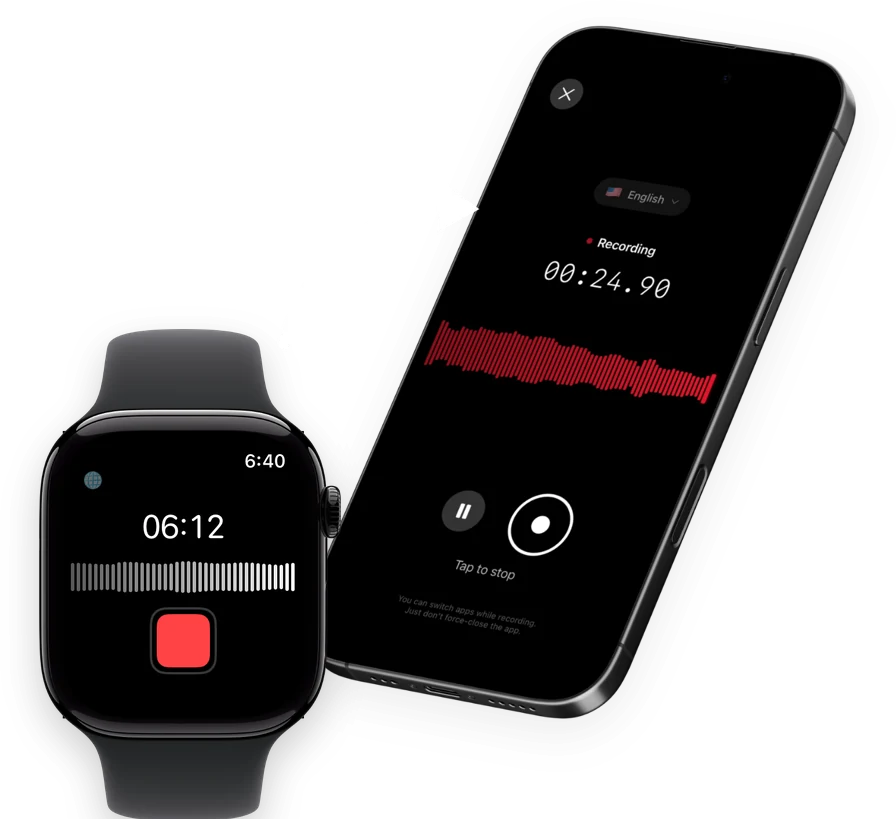
Speakwise is an AI note taker, voice recorder and voice-to-text app for iPhone with an Apple Watch companion app. Start and stop a recording from your wrist with one tap, and it syncs to your iPhone on its own. Once it arrives, Speakwise transcribes the recording, labels who's speaking, and writes a summary with action items.
Why Speakwise Stands Out
The frustration behind "voice memos not syncing" usually comes down to iCloud settings, a spotty connection, or simply not knowing when the sync finished. Speakwise's job is to make that step invisible: you record on your Watch, and the recording syncs to your iPhone, where it becomes a full transcript rather than just an audio file sitting in a list.
That distinction matters. A synced audio file still needs you to listen to it. A synced transcript with an AI summary is ready to read, forward, or act on the moment it lands, and if you use Notion, it syncs there too without any copying and pasting.
Key Features
- One-Tap Recording from Your Wrist: Start and stop a recording on your Apple Watch, then let it sync to your iPhone automatically.
- Transcript With Speaker Labels: Once synced, the recording becomes a transcript that shows who said what.
- AI Summaries: Every synced recording gets a summary built from a template, meeting notes, interviews and more, with action items pulled out.
- 100+ Languages: Transcription covers more than 100 languages, at 95%+ accuracy in good conditions and 92%+ in a noisy room.
- Long iPhone Sessions: On iPhone, recordings run up to 5 hours in a single session with no daily limit, continuing even with the screen off.
- Records Offline: Audio saves to your iPhone first, then syncs to transcribe once you're back online. Works with AirPods, Bluetooth earbuds and external mics.
- Native Notion Sync: Transcripts and summaries sync directly into Notion once the recording arrives on your iPhone.
Pricing
- Free Trial: Full access to try recording, transcripts and AI summaries
- Pro: Free trial, then a Pro subscription through the App Store
Best For
- Anyone frustrated by recordings that get stuck on their Watch
- People who want a transcript and summary, not just a synced audio file
- Notion users who want notes to sync there automatically
Limitations
- iPhone and Apple Watch only, no Android or desktop app
- The transcript and summary appear after the recording syncs, not on the Watch itself
- Not built for recording phone calls
Speakwise gets your hours back.
- ✓Built for in-person meetings, interviews, and site visits.
- ✓Trusted by recruiters, consultants, agents, and field pros.
- ✓One tap to record. Notion-ready summary in minutes.

2. Just Press Record - Best Simple Transcript, No Subscription
Just Press Record syncs recordings from Apple Watch to iPhone through iCloud, then turns them into an on-device transcript, all without a subscription. It's built to be one of the most reliable syncing apps in this category, since it uses the same iCloud pipeline across all your Apple devices.
Key Features
- Records on the Watch, even without your iPhone nearby
- Syncs automatically through iCloud to iPhone, iPad and Mac
- On-device transcript in more than 30 languages once synced
Pricing
$6.99 one-time purchase, no subscription.
Best For
- People who want reliable sync without paying every month
- A plain transcript with no AI processing needed
Limitations
- No AI summary or speaker labels
- Depends on iCloud being signed in and working correctly, same as any iCloud-based app
3. Apple Voice Memos - Best Free Option
Apple Voice Memos is built into every Apple Watch and syncs to iPhone through iCloud once both devices are signed into the same Apple Account and online. Apple's own guide describes this sync as automatic, but it's also the app behind most of the "not syncing" complaints, usually because iCloud sync for Voice Memos is turned off, or one device is offline.
Key Features
- Free, built into every Apple Watch
- Records without your iPhone connected nearby
- Syncs through iCloud once both devices are online
Pricing
Free, built into watchOS.
Best For
- Quick, casual voice notes you don't need transcribed
- Anyone who wants a free option with zero setup
Limitations
- Sync fails silently if iCloud sync for Voice Memos is switched off in Settings, which is the most common cause of "stuck on the Watch" recordings
- No transcript on the Watch in any current watchOS version
- No speaker labels or AI summary
4. Talk Memo - Best Low-Cost, Subscription-Free Option
Talk Memo is a simple Apple Watch recorder built around a one-time payment. It records without requiring your iPhone present, syncs through iCloud, and produces an on-device transcript once the recording reaches your iPhone.
Key Features
- Records on the Watch without an iPhone present
- Syncs to iPhone through iCloud
- On-device transcript generated after sync
Pricing
$3.99 one-time purchase, no subscription.
Best For
- A cheap, no-subscription way to get a synced recording and basic transcript
- Simple personal voice notes
Limitations
- No AI summary or speaker labels
- Very new app with a limited track record so far
5. Cleft Notes - Best for Syncing When Your iPhone Is Out of Range
Cleft Notes is built to keep working when your iPhone isn't nearby. Its Apple Watch app records fully offline and queues the recording locally, then syncs automatically over Bluetooth or shared WiFi the moment your iPhone is reachable again, no manual step required.
Key Features
- Fully offline recording with automatic local queuing
- Automatic sync over Bluetooth or shared WiFi once your iPhone is reachable
- AI summary generated after the recording syncs
Pricing
Free with in-app purchases; Cleft Plus costs $6.99 per month or $39.99 per year.
Best For
- Recording in places with a weak or no connection, where sync needs to catch up later
- People who want to be sure a recording won't get lost before it syncs
Limitations
- Fewer summary templates than a dedicated meeting-notes app
- Best suited to one or two speakers rather than a large group
How to Choose the Best Apple Watch Voice Notes App for Reliable Sync
- Check what triggers the sync. iCloud-based apps need both devices online and signed into the same account. Apps with their own sync system, like Speakwise and Cleft Notes, are less dependent on getting iCloud settings exactly right.
- Confirm it handles your iPhone being out of range. If you often record away from your phone, Cleft Notes and Just Press Record are both built to queue the recording and sync later automatically.
- Decide if you want more than an audio file. A synced audio file still needs your attention afterward. A synced transcript, or a transcript plus an AI summary from Speakwise, is ready to use the moment it arrives.
- If Voice Memos keeps failing to sync, check the setting first. Go to Settings, tap your name, then iCloud, and confirm Voice Memos is turned on there before assuming the app is broken.
- Weigh the cost against how often you rely on sync working. A one-time purchase is fine for occasional use. If getting your Watch recordings onto your iPhone reliably matters every day, a dedicated sync-plus-transcript app earns its subscription.
For a full breakdown of Apple's own recorder, see our comparison of Just Press Record vs Apple Voice Memos. If you're also wondering whether a synced Voice Memos recording gets transcribed once it lands, we cover that separately in does Voice Memos transcribe your recordings. And once a voice note is on your iPhone, our guide to apps that sync voice notes to Notion covers where to take it next.
Frequently Asked Questions
Why isn't my Apple Watch voice memo syncing to my iPhone?
The most common cause is iCloud sync for Voice Memos being turned off. Check Settings, tap your name, then iCloud, and make sure Voice Memos is switched on for both your Watch and iPhone. Both devices also need to be online and signed into the same Apple Account. If the setting looks correct and it still isn't syncing, restarting both devices often clears it up.
What is the best app for syncing Apple Watch recordings to iPhone?
Speakwise is the strongest overall choice, since it syncs your Apple Watch recording to your iPhone automatically and turns it into a transcript with speaker labels and an AI summary. If you just want reliable sync with a plain transcript and no subscription, Just Press Record is a solid pick.
Does Apple Voice Memos sync automatically from Apple Watch to iPhone?
Yes, when iCloud sync is turned on for Voice Memos and both devices are online and signed into the same Apple Account. Apple's own support guide confirms recordings appear across devices once that setting is active. When people report Voice Memos not syncing, it's almost always this setting being off or one device being offline, not a broken feature.
Can I get an AI summary from a voice note that synced from my Apple Watch?
Yes, with the right app. Speakwise and Cleft Notes both generate an AI summary after your Apple Watch recording syncs to your iPhone. Apple Voice Memos, Just Press Record and Talk Memo sync the recording but don't produce a summary, only a plain transcript in the case of Just Press Record and Talk Memo.
What should I do if a recording on my Apple Watch never made it to my iPhone?
First, confirm both devices are on and connected to the internet or to each other over Bluetooth. Open the app on your iPhone and check if the recording just hasn't finished syncing yet, since it can take a moment. If you're using Apple Voice Memos, double-check the iCloud toggle mentioned above. If a recording still doesn't appear, apps like Cleft Notes that queue recordings locally are built specifically to avoid this problem in the future.
Final Verdict
Apple Voice Memos and Just Press Record both get the job done for free or close to it, as long as your iCloud settings are right. Talk Memo is a fine cheap option for the same basic sync.
But if you want your Apple Watch recording to become something more than an audio file the moment it syncs, a transcript with speaker labels and an AI summary, Speakwise is the best choice. The sync happens automatically, and so does everything after it.
Download Speakwise from the App Store and stop worrying about whether your Apple Watch recording made it to your iPhone.
🎯 4.9★ App Store Rating | 📱 Built for iOS
