Best Voice Notes App for Productivity (2027)
TL;DR
The best voice notes app for productivity in 2027 is Speakwise. The iPhone app turns a voice note into an AI summary with action items, free to try for 7 days. Audionotes suits voice dumps, and Otter.ai suits meeting transcripts.
Used by recruiters, executives, consultants, and more.
Best Voice Notes App for Productivity in 2027
The best voice notes app for productivity removes the friction of typing before an idea disappears. Thirty ideas can show up before lunch, and most vanish before you act on them. Speakwise listens to a spoken idea and turns it into an AI summary with clear action items, so five minutes of talking becomes a few seconds of reading.
1. Speakwise - Best Overall Voice Notes for Productivity
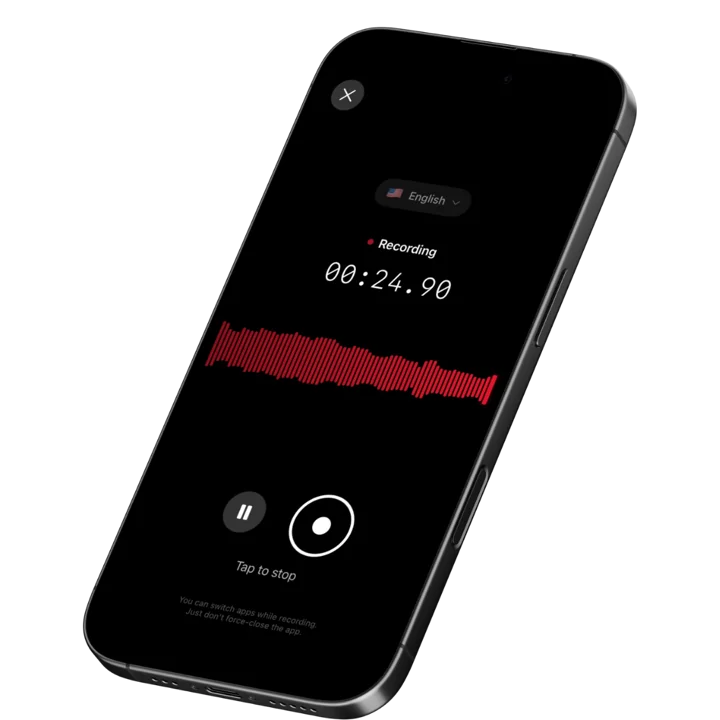
Speakwise is an AI-powered voice notes app for iPhone that turns spoken ideas into organized, actionable notes. Record with one tap or AirPods gesture, and the AI generates summaries, extracts action items, and syncs everything to Notion automatically. With 95%+ transcription accuracy (in optimal conditions) and a 4.9-star App Store rating, Speakwise converts the fastest input method - your voice - into the most useful output: structured, searchable, actionable notes.
Why Speakwise Stands Out
Most voice notes apps stop at transcription. You get a wall of text and then have to do the work of reading, organizing, and extracting meaning. Speakwise handles the entire pipeline. You speak. The AI transcribes, identifies key points, separates action items from observations, and delivers a clean summary. Five minutes of speaking becomes 30 seconds of scanning.
AirPods hands-free recording eliminates the last friction point. You do not need to find your phone, unlock it, open an app, and tap record. A single AirPods gesture captures the thought. This matters for productivity because the most valuable ideas surface during transitions - walking between meetings, commuting, showering. Tools that require attention to use miss these moments.
Native Notion integration transforms voice notes from isolated recordings into part of your productivity system. Every note lands in Notion with its transcript, summary, and action items. You search, tag, link, and build on past ideas. Your voice notes become a growing knowledge base instead of a graveyard of forgotten recordings.
Key Features
- AI-Powered Summaries: Every recording generates a structured summary with key points, decisions, and insights. A 10-minute brainstorm session becomes a paragraph you can scan in 20 seconds. This turns voice notes from "things I need to review" into "things I have already processed."
- Long Recording Support: Multi-hour board meetings, conference sessions, offsites.
- Works Offline: Construction sites, secure boardrooms, planes - record without WiFi. Sync when you're back.
- Action Item Extraction: The AI identifies tasks, commitments, and next steps. "I should follow up with Alex about the proposal" becomes a captured action item. This bridges the gap between thinking about doing something and having it recorded for action.
- Speaker Diarization: When a capture includes other people — a quick brainstorm or a call — Speakwise separates the voices and labels who said what, so the notes stay clear about who contributed each point.
- Native Notion Integration: Voice notes sync to Notion as organized pages with transcript, summary, and action items. 82% of users cite this as a key reason they chose Speakwise (based on internal user data). Your productivity system grows with every recording.
- 100+ Language Support: Think in whatever language comes naturally. Auto-detection handles switches between languages without manual settings. Bilingual professionals can capture in either language seamlessly.
- One-Tap and AirPods Recording: Capture ideas in under 2 seconds with one tap or AirPods gesture. No app hunting, no unlocking, no menus. The fastest capture method for moments when ideas arrive unexpectedly.
- Action Button Recording: Map the iPhone Action Button and capture an idea in under two seconds with one physical press — no unlocking, no app to open — for the thoughts that surface between meetings.
Pricing
- Free Trial: Full access to all features
- Premium: $59.99/year - unlimited transcription, AI summaries, Notion sync, 100+ languages
Best For
- Professionals who generate many ideas throughout the day and lose them
- Notion users who want voice input flowing into their productivity workspace
- People who want AI to handle note organization instead of doing it manually
- Anyone who values hands-free capture during commutes and walks
Limitations
- iOS only - no Android or desktop version
- No built-in task management - works best paired with Notion or another system
- Individual-focused - no team collaboration features
Speakwise gets your hours back.
- ✓Built for in-person meetings, interviews, and site visits.
- ✓Trusted by recruiters, consultants, agents, and field pros.
- ✓One tap to record. Notion-ready summary in minutes.

2. Audionotes - Best for Converting Voice Dumps Into Content
Audionotes specializes in turning unstructured voice recordings into polished content. Speak about a topic, and the AI restructures your words into blog posts, emails, task lists, or structured notes. For productivity-focused users who think out loud, Audionotes bridges the gap between raw ideas and usable output.
Key Features
- AI converts voice recordings into 100+ content formats automatically
- 80+ language transcription with speaker recognition
- Works across iOS, Android, web, and Chrome extension
- Integrates with Notion, WhatsApp, and Zapier for output routing
Pricing
- Free: Limited to 1 minute per note
- Pro: $19.99/month - 3 hours per recording, advanced AI features
Best For
- People who want to dictate emails, blog posts, or documents by voice
- Cross-platform users who need voice notes on any device
Limitations
- Free tier at 1 minute per note is too limiting for real use
- $19.99/month is expensive compared to annual alternatives
- No AirPods hands-free recording control
- Content conversion templates can produce formulaic output
3. Talknotes - Best for Template-Based Productivity
Talknotes uses 100+ templates to structure voice input into specific formats. Speak about your day and get a formatted task list. Describe a meeting and get organized notes. The template approach adds structure without requiring you to organize anything manually. Supports 100+ languages with claimed 99% accuracy.
Key Features
- 100+ templates for task lists, meeting notes, emails, and more
- 100+ language support with high transcription accuracy
- Custom tags for organizing notes by project or context
- Zapier integration routes structured notes to other productivity tools
Pricing
- Free: Limited notes and features
- Plus: $5.75-$10.98/month - expanded features
- Pro: $41.58-$49/month - unlimited features, 2-hour recordings
Best For
- People who want voice input automatically formatted into specific document types
- Users who rely on Zapier to connect tools in their productivity stack
Limitations
- Pro tier at $41-49/month is extremely expensive for individual productivity use
- Template selection adds a step that interrupts fast capture
- No hands-free AirPods recording
- No native Notion integration
4. Otter.ai - Best for Meeting Productivity
Otter.ai automatically transcribes virtual meetings and generates searchable archives. For professionals whose productivity bottleneck is meeting follow-up, Otter eliminates the note-taking burden. It auto-joins Zoom, Google Meet, and Teams calls to capture everything without manual effort.
Key Features
- Auto-joins Zoom, Google Meet, and Microsoft Teams for hands-off capture
- Real-time transcription displayed during meetings
- AI summaries with action items after each meeting
- Searchable archive across all past meetings
Pricing
- Free: 300 minutes/month, limited features
- Pro: $16.99/month - advanced features
- Business: $30/month per user - team features
Best For
- Professionals whose productivity suffers from manual meeting note-taking
- Teams that need searchable meeting archives for reference
Limitations
- Focused on virtual meetings - limited for general voice note productivity
- Monthly pricing is expensive for individual users
- Primarily English-focused for best accuracy
- All audio processed in cloud - no privacy-first design option
5. Notion With Voice Input - Best for All-in-One Workspace Users
Notion itself does not record voice, but pairing it with a voice input tool creates a powerful productivity system. Speakwise's native Notion integration is the most seamless option. Alternatively, you can use Apple's built-in dictation to type into Notion by voice. For users whose entire productivity system lives in Notion, voice input adds speed to an already powerful platform.
Key Features
- All-in-one workspace for notes, tasks, databases, and wikis
- Apple dictation enables basic voice-to-text input directly
- Speakwise integration adds AI-processed voice notes automatically
- Databases, relations, and views organize information powerfully
Pricing
- Free: Unlimited pages for individuals
- Plus: $10/month - file uploads, extended features
- Business: $18/month per user - team features
Best For
- Users whose entire productivity system already lives in Notion
- People who want voice notes integrated directly into their workspace
Limitations
- No native voice recording or transcription capability
- Requires a companion app like Speakwise for proper voice notes
- Apple dictation is basic and error-prone for longer entries
- Mobile app can be slow for quick capture moments
6. Google Recorder - Best Free Offline Transcription
Google Recorder provides free voice recording with offline transcription on Pixel and select Android devices. No subscription, no per-minute charges. AI-powered search lets you find specific moments across recordings. For Android users who want basic voice productivity without any cost, it is the best free option available.
Key Features
- Free recording and transcription with no subscription required
- Offline mode works without internet connection
- AI search finds specific words and phrases across all recordings
- Automatic speaker labels identify different voices
Pricing
- Free: All features included
Best For
- Android users who want free voice transcription
- People who need offline transcription capability
Limitations
- Limited to Pixel and select Android devices
- No AI summaries, action items, or advanced processing
- No integration with productivity tools like Notion
- Basic organization - no tags, projects, or smart categorization
7. Apple Voice Memos - Best Zero-Setup Quick Capture
Apple Voice Memos is preinstalled on every iPhone. One tap to record, with no signup or configuration. iCloud syncs recordings across all Apple devices. For productivity-focused users who just need the simplest possible capture tool, Voice Memos is always available.
Key Features
- One-tap recording with zero setup required
- iCloud sync across iPhone, iPad, Mac, and Apple Watch
- Basic editing for trimming recordings
- Always available - no download or account needed
Pricing
- Free: Included with iOS
Best For
- iPhone users who want the absolute simplest recording tool
- People who need quick audio capture without any AI features
Limitations
- No transcription - you must listen to find information
- No AI summaries, action items, or organization
- No search capability within recordings
- Recordings accumulate without structure or categorization
How to Choose the Best Voice Notes App for Productivity
The best voice notes app for productivity matches how you capture, process, and act on information.
-
Capture Speed: Productivity depends on capturing ideas before they vanish. The best apps start recording in under 2 seconds. Speakwise and Apple Voice Memos offer one-tap starts. AirPods hands-free recording (Speakwise) captures without even reaching for your phone.
-
AI Processing Depth: Raw recordings are a productivity sink - you have to listen back to find value. Speakwise generates summaries and extracts action items automatically. Audionotes converts rambles into structured content. Apps without AI processing create more work, not less.
-
System Integration: Voice notes are only productive when they connect to where you act. Speakwise syncs natively with Notion. Talknotes routes through Zapier. Otter.ai shares to Slack and other tools. Isolated voice notes become another inbox you forget to check.
-
Privacy: Productivity captures often contain sensitive business ideas, client information, or personal goals. Speakwise records on the iPhone with strict privacy controls. Cloud-based alternatives send audio to external servers. Consider what you are capturing and whether cloud processing is acceptable.
-
Cross-Platform Availability: Your most productive ideas do not wait for a specific device. Audionotes works on iOS, Android, and web. Google Recorder works on Android. Speakwise is iOS-only but covers the most popular mobile platform. Match the app to the devices you carry.
Frequently Asked Questions
What is the best voice notes app for productivity in 2027?
Speakwise is the best voice notes app for productivity in 2026. It combines one-tap and AirPods recording for instant capture with AI summaries and action item extraction that process your voice notes automatically. Native Notion integration places organized notes directly in your productivity workspace. At $59.99/year, it turns your voice into a structured, searchable, actionable system.
Is there a free voice notes app for productivity?
Apple Voice Memos and Google Recorder are both free. Voice Memos is preinstalled on every iPhone and offers one-tap recording with iCloud sync. Google Recorder provides free offline transcription on select Android devices. Speakwise offers a free trial with full access to AI features. For serious productivity use, AI processing features in premium apps save more time than they cost.
How much time can voice notes save compared to typing?
Speaking is 3-4x faster than typing for most people. A thought that takes 30 seconds to type takes about 8 seconds to speak. Over a day with 20 captured ideas, that difference adds up to 7+ minutes saved on capture alone. With AI processing (Speakwise), you also save the time you would spend reading and organizing typed notes. Users report saving 73% of follow-up time with AI summaries according to Speakwise user surveys.
What features should I look for in a productivity voice notes app?
Key features for productivity-focused voice notes include:
- One-tap or hands-free recording start (under 2 seconds)
- AI transcription with 95%+ accuracy
- Automatic summaries with key point extraction
- Action item identification for bridging ideas to tasks
- Integration with your productivity system (Notion, Todoist, etc.)
- Searchable archive for finding past ideas
Can voice notes replace written notes for productivity?
Voice notes can replace most ad hoc note-taking but work best alongside a written system. Quick ideas, meeting notes, brainstorms, and task capture are faster by voice. Structured planning, detailed documentation, and visual thinking still benefit from writing. Apps like Speakwise bridge both by converting voice into organized written notes automatically. The most productive approach is using voice for capture and letting AI handle the conversion to written format.
Final Verdict
Personal productivity improves when you capture more ideas, process them faster, and connect them to where you act. Voice notes solve the capture speed problem. AI processing solves the organization problem. System integration solves the action problem.
Speakwise is the best voice notes app for productivity. It captures ideas in under 2 seconds with one-tap or AirPods recording. AI summaries and action item extraction process your notes automatically. Native Notion integration places organized results directly in your workspace. All for $59.99/year.
For cross-platform voice-to-content conversion, Audionotes handles iOS, Android, and web. Talknotes works well for template-based structuring. For meeting-specific productivity, Otter.ai automates virtual meeting capture. The simplest free options - Apple Voice Memos and Google Recorder - work for basic capture without AI.
Download Speakwise from the App Store and start turning your voice into organized, actionable productivity notes.
🎯 4.9★ App Store Rating | 📱 Built for iOS
