Pricing verified: August 28, 2026 by Speakwise Team
Can ChatGPT Transcribe Audio? What Works in 2027
TL;DR
Can ChatGPT transcribe audio? Yes, through Record mode on the Mac app, voice mode, or the developer API, not by dropping a file into a normal chat. Speakwise records in-person conversations on iPhone and adds speaker labels to the transcript, with a 7-day free trial.
Used by recruiters, executives, consultants, and more.
Can ChatGPT Transcribe Audio? What Works in 2027
Dragging an audio file into a normal ChatGPT chat message does not produce a transcript, since OpenAI does not treat audio as a supported upload there. ChatGPT turns speech into text in a few other specific ways, each with its own app, plan, and limits. This guide breaks down what actually works, plus what to do with an in-person conversation you already recorded.
How to Transcribe Audio with ChatGPT: Quick Steps
To transcribe audio with ChatGPT, use Record mode for a live meeting or voice note, or the developer API for a file you already have.
- For a live meeting or voice note, open the ChatGPT Mac app and start Record (needs a Plus plan or higher).
- For an existing audio file, a developer can send it to OpenAI's transcription API, which accepts files up to 25 MB.
- Skip dragging an audio file into a normal ChatGPT chat message, since that is not a supported upload type.
- Check the transcript against what was actually said, since OpenAI notes its transcriptions can contain mistakes.
- For an in-person conversation, record it with Speakwise on iPhone first, then bring the transcript into ChatGPT.
Can You Upload an Audio File to ChatGPT and Get a Transcript?
No, not in a normal chat message, at least not as of September 2026. OpenAI's own help center lists the file types ChatGPT accepts for uploads: documents, spreadsheets, presentations, and image files like JPEG and PNG. Audio and video are absent from that list. Dragging an mp3, wav, or m4a file into the chat box and asking for a transcript does not work the way uploading a PDF does.
That does not mean ChatGPT is useless for audio. It means the transcript has to come from somewhere else first: Record mode for a live session, the developer API for a file you already have, or a dedicated app built for transcribing audio to text. Each of those paths is covered below.
What Does ChatGPT Voice Mode Actually Do?
Voice mode lets you have a spoken back and forth conversation with ChatGPT. You talk, ChatGPT answers out loud, much like a phone call with an assistant. It is available to logged in users on the ChatGPT mobile apps and on the web at chatgpt.com.
Voice mode is built for live conversation, not for turning a file you already recorded into text. You cannot feed it a meeting you already recorded and get a transcript of that file back. For that, you need Record mode or the developer API, both covered next.
Can ChatGPT Record and Transcribe a Meeting or Voice Note?
Yes. OpenAI's Record mode captures a live meeting, brainstorm, or voice note, then transcribes and summarizes it, with speaker labels like "Speaker 1" that you can rename afterward. The finished transcript and summary open as a canvas in your chat.
Record mode has real limits. It only works in the ChatGPT Mac desktop app, not on Windows, iPhone, Android, or the website. It needs a Plus, Pro, Business, Enterprise, or Edu plan, so it is not part of the free tier. Each session is capped at 4 hours, and a session that runs longer stops on its own and generates notes from what it captured so far. OpenAI also says the audio itself is used only for transcription, then deleted, and is not used to train its models.
Can Developers Transcribe Audio with the ChatGPT API?
Yes, and this is the most flexible option, but it needs code, not the ChatGPT app. As of September 2026, OpenAI's transcription API accepts audio files up to 25 MB, in formats including mp3, mp4, mpeg, mpga, m4a, and wav.
The API offers a few models to pick from. gpt-transcribe is the general-purpose option for turning speech into text. gpt-4o-transcribe-diarize adds speaker labels, similar to what Record mode does. whisper-1 is the older model, still useful for word-level timestamps and for translating audio into English. A file larger than 25 MB has to be split into smaller pieces before the API will accept it. None of this is available inside a normal ChatGPT chat window; it only works through OpenAI's developer platform.
How Do You Ask ChatGPT About an In-Person Conversation You Recorded?
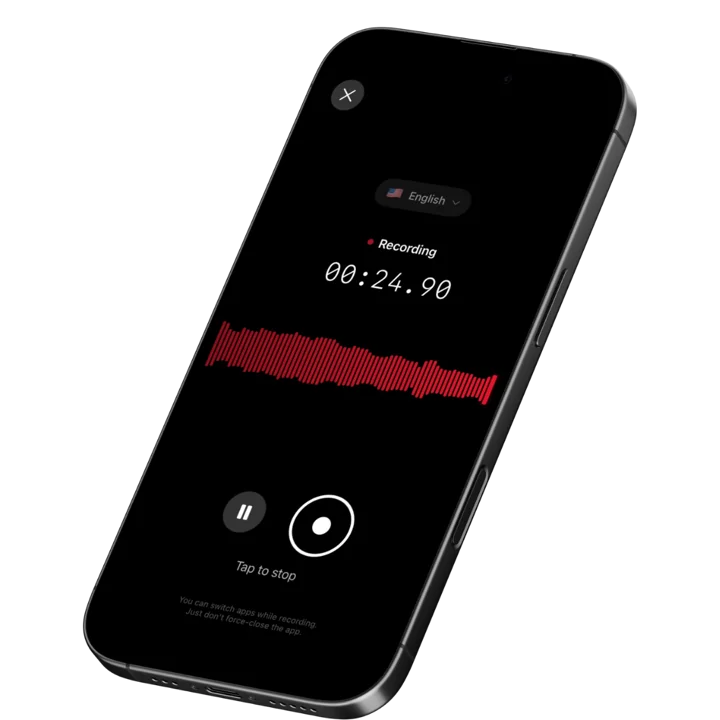
None of ChatGPT's own audio tools are built for a conversation that is already happening in a room with other people, unless you own a Mac and remember to start Record before it begins. Speakwise takes a different approach: record in-person conversations, meetings, lectures, and interviews on iPhone with one tap, or start and stop the recording from your Apple Watch and let it sync to your iPhone for transcription. The transcript comes back with speaker identification, and you can rename "Speaker 1" and "Speaker 2" to real names; Speakwise then offers to rewrite the summary and action items with those names too. You can also add speaker identification to a recording you already made. Speaker identification is not included in every plan. When you start your free trial, pick the plan that includes it.
The AI summary is not just one style either. Choose from several summary templates, like Meeting notes & actions, Lecture & study notes, Interview, and Sales recap, each with an adjustable level of detail. Every recording also gets its own Notes section for anything you want to add by hand, and you can search inside a transcript and filter it by speaker.
Once you have that transcript, you can bring it into ChatGPT two ways. The Speakwise connector works inside ChatGPT as a custom connector in developer mode, on the plans where OpenAI offers that, so you can ask ChatGPT questions about your own recordings, transcripts, summaries, and action items. Or export the transcript to PDF, Word, or plain text, and upload that file to ChatGPT the normal way, since text and Word documents are supported ChatGPT uploads even though audio is not. For more on how the speaker labels themselves work, see our guide on how to identify speakers in a recording.
How ChatGPT Compares to Dedicated Transcription Tools
ChatGPT can handle some audio work, but tools built only for transcription go further for both live conversations and files you already have.
| Feature | ChatGPT | Otter.ai | Speakwise app |
|---|---|---|---|
| Best for | Live meeting notes on Mac, or coding against the API | Cloud meeting bots for Zoom, Meet, Teams | In-person talks recorded on iPhone |
| Upload an existing audio file | Only through the developer API, not in a normal chat | Yes, upload to transcribe | Yes, import m4a, mp3, or wav, or share from another app |
| Live meeting or voice note capture | Yes, Record mode on the Mac app | Yes, joins the call or records in its apps | Yes, one tap on iPhone; transcribes after, works offline |
| Speaker labels | Yes, in Record mode ("Speaker 1", renameable) | Yes | Yes, speaker identification, rename to real names |
| Session or file limit | Record mode up to 4 hours; API files up to 25 MB | Free plan caps each conversation at 30 minutes | Up to 5 hours per recording |
| Works offline | No | Yes, its apps record offline and transcribe after reconnecting | Yes, records with no internet |
| Pricing | Free to use; Record mode needs a Plus plan or higher | Free plan available; paid plans from $8.33 a month billed yearly | 7-day free trial ($0.00), then from $69.99/yr (about $5.83/mo) |
For an in-person conversation, Speakwise is built for the room you are actually in, while ChatGPT leans on a Mac app, a live internet connection, or a separate upload step, and Otter is built first for video calls.
How to Get Started with Speakwise and ChatGPT
- Record the conversation on iPhone or Apple Watch. Open Speakwise and tap record before the meeting, interview, or lecture starts, or start and stop the recording from your wrist and let it sync to your iPhone. It keeps recording with the screen off and works with no internet connection.
- Get your transcript, speaker labels, and AI summary. Speakwise turns the recording into a transcript with speaker identification, then writes the summary in the template you pick, for example Meeting notes & actions or Interview, with key points and action items. Rename "Speaker 1" to the real name, and Speakwise offers to update the summary too.
- Connect Speakwise to ChatGPT. Add the Speakwise connector in ChatGPT's developer mode, on the plans where OpenAI offers that, then ask ChatGPT questions about what was recorded.
- For a file you already have, import it into Speakwise. Add an existing recording in m4a, mp3, or wav, or share a voice memo or audio file from another app straight to Speakwise, and get the same transcript, speaker labels, and summary.
Frequently Asked Questions
Can ChatGPT transcribe audio files I upload?
Not directly, in a normal chat message. As of September 2026, OpenAI's own list of supported ChatGPT upload types covers documents, spreadsheets, presentations, and images, but not audio or video files. If you drop an mp3 or wav file into a regular chat, it will not turn into a transcript. The two ways ChatGPT actually handles audio are Record mode, which captures a live meeting or voice note on the Mac app, and the developer transcription API, which accepts existing audio files up to 25 megabytes.
Is there a free way to transcribe audio with ChatGPT?
ChatGPT itself is free to use, but the audio features have limits. Record mode needs a Plus plan or higher, so it is not available on the free tier. Voice mode is open to free users for a live spoken conversation, but that is a conversation feature, not a way to transcribe a file you already have. For one existing audio file, Speakwise imports it on iPhone and gives you a transcript with speaker identification and a summary. Start with a 7-day free trial ($0.00). After that, Speakwise costs from $69.99 per year, which is about $5.83 a month, billed yearly. Prices shown are for the US and can differ by country.
What is the file size limit for transcribing audio with the ChatGPT API?
OpenAI's transcription API accepts audio files up to 25 megabytes, in formats including mp3, mp4, mpeg, mpga, m4a, wav, and webm. This limit applies to developers calling the API directly, not to a normal ChatGPT chat, since regular chat uploads do not support audio files at all. A file larger than that needs to be split into smaller pieces before it can be sent to the API.
Can Claude transcribe audio?
Based on Anthropic's own developer documentation, Claude does not take an audio file as input. The Claude Files API lists what Claude can accept: PDFs, plain text, and images such as JPEG and PNG, plus datasets through its code execution tool. Audio is not one of the supported file types, so a recording needs to become a transcript first before Claude can read, summarize, or answer questions about it. Speakwise connects to Claude the same way it connects to ChatGPT, so once you have a transcript, you can ask Claude questions about your own Speakwise recordings too.
Is ChatGPT good for transcribing in-person meetings and conversations?
ChatGPT's Record mode can capture a live meeting or voice note, but only on the Mac desktop app, and only on paid plans. For a conversation happening in a room, an iPhone app built for that job, like Speakwise, records with one tap, keeps working with no internet, and adds speaker labels to show who said what. You can then connect Speakwise to ChatGPT as a custom connector in developer mode and ask ChatGPT questions about the recordings, without retyping anything.
Final Verdict
Can ChatGPT transcribe audio? The honest answer is yes, but only through specific paths, not by attaching a file in a normal chat message. Record mode handles live meetings and voice notes on the Mac app. Voice mode handles spoken conversation. The developer API handles existing files, up to 25 megabytes, for anyone who can write code.
None of these paths are built for a conversation that already happened in a room with other people. That gap is where an app like Speakwise fits: record the conversation on iPhone or Apple Watch, get a transcript with speaker labels you can rename to real names, pick a summary template that fits the moment, and export it to PDF, Word, or plain text to bring straight into ChatGPT. Then connect Speakwise to ChatGPT to ask questions about what was said. For a single file you already have, import it into Speakwise, or share it from another app, for the same transcript and summary.
Which option to use depends on where the audio comes from. Developers with existing files should reach for the API. Anyone on a Mac who wants live meeting notes inside ChatGPT should try Record mode. Anyone recording an in-person conversation on iPhone or Apple Watch gets more out of an app built for that specific job.
Download Speakwise from the App Store and get a transcript with speaker labels from your next in-person conversation.
Get Speakwise Free
Free to download, with a 7-day free trial ($0.00), on the App Store

🎯 4.9★ App Store Rating | 📱 Built for iOS
