Pricing verified: August 28, 2026 by Speakwise Team
Granola AI Review (2027): Pros, Cons and Pricing
TL;DR
This Granola AI review finds Granola is a strong pick for back-to-back computer meetings on Zoom or Teams. Skip it if you mostly meet people in person. For in-person meetings on iPhone, Speakwise records the room and writes the summary, with a 7-day free trial.
 Speakwise - AI Note Taker
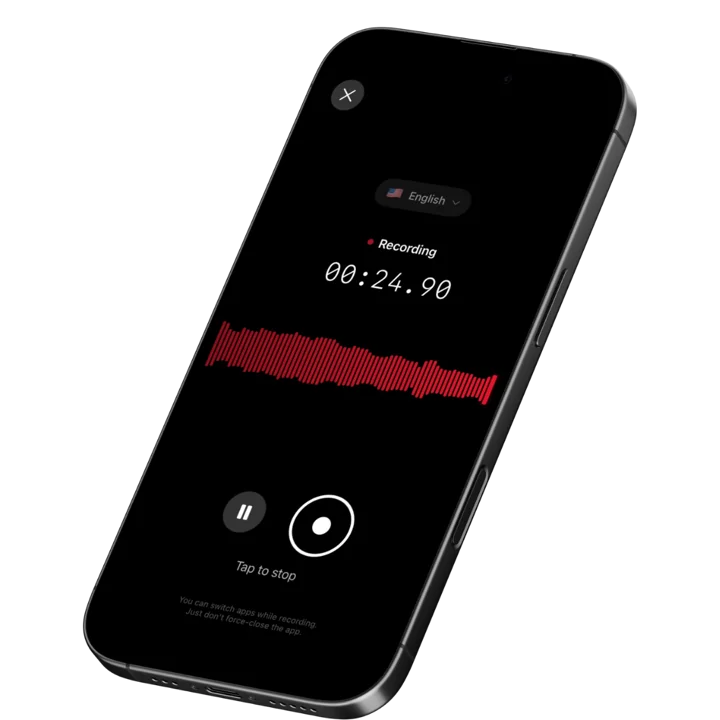
Never miss a key detail
- Smart summaries and action items.
- Speaker diarization labels who said what.
- Unlimited premium transcription.
- Auto-sync to Notion.
- Record offline, even with no signal.

Used by recruiters, executives, consultants, and more.
Granola Review: The Short Answer
This Granola AI review covers the AI notepad built for people who live in back-to-back meetings on a Mac or Windows computer. Granola listens during a Zoom, Google Meet, or Microsoft Teams call and turns your own typed notes into a full summary, without a bot joining the room. Speakwise makes a competing iPhone app built for meetings that happen in person, not on a screen.
Granola Review at a Glance
Granola AI review in one line: Granola is a bot-free AI notepad for computer meetings, with iPhone and Android apps that now also cover in-person notes.
| Granola | |
|---|---|
| What it is | An AI notepad that turns your own notes into a full meeting summary |
| Best for | People in back-to-back computer meetings |
| Platforms | macOS, Windows, iPhone, Android |
| Price from | Free plan, paid plans from $14/user/month |
| AI summaries | Yes |
| Works with Claude or ChatGPT | Yes (MCP connector, all plans) |
| Rating | 5.0 stars, iPhone app, US App Store (September 2026) |
| Biggest drawback | Named speaker tags only work inside three meeting apps |
What Is Granola?
Granola is an AI notepad made by Granola, Inc., a company based in London that raised a $125 million Series C round led by Index Ventures at a $1.5 billion valuation. It is built for people stuck in back-to-back meetings who want clean notes without typing everything themselves. During a call on Zoom, Google Meet, Microsoft Teams, or almost any other meeting app, Granola listens to your computer's audio and blends it with your own typed notes to write a fuller summary. No bot joins the meeting. Granola also has iPhone and Android apps for in-person conversations, plus an MCP connector that lets Claude, ChatGPT, and Cursor read your meeting notes.
Granola Key Features
- No-bot meeting notes: Granola uses your computer's system and microphone audio during a call, so it never sends a visible bot into Zoom, Google Meet, or Microsoft Teams.
- Notes on the go: the iPhone and Android apps also record in-person conversations, like coffee chats and walking one-on-ones, and sync straight back to the desktop app.
- Outbound phone call notes (iPhone only): register your number once, then call people from inside the Granola app to get a transcript and summary. It does not work for calls that come in to you.
- Speaker labels, with limits: mobile transcripts label speakers "Speaker A," "Speaker B," and so on. On desktop, named speaker tags only work with Google Meet, Zoom, and Microsoft Teams; every other app just shows "Me" and "Them."
- Live transcript and AI-enhanced notes: a live transcript panel is available during the meeting, and Granola expands your own notes into a full summary once the call ends.
- Works with Claude, ChatGPT, and Cursor: Granola's own MCP server lets you ask an AI assistant to pull from your real meeting notes, on every plan including the free one.
- Integrations: Business and Enterprise plans connect to Attio, Notion, HubSpot, Affinity, and Zapier, plus API access.
- A real free plan: Basic costs $0 and includes AI notes, AI chat, shared folders, note templates, and multi-language support, with limited meeting history.
Granola Pricing (Prices Checked August 2026)
- Basic, $0 per user per month: AI meeting notes, AI chat within and across meetings, shared folders, note templates, and multi-language support. History is limited; Granola's own MCP announcement says the free plan reaches back 30 days. Good for trying Granola without paying anything.
- Business, $14 per user per month (about $168 a year at that rate, since Granola offers no annual discount): unlimited meeting notes and history, more advanced AI models, the MCP connector in every app, API access, centralized billing, and integrations with Attio, Notion, HubSpot, Affinity, and Zapier. This is the plan most regular users need.
- Enterprise, $35 per user per month: everything in Business, plus single sign-on, admin controls for sharing and API access, priority support, and usage analytics. Built for companies, not individuals.
Granola Pros and Cons
Pros
- No bot ever joins your meeting, on desktop or mobile, and Granola only starts once you open or tap into a note.
- Runs on Mac, Windows, iPhone, and Android, with the same notes synced across all of them.
- Connects to Claude, ChatGPT, and Cursor through its own MCP server, even on the free plan.
- A real free plan exists, with no time limit on how long you can use it.
- The iPhone app holds a 5.0 rating from 13,782 App Store reviews (September 2026).
Cons
- Named speaker tags only work with Google Meet, Zoom, and Microsoft Teams on desktop. Almost everywhere else, the transcript just shows "Me" and "Them."
- The free Basic plan's meeting history and MCP access reach back only 30 days.
- Business and Enterprise cost the same per seat whether you pay monthly or commit to a year, since there is no annual discount.
What Users Say About Granola
Recent App Store reviews for the iPhone app skew positive. One five-star reviewer wrote, "This works so fundamentally well for what I do in development" (App Store, September 2026). Other reviewers describe using Granola to stay present in a conversation instead of typing through it, and to keep up with lectures or client calls.
The most common complaint is about the mobile apps, not the core notepad. One four-star review put it plainly: "The service itself is great, but a major feature missing from the non desktop apps is the ability to add a template..." (App Store, September 2026).
Who Should Use Granola?
- You should use Granola if most of your day is back-to-back Zoom, Google Meet, or Microsoft Teams calls and you want notes without a visible bot.
- Use it if you want an AI assistant like Claude or ChatGPT to answer questions from your real meeting history through MCP.
- Use it if your team already runs on Notion, HubSpot, Attio, or Affinity and wants meeting notes to land there automatically.
- Use it if you want to try a real product for free before paying anything.
- Use it if you occasionally step away from your desk, since the mobile app now covers coffee chats and walking meetings too.
Who Should Skip Granola?
- Skip Granola if almost none of your work happens on a computer screen.
- Skip it if you need every speaker in every recording labeled by name. Desktop tags only cover three meeting apps, and mobile only gives generic "Speaker A" and "Speaker B" labels.
- If you mostly record in-person conversations, interviews, or site visits on your iPhone, Speakwise is built for exactly that, with speaker identification, summary templates for the job at hand, and an Apple Watch app that starts and stops recording from your wrist and syncs to your iPhone for transcription.
Granola vs Speakwise
Granola and Speakwise start from different rooms. Granola is built for someone sitting at a computer, back-to-back in Zoom, Google Meet, or Microsoft Teams calls, who wants notes without a bot joining. Speakwise is built for someone walking into a room with just an iPhone, recording a conversation, a lecture, or an interview with one tap.
| Granola | Speakwise | |
|---|---|---|
| Built for | Computer meetings, plus mobile notes for in-person chats | In-person conversations recorded on iPhone |
| Extra device or bot needed | No bot; needs your own Mac, Windows PC, iPhone, or Android | No |
| Speaker identification | Named tags in 3 meeting apps; "Speaker A/B" on mobile; "Me"/"Them" elsewhere | Yes |
| Rename a generic speaker label | Named tags come automatically from the meeting app's display name (Google Meet, Zoom, Microsoft Teams only) | Yes: rename "Speaker 1" and "Speaker 2" to real names, and the app offers to rewrite the summary and action items with the names |
| Summary templates | Yes, on every plan including Basic, though the pricing page does not list which templates | Yes: Meeting notes & actions, Interview, Lecture & study notes, Sales recap, Custom, and more, each with an adjustable detail level |
| Export formats | CSV, emailed within a few hours | PDF, Word, and plain text, plus Notion sync and a share link |
| App interface language | English only | English, plus German, Danish, Spanish, French, Italian, Japanese, Dutch, Portuguese, Swedish, Indonesian, and Thai |
| Works offline | Needs a connection to Granola's transcription servers | Records offline, transcribes when back online |
| Works with Claude or ChatGPT | Yes, through Granola's own MCP server | Yes, through the Speakwise connector (MCP) |
| Price | Free Basic; Business $14/user/month; Enterprise $35/user/month | 7-day free trial ($0.00), then from $69.99/yr (about $5.83/mo) |
Choose Granola if your meetings happen on a screen. Choose Speakwise if they happen in a room with you, since it records with one tap and keeps working with the screen off. Once you are back from a conversation, Speakwise can add speaker identification to a recording you already made, and you can search the transcript and filter it by speaker. Every recording also gets its own Notes section for your own notes, which syncs, exports, and shows up on the share link. Speaker identification is not included in every plan. When you start your free trial, pick the plan that includes it.
Granola Alternatives
For a fuller list, see our Granola alternatives roundup. A few options stand out on their own:
- Otter.ai is the better pick if you want live captions inside the call itself and a large free tier; see our full Otter.ai vs Granola comparison.
- Fathom offers unlimited recordings, transcripts, and AI summaries on its free plan, with no per-seat cost.
- Fireflies.ai adds searchable conversation analytics across past meetings, which suits sales and customer success teams.
- For meetings that happen away from a screen, our best Granola alternative for in-person meetings covers Speakwise and four other options built for exactly that.
How We Reviewed Granola
This Granola review is based on Granola's own website, pricing page, blog announcements, and help center docs, plus its iPhone App Store listing and customer reviews, all checked in September 2026. Prices come from Granola's pricing page as verified on August 28, 2026. We did not test Granola ourselves; this is a research review built from Granola's own claims and the outside sources we link throughout. Speakwise makes a competing iPhone app, so we have a reason to prefer it, and we have tried to call out where Granola is the better tool alongside where it is not.
Frequently Asked Questions
Is Granola worth it?
Granola is worth it if you spend most of your day in Zoom, Google Meet, or Microsoft Teams calls on a Mac or Windows computer and want AI notes without a bot joining. Its free Basic plan costs nothing, so you can try it before deciding. It is a weaker fit if your work mostly happens away from a computer, since Granola's core notepad and integrations are built around Zoom, Google Meet, and Microsoft Teams. Try the free plan first and see how it fits your actual meetings before paying for a seat.
How much does Granola cost?
Granola has three plans, checked on Granola's pricing page in August 2026. Basic is free, with limited meeting history. Business costs $14 per user per month, or about $168 a year at that rate since Granola does not offer an annual discount, and adds unlimited history, more integrations, and the MCP connector in every app. Enterprise costs $35 per user per month and adds single sign-on and admin controls. There is no separate weekly or monthly-only pricing tier beyond these three plans.
Is Granola free?
Yes. Granola's Basic plan is free with no time limit, and includes AI meeting notes, AI chat, shared folders, note templates, and multi-language support. The catch is limited meeting history: Granola's own MCP announcement says the free plan reaches back only 30 days. For unlimited history and full transcript access, you need the $14 per user per month Business plan.
Does Granola work with ChatGPT or Claude?
Yes. Granola built its own MCP server, announced in February 2026, that connects to Claude, ChatGPT, and Cursor. It works on every plan, including the free Basic plan, though Basic only reaches your last 30 days of notes and skips full transcripts. Paid plans get full history and transcripts. Speakwise also connects to both Claude and ChatGPT, through its own MCP connector.
What is the best Granola alternative for iPhone?
If you want to stay inside the Granola ecosystem but on your phone, Granola's own iPhone app now covers in-person notes. If you want speaker identification, a summary template that fits the job, and a tool built for iPhone and Apple Watch, Speakwise is the better fit for in-person conversations, interviews, and site visits recorded with one tap. For calls inside apps like Zoom or Google Meet, Otter.ai is a stronger iPhone option than either one.
Final Verdict: Is Granola Worth It?
Granola earns its reputation. It is one of the cleanest ways to get AI notes out of a Zoom, Google Meet, or Microsoft Teams call without a bot showing up in the room, and its MCP connector means Claude or ChatGPT can answer questions from your real meeting history. The free Basic plan is a fair way to try it, and Business at $14 a user a month is reasonable for what it adds.
The trade-offs are real. Named speaker tags only work in three meeting apps, and everywhere else the transcript just shows "Me" and "Them." On mobile, Granola is built for in-person conversations, not for capturing a virtual meeting directly; that still needs the Mac or Windows desktop app.
If most of your meetings happen on a screen, Granola is worth trying, starting with the free plan. If most of your conversations happen in person, it is not really built for you.
If you mostly record in-person conversations on your iPhone, download Speakwise from the App Store and get a transcript with speaker labels you can rename, plus an AI summary in a template that fits the job.
Get Speakwise Free
Free to download, with a 7-day free trial ($0.00), on the App Store
🎯 4.9★ App Store Rating | 📱 Built for iOS
