Best App for Landscaper Client Property Walks (2027)
TL;DR
The best app for landscaper client property walks in 2027 is Speakwise. The iPhone app starts hands-free from the Action Button and turns the walk into notes with action items, with a free trial. CompanyCam suits photo documentation, and Jobber suits full business management.
Used by recruiters, executives, consultants, and more.
Best App for Landscaper Client Property Walks (2027)
An app for landscaper client property walks has to capture the whole scope in one pass: a drainage fix, where irrigation heads should move, which trees stay or go. Typing any of it mid-conversation breaks the client's train of thought, and the details blur before the truck. Speakwise records the walk hands-free and turns it into organized notes with action items, so nothing gets lost before the estimate.
1. Speakwise - Best Overall for Client Property Walks
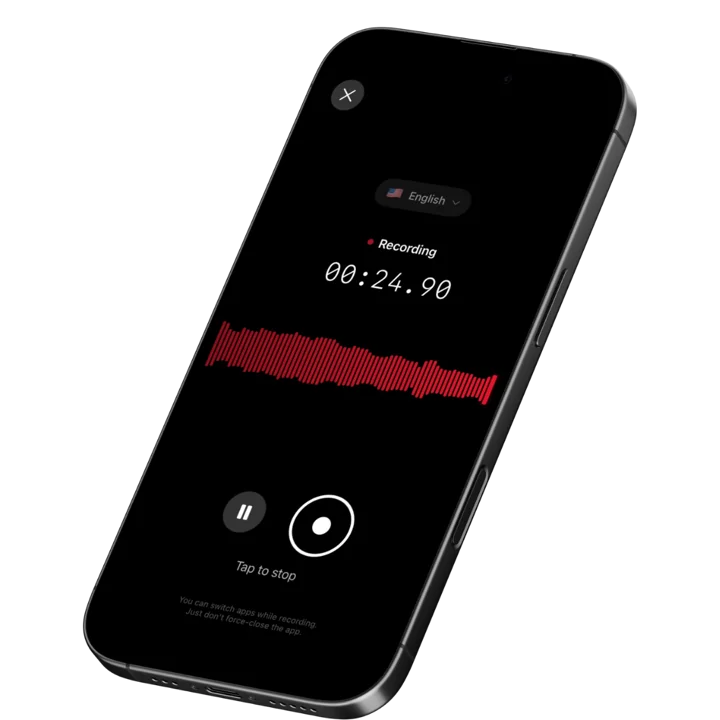
Speakwise is an iOS-native AI voice notes app that captures the full property walk conversation and converts it into structured client notes with a 4.9-star App Store rating and 95%+ transcription accuracy. For landscapers and irrigation contractors, this means you stay fully present with the client during the walk - maintaining eye contact, asking follow-up questions, and building the relationship - while Speakwise captures every scope detail, client preference, and special request in the background via AirPods hands-free recording. The AI then extracts the key action items and organizes the conversation into notes you can review before building the estimate.
Why Speakwise Stands Out
Client walks are relationship moments. The client is evaluating whether they trust you with their property as much as they are describing the scope of work. Breaking that flow to type notes or consult your phone signals that you are not fully listening. Speakwise solves this entirely. Tap your AirPod when the walk begins, stay completely engaged with the client, and tap again when it ends. Everything gets captured without visible note-taking.
The AI processing turns the captured conversation into a usable scope document. A thirty-minute property walk discussing turf replacement zones, irrigation head relocation, tree removal, drainage improvements, and plant selections becomes a clean summary with each scope item listed and any client preferences flagged. This gives you the raw material for your estimate without spending an evening reconstructing what you heard.
For contractors managing multiple properties per day, the efficiency compounds quickly. Similar to how service technicians use hands-free recording to capture diagnostic observations, landscapers get the same benefit during client walkthroughs - the work gets documented at the moment of maximum detail retention rather than reconstructed hours later from memory.
Key Features
- AI-Powered Summaries: Convert a full property walk conversation into a structured scope summary with client requirements, site observations, and action items organized. Users save 73% of documentation time compared to manual note-writing (according to Speakwise user surveys). Your estimate prep begins with organized notes, not memory reconstruction.
- Long Recording Support: Multi-hour board meetings, conference sessions, offsites.
- Works Offline: Construction sites, secure boardrooms, planes - record without WiFi. Sync when you're back.
- Action Item Extraction: Identifies follow-up tasks, measurements to take, materials to price, and approvals needed. Say "get a quote for that Japanese maple from the nursery before Friday" during the walk and it appears as an extracted action item automatically.
- Speaker Diarization: Speakwise applies speaker diarization to separate the client's requests from your own observations during the walk, so scope preferences are attributed to the client and your notes stay clearly yours.
- Advanced Noise Cancellation: Maintains 92%+ accuracy outdoors in wind, near running irrigation systems, and with ambient street or equipment noise. Outdoor recording conditions are challenging for basic voice apps. Speakwise's noise cancellation keeps your transcription clean regardless of the job site acoustic environment.
- 100+ Language Support: Many client relationships and crew conversations cross language boundaries. Speakwise auto-detects and transcribes in 100+ languages, capturing property discussions in English, Spanish, or any other language without manual settings adjustments.
- Native Notion Integration: Sync property walk notes to Notion automatically, organized by client name, address, or project date. Landscapers managing dozens of active proposals get a searchable record of every client conversation. 82% of users cite this as a key reason they chose Speakwise (based on internal user data).
- AirPods Hands-Free Recording: Start and stop recording from your AirPods while your hands hold measuring tools, take photos, or stay free for client interactions. No phone interaction needed during the property walk. Your visible attention stays on the client where it belongs during the entire conversation.
- Action Button Recording: On iPhone 15 Pro and later, map the Action Button so one press starts the recording as the walk begins — no unlocking, no app to open — then keep both hands on your measuring wheel and drawings.
Pricing
- Free Trial: Full access to all features
- Premium: $59.99/year - unlimited transcription, AI summaries, Notion sync, 100+ languages
Best For
- Landscapers capturing client scope conversations during property walks
- Irrigation contractors documenting head locations, coverage gaps, and system upgrade requests
- Lawn care business owners who need detailed client notes before building proposals
- Landscape designers conducting design consultation walks with detailed client preference capture
Limitations
- iOS only - no Android or desktop version
- No Zoom/Teams bot integration (designed for in-person recording)
- Individual-focused - no multi-crew team dashboards
Speakwise gets your hours back.
- ✓Built for in-person meetings, interviews, and site visits.
- ✓Trusted by recruiters, consultants, agents, and field pros.
- ✓One tap to record. Notion-ready summary in minutes.

2. CompanyCam - Best for Organized Photo Documentation
CompanyCam is purpose-built for field contractors who need organized, timestamped, GPS-tagged photo documentation for every job. For landscapers, the before-and-after photo pairs prove completed work to clients, and the AI reporting feature generates structured reports from job site photos and voice notes. Photos are stored under the correct project automatically and accessible by the whole crew. The starting price of $99/month (minimum 3 users) positions it as a team-level tool rather than a solo operator solution.
Key Features
- GPS-tagged, timestamped photos automatically organized by project
- Before-and-after photo pairing for proof-of-work documentation
- AI reporting: generate structured reports from photos and voice notes
- Unlimited photo, video, and document cloud storage on all plans
- Integrations with Jobber, JobNimbus, and ServiceTitan
Pricing
- Pro: $99/month (minimum 3 users)
- Premium: $149/month
- Elite: $249/month
Best For
- Landscaping crews needing organized photo records for client-facing project documentation
- Landscape contractors managing multiple active projects with client approval workflows
Limitations
- Photo-first design - less suited for capturing full verbal property walk conversations
- Minimum 3-user requirement makes it expensive for solo operators
- No hands-free voice recording for client conversations
3. Jobber - Best for Full Landscaping Business Management
Jobber is the most widely used field service management platform in the landscaping industry. It handles client records, quoting, scheduling, route optimization, and invoicing in one system, with a mobile app that includes job notes and client history on every visit. The platform added a beta AI voice assistant for hands-free note updates and quote creation via voice commands, though it is not the primary documentation focus. For landscapers who need a complete operations platform rather than a dedicated recording tool, Jobber is the logical choice.
Key Features
- Complete client CRM with full job history and property notes
- Recurring service scheduling with route optimization
- On-site quoting with tiered proposal packages
- Beta AI voice assistant for hands-free note and quote updates
- 14-day free trial of the Grow plan
Pricing
- Core: $39/month
- Connect: $119/month (recommended for recurring residential clients)
- Grow: $199/month
- Plus: $599/month
Best For
- Landscaping businesses needing a complete operations platform with integrated job notes
- Lawn care companies managing recurring residential routes with client communication tools
Limitations
- Voice assistant is in beta and not built for extended property walk narration
- More expensive than dedicated recording tools for operators who only need note capture
- Primary value is business operations, not documentation quality
4. Otter.ai - Best for Real-Time Transcription with Team Sharing
Otter.ai provides real-time transcription with automatic speaker labeling, which helps when both you and the client are speaking during the property walk. Office staff and estimators can access transcriptions from their browser while you are still in the field. The 300-minute free tier provides enough capacity for occasional property walk recording. For landscaping businesses where office staff needs to build estimates from field conversations, the shared access model is useful.
Key Features
- Real-time transcription with automatic speaker identification
- Team sharing with browser and mobile access
- 300 free minutes per month on the free tier
- Integrations with Slack and Notion for note distribution
- Keyword search across all recorded transcriptions
Pricing
- Free: 300 minutes/month
- Pro: $16.99/month or $8.33/month billed annually
- Business: $30/user/month or $19.99/month billed annually
Best For
- Landscaping businesses where estimators need to review field conversation transcripts from the office
- Multi-person property walks where speaker identification helps organize the notes
Limitations
- No AirPods hands-free recording
- No dedicated noise cancellation for outdoor recording conditions
- Free tier limits exhaust quickly during busy estimation seasons
5. Rev Voice Recorder - Best for Offline High-Quality Capture
Rev Voice Recorder focuses on capturing the cleanest possible audio from your iPhone microphone, which matters when recording outdoors in wind or near running equipment. The app records fully offline without internet connectivity, making it reliable for rural properties or areas with poor cell coverage. The pay-per-use transcription model suits landscapers who record occasionally for specific client conversations rather than every property walk.
Key Features
- Optimized audio capture for challenging outdoor conditions
- Full offline recording without internet connectivity
- Human transcription at $1.99/minute for complex or noisy audio
- AI transcription at $0.25/minute for cleaner recordings
- Simple interface with no learning curve
Pricing
- Recording: Free
- AI Transcription: $0.25/audio minute
- Human Transcription: $1.99/audio minute
- Pro Plan: $14.99/user/month for 20 hours AI transcription
Best For
- Landscapers who record specific high-value client consultations and need accurate transcription
- Irrigation contractors in rural areas with unreliable cellular coverage
Limitations
- No hands-free AirPods recording
- No AI summaries or action item extraction
- Transcription cost adds up significantly with daily recording volume
6. RealGreen - Best for Landscaping-Specific Field Operations
RealGreen is a lawn care and landscaping business management platform with voice-activated text entry in its mobile app, automatic local weather sync, and full offline capability for crews in areas without reliable signal. The platform handles route optimization, customer history, and service documentation in a single system designed specifically for the lawn care industry. It is a business operations platform first and a documentation tool second, but the voice-activated entry feature reduces friction for technicians who need to add field notes quickly.
Key Features
- Voice-activated text entry for quick field note capture
- Automatic local weather condition sync for job site records
- Full offline capability with automatic sync on reconnect
- Customer history and service records accessible on mobile
- Route optimization for multi-stop daily schedules
Pricing
- Contact RealGreen for current pricing (custom quotes based on company size)
Best For
- Established lawn care businesses already invested in the RealGreen ecosystem
- Operations that need weather data and route optimization integrated with field notes
Limitations
- Not purpose-built for capturing long-form client property walk conversations
- Custom pricing structure makes cost comparison difficult
- Voice entry captures brief notes rather than full conversation transcription
How to Choose the Best Property Walk App
1. Does it keep you fully present with the client? A property walk is a sales conversation as much as a site assessment. Visible note-taking on a phone screen interrupts the client's train of thought and signals that your attention is split. The best apps capture everything in the background while you maintain full eye contact and engagement with the client. Hands-free recording via AirPods or wearables is the gold standard for property walk documentation.
2. Does it handle outdoor recording conditions? Wind noise, running sprinklers, lawn equipment, and traffic create background noise that defeats basic recording apps outdoors. Test any app you consider in actual outdoor conditions - walking next to running irrigation equipment or on a windy property - not in a quiet office. Advanced noise cancellation built for outdoor environments is a hard requirement for reliable property walk transcription.
3. Does it turn conversation into usable scope documentation? Capturing audio is step one. The more valuable question is whether your recording becomes a structured scope document automatically - with client requirements, site observations, and action items already organized - or whether you have to listen back and re-type everything yourself. For landscapers working multiple properties per day, AI-powered summarization is the difference between a tool you use consistently and one you abandon within a week.
4. Does it integrate with how you build estimates? Your captured property walk notes are only useful if they flow naturally into your estimating process. Look for apps that sync with Notion, export structured notes, or integrate with the estimating tools your business already uses. The goal is to reduce the friction between a completed property walk and a submitted proposal.
5. Does it work offline? Rural properties, large estate lots, and areas with poor cell coverage are common scenarios for landscapers. Apps that require a live internet connection for recording or transcription are unreliable in exactly the locations where property walks happen. Confirm offline recording capability and automatic sync on reconnect before committing to any platform.
Frequently Asked Questions
How do I capture client property walk notes without interrupting the conversation? Use an app that supports AirPods hands-free recording. Speakwise lets you tap your AirPod to start recording when the walk begins, then tap again when it ends. Your phone stays in your pocket, your hands stay free, and the client never sees you looking at a screen. After the walk, your AI summary contains every scope detail, client preference, and special request without any visible note-taking during the conversation.
Will wind and outdoor noise affect the transcription quality? Yes, unless the app has dedicated noise cancellation built for outdoor conditions. Basic voice apps produce unreliable transcriptions when recorded outdoors in wind or near running irrigation equipment. Speakwise uses advanced noise cancellation that maintains 92%+ accuracy in outdoor recording environments. Test any app you are evaluating in actual outdoor job site conditions - the performance difference from office to field is significant.
Can I capture both what the client says and my own observations? Yes. Speakwise transcribes everything spoken during the recording session, regardless of who is speaking. For property walks, this means the client's preferences, your questions, and your own site observations all appear in the transcript and summary. Speaker diarization helps distinguish client statements from your own notes in multi-person conversation transcripts.
What should I do with the property walk recording after the job? Review the AI summary before building your estimate to confirm you captured all scope items. Export or sync to your project management or estimating system. For Notion users, Speakwise syncs automatically organized by client or date. For recurring clients, the searchable history of property walk notes gives you a record of every conversation, which is invaluable when scope disputes arise months after the project completes.
Is a voice recording app enough or do I also need a photo documentation tool? Both serve different purposes. Voice recording captures what the client says and your observations during the walk. Photo documentation captures visual evidence of site conditions before work begins. For landscapers bidding larger projects, combining a voice recording tool like Speakwise with a photo documentation tool like CompanyCam provides complete coverage of both the client conversation and the physical site conditions in separate, purpose-built tools.
Final Verdict
Property walk documentation is where landscaping jobs are won or lost. Detailed, accurate scope capture at the point of the client conversation leads to accurate estimates, fewer change orders, and cleaner project execution. Documentation built from memory hours later produces gaps, misremembered preferences, and the kind of scope disagreements that turn profitable projects into disputes.
Speakwise is the best overall option because it solves the most critical problem first: keeping you fully present with the client during the walk while capturing everything in the background. The AirPods hands-free recording and AI summarization combination means you leave every property walk with structured scope notes in hand rather than a memory reconstruction task waiting for you at the truck.
For landscaping businesses that need a complete operations platform, Jobber handles the full workflow from lead to invoice with adequate built-in note tools. CompanyCam adds strong value for photo documentation and client-facing proof-of-work records. But for capturing the substance of what your client actually said during the walk, a dedicated voice recording tool with AI summarization delivers results that general business software cannot match.
Download Speakwise from the App Store and start capturing hands-free property walk recordings that turn into organized scope notes automatically - so your next estimate is built from exactly what the client said, not what you remember they said.
🎯 4.9★ App Store Rating | 📱 Built for iOS
