Best App for Personal Trainers to Record Client Session Notes (2027)
TL;DR
The best app for personal trainers to record client session notes in 2027 is Speakwise. The iPhone app records what you say between clients, then writes the note, free to try for 7 days. Trainerize suits full client platforms, and Apple Voice Memos is free.
Used by recruiters, executives, consultants, and more.
Best App for Personal Trainers to Record Client Session Notes in 2027
Personal trainers need an app for recording client session notes between the six to nine sessions a day, when there is no time to write anything down. A full back-to-back schedule on a gym floor with music playing leaves about ninety seconds to capture a cue, a rep count, or a reason to adjust next week's program. This guide compares 6 tools built for capturing client session notes fast.
Best App for Personal Trainers to Record Client Session Notes at a Glance (2027)
The best app for personal trainers to record client session notes in 2026 is Speakwise for dictating the note between clients, paired with a coaching platform such as Trainerize or TrueCoach as the system of record. The full ranking:
- Speakwise - Best overall for dictating session notes on the gym floor between clients
- Trainerize - Best all-in-one client app and programming platform
- TrueCoach - Best simple coaching platform for small rosters
- PT Distinction - Best flat pricing with everything included
- Everfit - Best automation and habit coaching features
- Apple Voice Memos - Best free built-in option
The coaching platforms are where programming, client communication, and workout history live. None of them solve the capture problem, which is that typing a note during or after a session competes directly with training the next person.
1. Speakwise - Best Overall for Dictated Session Notes
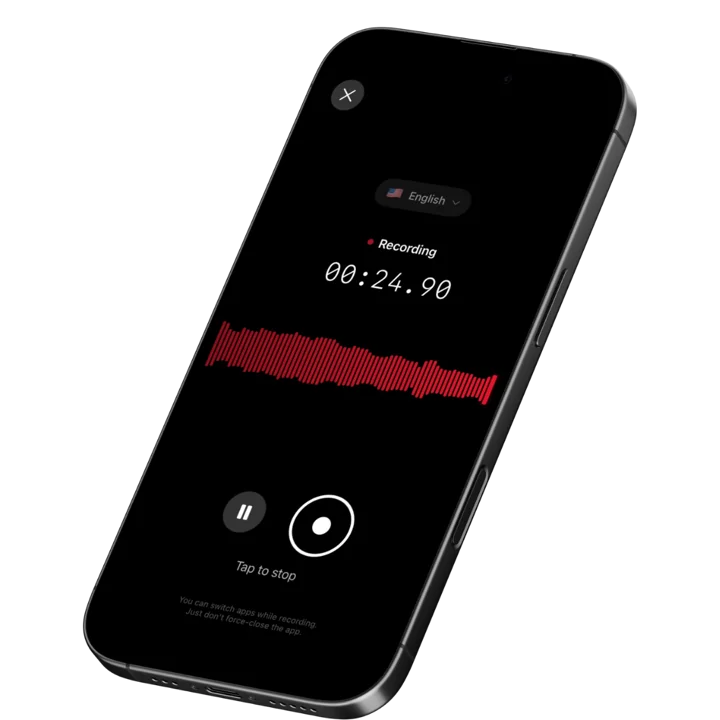
Speakwise is an iOS app that records through the iPhone microphone and turns what you say into a structured note with an AI summary and extracted follow-up items. For a personal trainer, it is a dictation tool used in the gap between clients: talk for sixty to ninety seconds about what happened in the session, and the note is written before you shake the next client's hand.
It runs on a paid subscription through the App Store. Speakwise is not a coaching platform and does not program workouts, deliver them to clients, or track adherence. It sits in front of whatever platform you already use and solves the part those platforms are worst at.
Why Speakwise Stands Out
Trainers do not skip notes because they undervalue them. They skip them because the documentation window is the same ninety seconds they need to reset equipment, refill a water bottle, and greet the next client. Speaking is roughly three times faster than typing on a phone, and it works while you are re-racking plates. That is the entire difference between a session note that exists and one that does not.
The AI summary is what makes dictation usable rather than just faster. A rambling verbal note becomes an organized summary, and the follow-ups come out on their own: order the resistance bands, program a deload next week, check in about the knee on Thursday, adjust Tuesday because of the flight. Those are the details that make a client feel like their program is actually theirs, and they are the first things that disappear across a nine-session day. Trainers face the same capture problem coaches in other disciplines run into during live sessions.
Speakwise also handles the long-form conversations that bookend a client relationship. Initial consultations, movement assessments, and quarterly check-ins are twenty to sixty minute conversations dense with history, goals, injuries, and constraints. Recording those with the client's permission means you can be present for the conversation instead of writing while they talk, and speaker labels keep the client's own words distinct from your observations. When you revisit the intake six months later, what the client said about their back is in their words, not your paraphrase.
The realistic limitation is acoustic. A commercial gym at 6pm with music, plates, and conversation is a hard recording environment. Dictation works well because you are speaking close to the phone. Recording a full session from across a squat rack does not, and it is not what this workflow is for.
Key Features
- One-tap dictation between sessions: Record the note by talking, on the phone already in your pocket, while you reset the equipment.
- AI summaries: Converts a spoken note into an organized summary instead of an audio file you have to listen back to.
- Action item extraction: Program changes, equipment orders, and check-ins are pulled out as a separate list.
- Speaker labels: In a recorded consultation or assessment, diarization keeps the client's words separate from yours.
- Long recordings: Handles a full sixty-minute intake consultation in one file.
- Share and export: Copy or export the note text into Trainerize, TrueCoach, or whichever platform holds your client records, or share a summary link with the client.
- 100+ languages: Useful for trainers working with clients in a second language.
Pricing
- Paid subscription purchased through the App Store. Current pricing is shown on the Speakwise App Store listing.
Best For
- Trainers dictating session notes between back-to-back clients
- Recording initial consultations and movement assessments with client permission
- Solo trainers and small studios without an admin layer
- Trainers who already have a coaching platform and need the capture layer in front of it
Limitations
- iOS only, with no Android or desktop version
- Not a coaching platform: no programming, no exercise library, no client app, no scheduling or billing
- Gym floor noise degrades recording quality at a distance, so it works best as dictation
- Not a clinical documentation tool and holds no health data compliance certification
Speakwise gets your hours back.
- ✓Built for in-person meetings, interviews, and site visits.
- ✓Trusted by recruiters, consultants, agents, and field pros.
- ✓One tap to record. Notion-ready summary in minutes.

2. Trainerize - Best All-in-One Client Platform
ABC Trainerize is the most widely adopted coaching platform in the industry, combining workout programming, a branded client app, progress tracking, messaging, and payments. Clients log workouts and see their history, and trainers get adherence data without asking. Pricing scales with roster size and lands around $175 per month at 50 clients, with a 30-day trial. Several capabilities are priced as add-ons, including nutrition at roughly $5 to $45 per month, video coaching at about $10, and payment processing at about $10.
Key Features
- Workout programming with a large exercise library and video demonstrations
- Branded client app with workout logging and progress tracking
- In-app messaging and habit tracking
- Integrated payments and package management
Pricing
- Scales with client count; roughly $175 per month at 50 clients
- Add-ons for nutrition, video coaching, and payment processing
- 30-day free trial
Best For
- Trainers who want programming, client app, and billing in one system
- Studios standardizing on a single platform across multiple trainers
Limitations
- Session notes are typed, which is the exact bottleneck on a busy floor
- Add-on pricing makes the real monthly cost higher than the headline
- Feature depth means a longer setup before it earns its cost
3. TrueCoach - Best Simple Platform for Small Rosters
TrueCoach is the option trainers pick when Trainerize feels like more software than the business needs. Programming is fast to build, the client experience is clean, and the interface has fewer places to get lost. It costs around $49 per month for a trainer with 20 active clients and roughly $164 per month at 50, with a 14-day trial.
Key Features
- Fast workout builder with video demonstrations
- Client app with workout logging and form-check video upload
- Direct messaging and progress photo tracking
- Straightforward per-client pricing tiers
Pricing
- ~$49 per month at 20 active clients
- ~$164 per month at 50 clients
- 14-day free trial
Best For
- Trainers with rosters under about 25 clients
- Coaches who want programming without an all-in-one business platform
Limitations
- Per-client pricing gets expensive as a roster grows
- Fewer business features than Trainerize
- Notes are still typed entries in a client record
4. PT Distinction - Best Flat Pricing with Everything Included
PT Distinction's differentiator is that the price includes everything: branded app, automations, AI tools, and group training with no separate fees. At 50 clients with every feature enabled it runs about $89.90 per month, roughly half what comparable configurations cost elsewhere, and it carries the highest Trustpilot rating in the category at around 4.7 stars. The trial is a full month.
Key Features
- Flat pricing with branded app, automations, and group training included
- Automated program delivery and check-in sequences
- Assessment and progress tracking tools
- One-month free trial
Pricing
- ~$89.90 per month at 50 clients with all features included
- One-month free trial
Best For
- Trainers who want predictable costs without add-on creep
- Online coaches running automated check-in sequences at scale
Limitations
- Smaller brand presence than Trainerize, so fewer clients recognize it
- Interface is functional rather than polished
- Still a typing-based documentation workflow
5. Everfit - Best for Automation and Habit Coaching
Everfit leans hardest into behavior change: habit tracking, automated task sequences, and structured accountability alongside programming. For coaches whose value is adherence rather than exercise selection, that focus is the differentiator. Pricing at 50 clients starts around $197 per month, with automation priced at roughly $24 to $29 per month and meal plans at roughly $33 to $39 on top. The trial runs 30 days.
Key Features
- Habit and behavior tracking alongside workout programming
- Automated task and check-in sequences
- Group coaching and community features
- Nutrition and meal plan modules
Pricing
- From ~$197 per month at 50 clients
- Automation add-on ~$24 to $29 per month; meal plans ~$33 to $39 per month
- 30-day free trial
Best For
- Coaches whose programs centre on habit change and accountability
- Online coaching businesses running large group cohorts
Limitations
- Highest total cost in this comparison once add-ons are included
- More features than an in-person trainer with 15 clients needs
- Documentation is typed, like every platform on this list
6. Apple Voice Memos - Best Free Built-In Option
Voice Memos is already on your phone, records instantly with no login, and produces a transcript on recent iOS versions. For a trainer who wants to test whether talking out session notes fits their day, it removes every barrier and costs nothing. What it does not do is organize anything. Six months of daily recordings becomes a chronological list of untitled files, and finding the session where a client first mentioned their shoulder means scrubbing through audio.
Key Features
- Free and preinstalled on every iPhone
- Instant recording with no account required
- Built-in transcription on recent iOS versions
- Syncs across Apple devices via iCloud
Pricing
- Free
Best For
- Trainers testing verbal note capture before paying for anything
- Occasional recording where retrieval does not matter
Limitations
- No AI summaries and no extracted follow-up items
- No structure, so retrieval degrades quickly as recordings accumulate
- No speaker labels for consultations
How to Choose the Best Personal Trainer Session Notes App
1. Separate the capture layer from the coaching platform. Trainerize, TrueCoach, PT Distinction, and Everfit are systems of record: programming, client app, history, billing. None of them make it faster to get today's observations into text. The realistic setup is a fast capture tool feeding the platform you already pay for, not a second platform.
2. Test it against ninety seconds and a noisy room. That is the actual window between clients, standing on a gym floor with music playing. Anything that requires sitting down, opening a laptop, or navigating four screens will be abandoned inside a month. If you cannot use it while re-racking plates, it is not a session notes tool for this job.
3. Check what happens to the follow-ups. The narrative note matters less than the list: deload next week, order the bands, ask about the knee, move Tuesday's session. Those are the items that make a client feel individually coached, and they are the ones that vanish across nine sessions. Tools that extract them separately are managing the part that drives retention.
4. Be deliberate about health information. Clients disclose injuries, surgeries, medications, and conditions in a training relationship. That information deserves the same care a clinic would give it, even though you are not a clinic. Keep detailed medical history in your coaching platform's client record where access is controlled, keep casual notes light on specifics, and never present a training note as clinical documentation. Practitioners who do work in a clinical setting have a different documentation standard entirely.
5. Decide whether you record consultations at all. Recording an hour-long intake with the client's permission is genuinely valuable and low-risk. Recording every training session is neither: gym acoustics make it unreliable, and few clients want to be recorded while they train. Record the conversations, dictate the sessions. The same distinction shows up in how sports coaches handle practice recording.
A Note on Consent and Client Privacy
Recording law varies by jurisdiction, and several US states and many countries require the consent of every party to a recorded conversation. Before recording a consultation, assessment, or check-in, ask the client directly and get a clear yes. Explain what you will do with the recording and who can see it. Dictating your own notes after a session is ordinary professional record keeping and involves no recording of the client, which is why it is the default workflow recommended here.
On health information: clients routinely disclose injuries, surgeries, and medical conditions. Speakwise is a recording and notes tool with no health data compliance certification, and it is not a clinical documentation system. Keep detailed medical history in your coaching platform's controlled client record, use judgment about what goes into a general-purpose notes app, and refer anything that belongs to a physician or physical therapist to one. A training note is not a medical record and should never read like one. The same principle applies across adjacent roles, including wellness coaches documenting client sessions.
Frequently Asked Questions
What is the best app for personal trainers to record client session notes?
Speakwise is the best app for personal trainers to record client session notes because it captures a dictated note in the ninety seconds between clients and returns an organized summary with follow-ups separated out. Pair it with a coaching platform such as Trainerize or TrueCoach, which holds programming, client history, and billing.
Should personal trainers record training sessions?
Generally no. Gym acoustics make full-session recording unreliable, and most clients do not want to be recorded while training. Recording an initial consultation or assessment with explicit permission is different and genuinely useful. For regular sessions, dictating your own note immediately afterward captures what matters without recording the client.
How do trainers write session notes faster between clients?
Dictate instead of typing. Talking through a session takes sixty to ninety seconds and can be done while resetting equipment, versus several minutes of thumb-typing you do not have. An app with AI summaries turns that dictation into structured text with program changes and check-ins extracted, ready to paste into your coaching platform.
What should a personal training session note include?
Four things: the work performed with loads and effort levels, anything the client reported physically such as pain or unusual fatigue, cues or adjustments that worked, and what changes next session. Life details that affect programming, like travel or sleep disruption, belong there too. Keep detailed medical history in your controlled client record instead.
Final Verdict
Session notes are the difference between coaching and supervising. A trainer who remembers that a client's knee clicked three weeks ago, that the last deadlift session felt heavier than the numbers suggest, and that they are flying to Denver on Thursday is delivering something a workout template cannot. That memory does not scale past a handful of clients without a written record.
Speakwise is the best pick for building that record because it fits the only gap that exists in a trainer's day. Ninety seconds of talking while you reset the rack produces a structured note with the program changes and check-ins already pulled out, and it works on the phone already in your pocket rather than requiring a desk you do not sit at.
For programming, client apps, and billing, pick the coaching platform that matches your roster: TrueCoach for small rosters, PT Distinction for the best price with everything included, Trainerize for the most complete ecosystem, and Everfit if habit coaching is the core of your offer. Then put a fast capture tool in front of it, because none of them solve the ninety-second problem, and that is where session notes are actually won or lost.
Download Speakwise from the App Store and get your next session note written before the following client is warmed up.
🎯 4.9★ App Store Rating | 📱 Built for iOS
