Best App for Recording Quarterly Business Reviews (QBRs) (2027)
TL;DR
The best app for recording quarterly business reviews in 2027 is Speakwise. The iPhone app records the room during an in-person QBR, with a 7-day free trial. Gong suits virtual QBRs at scale, and Fathom suits a free option for video calls.
 Speakwise - AI Note Taker
Never miss a key detail
- Smart summaries and action items.
- Speaker diarization labels who said what.
- Unlimited premium transcription.
- Auto-sync to Notion.
- Record offline, even with no signal.


Used by recruiters, executives, consultants, and more.
Best App for Recording Quarterly Business Reviews (QBRs) in 2027
Picking a good app for recording quarterly business reviews starts with where yours actually happen, on a screen or in a room. A QBR is often the one hour all quarter with the economic buyer, and typing four bullets while they talk loses the detail that decides a renewal. Speakwise closes that gap by recording the room itself, not just a video call.
Best App for Recording Quarterly Business Reviews at a Glance (2027)
The best app for recording quarterly business reviews in 2026, ranked by the situation each one actually fits:
- Speakwise - Best for in-person and on-site QBRs held in a room
- Gong - Best enterprise conversation intelligence for virtual QBRs at scale
- Avoma - Best value AI meeting assistant with conversation intelligence
- Fathom - Best free option for virtual meeting notes
- Otter.ai - Best lightweight transcription with a usable free tier
- Apple Voice Memos - Best free built-in fallback for a room
The split matters more than the feature lists. Gong, Avoma, Fathom, and Otter attach to web conferencing, so they capture QBRs held over Zoom, Meet, or Teams. None of them help when the QBR is an in-person executive meeting at the customer's office, which is exactly when the most valuable ones happen.
1. Speakwise - Best for In-Person and On-Site QBRs
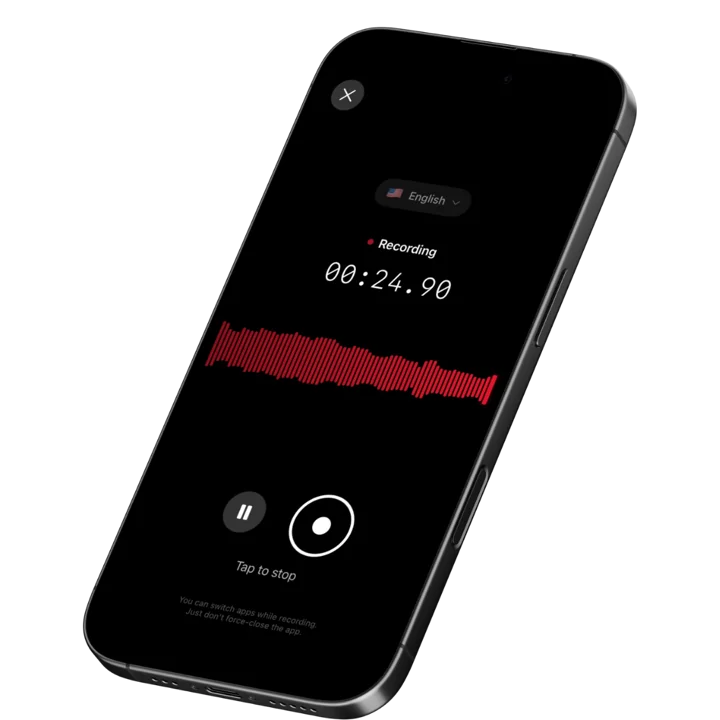
Speakwise is an iOS recording and AI notes app. It records the room through your iPhone microphone, transcribes in over 100 languages, applies speaker labels, and returns a structured summary with action items extracted. For QBRs, it covers the case the entire conversation intelligence category ignores: the review that happens around a conference table at the customer's office, where there is no meeting link for a tool to attach to.
Why Speakwise Stands Out
The most important QBRs are frequently in person. That is not a coincidence: teams fly to a customer site precisely when the account is large, the relationship is strategic, or the renewal is contested. Those meetings involve executives who do not join routine video meetings, and they generate exactly the information you most want a record of. Every major tool in this category structurally cannot capture them, because they work by attaching to a web conference that does not exist.
Speakwise inverts the assumption. You put the iPhone on the table, tap record, and participate normally. Afterward you get a transcript with speakers separated, so a commitment the VP made is attributed to the VP, not lost in a wall of undifferentiated text. In a six person QBR with people talking over each other, that attribution is the difference between a usable record and an unusable one. Our comparison of transcription apps with speaker labels covers how tools differ on this.
The AI summary and action item extraction address the second QBR failure mode. QBRs produce commitments on both sides: you will get them a feature timeline, they will introduce you to the team in EMEA, someone will send the security questionnaire, both parties will revisit pricing in March. Those commitments are the entire operational output of the meeting, and they routinely survive only in one person's memory. Extracted action items turn them into a list you can send the same afternoon, which is also the cheapest way to make a QBR look professional.
Because it runs on the phone in your pocket, there is nothing to explain and nothing to set up. No bot joins anything, no laptop sits open recording the room, and no software has to be approved by the customer's IT team. Customer success teams face this pattern constantly, as covered in our guide to AI note-taking for customer success managers, and it applies just as directly to high-stakes external meetings covered in our roundup on recording investor meetings.
Key Features
- In-room capture: Records the physical meeting through your iPhone, which is the one thing conversation intelligence platforms cannot do.
- Speaker labels: Multi-person QBRs read as a dialogue, so commitments and objections stay attributed to the person who voiced them.
- AI summaries: A ninety minute review becomes a structured summary you can send to your internal team and to the customer the same day.
- Action item extraction: Both-sided commitments come back as an explicit list rather than something you reconstruct on the flight home.
- Long recordings: Handles full-length QBRs, multi-session executive business reviews, and full-day on-site visits.
- 100+ languages: Automatic language detection for international accounts and multilingual customer teams.
- Export and share: Copy or export the transcript and summary into your account plan, follow-up email, or internal wiki. Share notes by link with your team.
Pricing
- Paid subscription via the App Store. Speakwise is a paid iOS app with no free tier. Check the current price on the App Store listing before subscribing.
Best For
- On-site and in-person QBRs at customer offices
- Executive business reviews where senior stakeholders attend in the room
- Account teams that fly out for strategic reviews
- Anyone whose most important meetings never appear on a web conference platform
Limitations
- iOS only, with no Android or desktop version
- Does not attach to Zoom, Meet, or Teams, so virtual QBRs need a different tool
- No CRM integration, deal scoring, or revenue analytics
- Paid subscription with no free tier
A Note on Consent
Recording a customer meeting requires everyone's agreement, and recording laws differ by country and by US state. Several jurisdictions require all participants to consent. Ask at the top of the meeting, explain that the recording is used to write accurate notes and follow-ups, and get a clear yes. Enterprise customers often have their own policy on external recording, so raise it before the meeting rather than in it.
Speakwise gets your hours back.
- ✓Built for in-person meetings, interviews, and site visits.
- ✓Trusted by recruiters, consultants, agents, and field pros.
- ✓One tap to record. Notion-ready summary in minutes.
2. Gong - Best Enterprise Conversation Intelligence
Gong is the category leader in revenue conversation intelligence. It records and analyzes customer conversations across web conferencing, transcribes them, scores them against your playbook, surfaces risk signals across the account base, and feeds coaching programs. For a QBR, its value is less about the notes and more about the pattern: what was said across every account this quarter, and which signals predict churn.
Key Features
- Automatic recording and transcription of web conference meetings
- Deal and account risk scoring across the full customer base
- Manager coaching workflows and call libraries
- Deep CRM integration and revenue analytics
- Topic and competitor mention tracking at scale
Pricing
- Quote-based. Typically ~$150 to $250 per user per month all-in, plus a platform fee that commonly runs from ~$5,000.
Best For
- Enterprise revenue organizations standardizing on one system
- Teams that want QBR content analyzed as data across accounts
Limitations
- Expensive, with a platform fee before the first seat
- No capture of in-person meetings
- Substantial overkill for small customer success teams
3. Avoma - Best Value AI Meeting Assistant
Avoma sits between a note taker and full conversation intelligence, at a fraction of enterprise pricing. It records web conference meetings, transcribes, generates structured notes with agendas and templates, and offers conversation intelligence as an add-on. For customer success teams that want QBR notes and some analytics without an enterprise contract, it is the most common landing spot.
Key Features
- Meeting recording, transcription, and AI-generated notes
- Agenda templates and collaborative note taking
- Conversation intelligence available as an add-on
- CRM sync and shared meeting collections
- Scheduling and meeting management features
Pricing
- From ~$19 to ~$24 per user per month, plus roughly ~$29 per seat for the conversation intelligence add-on
Best For
- Customer success teams that run structured, templated QBRs
- Organizations wanting Gong-style insight without Gong-level cost
Limitations
- Conversation intelligence costs extra on top of the base seat
- No in-person meeting capture
- Analytics depth is below Gong at the enterprise end
4. Fathom - Best Free Option for Virtual QBRs
Fathom offers unlimited free recording, transcription, and AI summaries for individual users across Zoom, Google Meet, and Microsoft Teams. For a customer success manager running virtual QBRs who wants notes and highlights without a budget conversation, it is the highest-value free option in the category by a wide margin.
Key Features
- Unlimited free recording and transcription for individuals
- AI summaries, highlights, and automatic action items
- Works across Zoom, Google Meet, and Microsoft Teams
- CRM push available on paid team plans
- Fast post-meeting summary turnaround
Pricing
- Free: Unlimited recordings for individual users
- Team Edition: from ~$19 per user per month
Best For
- Individual CSMs and account managers running virtual QBRs
- Small teams that want notes without procurement
Limitations
- No in-person capture
- Team analytics and CRM features require the paid tier
- Not a conversation intelligence platform
5. Otter.ai - Best Lightweight Transcription
Otter.ai is the most widely known transcription tool, with a genuinely useful free tier and automatic speaker identification. It joins web conference meetings, produces live transcripts, and generates summaries. For teams whose QBR need is simply an accurate searchable transcript rather than deal analytics, it covers the job cheaply.
Key Features
- Live transcription with automatic speaker identification
- Free tier with 300 transcription minutes per month
- Searchable transcript archive across meetings
- Summaries and highlights
- Broad integration support
Pricing
- Free: 300 minutes per month
- Pro: from ~$8.33 per user per month billed annually
- Business: from ~$20 per user per month billed annually
Best For
- Teams needing a searchable transcript archive at low cost
- Individuals who want speaker-labeled notes without a platform commitment
Limitations
- Joins meetings as a visible participant, which some customers object to
- Per-meeting duration limits on lower tiers
- No account analytics or risk scoring
6. Apple Voice Memos - Best Free Built-In Fallback
Voice Memos is on every iPhone and costs nothing, and unlike every virtual tool on this list it can capture an in-person QBR. Set the phone on the table and record. On iPhone 12 and later it produces a transcript in supported languages. It has no summaries, no action items, no speaker labels, and no organization, which is exactly what a ninety minute six-person meeting most needs.
Key Features
- Free and pre-installed on every iPhone
- Captures in-person meetings with no setup
- Transcripts on iPhone 12 and later in supported languages
- Works fully offline
Pricing
- Free, included with iOS
Best For
- An unplanned in-person QBR when nothing else is installed
- Testing whether recording your QBRs changes your follow-up quality
Limitations
- No speaker labels, which makes long multi-person transcripts hard to use
- No summaries or action item extraction
- No organization across a quarter of meetings
How to Choose a QBR Recording App
- Start with where the QBR physically happens. Virtual QBRs need a tool that attaches to your web conferencing. In-person QBRs need a device in the room. Buying the wrong category is the most common mistake, and it shows up only when the important meeting is the one that went uncaptured.
- Demand speaker labels for multi-person meetings. A QBR with six attendees produces a transcript that is unreadable without attribution. Knowing the CFO raised the pricing objection, not the analyst, is the entire value of the record.
- Judge it on action items, not transcription. The output that matters is the commitment list you send the same day. A transcript alone moves the work rather than removing it.
- Clear recording with the customer before the meeting. Enterprise customers frequently have policies on external recording, and consent law varies by jurisdiction. Raising it in advance avoids an awkward first two minutes.
- Check whether you need analytics or just notes. Gong-class analytics only pay off with volume and a coaching program behind them. Most teams under twenty reps get more value from good notes than from scored conversations.
Frequently Asked Questions
What is the best app for recording quarterly business reviews?
It depends on format. For in-person and on-site QBRs, Speakwise is the strongest pick, recording the room through your iPhone with speaker labels and action items. For virtual QBRs, Gong leads at enterprise scale, Avoma offers the best value, and Fathom is the best free option.
Can I record an in-person QBR?
Yes, with a device in the room. Conversation intelligence platforms like Gong, Avoma, and Otter attach to web conferencing and capture nothing at a customer's office. Speakwise records the physical meeting through your iPhone with speaker separation, and Apple Voice Memos captures audio for free without labels or summaries.
Do I need consent to record a customer QBR?
Yes. Recording rules vary by country and US state, and several require every participant to agree. Many enterprise customers also have their own policy on external recording. Raise it before the meeting rather than at the start of it, explain that it is for accurate notes, and get a clear yes.
What should a QBR recording actually produce?
A commitment list, not an hour of audio. The useful output is who agreed to what, by when, on both sides, plus the objections and priorities the customer raised. Tools that extract action items automatically turn the recording into a same-day follow-up email, which is where the renewal work actually happens.
Is Gong worth it just for QBRs?
Usually not on its own. Gong's value comes from analyzing conversation patterns across many meetings and feeding a coaching program, which requires volume and management commitment. For teams that mainly want accurate QBR notes and follow-ups, Avoma or Fathom deliver most of the practical benefit at a fraction of the cost.
Final Verdict
The QBR tooling market is built almost entirely around one assumption: that the meeting is happening on a screen. Gong, Avoma, Fathom, and Otter are all good at that, and if every QBR you run is on Zoom, pick from those four based on budget and whether you need analytics or just notes.
The assumption breaks exactly where the stakes are highest. Strategic accounts, contested renewals, and executive business reviews are the ones people get on planes for, and none of them have a meeting link. Speakwise is the best pick for those, because it records the room from the phone already in your pocket and gives back speaker-labeled notes with the commitments extracted.
Most account teams should own one of each. Something attached to your web conferencing for the routine quarterly cadence, and something in your pocket for the meeting that actually decides the renewal.
Download Speakwise from the App Store and walk out of your next on-site QBR with the commitments already written down.
🎯 4.9★ App Store Rating | 📱 Built for iOS
