Best App for Recording Walking Meetings (2027)
TL;DR
The best app for recording walking meetings in 2027 is Speakwise. The iPhone app records through your AirPods while you walk, then returns a transcript and summary, with a 7-day free trial. Apple Voice Memos suits raw audio, and Plaud NotePin suits a wearable mic.
 Speakwise - AI Note Taker
Never miss a key detail
- Smart summaries and action items.
- Speaker diarization labels who said what.
- Unlimited premium transcription.
- Auto-sync to Notion.
- Record offline, even with no signal.


Used by recruiters, executives, consultants, and more.
Best App for Recording Walking Meetings in 2027
The best app for recording walking meetings has to solve a problem no conference room ever faced: nobody is holding a pen. That is the whole appeal of a walking one-to-one, and also why the good ideas from it usually go unwritten. Speakwise records through your AirPods as you walk and turns the conversation into notes by the time you sit back down.
Best App for Recording Walking Meetings at a Glance (2027)
The best app for recording walking meetings in 2026 is Speakwise, followed by five alternatives covering free capture, wearables, and solo debriefs:
- Speakwise - Best overall for hands-free capture that returns a summary and action items
- Apple Voice Memos - Best free option for raw audio in your pocket
- Otter.ai - Best for a live transcript you can check mid-walk
- Plaud NotePin - Best wearable for clipping the microphone above the wind
- Voicenotes - Best for a solo walk where you talk and it organises
- AudioPen - Best for turning a rambling post-walk debrief into clean prose
Speakwise ranks first because it is the only option that starts from an AirPod, records with the phone in your pocket, and returns attributed notes rather than a thirty minute file.
1. Speakwise - Best Overall for Walking Meetings
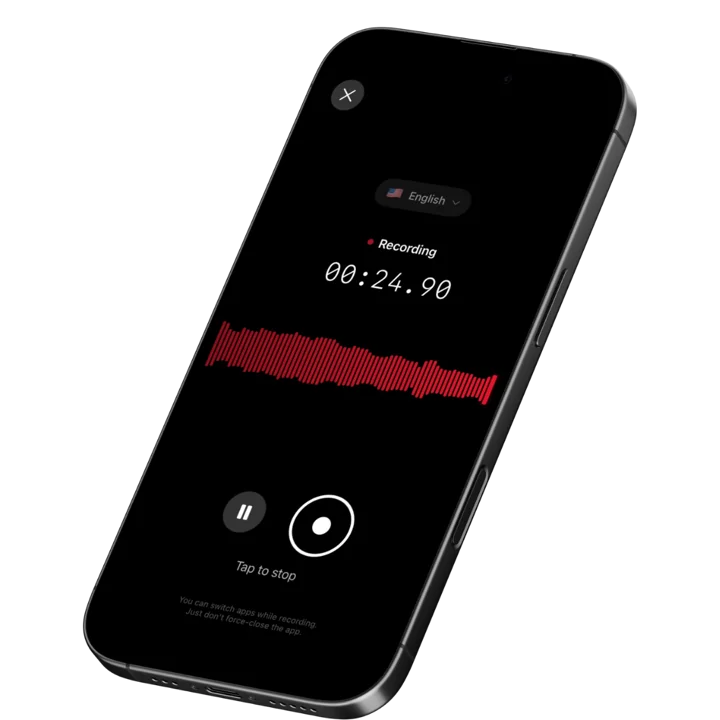
Speakwise records through your AirPods or the iPhone in your pocket, keeps recording with the screen off, and returns a transcript, an AI summary, and extracted action items when you stop. For a walking one-to-one, that is the entire workflow: tap an AirPod at the start of the loop, talk normally, tap again at the end, read the summary before you sit down.
Why Speakwise Stands Out
Walking meetings are hostile to every assumption a meeting tool makes. There is no calendar invite, no video link, no laptop, no bot to send. The audio is worse than a conference room because of wind, traffic, and footfall. And nobody wants to walk around holding a phone out like a microphone, which defeats the informality that made the walk worth doing.
Speakwise handles this by starting and stopping from an AirPod and then disappearing. The phone stays in a pocket. Because it is built for in-person capture rather than video calls, there is nothing to configure for a conversation that only exists in the real world. Speaker labels then separate your voice from your colleague's, which turns a thirty minute walk into a readable record of who committed to what.
The action item extraction is the part that changes behaviour. Walking conversations generate commitments at a higher rate than seated ones precisely because they are relaxed, and those are the commitments most likely to evaporate. If the format itself is new to you, our walking meeting statistics roundup covers what the research says about why they work.
Key Features
- AirPods Hands-Free Start and Stop: Begin and end the recording from an AirPod without taking the phone out, so the walk never turns into a device interaction.
- Background Recording: The recording continues with the screen off and the phone in your pocket for the length of the walk.
- AI Summaries: A thirty minute wandering conversation comes back as a structured summary you can read before your next meeting starts.
- Automatic Action Items: Commitments made mid-walk get pulled out into a list rather than staying buried in the middle of a transcript.
- Speaker Labels: Diarization attributes each passage, so a two-person walk reads as a conversation record rather than one long block.
- No Meeting Bot Required: Nothing to invite, install, or connect. The capture happens on the phone that was already in your pocket.
- PDF Export and Link Sharing: Send the notes to the other person as a link or a PDF straight after the walk.
Pricing
- Paid subscription via the App Store, on weekly or annual auto-renewing plans. Speakwise is not a free app and has no permanent free tier.
Best For
- Managers running walking one-to-ones who want a record without taking notes
- Founders and consultants who think better moving than sitting
- Outdoor catch-ups, campus walks, and post-lunch strategy loops
- Anyone who needs the action items from a conversation that had no agenda
Limitations
- iOS only, so a walking partner on Android cannot record their side
- Paid subscription with no free tier
- Wind and traffic degrade any microphone, AirPods included
- No meeting bot, so it does not cover video calls
Speakwise gets your hours back.
- ✓Built for in-person meetings, interviews, and site visits.
- ✓Trusted by recruiters, consultants, agents, and field pros.
- ✓One tap to record. Notion-ready summary in minutes.
2. Apple Voice Memos - Best Free Option
Voice Memos is free, already installed, and keeps recording when you lock the phone and pocket it, which covers the mechanical part of a walking meeting perfectly well. Voice Isolation helps against wind and traffic on supported devices, and recent iOS versions transcribe finished recordings on supported hardware. What you do not get is any structure: a thirty minute walk is a thirty minute file with a location for a name.
Key Features
- Free and preinstalled on every iPhone
- Recording continues with the screen locked and the phone pocketed
- Voice Isolation to reduce wind and street noise
- Built-in transcription on supported devices and iOS versions
Pricing
Free.
Best For
- Testing whether recorded walking meetings are useful before paying for anything
- Occasional walks where the raw audio is enough
Limitations
- No AI summary, action items, or speaker labels
- Cannot start a new recording from the Lock Screen
- Long files pile up unorganised and mostly go unplayed
3. Otter.ai - Best for a Live Transcript
Otter transcribes in real time on mobile, and the transcript keeps building while the app is in the background. If you like to glance down and see what was said five minutes ago, no other tool here does that as well. Speaker identification helps with two-person walks. The constraint is the free tier: 300 minutes per month sounds generous until you hit the 30 minute per-recording cap, which is roughly the length of a decent walking meeting.
Key Features
- Real-time transcription that continues in the background
- Speaker identification across the transcript
- Keyword search across every recording in the account
- Shared workspaces so a manager and report can both see the notes
Pricing
Free tier: 300 minutes per month with a 30 minute per-session cap. Paid plans from around $8.33 per user per month billed annually.
Best For
- People who want to check the running transcript during the walk
- Teams that want the notes in a shared workspace afterwards
Limitations
- The 30 minute free-tier cap lands right on typical walk length
- Live transcription drains battery faster than plain recording
- Outdoor audio degrades live transcript accuracy noticeably
4. Plaud NotePin - Best Wearable for Outdoor Audio
The strongest argument for a wearable on a walking meeting is microphone position. A pin clipped to your collar sits closer to both speakers and higher above ground noise than a phone in a trouser pocket. The Plaud NotePin records for roughly 20 hours per charge and syncs to a companion app that produces transcripts and summaries. The NotePin is $159 and the NotePin S is $179, with a subscription for transcription volume beyond the free tier.
Key Features
- Clip-on wearable positioned at collar height, above most ground noise
- Around 20 hours of continuous recording per charge
- Companion app with transcripts, AI summaries, and speaker identification
- Recording happens independently of your phone
Pricing
Device: $159 (NotePin) or $179 (NotePin S). Subscription: free tier with 300 minutes per month, Pro around $99.99 per year, Unlimited around $239.99 per year.
Best For
- People who walk-and-talk daily and want the best possible outdoor audio
- Anyone who would rather not have the phone involved at all
Limitations
- Hardware cost on top of a subscription
- A visible recording device changes the tone of an informal walk
- Another thing to charge and remember
5. Voicenotes - Best for Solo Walking Notes
Not every walking meeting has two people in it. Voicenotes is built for the solo version: you walk, you talk through a problem, and it transcribes, summarises, and pulls out action items, then lets you query everything you have ever recorded through an AI chat. It is available across iOS, Android, macOS, Windows, and the web, which makes it the most platform-agnostic option here.
Key Features
- Transcription in over a hundred languages with summaries and action items
- Ask AI across your entire recording history
- Apps on iOS, Android, macOS, Windows, and watchOS
- Reformats a recording into different written outputs
Pricing
Pro from roughly $9 to $15 per month depending on plan, with an annual option around $99.99. Check Voicenotes for current pricing.
Best For
- Solo thinking walks where you are talking to yourself, not a colleague
- People who want to search and question months of past recordings
Limitations
- Built around personal notes more than two-person meeting records
- Published pricing varies between sources, so confirm before subscribing
- Less focused on multi-speaker attribution than dedicated meeting tools
6. AudioPen - Best for the Post-Walk Debrief
AudioPen does not try to record the meeting. It records you afterwards, describing what happened, and converts a rambling two minute monologue into clean written prose. For anyone who finds full transcripts too long to be useful, this is a different and often better answer: walk, talk, then spend ninety seconds summarising it into AudioPen while it is fresh. It runs as a web app you can install to your home screen rather than a native iOS app.
Key Features
- Converts unstructured speech into polished written notes
- SuperSummaries that combine multiple recordings into one document
- Adjustable output style and length
- Works from any browser, installable to the home screen
Pricing
Pro around $99 per year. A limited free tier is available.
Best For
- People who prefer a short summary in their own words over a full transcript
- Debriefing a walk you did not record
Limitations
- Not a verbatim transcription tool, so it cannot record the meeting itself
- Recording length limits on the free tier
- Web-based rather than a native app, which affects background behaviour
How to Choose a Walking Meeting App
- Can you start it without stopping? If capturing the meeting requires unlocking a phone and opening an app, the walk pauses and the mood breaks. AirPods triggers, an Action Button mapping, or a wearable button are what make this work in practice.
- How does it handle wind? Outdoor audio is the hardest constraint here, and no software fixes a microphone pointed at a gale. Walk on the sheltered side, keep the phone out of a swinging pocket, and test your setup on a windy day before you rely on it. Our outdoor meeting recording roundup goes deeper on this.
- Do you need speaker attribution? For a one-to-one, knowing who committed to what is the entire point of having a record. Tools without diarization give you the words but not the ownership.
- What is the session cap? Free tiers frequently cap individual recordings at 30 minutes, which is shorter than most walking meetings. Check the per-recording limit, not just the monthly total.
- Does it produce something you will actually read? A thirty minute file is not notes. Summaries and extracted action items are what convert a pleasant walk into a decision you can point at next week. The same logic applies to voice notes on the commute.
A Note on Recording the Other Person
A walking meeting feels informal, which is exactly why you should be formal about consent. Say you are recording before you start walking, and accept a no without negotiating. Recording laws vary by country and by state, and some jurisdictions require every participant to agree rather than just one. For one-to-ones with a direct report, the power imbalance means an unrecorded walk is often the better call unless they have clearly opted in.
Frequently Asked Questions
What is the best app for recording walking meetings?
Speakwise is the best app for recording walking meetings because you start and stop it from an AirPod, the phone stays pocketed, and you get a summary with action items instead of a long audio file. Apple Voice Memos is the free alternative for raw audio. The Plaud NotePin is worth considering if outdoor audio quality is your main concern.
How do you take notes during a walking meeting?
You do not. That is the point of recording one. Start a hands-free recording from your AirPods before you set off, hold a normal conversation, and let an AI note app produce the summary and action items afterwards. Trying to type while walking removes the informality that makes walking meetings worth having in the first place.
Do AirPods record well enough for a walking meeting?
Well enough for transcription in most conditions, though wind is the limiting factor. AirPods sit close to your mouth, which helps your side of the conversation, but the other person may come through more faintly. Walk on the sheltered side of a path, avoid busy roads, and test your setup before relying on it for something important.
Is it legal to record a walking meeting with a colleague?
It depends where you are. Some jurisdictions require only one participant to consent, others require everyone. Regardless of the legal minimum, tell the other person before you start and accept a refusal without pushing. For manager and report conversations, an unrecorded walk is usually the better choice unless they have clearly agreed.
Final Verdict
Walking meetings work because nothing is between the two people talking. Any tool that reintroduces a screen, a bot, or a note-taking task cancels out the reason you left the office.
Speakwise is the best overall pick because it stays invisible during the walk and useful after it. An AirPod tap starts it, the phone stays in your pocket, and you come back to attributed notes with the commitments already listed. That is the shape of the problem walking meetings create.
Voice Memos is the honest free starting point, and it is worth two weeks of use to prove the habit sticks. The Plaud NotePin is the answer if wind and outdoor audio are your real constraint and you walk-and-talk daily enough to justify the hardware.
Download Speakwise from the App Store and come back from your next walking meeting with the action items already written down.
🎯 4.9★ App Store Rating | 📱 Built for iOS
