Best App to Transcribe Long Audio Files (2027)
TL;DR
The best app to transcribe long audio files in 2027 is Speakwise. It records on iPhone with no 30-minute cutoff and speaker labels, free to try for 7 days. If the file already exists, TurboScribe suits unlimited uploads, and Sonix suits tricky audio.
 Speakwise - AI Note Taker
Never miss a key detail
- Smart summaries and action items.
- Speaker diarization labels who said what.
- Unlimited premium transcription.
- Auto-sync to Notion.
- Record offline, even with no signal.


Used by recruiters, executives, consultants, and more.
Best App to Transcribe Long Audio Files in 2027
An app to transcribe long audio files needs to handle two different jobs: a recording you are about to make, and a three-hour file already sitting in your downloads folder. Free tiers often cap sessions at 30 minutes, and some tools lose speaker continuity on long uploads. This guide compares 7 tools across both scenarios.
Best App to Transcribe Long Audio Files at a Glance (2027)
The best app to transcribe long audio files in 2027 is Speakwise for recordings you capture yourself, followed by six upload-based tools for files you already have:
- Speakwise - Best overall for long sessions you record on iPhone, with no per-session cap
- TurboScribe - Best for unlimited uploads of very long files
- Sonix - Best accuracy on difficult audio across 53+ languages
- Descript - Best when you need to edit the audio as well as read it
- Notta - Best cross-platform option for iOS, Android, and web
- Rev - Best when a human check on the AI transcript is worth paying for
- Apple Voice Memos - Best free option for recordings already on your iPhone
The dividing line is capture versus upload. Speakwise records the long session in one continuous file and returns a transcript, a summary, and action items. The rest take a file you already have.
1. Speakwise - Best Overall for Long Recordings You Capture
Speakwise is an iOS app that records in-person conversations through the iPhone microphone and returns a full transcript in 100+ languages, an AI summary, and extracted action items. Its relevance to long audio is straightforward: it is built to run for hours without a per-session cap, which is where most free transcription tiers give up.
Why Speakwise Stands Out
Long audio has a compounding problem. The longer the recording, the less likely you are to ever listen back to it, and the more valuable a summary becomes. A 20-minute recording you can skim. A 3-hour board meeting, all-day training, or academic conference session is effectively write-only unless something condenses it.
Speakwise handles that in one pass: record the whole session, then read a structured summary with the follow-ups pulled out. There is no bot to invite and no laptop to open, which matters at a conference or an offsite where you are moving between rooms. Our comparison of tools for hour-long meetings goes deeper on where session caps break down.
Speaker labels are the other thing long recordings need. A three-hour panel with five voices produces an unreadable wall of text without them. Speakwise separates speakers in the transcript so a long file stays usable weeks later.
Key Features
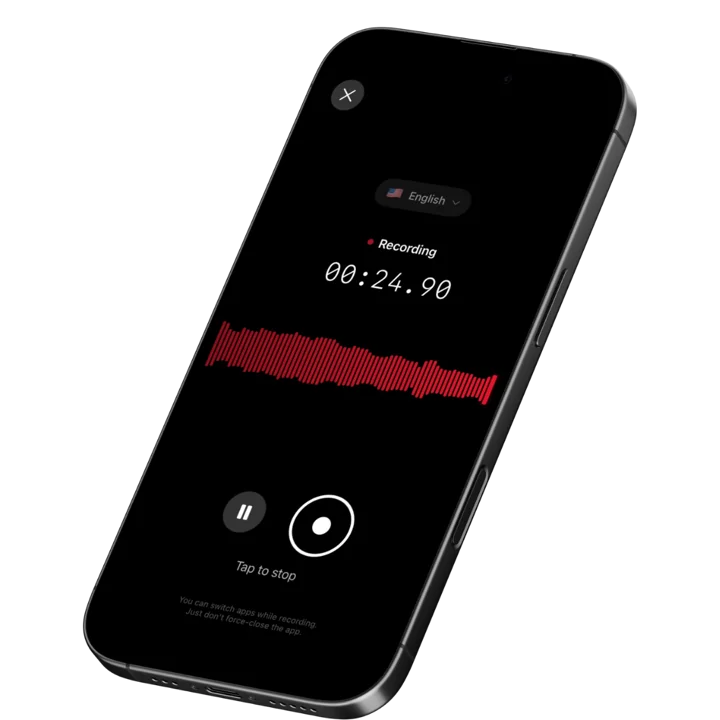
- Long Recording Support: Multi-hour sessions record in a single continuous file. No 30-minute cutoff, no manual restart partway through a keynote.
- One-Tap Recording: Start before the session begins and stop when it ends. Nothing to configure per recording.
- AI Summaries: The practical answer to a 3-hour file is not a 3-hour transcript; it is a summary of what the session contained. Speakwise generates one after each recording.
- Automatic Action Items: Commitments and follow-ups from a long session are extracted rather than hunted for.
- Speaker Labels: Panels, workshops, and multi-person meetings stay attributable across the whole recording.
- 100+ Languages: Auto-detected transcription across 100+ languages, including sessions where speakers switch language mid-discussion.
- Share and Export: Copy or export the transcript and share notes via a link, so a long session can be distributed as text instead of as an audio file nobody opens.
- AirPods Hands-Free Control: Start, pause, and stop from your AirPods without pulling the phone out mid-session.
Pricing
- Paid subscription via the App Store, with no free tier
Best For
- Conferences, all-day training, board meetings, and lectures you attend in person
- Long interviews and research sessions recorded on iPhone
- Anyone who needs a summary rather than a wall of transcript
- Multi-speaker sessions where attribution matters across hours of audio
Limitations
- iOS only
- Records through the iPhone microphone; it is a capture tool, not a file-upload service
- Paid subscription with no free tier
- Very long files still take time to process; a 3-hour recording is not instant
Speakwise gets your hours back.
- ✓Built for in-person meetings, interviews, and site visits.
- ✓Trusted by recruiters, consultants, agents, and field pros.
- ✓One tap to record. Notion-ready summary in minutes.
What If You Already Have the File?
If the audio already exists, Speakwise is the wrong shape for the job, and pretending otherwise would waste your time. For an existing recording, you have two practical routes.
The first is a browser tool. This site runs a set of free web transcription tools that take an uploaded file and return text without an account, including audio to text, MP3 to text, and speaker diarization for multi-speaker files. They are useful for a one-off file, and they cost nothing to try. They are also browser tools, which means a very large upload is at the mercy of your connection.
The second is a paid upload service built for volume, which is what the six tools below are for. If you process long files weekly, that is the right investment. If this is a single 90-minute interview, start with the free browser tool.
2. TurboScribe - Best for Unlimited Long Uploads
TurboScribe is an upload-based transcription service whose Unlimited plan removes both the file count and the practical length limits that trip up other tools. The free tier gives 3 files per day capped at 30 minutes each, which is enough to evaluate quality but not enough for a long file. The paid plan is priced for people who process long audio regularly.
Key Features
- Unlimited transcriptions on the paid plan, including very long files
- Speaker identification and timestamped output
- Export to TXT, DOCX, PDF, SRT, and VTT
- 90+ languages supported
Pricing
- Free: 3 files per day, 30 minutes each
- Unlimited: ~$10/month billed annually, ~$20/month billed monthly
Best For
- Researchers and journalists with a backlog of multi-hour interviews
- Anyone transcribing several long files per week
Limitations
- Upload-only; it does not record for you
- No meaningful AI summary layer compared to dedicated note tools
- Free tier's 30-minute cap makes it useless for the actual use case
3. Sonix - Best Accuracy on Difficult Audio
Sonix is a professional transcription platform covering 53+ languages, with a workflow designed around cleaning up AI output rather than accepting it as-is. For long files with accents, crosstalk, or room noise, its editor and optional human transcriber marketplace are the practical differentiators. Pricing is usage-based, which suits occasional long files better than a monthly seat.
Key Features
- 53+ languages with strong accented-speech handling
- In-browser transcript editor with audio-synced playback
- Optional human transcriber marketplace for difficult audio
- Timestamps, speaker labels, and subtitle export formats
Pricing
- Pay as you go: from ~$10 per hour of audio
- Premium: from ~$22/user/month plus a lower per-hour rate
Best For
- Long recordings with poor audio quality or heavy accents
- Teams that need to edit and verify transcripts before publishing
Limitations
- Per-hour pricing gets expensive fast on multi-hour files
- Overkill if you only need the gist of a long session
4. Descript - Best When You Also Need to Edit
Descript transcribes long audio and lets you edit the recording by editing the text, which is the fastest way to cut a three-hour raw session down to something publishable. For podcasters and video teams, transcription is a means to an edit rather than the end product. A 2025 pricing overhaul replaced transcription hours with media minutes and added metered AI credits, so watch the effective cost.
Key Features
- Text-based audio and video editing on the transcript
- Filler word removal and multitrack support
- Overdub and AI editing tools with metered credits
- Collaborative editing across a team
Pricing
- Free tier with limited minutes
- Hobbyist: ~$16/user/month billed annually
- Creator: ~$24/user/month billed annually
- Business: ~$50/user/month billed annually
Best For
- Podcast and video producers cutting long raw sessions
- Teams that edit and publish the audio, not just the transcript
Limitations
- Media minutes and AI credit top-ups can push the real cost well past the headline
- Heavier than needed if you only want text
5. Notta - Best Cross-Platform Option
Notta runs on iOS, Android, and the web, which makes it the practical choice when your team is not all on iPhone. It handles both live transcription and file uploads. The free tier is generous on total minutes but caps individual files at 3 minutes, which rules it out for long audio until you upgrade.
Key Features
- iOS, Android, and browser access with synced transcripts
- Both live recording and file upload in one tool
- Speaker labels and shareable transcript links
- Multilingual transcription with translation output
Pricing
- Free: 120 minutes/month with a 3-minute per-file cap
- Pro: ~$8.17/month billed annually, ~$13.99/month billed monthly
- Business: from ~$27.99/seat/month
Best For
- Mixed iPhone and Android teams
- Users who want one tool for both recording and uploads
Limitations
- The 3-minute free per-file cap is unusable for long audio
- Per-file length limits still apply on lower paid tiers
6. Rev - Best for Human-Verified Long Files
Rev offers both AI transcription at a low per-minute rate and human transcription at a much higher one. For long files where accuracy is legally or editorially important, the human option is the only one on this list that comes with a real accuracy commitment. For everything else, the AI tier is competitive.
Key Features
- AI transcription priced per minute of audio
- Human transcription with a published accuracy standard
- Subtitle and caption output formats
- Order-based workflow rather than a subscription
Pricing
- AI transcription: from ~$0.25 per minute
- Human transcription: from ~$1.99 per minute
- Subscription plans available for regular volume
Best For
- Legal, medical research, and editorial work where errors are costly
- One-off long files where you would rather pay than proofread
Limitations
- Human transcription on a 3-hour file runs into the hundreds of dollars
- Turnaround on human transcription is hours, not minutes
7. Apple Voice Memos - Best Free Option for iPhone Recordings
Voice Memos is free, pre-installed, and produces a transcript on iOS 18 and later. If the long file is already a Voice Memo on your iPhone, this is the zero-cost starting point. It is less reliable on very long recordings, and it offers no speaker separation, which limits how usable a multi-hour multi-speaker transcript actually is. Our accuracy comparison covers where built-in transcription falls behind.
Key Features
- Free and pre-installed on every iPhone
- Transcript view with tap-any-word playback on iOS 18 and later
- Short on-device summaries on Apple Intelligence devices for supported languages
- No account, no upload, no per-minute cost
Pricing
- Free
Best For
- Long recordings already sitting in Voice Memos
- Testing whether you need a paid tool at all
Limitations
- No speaker labels, which makes long multi-person transcripts hard to read
- Summaries are short bullet lists, not structured meeting notes
- Transcription language support is narrower than paid tools
How to Choose a Tool for Long Audio Files
-
Capture or upload? If the session has not happened yet, a recorder with no session cap beats any upload workflow, because you skip the file handling entirely. If the file exists, you need an upload service. Do not force one tool to do both jobs.
-
Check the per-session and per-file caps, not the monthly total. A tool advertising 300 free minutes per month may still cap each session at 30 minutes. For long audio, the per-item limit is the only number that matters.
-
Decide whether you need the transcript or the summary. Nobody reads a 30,000-word transcript. If the deliverable is understanding rather than a verbatim record, prioritize summary quality over raw transcription features.
-
Speaker separation is non-negotiable past an hour. Multi-hour recordings with several voices are unreadable without labels. Test this specifically, because output quality varies a lot between tools on crosstalk.
-
Price per hour, not per month. A ~$10 per hour service is cheap for one file a month and expensive for twenty. A flat subscription flips that. Estimate your real monthly hours before committing. Long-format meetings like board sessions have their own requirements, covered in our board meeting recorder roundup.
Frequently Asked Questions
What is the best app to transcribe long audio files?
For long sessions you record yourself, Speakwise is the best choice because it records multi-hour audio in one file with no per-session cap and returns a summary alongside the transcript. For files you already have, TurboScribe handles unlimited long uploads cheapest, and Sonix is more accurate on difficult audio.
Can you transcribe a 3-hour audio file?
Yes. TurboScribe, Sonix, Descript, and Rev all accept multi-hour uploads, and Speakwise records multi-hour sessions directly on iPhone. The limits to check are per-file length caps and maximum file size, not the monthly minute allowance. Free tiers usually cap individual files well below an hour.
Is there a free way to transcribe a long audio file?
Partly. Apple Voice Memos transcribes recordings already on your iPhone at no cost, and this site offers free browser tools that transcribe an uploaded file without an account. Most dedicated services cap free files at 3 to 30 minutes, so a genuinely long file usually needs a paid plan.
How long can Speakwise record in one session?
Speakwise supports multi-hour recordings in a single continuous file, which covers conferences, all-day training, board meetings, and long interviews. There is no 30-minute session cap of the kind found on free transcription tiers. Processing a very long recording takes time, so a 3-hour file is not transcribed instantly.
Do long transcripts keep speaker labels accurate throughout?
Mostly, with caveats. Speaker separation holds up well across long recordings when speakers are distinct and crosstalk is limited. Accuracy drops with overlapping speech, similar voices, and poor room acoustics. Test any tool on a sample of your own audio before committing to it for a multi-hour session.
Final Verdict
The honest answer to long audio splits in two. If you are going to be in the room, record it with a tool that has no session cap and produces a summary, because the summary is what you will actually read. Speakwise is the strongest option there on iPhone, and it handles the multi-hour sessions where free tiers cut out.
If the file already exists, TurboScribe is the best value for volume, Sonix is the most accurate on difficult audio, and Descript is right when the transcript is a step toward an edit. For a single file, the free browser tools on this site are worth trying before you pay anyone.
The mistake to avoid is choosing on monthly minutes. Per-file caps are what break long-audio workflows, and they are rarely on the pricing page.
Download Speakwise from the App Store and record your next multi-hour session without a cutoff.
🎯 4.9★ App Store Rating | 📱 Built for iOS
