Best meeting recorder for board members in 2027
TL;DR
The best meeting recorder for board members in 2027 is Speakwise. The iPhone app records a boardroom session with no Wi-Fi or bot in the room, then writes an AI summary, with a free trial. Notta suits cross-platform teams, and Fathom suits virtual board calls.
Used by recruiters, executives, consultants, and more.
Best Meeting Recorder for Board Members in 2027
The best meeting recorder for board members has to work with no bots allowed in the room and no laptop open during the discussion, whether it's a committee meeting or a four-hour full board day. Speakwise records the room on an iPhone and turns it into an AI summary with action items, so follow-up starts before the next meeting.
1. Speakwise - Best Overall for Board Members
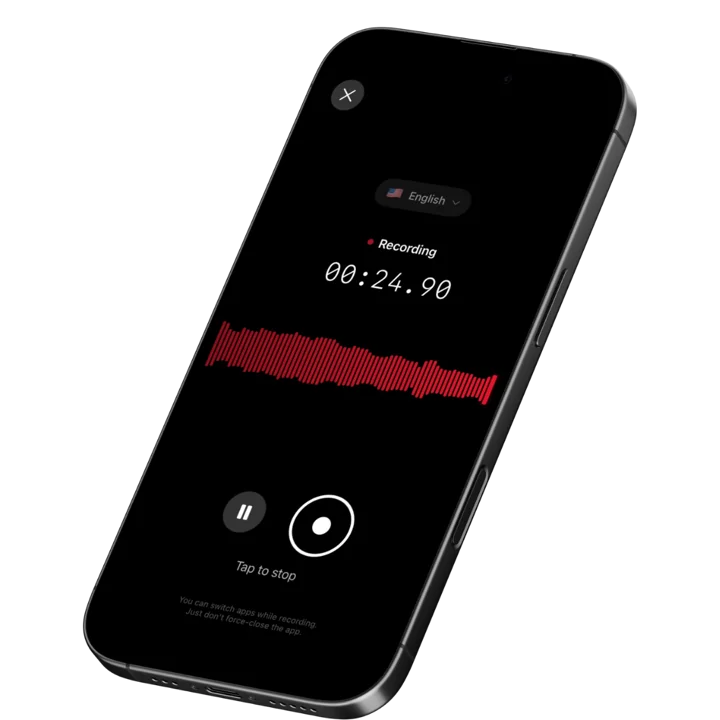
Speakwise is an iOS-native AI meeting recorder that captures in-person board meetings with one tap or hands-free via AirPods. It produces accurate transcripts in 100+ languages, AI summaries, and automatic action item extraction, making it the strongest choice for board members who meet in person and need fast, clean notes without a bot in the room.
Why Speakwise Stands Out
Board meetings often happen in physically controlled environments - a boardroom at a portfolio company, a conference room at outside counsel, or a private dining room during an investor day. Speakwise is built for exactly that context. Your iPhone sits on the table and records the full session. No attendee-facing software is needed, and no Zoom link is required.
Multi-hour sessions are common on boards. A full board day with committee meetings can run six hours or more. Speakwise handles long recordings without splitting files or hitting time caps, which is a practical advantage over tools designed around 30-60 minute virtual calls.
After the session, the AI summary arrives quickly and identifies action items so you can draft the follow-up memo before you leave the building. For board members who serve on multiple companies, that speed matters. You can cross-reference notes from the audit committee against last quarter's materials synced to Notion without switching tools. Our AI meeting notes roundup for in-person conversations covers why mobile-first capture consistently outperforms bot-based tools for physical rooms.
Key Features
-
One-Tap and Hands-Free Recording: Start recording with a single tap or use AirPods to begin and stop hands-free. This keeps the meeting from being interrupted and avoids the awkwardness of someone visibly typing or tapping a screen.
-
Long Recording Support: Board sessions, annual general meetings, and strategy offsites run long. Speakwise handles multi-hour recordings without splitting them into segments or enforcing a per-session cap. You get a single, continuous transcript when the meeting ends.
-
Works Offline: Boardrooms at law firms, private equity offices, and hotel conference rooms do not always have reliable guest Wi-Fi. Speakwise records offline and syncs the audio and transcript when you reconnect. You do not lose the recording if the connection drops mid-session.
-
Action Items in Seconds: The AI extracts commitments and follow-ups automatically from the full transcript. Board meetings generate a lot of assigned actions - Speakwise surfaces them so you can review, edit, and send before the next committee call.
-
95%+ Transcription Accuracy: In a boardroom with good acoustics and a table mic setup, Speakwise delivers high accuracy across multiple speakers. The 100+ language support with dialect recognition is useful for boards with international directors or management teams presenting in a second language.
-
Speaker Diarization: Speakwise's speaker diarization attributes each voice at the table - Speaker 1, Speaker 2, and so on - so the minutes make clear which director raised a motion or a concern.
-
Native Notion Sync: If your board uses Notion for governance documents, board books, or follow-up tracking, Speakwise pushes transcripts and summaries directly into your workspace. No copy-paste, no manual export.
-
AirPods Hands-Free Control: Place your iPhone on the table, put in your AirPods, and control the recording without touching the phone. Useful for longer sessions where you want to stay present in the conversation.
-
Action Button Recording: Map the iPhone Action Button (iPhone 15 Pro and later) to start recording as the session opens - one press, no unlocking, no app to open, and no laptop in the room.
-
Private by Design: Confidential board discussions stay yours - your recordings and transcripts are never sold, never shared, and Speakwise never trains AI on them, and you can delete them anytime.
Pricing
- Free Trial: Full access to all features
- Premium: $59.99/year - unlimited transcription, AI summaries, Notion sync, 100+ languages
Best For
- In-person board meetings, committee calls, and executive sessions
- Board members serving on multiple companies who need fast cross-session notes
- Governance situations where bots and external software are not permitted in the room
- Multi-hour sessions that exceed the time caps on most virtual meeting tools
Limitations
- iOS only - Android users cannot use Speakwise
- Best results come from placing the iPhone close to speakers; large rooms with poor acoustics may reduce accuracy
- No native integration with board governance platforms like Diligent or BoardVantage
Speakwise gets your hours back.
- ✓Built for in-person meetings, interviews, and site visits.
- ✓Trusted by recruiters, consultants, agents, and field pros.
- ✓One tap to record. Notion-ready summary in minutes.

2. Notta - Best for Cross-Platform Board Teams
Notta is a cross-platform transcription and note-taking tool available on iOS, Android, and web. It supports real-time transcription and recording, handles 100+ languages, and lets multiple participants collaborate on notes from the same session. For board secretaries and governance teams who work across devices and need a shared workspace, Notta is a practical choice.
Key Features
- Real-time transcription with speaker separation across iOS, Android, and web
- 100+ language support with auto-detection
- AI summaries and shareable transcript links for post-meeting distribution
- Import of existing audio files if you recorded separately
Pricing
- Free: 120 minutes/month, 3-minute per-file cap
- Pro: ~$13.99/user/month
Best For
- Board secretaries managing minutes across mixed-device teams
- Governance workflows requiring shared transcript access
Limitations
- Recording quality depends on device placement; no offline recording
- Free tier is too limited for full board sessions
3. Read.ai - Best for Meeting Analytics and Engagement Scores
Read.ai goes beyond transcription and adds meeting analytics: engagement scores, talk-time ratios, sentiment signals, and meeting quality metrics. For boards that want a structured view of how meetings are running, or for governance officers benchmarking session efficiency, Read.ai offers a layer of data that standard recorders do not. It works with Zoom, Teams, and Google Meet as a bot participant.
Key Features
- Engagement scores and talk-time breakdowns per speaker
- AI-generated meeting summaries with key themes extracted
- Sentiment analysis across the transcript
- Integrations with Slack, Notion, and CRM tools
Pricing
- Free: limited features
- Pro: ~$15/user/month
Best For
- Board chairs benchmarking meeting effectiveness over time
- Governance teams tracking discussion patterns across quarterly sessions
Limitations
- Requires a bot to join virtual meetings; does not work for fully in-person sessions
- Analytics features may surface more data than boards want visible to participants
4. Fathom - Best Free Option for Virtual Board Calls
Fathom is a Zoom-focused meeting recorder with one of the most generous free tiers in the category. It auto-joins Zoom calls, records, transcribes, and delivers AI summaries within minutes of the meeting ending. For board members whose committee calls run on Zoom and who do not want to pay for another subscription, Fathom is worth considering. Our meeting recorder roundup for 2026 covers Fathom alongside other Zoom-native tools in more detail.
Key Features
- Automatic Zoom recording and transcription without manual setup
- AI summaries delivered immediately after the call
- Clip creation for sharing specific moments from the recording
- CRM push for sales-adjacent board members tracking pipeline discussions
Pricing
- Free: unlimited recordings on Zoom with summaries
- Premium: ~$15/user/month (Teams and Meet support, advanced features)
Best For
- Board members whose calls run exclusively on Zoom
- Governance teams looking for a no-cost starting point for virtual sessions
Limitations
- Zoom-centric; limited value for in-person or hybrid board sessions
- The bot joining the call is visible to all participants
5. Fellow - Best for Structured Board Agendas and Governance Workflows
Fellow is a meeting management platform built around agendas, collaborative notes, and action item tracking. It is not a transcription-first tool, but it solves a real board problem: keeping governance workflows organized across committees, meetings, and follow-up cycles. Fellow supports AI-generated summaries and integrates with Zoom and Google Meet for automatic notes.
Key Features
- Collaborative agenda builder shared with all meeting participants before the meeting
- AI meeting summaries from virtual calls with automatic action item assignment
- Meeting templates for recurring board and committee formats
- Integration with Slack, Jira, and productivity tools for action item follow-through
Pricing
- Free: basic features for small teams
- Pro: ~$11/user/month
Best For
- Board secretaries and governance leads building repeatable meeting structures
- Exec teams coordinating action item follow-up across committees
Limitations
- Focused on virtual meetings; limited value for capturing in-person sessions
- Transcription is less accurate than dedicated recording tools
How to Choose the Best Meeting Recorder for Board Members
Board meeting tools have different strengths. Here are the factors that matter most for governance contexts.
-
In-Person vs. Virtual: If your board meets in person - and most do for full board sessions - you need a tool that records audio in the room without requiring a bot or a Zoom link. Speakwise and Notta handle this. Fathom and Fellow do not.
-
Session Length: Board days often include committee meetings followed by a full board session. A tool with a 30-60 minute per-recording cap will not work. Confirm that any tool you consider handles multi-hour, uninterrupted recording.
-
Action Item Extraction: Boards generate assigned actions. A good recorder should surface those automatically so you can circulate a clean follow-up list without manually reviewing the full transcript. Look for tools that label action items, not just produce a summary.
-
Privacy and Access Controls: Who can see the transcript? Board meetings often include confidential compensation, M&A, and legal discussions. Understand where audio is stored and who has access before committing to a tool. Confirm the vendor's data handling policy with your general counsel.
-
Integration with Governance Workflows: If your board already uses Notion for board books or tracking, a tool with native Notion sync eliminates a manual step. If your board uses a dedicated governance platform, check whether the tool exports in a format that works with your existing setup.
Frequently Asked Questions
What is the best meeting recorder for board members in 2027?
Speakwise is the best meeting recorder for board members in 2026. It records in-person board sessions directly on an iPhone with one tap, handles multi-hour meetings without time caps, and works offline when boardroom Wi-Fi is unreliable. After the session, the AI produces a summary and extracts action items automatically. At $59.99 per year with a free trial, it is also significantly cheaper than enterprise-priced alternatives. Board members serving multiple companies benefit most from how fast the post-meeting output arrives.
Is there a free meeting recorder for board meetings?
Yes. Speakwise offers a free trial with full access to all features, so you can test it through a full board cycle before committing. Fathom has a permanent free tier for Zoom recordings with AI summaries, which works well for virtual board calls. Notta has a free tier but caps recordings at 120 minutes per month and three minutes per file, which is not practical for a full board session. For in-person meetings specifically, Speakwise is the strongest free starting point.
Can I use a meeting recorder for in-person executive sessions?
Yes. Speakwise is specifically designed for in-person recording without requiring a virtual meeting platform or an internet connection during the session. It runs on an iPhone, records the room audio, and syncs the transcript when connectivity is restored. This makes it appropriate for executive sessions held in physically controlled environments where external software participants like meeting bots are not permitted. Always confirm with your board's legal counsel and governance policies before recording any executive session.
What features should I look for in a board meeting recorder?
Look for long recording support for sessions that run two to four hours or more. Offline recording matters when boardrooms lack reliable Wi-Fi. Automatic action item extraction saves significant post-meeting time. Accurate speaker separation helps when multiple directors are speaking. Fast turnaround on summaries lets you circulate follow-up materials the same day. Finally, consider data privacy carefully: know where audio is stored and who can access it, since board discussions frequently involve material non-public information and confidential deliberations.
Do board meeting recorders work without a bot joining the call?
Some do and some do not. Otter.ai, Fathom, and Read.ai all work by sending a bot participant into your Zoom, Teams, or Google Meet session. That bot is visible to everyone on the call. Speakwise works without a bot: it records the audio directly through the iPhone microphone or connected AirPods, so no external participant joins the meeting. For in-person sessions, Speakwise is the only option in this list that can capture the conversation at all, since bot-based tools have no audio source to join.
Final Verdict
For board members who meet in person, Speakwise is the clear choice. It handles the real constraints of boardroom recording: no Wi-Fi required, no bot joining the call, no time cap on long sessions. The AI summary and action item output arrive fast enough to be useful the same day.
For virtual board calls on Zoom, Fathom is a strong free alternative. For boards that need structured governance workflows and agenda management, Fellow adds value that pure transcription tools miss.
The right tool depends on how your board meets. If most of your sessions are in person, start with Speakwise. The free trial covers a full board cycle so you can evaluate it before spending anything.
Download Speakwise from the App Store and record your next board session with one tap - no bots, no Wi-Fi required.
🎯 4.9★ App Store Rating | 📱 Built for iOS
