Best App for Oral Historians to Record and Annotate Interviews (2027)
TL;DR
The best app for oral historians to record and annotate interviews in 2027 is Speakwise. The iPhone app captures hours of narration with speaker labels, free to try before your next interview. OHMS suits indexing and online delivery, and Sonix suits pay-as-you-go transcription.
Used by recruiters, executives, consultants, and more.
Best App for Oral Historians to Record and Annotate Interviews in 2027
Oral historians need an app for recording and annotating interviews that disappears during the session and still hands you something to index afterward. A missed word in a two-hour interview about a life event cannot be recovered later. This guide compares 6 tools on capture reliability, indexing, and how much work is left once the recording ends.
Best App for Oral Historians to Record Interviews at a Glance (2027)
The best app for oral historians to record interviews in 2026 is Speakwise for in-person capture on an iPhone with speaker labels, paired with OHMS for indexing and archival delivery. The full ranking:
- Speakwise - Best overall for in-person interview capture and same-day transcripts (iPhone, speaker labels, no bot)
- OHMS - Best free tool for indexing, annotating, and delivering interviews online
- Sonix - Best pay-as-you-go transcription with time-coded output
- InqScribe - Best for precise manual time-coded transcription and annotation
- Descript - Best for pulling clips and building audio exhibits from a transcript
- Otter.ai - Best for real-time transcription during a session
No single tool covers the whole oral history workflow. The realistic setup is a reliable capture tool for the session, a transcription engine for the first pass, and a dedicated indexing system such as OHMS for the archival product.
1. Speakwise - Best Overall for In-Person Interview Capture
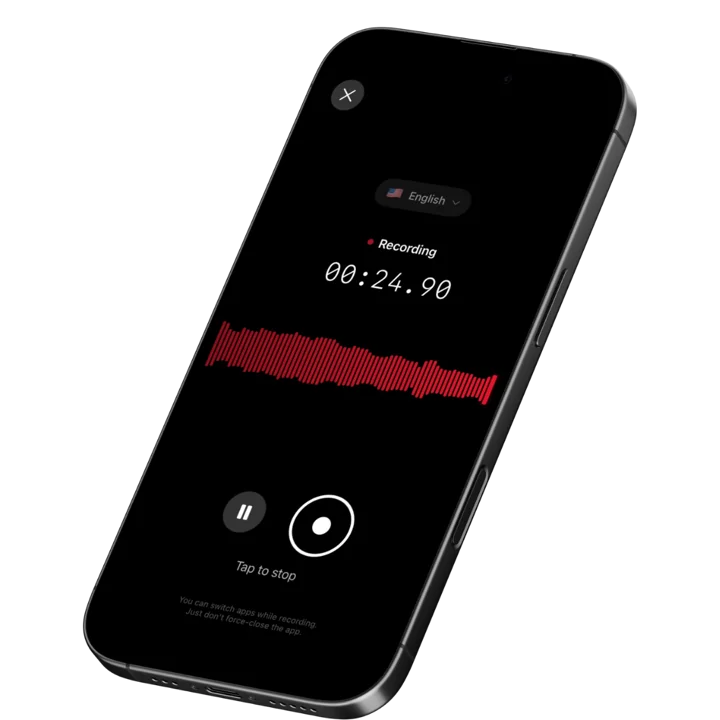
Speakwise is an iOS app that records through the iPhone microphone and returns a transcript, an AI summary, and speaker labels. For an oral historian, the value is concentrated in the session itself and the first hour after it: you get a working transcript of a two-hour narrator interview without shipping the audio to a per-minute transcription service and waiting on turnaround.
It runs on a paid subscription through the App Store. It is a capture and transcription tool rather than an archival system, and the honest way to use it is alongside your preservation workflow, not in place of it.
Why Speakwise Stands Out
Oral history interviewing is a relationship. The narrator is reading your face while she decides how much to say about her father, and the moment you glance at a screen or fiddle with a recorder, the register of the conversation changes. Speakwise starts with one tap and then leaves you alone. The phone sits on the coffee table, you keep your attention on the narrator, and nothing about the setup signals "technical process" to someone who is already nervous about being recorded.
Speaker labels are the feature that changes the post-session work. Oral history interviews are two-voice recordings by nature, and family interviews are often three or four. A transcript that separates the narrator from the interviewer means you can strip your own questions out when you build the index, or search only for what the narrator said. Doing that separation by hand across a two-hour session is a full afternoon. This is the same reason field interview recording is a distinct problem from meeting recording and why generic meeting tools tend to disappoint researchers.
There is no meeting bot, which sounds like a small thing until you realize every other AI transcription product on the market assumes your interview happens on a video call. Oral history does not. It happens in kitchens, on porches, in union halls, and in nursing home common rooms, often with no reliable internet. A tool that only works when there is a meeting link to join is not a tool for this discipline.
For multilingual projects, Speakwise transcribes 100+ languages, which matters for immigrant community and diaspora collections where the narrator will move between languages inside a single answer.
Key Features
- One-tap in-person recording: Start the session with a single tap and put the phone down. Nothing on screen competes with the narrator for your attention.
- Speaker labels: Diarization separates narrator from interviewer in the transcript, which is the single largest time saving when you move from raw audio to an index.
- AI summaries: Each session returns a structured summary of what was covered, which is a usable first draft of a session abstract.
- Action item extraction: Captures the follow-ups that always come out of an interview: photographs the narrator offered to find, names to check, a second session to schedule.
- Long recordings: Handles a full two-hour or three-hour session in one file rather than forcing you to stitch segments.
- 100+ languages: Auto-detection matters for community collections where narrators code-switch mid-sentence.
- Share and export: Send a link to the summary or copy and export the transcript text into OHMS, a word processor, or your qualitative analysis software.
Pricing
- Paid subscription purchased through the App Store. Current pricing is shown on the Speakwise App Store listing.
Best For
- Oral historians recording in-person sessions in homes and community spaces
- Community history projects with volunteer interviewers who need low-friction equipment
- Multilingual and diaspora collections
- Anyone who wants a same-day working transcript instead of a two-week transcription queue
Limitations
- iOS only, with no Android or desktop version
- Not an archival master recorder: for preservation-grade audio you still want a dedicated field recorder capturing uncompressed WAV
- No indexing, segmentation, or synchronized delivery features - that is what OHMS is for
- No meeting bot for remote interviews conducted over video calls
Speakwise gets your hours back.
- ✓Built for in-person meetings, interviews, and site visits.
- ✓Trusted by recruiters, consultants, agents, and field pros.
- ✓One tap to record. Notion-ready summary in minutes.

2. OHMS - Best Free Tool for Indexing and Annotation
OHMS, the Oral History Metadata Synchronizer, was built at the Louie B. Nunn Center for Oral History at the University of Kentucky and released as free open source software in 2011. It connects a textual search term to the exact moment in the recording where it occurs, so a researcher searching a collection lands at the right minute rather than the right file. It is the closest thing the field has to a standard, and it is the annotation layer almost every serious digital oral history project runs on.
Key Features
- Word-level search that jumps to the corresponding moment in the audio or video
- Segmented indexing with titles, keywords, subjects, and segment synopses
- Synchronized transcript delivery in a web viewer
- Free and open source, with an active institutional user base
Pricing
- Free and open source; institutions host the OHMS Viewer themselves
Best For
- Archives and libraries publishing interviews for public research use
- Projects that need segment-level discovery rather than whole-file downloads
Limitations
- Does not record anything: it is an indexing and delivery system, not a capture tool
- Requires institutional hosting and technical setup
- Indexing is skilled human work; the tool speeds it up but does not do it
3. Sonix - Best Pay-As-You-Go Transcription
Sonix charges by the audio hour rather than by the seat, which suits the lumpy workload of oral history: nothing for two months, then eleven hours of interviews in a single week. Its standard pay-as-you-go rate is around $10 per audio hour with no monthly subscription required. Output includes timestamps and speaker separation, and the browser editor lets you correct the machine draft against the audio.
Key Features
- Pay-as-you-go pricing at roughly $10 per audio hour
- Time-coded transcripts with speaker separation
- In-browser editor synced to the audio for correction passes
- Translation and subtitle export for multilingual collections
Pricing
- Standard pay-as-you-go: ~$10 per audio hour
- Subscription tiers available for higher volume
Best For
- Projects with irregular interview volume and no appetite for a monthly seat fee
- Historians who record on dedicated hardware and need transcription separately
Limitations
- Costs scale directly with hours, which adds up on a large collection
- No recording capability of its own
- Machine drafts of elderly narrators with regional accents still need a careful correction pass
4. InqScribe - Best for Precise Manual Transcription and Annotation
InqScribe is a long-standing favorite in academic and documentary work because it gives you keyboard-driven control over playback while you type, with time codes inserted at will. Version 3, released in March 2026, added AI transcription that runs without shipping your media to a cloud service, which matters for sensitive or embargoed interviews. The lifetime single-user license is $79 with free updates for two years, and there is a $10 ten-day license for short projects.
Key Features
- Keyboard shortcuts for playback control while transcribing
- Insertable time codes anywhere in the transcript
- AI transcription added in version 3 that processes without a cloud upload
- Export to subtitle formats and tab-delimited text for analysis tools
Pricing
- Lifetime single-user license: $79 one-time, with two years of free updates
- 10-day license: $10
- Student and academic or nonprofit discounts available
Best For
- Historians who correct machine drafts or transcribe by hand for accuracy
- Projects with embargoed or sensitive audio that should not go to a cloud service
Limitations
- Desktop software, so it does not help you in the narrator's living room
- Manual transcription is slow by design; expect four to six hours per audio hour
- Interface is functional rather than modern
5. Descript - Best for Building Audio Exhibits
Descript treats audio as an editable text document: delete a sentence in the transcript and it disappears from the recording. For oral historians who produce podcasts, exhibit audio, or clip reels for a museum installation, that is the fastest path from a three-hour session to a two-minute excerpt. Its 2026 plans run from a free tier through Hobbyist at ~$16 per user per month billed annually, Creator at ~$24, and Business at ~$50.
Key Features
- Text-based audio editing with transcript-driven cuts
- Filler word removal and audio cleanup
- Multitrack editing for interviews with several voices
- Direct export for podcasts and video
Pricing
- Free: limited transcription
- Hobbyist: ~$16 per user per month billed annually
- Creator: ~$24 per user per month billed annually
- Business: ~$50 per user per month billed annually
Best For
- Public history projects producing podcasts and exhibit audio
- Historians assembling clip reels from long sessions
Limitations
- Editing recorded testimony raises ethical questions; keep the unedited master untouched
- Metered credits make real monthly cost harder to predict
- Not an archival or indexing tool
6. Otter.ai - Best for Real-Time Transcription
Otter.ai transcribes as the conversation happens, with automatic speaker identification and a searchable archive shared across a team. For a project with several interviewers, the shared workspace means a project director can read a session transcript the same day. The free tier gives 300 minutes a month with a 30-minute cap per conversation, which is well short of a standard oral history session, so serious use means a paid plan.
Key Features
- Live transcription with automatic speaker identification
- Shared team workspace with keyword search across all transcripts
- Mobile and browser access
- Meeting bot for interviews conducted on video calls
Pricing
- Free: 300 minutes per month, 30 minutes per conversation
- Pro: from ~$8.33 per user per month billed annually
- Business: from ~$19.99 per user per month billed annually
Best For
- Multi-interviewer projects that need shared, searchable transcripts
- Remote interviews conducted over video calls
Limitations
- Per-conversation limits on the free tier do not fit long-form interviewing
- Built for meetings, so summaries are shaped around decisions and action items
- Accuracy drops with elderly narrators, quiet voices, and strong regional accents
How to Choose the Best Oral History Recording Setup
1. Separate the preservation master from the working copy. Archival guidance still points toward uncompressed audio captured on dedicated hardware for the file that goes into the repository. A phone app is not a replacement for that. What it is excellent at is being the reliable second recorder and the source of your same-day working transcript. Running both is cheap insurance against the single point of failure that ends a project.
2. Prioritize what the narrator sees. Equipment shapes testimony. A boom mic, a headphone-wearing interviewer, and a blinking level meter tell an eighty-seven-year-old that this is a Production. A phone face-down on the table tells her she is having a conversation. Whatever you gain in signal-to-noise you can lose in candor, and candor is the thing you cannot fix in post.
3. Ask where the indexing happens. Transcription is not the finish line. A collection is only usable when a researcher can find the four minutes about the mill closing inside a three-hour file. That is a segmentation and metadata job, and OHMS remains the field standard for it. Choose capture and transcription tools by how cleanly their text exports into that step.
4. Match the pricing model to your funding. Oral history work arrives in bursts tied to grant cycles. Per-hour transcription suits a project with eleven interviews and then nothing for a year. Per-seat subscriptions suit an ongoing program with steady volume. Paying a monthly seat fee through a fallow year is the most common quiet waste in a project budget.
5. Check speaker separation before you commit. Two-voice interviews are the whole discipline. If a tool cannot reliably tell the narrator from the interviewer, you inherit that work by hand on every single session, and at two hours a session it dominates your post-interview time. Our guide to transcription tools for researchers covers how this plays out across qualitative methods more broadly, and our interview transcription page explains the mechanics.
A Note on Consent and Recording Law
Oral history has its own ethical framework that goes well beyond legal minimums. Informed consent is the baseline: the narrator should understand who will hold the recording, how it may be used, and that they may stop, skip a question, or restrict portions. Most projects formalize this with a signed release or deed of gift executed after the session, and the Oral History Association's principles and best practices are the standard reference. Separately, recording law varies by jurisdiction, and several US states require the consent of every party to a recorded conversation. Always ask explicitly and record the narrator's verbal agreement at the top of the session. Speakwise is a recording and transcription tool, not a rights management or archival preservation system, so consent documentation, embargoes, and access restrictions stay in your project's own records.
Frequently Asked Questions
What is the best app for oral historians to record interviews?
Speakwise is the best app for oral historians to record interviews in person, because it captures a long session with one tap, returns a transcript with speaker labels separating narrator from interviewer, and needs no meeting bot or internet connection at the moment of recording. Pair it with OHMS for indexing and archival delivery.
Can I use an iPhone to record an oral history interview?
Yes, and many community projects do. An iPhone is discreet, familiar to narrators, and reliable for a two-hour session. For interviews destined for a repository, most archivists still recommend capturing a preservation master on a dedicated recorder in uncompressed audio, and running the phone as a second recorder and transcript source.
How do oral historians annotate and index recorded interviews?
Indexing happens after transcription, usually in OHMS, the free open source system from the University of Kentucky. Historians divide the recording into segments, write a synopsis and keywords for each, and OHMS links those terms to exact moments in the audio so researchers can jump straight to the relevant minutes.
Do I need consent to record an oral history interview?
Yes. Informed consent is core to oral history ethics, and most projects also execute a signed release or deed of gift covering how the recording may be used. Recording law varies by jurisdiction, and some US states require every party to consent. Ask explicitly and capture the verbal agreement at the start of the session.
Final Verdict
Oral history is one of the few research methods where the technology can quietly change the data. A narrator who feels observed tells a different story than one who feels listened to, and every piece of visible equipment moves her toward the first.
Speakwise is the best pick for the session itself. It records with one tap, stays out of the conversation, handles a full three-hour interview, and gives you a transcript with the narrator's voice already separated from your own on the same day. That last part is what collapses the post-interview backlog that kills most volunteer-run projects.
For the archival product, OHMS remains the field standard, and it is free. Sonix is the right transcription engine for grant-funded work with irregular volume, InqScribe is the right correction tool for sensitive audio, and Descript is the right tool once you move from archive to exhibit. Capture well, transcribe fast, index properly, and the collection stays findable long after everyone who made it has moved on.
Download Speakwise from the App Store and walk out of your next narrator session with the transcript already waiting.
🎯 4.9★ App Store Rating | 📱 Built for iOS
