Best App for Paralegals to Record Client Intake Interviews (2027)
TL;DR
The best app for paralegals to record client intake interviews in 2027 is Speakwise. The iPhone app records intake, then sorts parties, facts and deadlines into a Legal file note, free to try for 7 days. Otter.ai suits remote intake, and Rev suits human-verified transcripts.
Used by recruiters, executives, consultants, and more.
Best App for Paralegals to Record Client Intake Interviews in 2027
Paralegals need an app for recording client intake interviews that survives how a real intake actually unfolds: a client describing an accident out of order, with a witness name or an insurance adjuster detail surfacing minutes later. Getting the facts right the first time matters more than typing fast. This guide compares 7 tools built for in-person and video intake, starting with confidentiality and consent.
Best App for Paralegals to Record Client Intake Interviews at a Glance (2027)
The best app for paralegals to record client intake interviews in 2026 is Speakwise, because most intake still happens across a conference room table where there is no video call for a bot to join. The full ranking:
- Speakwise - Best overall for in-person intake on iPhone, with AI summaries, action items, and speaker labels
- Otter.ai - Best for remote intake conducted over Zoom or Teams
- Rev - Best for a human-verified transcript when exact wording matters
- Sonix - Best for uploaded audio needing clean speaker separation
- Notta - Best for multilingual clients and mixed iPhone/Android teams
- Apple Voice Memos - Best free built-in option when you only need the audio
- Clio - Best for where the intake record belongs afterwards
Speakwise leads because it records the room without a bot, separates speakers, and turns the intake into a document list you can send the same day.
1. Speakwise - Best Overall for Client Intake Interviews
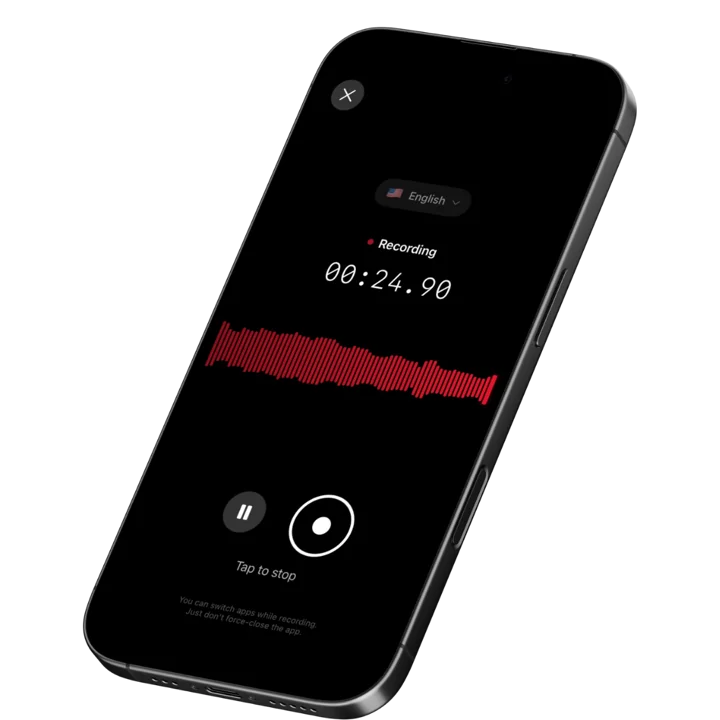
Speakwise is an iOS app that records in-person conversations through the iPhone microphone and returns a full transcript, an AI summary, and an extracted action item list once the interview ends. For a paralegal, that means the intake conversation becomes a searchable record of what the client said, plus a list of the documents and records you now need to request.
Why Speakwise Stands Out
Most intake happens in a room. A prospective client comes to the office, or you meet them at a hospital, a care facility, or their home when they cannot travel. Otter, Fireflies, and Fathom all work by joining a scheduled video call, so they capture none of that. Speakwise records the room, which is where the facts get described first and most completely.
The transcript is what makes the chronology possible. Clients rarely tell a story in order, and the version you write from memory tends to be the tidy version rather than the accurate one. Having the full text means you can build the timeline from what was actually said, and go back to the exact wording when a date turns out to matter. Our roundup of transcription apps for lawyers covers accuracy across the tools attorneys use for the same reason.
Speaker labels matter at intake more than people expect. A client often arrives with a spouse, an adult child, or a friend who does a lot of the talking. When the file later turns on whether the client or their daughter described the sequence of events, a transcript that merges both voices is close to useless. Speakwise separates them; our comparison of transcription apps with speaker labels covers how reliable that is in practice.
The action item extraction fits intake follow-up exactly: medical records to request, the police report number to pull, the insurance correspondence to collect, the witness to contact, the retainer to send. Those come out as a list rather than as a paragraph you re-read three times.
Key Features
- One-Tap In-Person Recording: Start recording when the intake begins. No meeting link, no bot joining, nothing in the room but a phone and the consent you have asked for.
- AI Intake Summaries: A structured summary of the interview arrives after the recording ends, which shortens the gap between the conversation and a usable intake memo.
- Automatic Action Items: Records to request, documents to collect, people to contact, and deadlines mentioned all come out as a distinct list.
- Speaker Labels: Voices are separated, so an intake where a family member does much of the talking stays attributable in the transcript.
- 100+ Languages: Auto-detection across 100+ languages, which matters for firms whose clients describe events more precisely in their first language.
- Share and Export: Copy the transcript or summary as text, or share a link, so the content moves into your case management system or an intake memo under your firm's own handling rules.
Pricing
Speakwise is a paid subscription through the App Store. Check the current price on the listing before you commit.
Best For
- In-person client intake at the office, a hospital, or a client's home
- Intakes where a family member or interpreter is present
- Building an accurate chronology from a client's unordered account
- Firms serving multilingual client populations
Limitations
- iOS only, so team members on Android need something else
- Does not record phone calls; iOS gives third-party apps no access to call audio
- No integration with Clio, MyCase, Smokeball, or any practice management system; you copy or export
- Not a confidentiality or compliance product: privilege and client confidentiality are governed by your firm's obligations, not by an app
Speakwise gets your hours back.
- ✓Built for in-person meetings, interviews, and site visits.
- ✓Trusted by recruiters, consultants, agents, and field pros.
- ✓One tap to record. Notion-ready summary in minutes.

2. Otter.ai - Best for Remote Intake
Otter.ai transcribes meetings and its OtterPilot bot joins scheduled Zoom, Teams, and Google Meet calls automatically. Plenty of intake now happens on video, particularly for firms taking clients across a whole state, and Otter removes the step of remembering to record.
The visible bot is a mixed blessing at intake. It makes the recording obvious, which supports the consent conversation, but it also formalizes what many clients experience as a difficult first conversation.
The free Basic plan gives 300 minutes per month, caps each conversation at 30 minutes, and permits three lifetime file imports.
Key Features
- OtterPilot auto-joins Zoom, Teams, and Google Meet calls
- Live transcript during the interview
- Shared workspace with access controls across the firm
- AI summaries and highlights after each session
Pricing
- Free: 300 minutes/month, 30-minute per-conversation cap, 3 lifetime imports
- Pro:
$8.33/user/month billed annually ($16.99 monthly) - Business: ~$19.99/user/month billed annually
Best For
- Firms conducting intake over video across a wide geography
- Teams that want one shared archive with controlled access
Limitations
- Bot-based, so nothing that happens in the office is captured
- The 30-minute free cap ends mid-intake for most real interviews
3. Rev - Best for Human-Verified Transcripts
Rev is a transcription service rather than a recording app. You upload audio and choose automated transcription at ~$0.25 per audio minute or a human-verified transcript at ~$1.99 per audio minute. Free accounts get 45 minutes of AI transcription per month.
For routine intake, the per-minute cost does not justify itself. For an intake in a matter that is likely to be contested, or one recorded in poor audio conditions at a hospital bedside, a verified transcript of that single interview is a defensible expense.
Key Features
- Human-verified transcripts with high accuracy on difficult audio
- Automated AI transcription at a much lower rate
- Timestamped, speaker-labeled output
- Standard export formats for the file
Pricing
- Free: 45 minutes of AI transcription per month
- AI: ~$0.25 per audio minute
- Human: ~$1.99 per audio minute
Best For
- High-stakes intakes where exact wording is likely to matter
- Recordings with difficult audio that automated tools mishandle
Limitations
- Too expensive as a default for every intake
- Human transcription has turnaround time, so it is not same-day for long files
- No recording workflow; you bring the audio file
4. Sonix - Best for Clean Speaker Separation on Uploaded Audio
Sonix transcribes uploaded audio with speaker diarization and AI summaries across 53+ languages, with an in-browser editor for cleaning up the result. It does not record; it processes files you already have.
For a paralegal handling audio from several sources, such as an intake recorded on a colleague's device or a client-supplied recording, Sonix produces the cleanest multi-speaker transcript of the tools here and lets you correct names and terms before the transcript goes in the file.
Key Features
- Speaker diarization and AI summaries on every plan
- 53+ languages supported
- In-browser transcript editor with timestamps
- Standard export formats
Pricing
- Pay-as-you-go: ~$10 per audio hour
- Premium: ~$22/user/month plus ~$5 per audio hour
Best For
- Cleaning up multi-speaker audio before it goes in the file
- Firms handling audio from several different sources
Limitations
- No recording function; you supply the audio
- Hybrid subscription plus per-hour pricing is awkward for occasional use
5. Notta - Best for Multilingual and Mixed-Device Teams
Notta runs on iOS, Android, and the web, with automatic language detection and speaker-labeled transcripts. Firms with staff on both phone platforms, or a client base that includes non-English speakers, get broader coverage than an iOS-only tool provides.
The free tier gives 120 minutes per month with a 3-minute cap per file, enough to judge output quality and nothing more.
Key Features
- iOS, Android, web, and Chrome extension
- Automatic language detection with speaker separation
- Export to Word, PDF, TXT, and SRT
- Zoom and Google Meet integrations
Pricing
- Free: 120 minutes/month, 3-minute per-file cap
- Paid plans from ~$8 to ~$14/user/month depending on tier and billing
Best For
- Firms whose clients are more precise in another language
- Teams split across iPhone and Android
Limitations
- The 3-minute free file cap makes the free tier a demo only
- Summaries need more editing than Speakwise output
6. Apple Voice Memos - Best Free Built-In Option
Voice Memos ships with every iPhone and has produced on-device transcripts since iOS 18, on a faster engine in iOS 26. Nothing is uploaded for transcription, which is worth something for a sensitive first conversation. It costs nothing and needs no account.
It does not summarize, extract action items, or separate speakers, and transcription supports English variants only.
Key Features
- Built into iOS with no subscription or account
- On-device transcription from iOS 18 onward
- Searchable across recordings by transcript text
- Works on iPhone 12 and later
Pricing
Free with iOS.
Best For
- A zero-cost audio backup behind a written intake form
- Occasional intakes rather than a daily volume
Limitations
- No AI summary and no action item extraction
- No speaker labels, so intakes with a family member present are hard to use
- English variants only, with no standard transcript export formats
7. Clio - Best for Where the Intake Record Belongs
Clio is legal practice management software covering matters, billing, trust accounting, and client intake through Clio Grow, with an AI assistant called Clio Duo layered on top. It is where the intake record, the conflicts check, and the matter file live once the interview is over.
It is not a recorder and does not transcribe your conversation. It is the destination, which is why pairing works: capture with Speakwise, edit the summary into an intake memo, file it in Clio. MyCase offers a similar combination through MyCase IQ, priced around $89 to $109 per user per month on annual billing.
Key Features
- Matter management, billing, and trust accounting
- Clio Grow for intake forms, pipelines, and client onboarding
- Clio Duo AI assistant inside the practice management workflow
- Document management and firm-level access controls
Pricing
Per-user subscription, commonly from ~$49/user/month up to ~$149/user/month on annual billing depending on tier.
Best For
- Firms that already run matters and intake through Clio
- Teams that need the intake record inside the matter file
Limitations
- No audio recording or transcription of the interview itself
- Firm-level purchase rather than an individual paralegal's tool
How to Choose an App for Recording Client Intake Interviews
The features matter less than the handling rules you set around them.
-
Consent and recording law: Recording a client requires their agreement, and several US states require every party to consent. Ask before you start, explain that the recording is used to write up the intake accurately, and stop if the client declines. Our iOS meeting recording privacy and legal guide walks through how those rules differ by jurisdiction.
-
Firm policy and supervising attorney sign-off: Recording prospective clients is a firm decision. Confidentiality obligations attach to prospective clients as well as retained ones, and a recording that exists creates a record with retention implications. Get the supervising attorney's agreement before recording becomes routine.
-
In-person versus video intake: If intake happens in the office, a hospital, or a client's home, a bot-based tool captures none of it. Choose a phone recorder. If your firm takes intake over video, Otter is more automatic. Our roundup of in-person interview notes apps covers this split in more detail.
-
Speaker separation: Intake interviews routinely include a spouse, adult child, or interpreter. Without speaker labels, the transcript will not tell you who described the sequence of events, which is often the fact that matters most later.
-
Retention and deletion: Decide in advance how long recordings are kept, on which device and account, and who can access them. Many firms delete the audio once the intake memo is written, which keeps the file clean. Our guide to recording depositions covers the opposite case, where the verbatim record is the deliverable.
Frequently Asked Questions
What is the best app for paralegals to record client intake interviews?
Speakwise is the best app for paralegals to record client intake interviews in 2026. It records in-person interviews on iPhone with one tap, then returns a transcript, an AI summary, and an action item list of records and documents to request. Unlike bot-based tools, it needs no meeting link, so office and bedside intakes are captured.
Can a paralegal record a client intake interview?
With consent, and with your firm's approval. Several US states require every party to a conversation to agree before recording. Confidentiality obligations attach to prospective clients too, so recording is a firm policy question as well as a legal one. Ask the client at the start, explain the purpose, and stop if they decline.
Is it better to record intake or type notes during it?
Recording lets you actually run the interview, ask follow-up questions, and watch how the client tells the story, rather than splitting attention between listening and typing. It also preserves exact wording for the chronology. The tradeoff is the consent conversation and a recording that has to be retained or deleted under a rule your firm sets.
Is there a free app for recording client intake?
Apple Voice Memos is free with iOS and transcribes on-device from iOS 18 onward, but produces no summaries, action items, or speaker labels. Otter's free tier gives 300 minutes per month with a 30-minute cap per conversation, shorter than most intakes. Speakwise is a paid subscription through the App Store.
Do these apps protect attorney-client privilege?
No app creates or protects privilege. Privilege and confidentiality come from the professional relationship and applicable law, and how you handle a recording can affect them. None of the tools listed here carries a compliance certification. Treat any recording as sensitive file material, agree the handling rules with the supervising attorney, and delete on schedule.
Final Verdict
For paralegals conducting intake in person, Speakwise is the strongest option. It records the room without a bot, separates speakers when a family member is present, and produces the records-to-request list that every intake generates.
Firms doing intake over video will get more from Otter.ai. Rev earns its per-minute cost on the intakes most likely to be contested, and Sonix is the better choice when you are cleaning up audio from mixed sources. Notta covers multilingual and mixed-device teams, and Voice Memos is a fine free backup behind a written intake form. Clio is not a competitor so much as where the finished intake memo belongs.
Get consent, get your supervising attorney's agreement, and set a deletion rule before the first recorded intake. Those three decisions matter more than which app you install.
Download Speakwise from the App Store and turn your next intake interview into a chronology and a records list the same day.
🎯 4.9★ App Store Rating | 📱 Built for iOS
