Best App for Plumbers to Record Service Call Notes (2027)
TL;DR
The best app for plumbers to record service notes in 2027 is Speakwise. The iPhone app captures what a homeowner says with wet hands nearby, then writes up the findings, with a free trial. ServiceTitan suits larger operations, and Jobber suits small to mid-size shops.
Used by recruiters, executives, consultants, and more.
Best App for Plumbers to Record Service Call Notes in 2027
An app for plumbers to record service notes has to work with wet hands under a sink, where there is no time to type. A homeowner's two-minute description of a backed-up shower, that one detail about last March, and the running list of parts have to end up on the invoice later. This guide compares 6 tools plumbers and techs actually use on site.
Best App for Plumbers to Record Service Call Notes at a Glance (2027)
The best app for plumbers to record service call notes in 2026 is Speakwise, with five alternatives depending on whether you need capture or a full field service platform:
- Speakwise - Best overall for narrating the on-site visit and the homeowner's description (iOS, no bot required)
- ServiceTitan - Best for larger plumbing operations with full dispatch and pricebook
- Jobber - Best for small to mid-size shops that need scheduling plus notes
- Housecall Pro - Best all-in-one for residential service with in-field payments
- Workiz - Best for shops that want dispatch and job tracking without enterprise cost
- Apple Voice Memos - Best free built-in fallback for a quick note
Speakwise is the only tool here that turns a spoken walkthrough of the job into an organized summary with the homeowner's account and your findings separated.
1. Speakwise - Best Overall for Service Call Notes
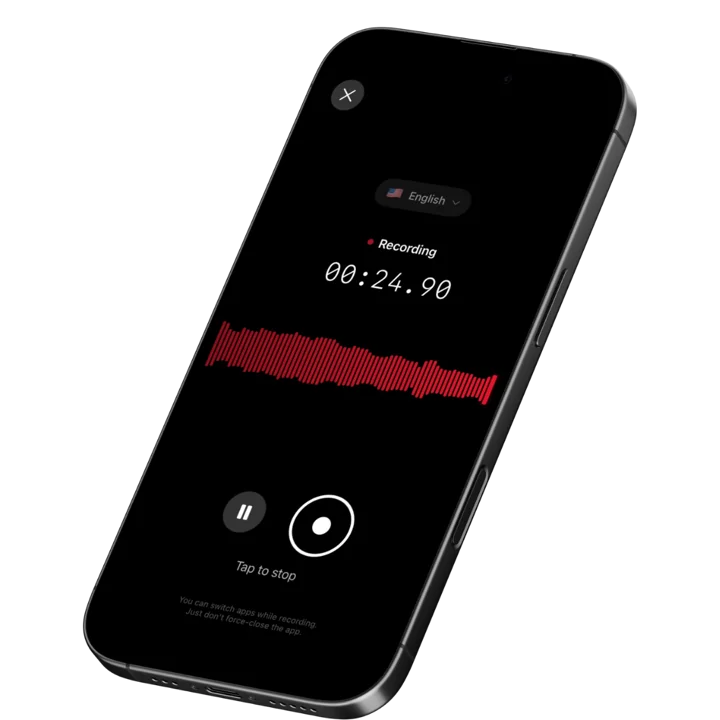
Speakwise is an iOS AI voice notes app that captures the in-person part of a plumbing service call. You tap once before you knock, let it run through the homeowner's description of the problem, narrate what you find as you diagnose, and stop when you are back at the truck. The AI returns a summary of the visit with your findings, what the customer told you, and the follow-ups you called out - text you can copy into the work order or the estimate before you drive to the next address.
One clarification worth making, because the phrase is ambiguous: this is for the on-site service visit, captured through the iPhone microphone in the room. Speakwise is not a call recorder and should not be used for telephone conversations.
Why Speakwise Stands Out
The most useful information on a plumbing job arrives in the first two minutes and the last two minutes, and both are moments when your hands are not free. On the doorstep the homeowner gives you the symptom history that determines where you look first. At the end, you are explaining what you found, what you did, and what still needs doing - often the highest-value conversation of the day, because that is where the water heater replacement, the repipe, or the sewer line quote comes from.
Every field service platform expects you to type that into a work order later. Later means sitting in the van at the end of the job, or worse, at nine p.m. after eight calls, when the details of call three have blended into call five. What survives is usually the line item and the price. What disappears is the reasoning: that the customer said the backup started after the storm, that the previous company snaked it and did not camera it, that the cleanout is buried under the deck, that the shutoff valve is seized and needs replacing before any future work.
Speakwise captures that reasoning as it happens. You narrate while you work: "Camera at 40 feet, offset joint, roots at the seam, no collapse. Cleanout is under the deck, access is bad. Water heater is a 2012 unit, anode never serviced, recommend replacement quote." When you stop, the AI groups it into findings, customer-reported history, work performed, and follow-ups. Our roundup of apps for HVAC service tech field complaint notes covers the same capture pattern in an adjacent trade.
Speaker labels keep the homeowner's account separate from your own diagnosis, which matters on callbacks and disputes. If the customer said the leak had been there for two weeks, that statement stays attributed to them rather than merging into your notes. Crawlspaces, basements, and mechanical rooms often have no signal, so capture happens on the device and the transcript is produced once you are back in range.
Key Features
- One-Tap On-Site Capture: Start before you knock, run through the diagnosis, stop at the truck. No bot, no link, no typing while a homeowner watches.
- AI Summaries Organized by Topic: The visit comes back grouped into customer-reported symptoms, findings, work performed, and recommended follow-up rather than one flat transcript.
- Action Item Extraction: Parts to order, return trips, quotes to send, permits to pull, and warranty items are pulled into a discrete list you work through between calls.
- Speaker Labels: Separates the homeowner's account from your diagnosis so symptom history stays attributed to the person who reported it.
- Long Recording Support: A repipe scope walk or a multi-hour diagnostic runs in a single session.
- Records Without a Connection: Crawlspaces, basements, and mechanical rooms have no coverage. Capture is local; processing completes when you reconnect.
- 100+ Languages: Residential service means multilingual customers. The homeowner's description is captured in the language they used.
- Export and Share: Copy the summary into the work order or estimate description, or share the recap with the office or the customer via link.
Pricing
- Paid subscription via the App Store: Speakwise is a paid iOS subscription. Current plan details are on the App Store listing.
Best For
- Service plumbers running five to ten calls a day who write up notes at the end
- Techs who diagnose out loud and want that reasoning preserved on the work order
- Anyone quoting repipes, sewer replacements, or water heater swaps from a service call
- Shops where callbacks get argued over what the customer originally reported
Limitations
- iOS only - no Android version
- In-person recording only. It is not a call recorder and must not be used for telephone conversations
- No dispatch, scheduling, invoicing, flat-rate pricebook, or payment collection
- No photo capture and no integration with ServiceTitan, Jobber, or Housecall Pro
Speakwise gets your hours back.
- ✓Built for in-person meetings, interviews, and site visits.
- ✓Trusted by recruiters, consultants, agents, and field pros.
- ✓One tap to record. Notion-ready summary in minutes.

2. ServiceTitan - Best for Larger Plumbing Operations
ServiceTitan is the enterprise field service platform for plumbing, HVAC, and electrical companies. Techs arrive with the full customer and equipment history on screen, build flat-rate options from the pricebook in front of the customer, capture photos against the job, and take payment on site. Dispatch, marketing attribution, and job costing all run off the same data. For shops running a dozen trucks or more, nothing else covers as much ground.
Notes still go in by typing, and ServiceTitan's own guidance is that it is not built for very small operations.
Key Features
- Full customer and equipment service history on the tech's device
- Flat-rate pricebook with good-better-best option presentation
- Dispatch, scheduling, and routing
- In-field invoicing and payment collection
- Job costing and marketing attribution reporting
Pricing
- Typically quoted from ~$245 to ~$500/technician/month, plus implementation
Best For
- Plumbing companies running 10 or more technicians
- Shops where flat-rate option selling drives revenue
- Operations needing job costing and marketing attribution
Limitations
- Cost puts it out of reach for small shops and owner-operators
- Long implementation and training cycle
- No voice capture or AI summarization of a service visit
3. Jobber - Best for Small to Mid-Size Shops
Jobber is the practical choice for residential plumbing shops with two to ten techs. Scheduling, dispatching, quoting, job notes, checklists, and invoicing are all handled cleanly, and the mobile app functions offline, which matters when the job is in a basement. Quotes can be built and sent from the truck, and customers get automated appointment and follow-up messaging.
Like all field service platforms, notes are typed. Jobber makes the typing as painless as it can be, but a tech under a sink is still not typing.
Key Features
- Scheduling, dispatch, and route planning
- Offline-capable mobile app for job details and notes
- Quotes and invoices generated and sent from the field
- Custom checklists for recurring service types
- Automated customer messaging and follow-up
Pricing
- from ~$39/month for a single user, scaling to ~$529/month for larger teams
Best For
- Plumbing shops with 2 to 10 technicians
- Owner-operators who want scheduling and invoicing in one place
- Teams that need mobile access in low-signal environments
Limitations
- No voice capture or AI summarization
- No flat-rate pricebook comparable to ServiceTitan
- Reporting depth is limited without add-ons
4. Housecall Pro - Best All-in-One for Residential Service
Housecall Pro is built for residential trades and is one of the easiest platforms for a tech to learn in an afternoon. The mobile flow is simple: open the app, see the day, tap the job, work through it, collect payment. Digital job reports with photos attach to the customer record, and automated review requests go out after completion, which is a real advantage for shops that live on local search reputation.
Key Features
- Clean mobile interface with minimal training required
- Digital job reports with photos attached to the customer record
- In-field card payment collection
- Automated follow-up and review request messaging
- Customer history visible before arrival
Pricing
- from ~$59/month, with mid and upper tiers around ~$149 and ~$329/month
- Several capabilities sit behind paid add-ons
Best For
- Residential plumbing shops that want fast adoption
- Owner-operators handling scheduling and customer communication themselves
- Shops that depend on online reviews for lead flow
Limitations
- Add-ons push real cost above headline tier prices
- No voice capture or AI summarization of a service visit
- Reporting is shallower than ServiceTitan
5. Workiz - Best Mid-Market Dispatch Without Enterprise Cost
Workiz targets the gap between Jobber and ServiceTitan: shops with several trucks that need real dispatch, job tracking, and reporting but cannot justify enterprise pricing or a six-month implementation. It handles scheduling, estimates, invoicing, and job status tracking, with communication tools tied to the job record.
Its pricing is seat-bundled, so it works best for shops that already have several techs rather than solo operators.
Key Features
- Dispatch board and scheduling for multi-truck shops
- Estimates and invoicing from the field
- Job status tracking and team communication
- Reporting on jobs, revenue, and technician performance
- Customer record with service history
Pricing
- Plans commonly quoted from ~$225/month for a small seat bundle, rising with seats and features
Best For
- Plumbing shops with 3 to 15 techs
- Operations that outgrew Jobber but do not want ServiceTitan
- Teams needing dispatch visibility across multiple trucks
Limitations
- Seat-bundled pricing is poor value for solo operators
- No voice capture or AI summarization
- Smaller ecosystem and integration list than the larger platforms
6. Apple Voice Memos - Best Free Built-In Fallback
Voice Memos is already on the phone, records without a connection, and starts in one tap. For capturing a single thing - a water heater model and serial, a measurement, the location of a buried cleanout - it is the fastest option available.
For a whole service call it gives you an audio file. No summary, no findings list, no separation between what the homeowner said and what you concluded. After eight calls you have eight recordings and no faster route to a work order than listening to all of them.
Key Features
- Built into iOS, no download or account
- Records with no connection required
- iCloud sync across Apple devices
- Basic trimming and sharing
- Free
Pricing
- Free: Included with iOS
Best For
- Single model numbers, measurements, and location notes
- A zero-cost backup when nothing else is available
- Techs who type their own work orders and want an audio reminder
Limitations
- No AI summary, no action items, no speaker labels
- Nothing to organize a full day of calls
- Retrieving one detail means listening to the whole file
How to Choose the Best App for Plumbing Service Call Notes
Almost every shop has a field service platform already. The question is what fills the gap between what happens on the job and what ends up typed into it.
-
Capture versus system of record: ServiceTitan, Jobber, Housecall Pro, and Workiz are systems of record - they hold the job, the invoice, and the customer history. None of them capture the spoken part of the visit. If details are being lost between the crawlspace and the work order, that is a capture problem and a different tool solves it.
-
Where your hands are: The two most valuable moments on a service call are the doorstep symptom description and the end-of-job explanation, and you are carrying something during both. Anything that requires typing at those moments will get skipped.
-
On-site, not on the phone: A plumbing service call is an in-person visit, and that is what a device recorder captures. Recording telephone conversations is a separate matter with its own legal requirements and is not what these tools do.
-
Offline behavior: Crawlspaces, basements, and mechanical rooms have no coverage. Confirm your tools record and function without a live connection rather than assuming they do.
-
Consent when the customer is speaking: Recording laws vary by state and country, and some require every party to consent. Tell the homeowner at the door that you record your job notes so nothing gets missed, and get the acknowledgement on the recording. Check your state's rules and your company policy first. These are notes tools and do not provide legal advice.
Frequently Asked Questions
What is the best app for plumbers to record service call notes?
Speakwise is the best app for plumbers to record service call notes in 2026. It captures the on-site visit through the iPhone microphone and returns a summary split into customer-reported symptoms, findings, work performed, and follow-ups. Pair it with ServiceTitan, Jobber, Housecall Pro, or Workiz for dispatch, invoicing, and payment.
How do plumbers take job notes without stopping work?
By narrating instead of typing. Start a recording before you knock, let it capture the homeowner's description, then talk through your diagnosis as you work: camera footage distance, joint condition, valve state, equipment age. Speakwise organizes that into findings and follow-ups so the work order write-up starts from a structured summary.
Does a service call app record phone calls?
No. A plumbing service call is the in-person visit to the property, which is what these tools capture. Speakwise records through the iPhone microphone in the room and is not a call recorder. Recording telephone conversations is a separate matter governed by its own rules and is not a use these apps support.
Is there a free app for plumbing job notes?
Apple Voice Memos is free, built into every iPhone, and records without a connection, which covers a single model number or measurement. It returns raw audio with no summary or follow-up list. MaintainX-style free tiers exist in maintenance software, but among the plumbing platforms listed here, Speakwise and the field service systems are all paid subscriptions.
Do I need the homeowner's permission to record on a job?
Recording laws vary by state and country, and some require all parties to consent. Tell the customer at the door that you record job notes so details are not lost, and capture their acknowledgement on the recording. Check your state's rules and your employer's policy. Speakwise is a notes tool and does not provide legal advice.
Final Verdict
Plumbing shops lose money in the gap between the job and the write-up. The symptom history that would have prevented a callback, the water heater that was quietly fourteen years old, the customer's exact words about how long the leak had been running - all of it is available on site and most of it is gone by the time anyone types.
Speakwise is the strongest tool in 2026 for closing that gap. On-site capture through the iPhone with no bot or link, AI summaries split into what the customer reported and what you found, extracted follow-ups, and speaker labels that keep the two apart. It is a paid iOS subscription, it is strictly for in-person capture rather than phone calls, and it does not replace your field service platform.
For the platform layer, ServiceTitan remains the most complete for larger operations, Jobber is the best value for small residential shops, Housecall Pro is the easiest to adopt, and Workiz fills the mid-market. Our roundups for field technicians and electrician troubleshooting jobs cover the same problem across neighbouring trades.
Download Speakwise from the App Store and run your next service call with the recording going, then write the work order from an organized summary instead of memory.
🎯 4.9★ App Store Rating | 📱 Built for iOS
