Best iPhone App to Record Audio in the Background (2027)
TL;DR
The best iPhone app to record audio in the background in 2027 is Speakwise. It keeps recording with the screen off and hands back a summary, with a 7-day free trial. Apple Voice Memos suits raw audio, and Otter.ai suits a live transcript.
 Speakwise - AI Note Taker
Never miss a key detail
- Smart summaries and action items.
- Speaker diarization labels who said what.
- Unlimited premium transcription.
- Auto-sync to Notion.
- Record offline, even with no signal.


Used by recruiters, executives, consultants, and more.
Best iPhone App to Record Audio in the Background in 2027
An iPhone app that can record audio in the background has to survive the moment you check the time, snap a photo, or lock the screen without the recording stopping. That small failure ruins a lecture, a site walkthrough, or a long workshop. Speakwise keeps recording through all of it and turns the finished audio into a transcript and summary instead of a file nobody replays.
Best iPhone App to Record Audio in the Background at a Glance (2027)
The best iPhone app to record audio in the background in 2026 is Speakwise, followed by five options ranging from the free built-in recorder to dedicated hardware:
- Speakwise - Best overall for background recording that becomes a written summary
- Apple Voice Memos - Best free built-in option for raw background audio
- Just Press Record - Best for starting from the Lock Screen, Action Button, or Apple Watch
- Otter.ai - Best for a live transcript that keeps running in the background
- Rev Voice Recorder - Best free unlimited recording with pay-per-use transcription
- Plaud NotePin - Best when you want capture that does not depend on the phone at all
Speakwise leads because background recording is only useful if the audio turns into something readable, and it is the only option here that hands back a summary and action items.
What "Background Recording" Actually Means on iPhone
iOS grants apps a background audio capability, which is what lets a recording continue after you leave the app or lock the screen. In practice that means three things work: you can switch to another app, you can lock the phone and put it in your pocket, and you can let the display sleep to save battery. The microphone stays engaged and the file keeps growing.
Three things do not work, on any app, because iOS does not permit them. An app cannot capture audio playing in another app. It cannot capture system audio. And it cannot access phone call audio, which Apple has never exposed to third-party developers. Every app on this list records what the microphone hears in the room, and nothing else.
One more constraint applies broadly: force-quitting a recording app from the app switcher ends the recording. Locking the screen is fine. Swiping the app away is not.
1. Speakwise - Best Overall for Background Recording
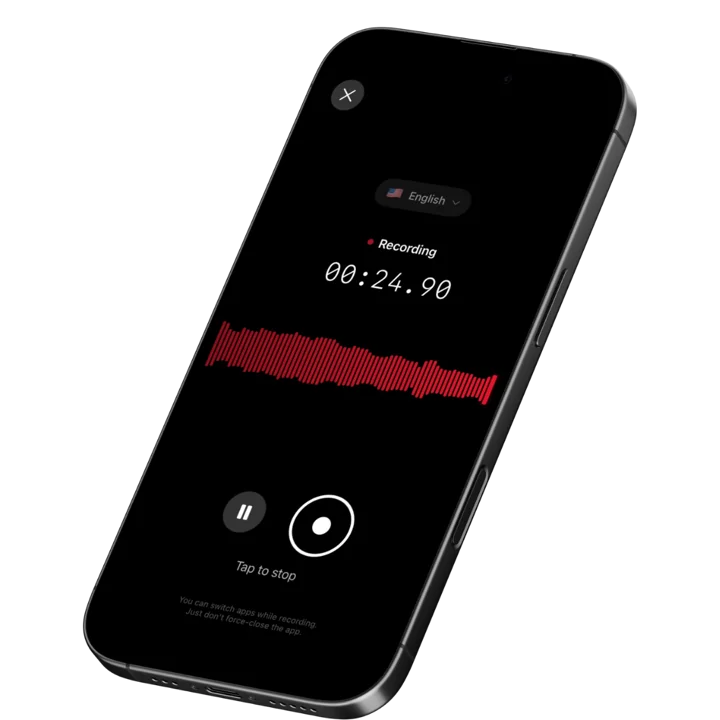
Speakwise records through the iPhone microphone or AirPods and keeps recording when you leave the app or turn the screen off. Recordings are written to the device as they happen, so the audio is not hostage to a live connection. When you stop, it returns a transcript, an AI summary, and extracted action items rather than a file you have to listen back to.
Why Speakwise Stands Out
Background recording is a means, not an end. Every app in this category can keep a microphone open with the screen off. The question that decides which one you keep using is what you find waiting when you pick the phone back up. With a plain recorder, it is a ninety minute file. With Speakwise, it is a summary you can read in forty seconds.
That difference matters most in exactly the situations where background recording is useful. A long lecture, a multi-hour workshop, a site visit where you are also taking photos and measurements: these produce recordings too long to review. Speakwise is built for that shape of capture, with no session cap forcing you to restart mid-session and no bot required, since the meetings it targets happen in rooms rather than on video calls.
Speaker labels help further when the background recording captured several people. A transcript that says who said what is a record. A transcript that does not is a wall. If you are weighing this against the other iPhone-native options, our roundup of AI voice recorder apps covers the wider category.
Key Features
- Background Recording With the Screen Off: The recording continues when you switch apps or lock the phone, so you can take photos, check notes, or pocket the device mid-session.
- Recordings Saved to the Device First: Audio is written to the iPhone as it records and uploads afterwards, so a dropped signal does not cost you the session.
- One-Tap and AirPods Start: Begin recording with a tap on screen or on an AirPod. On iPhone 15 Pro and later, map the Action Button to start a recording without unlocking.
- AI Summaries and Action Items: A long background recording comes back as a structured summary with follow-ups pulled out, instead of an audio file you never replay.
- Speaker Labels: Diarization separates voices so a multi-person recording is attributable rather than anonymous.
- 100+ Languages: Automatic language detection, plus the option to re-transcribe an existing recording into another language.
- PDF Export and Link Sharing: Send the transcript or summary as a PDF, or share a link to the notes without the recipient installing anything.
Pricing
- Paid subscription via the App Store, on weekly or annual auto-renewing plans. Speakwise is not a free app and has no permanent free tier.
Best For
- Long sessions where you need the phone for other things while it records
- Lectures, workshops, and conference talks that run past an hour
- Site walkthroughs where the phone is also the camera and the notepad
- Anyone who wants a readable summary rather than a long audio file
Limitations
- iOS only, with no Android or desktop version
- Paid subscription with no free tier
- No meeting bot, so it does not join Zoom or Teams calls
- Force-quitting the app from the app switcher ends the recording, as with every iOS recorder
Speakwise gets your hours back.
- ✓Built for in-person meetings, interviews, and site visits.
- ✓Trusted by recruiters, consultants, agents, and field pros.
- ✓One tap to record. Notion-ready summary in minutes.
2. Apple Voice Memos - Best Free Built-In Option
Voice Memos is already installed, costs nothing, and handles the core job correctly: start a recording, lock the phone, and it keeps going. The catch is at the start, not the end. You cannot begin a fresh recording from a locked screen, so the reliable pattern is unlock, start, then lock. Recent iOS versions add built-in transcription of finished recordings on supported hardware, which closes part of the gap with paid apps.
Key Features
- Free and preinstalled on every iPhone
- Recording continues with the screen locked once started
- Voice Isolation to suppress background noise, or Wide Spectrum to keep it
- Built-in transcription of recordings on supported devices and iOS versions
Pricing
Free.
Best For
- Anyone who needs raw background audio and nothing more
- Testing whether background recording fits your workflow before paying for anything
Limitations
- Cannot start a new recording from the Lock Screen
- No AI summary, action item extraction, or speaker labels
- Organisation is a flat list, which becomes unusable past a few dozen recordings
3. Just Press Record - Best for Lock Screen and Watch Starts
Just Press Record is built around one idea: remove every step between deciding to record and recording. It can be started from the Lock Screen, Control Centre, the Action Button, a widget, Siri, Shortcuts, or an Apple Watch, which solves the exact gap Voice Memos leaves open. Recording is unlimited in length and continues in the background, and everything syncs through iCloud to your other Apple devices. It is a one-time purchase rather than a subscription.
Key Features
- Start and stop from the Lock Screen, Control Centre, Action Button, widget, Siri, or Apple Watch
- Unlimited recording length with background recording
- iCloud sync across iPhone, iPad, Mac, and Apple Watch
- Records from the built-in mic, AirPods, or an external microphone
- Transcription in a wide range of languages
Pricing
Around $6.99 as a one-time purchase.
Best For
- Users who want the fastest possible start, especially from the Watch
- Anyone who prefers a one-time purchase over a subscription
Limitations
- Transcription only, with no AI summary or action item extraction
- No speaker labels for multi-person recordings
- You still read the whole transcript to find what mattered
4. Otter.ai - Best for a Live Background Transcript
Otter's mobile app records and transcribes in real time, and the transcript continues building while the app is in the background. For anyone who wants to glance at what has been said in the last few minutes without stopping the session, that live view is genuinely useful. The free tier gives 300 minutes a month but caps individual recordings at 30 minutes, which is the wrong limit for exactly the long sessions background recording is best at.
Key Features
- Real-time transcription that continues in the background
- Speaker identification across the transcript
- Keyword search across every recording in the account
- Shared workspaces for teams reviewing the same session
Pricing
Free tier: 300 minutes per month with a 30 minute per-session cap. Paid plans from around $8.33 per user per month billed annually.
Best For
- Sessions where you want to check the running transcript mid-recording
- Teams that need the transcript accessible to several people
Limitations
- The 30 minute free-tier session cap cuts off long recordings
- Live transcription is more battery-hungry than plain recording
- Built primarily around calls and bots, with in-person capture as a secondary mode
5. Rev Voice Recorder - Best Free Unlimited Recording
Rev's app records for free, without ads, subscriptions, or a length cap, and keeps recording in the background. Transcription is a separate paid step you order per file, which suits people who record constantly but only need text from a handful of sessions. AI transcription runs at $0.25 per audio minute, with human transcription available for audio a machine will mangle.
Key Features
- Free unlimited background recording with no subscription
- AI transcription at $0.25 per audio minute, ordered per file
- Human transcription available for difficult audio
- Around 45 free AI transcription minutes per month on the free plan
Pricing
Recording: free. AI transcription: $0.25 per audio minute. Human transcription: from roughly $1.50 per minute.
Best For
- Heavy recorders who only occasionally need a transcript
- Anyone who wants unlimited free recording length
Limitations
- No AI summaries or action item extraction
- Transcription cost climbs quickly at regular volume
- Ordering and waiting for a transcript is a two-step process
6. Plaud NotePin - Best Hardware Alternative
If the reason you want background recording is that the phone keeps getting used for other things, a dedicated device removes the conflict entirely. The Plaud NotePin is a clip-on recorder that captures independently of your iPhone and syncs to a companion app for transcription and summaries. The NotePin is $159 and the NotePin S is $179, and both record for roughly 20 hours continuously. A subscription is required for meaningful transcription volume.
Key Features
- Clip-on wearable that records without involving the phone
- Around 20 hours of continuous recording per charge
- Companion app produces transcripts and AI summaries
- Speaker identification across a broad language list
Pricing
Device: $159 (NotePin) or $179 (NotePin S). Subscription: free tier with 300 minutes per month, Pro around $99.99 per year, Unlimited around $239.99 per year.
Best For
- People who record most of the day and do not want the phone tied up
- Situations where taking a phone out would be disruptive
Limitations
- Significant upfront hardware cost on top of a subscription
- A second device to charge, carry, and not lose
- No advantage over a phone app if you only record occasionally
How to Choose a Background Recording App
- Can you start it without unlocking? This is where the options genuinely differ. Voice Memos requires an unlock to start. Just Press Record and an Action Button mapping do not. If you record spontaneously, this is the deciding factor.
- Is there a session length cap? Free tiers cap sessions more often than they cap totals. Otter's 30 minute free-tier cap is the clearest example, and it lands precisely on the long-session use case background recording exists for.
- What do you get when you stop? A file or a summary. If your recordings routinely run past an hour, a raw file is a task you will not do. Summaries and extracted action items are what make long background recordings worth keeping.
- How does it handle battery? Live transcription costs more battery than plain recording. For all-day capture, an app that transcribes after the fact will outlast one that transcribes as you go.
- Where does the audio live while you record? Apps that write to the device as they record survive a lost connection. Apps that stream can lose the session. Our guide to private voice recording covers the storage question in more depth.
A Note on Recording Other People
Background recording makes it easy to record without anyone seeing you do it, which is exactly why the consent question matters more here than elsewhere. Recording laws vary by country and by state, and some jurisdictions require every participant to consent rather than just one. Tell people you are recording before you start. For anything you plan to share, quote, or file, get explicit agreement. If you want a broader look at Apple's own recorder before deciding, see our best iPhone Voice Memos app comparison.
Frequently Asked Questions
What is the best iPhone app to record audio in the background?
Speakwise is the best iPhone app to record audio in the background because the recording continues with the screen off and comes back as a readable summary rather than a long audio file. Apple Voice Memos is the free baseline and handles background recording correctly. Just Press Record is the pick if starting from the Lock Screen matters most.
Does iPhone keep recording when the screen is locked?
Yes. iOS allows apps to keep recording audio after you lock the screen or switch to another app, as long as the recording was already running. Speakwise, Voice Memos, and Just Press Record all behave this way. The one thing that reliably stops a recording is force-quitting the app from the app switcher.
Can an iPhone app record audio from other apps or system sound?
No. iOS does not give third-party apps access to audio playing in other apps, to system audio, or to phone call audio. Every background recording app on iPhone captures what the microphone picks up in the room and nothing else. Screen Recording in Control Centre is the only built-in tool that captures app audio.
Why does my recording stop when I leave the app?
Either the app lacks the background audio capability, or the app was force-quit from the app switcher, which ends any recording. Some apps are also terminated by iOS under memory pressure. Use an app built for long-form recording, keep it running rather than swiping it away, and confirm microphone permission is set to Allow.
Final Verdict
Background recording on iPhone is a solved problem at the platform level. Every serious app here keeps the microphone open with the screen off, so the choice comes down to how you start the recording and what you get when it ends.
Speakwise is the strongest overall pick because it answers the second question best. Long background recordings are precisely the ones nobody replays, and turning a two hour session into a summary with action items is what makes the capture worth doing at all.
Voice Memos remains the right starting point if you have never tried this and want to spend nothing. Just Press Record wins on pure speed of starting, especially from an Apple Watch. And if you want capture that never competes with your phone, the Plaud NotePin is the hardware answer, at hardware prices.
Download Speakwise from the App Store and let the recording run in your pocket while you get on with the meeting.
🎯 4.9★ App Store Rating | 📱 Built for iOS
