Best App to Share Meeting Notes and Summaries via Link (2027)
TL;DR
The best app to share meeting notes and summaries via link in 2027 is Speakwise. The iPhone app turns a meeting into one link with the summary, free to try for 7 days. Otter.ai suits team use, and Fathom suits client recordings.
 Speakwise - AI Note Taker
Never miss a key detail
- Smart summaries and action items.
- Speaker diarization labels who said what.
- Unlimited premium transcription.
- Auto-sync to Notion.
- Record offline, even with no signal.

Used by recruiters, executives, consultants, and more.
Best App to Share Meeting Notes and Summaries via Link in 2027
Finding the right app that lets you share meeting notes and summaries via link saves everyone from a long email thread after a meeting. One URL lets a teammate open the summary and action items right away, no account needed. This guide compares 6 tools so you can pick the one that fits your team.
Best App to Share Meeting Notes via Link at a Glance (2027)
The best app to share meeting notes via link in 2027 is Speakwise, with five alternatives covering team workspaces, video call recordings, and free fallbacks:
- Speakwise - Best overall for in-person meetings captured and shared from an iPhone
- Otter.ai - Best for a shared team workspace with per-transcript links
- Fathom - Best for sending a client a recording link with granular permissions
- Fireflies.ai - Best for teams that want links plus search across every meeting
- Google Docs - Best free fallback with total control over what the link shows
- Apple Notes - Best built-in option for quick sharing inside the Apple ecosystem
Speakwise leads because it covers the case the others handle worst: meetings that happened in a room, with no call to join and no bot to invite.
1. Speakwise - Best Overall for Sharing In-Person Meeting Notes
Speakwise records in-person meetings on your iPhone, generates a transcript, an AI summary, and extracted action items, then gives you a link to share. The recipient opens it in a browser and sees the summary and the action items without installing anything. For consultants, field teams, and anyone whose meetings happen across a table, that closes the loop between the conversation and the follow-up.
Why Speakwise Stands Out
Every other tool on this list starts from a video call. That is fine until the meeting is a client site visit, a coffee with a candidate, a workshop, or a conversation in a corridor that turned into a decision. Those meetings produce the notes people most want and least often get, because there was no bot in the room and no recording to link to afterwards.
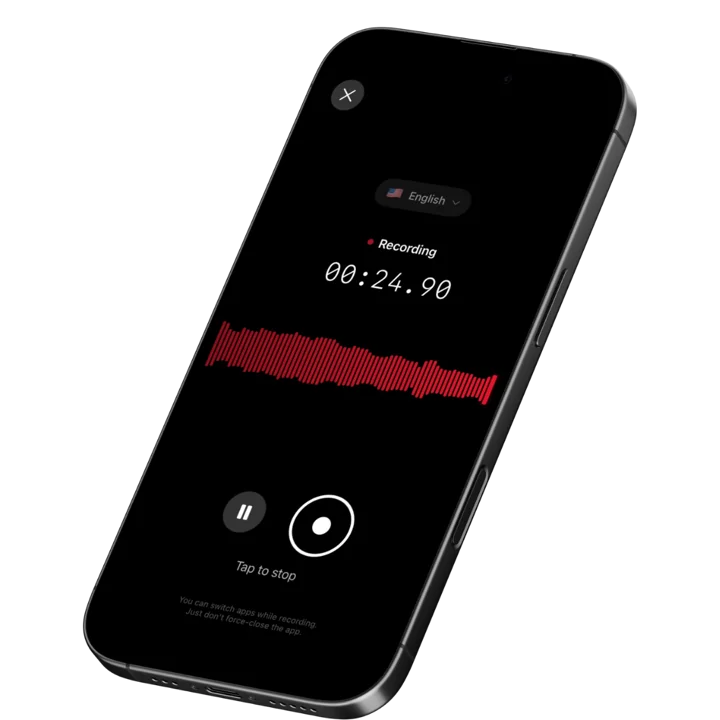
Speakwise starts from the phone instead. Tap to record, let it run, and the summary is ready by the time the handshake is done. The share link then does the work an email thread used to: one URL, viewable on any device, with the summary and action items laid out rather than buried in a transcript. The recipient does not need an iPhone, an account, or the app.
Speaker labels matter more than people expect for shared notes specifically. If three people were in the room, a shared summary that attributes each commitment is a record. One that does not is a suggestion. Our explainer on speaker diarization covers how the feature works and where it struggles.
Key Features
- Share via Link: Send a link to the notes, with the summary and extracted action items laid out for the recipient. No account or install needed on their end.
- One-Tap In-Person Recording: Record through the iPhone mic or AirPods with no bot, no meeting link, and no hardware.
- AI Summaries and Action Items: What you share is a readable summary with commitments listed, rather than a raw transcript nobody scrolls through.
- Speaker Labels: Diarization attributes each passage, so shared notes from a multi-person meeting show who said what.
- PDF Export: When the recipient needs a file to attach or archive rather than a link, export the transcript or summary as a PDF.
- 100+ Languages: Automatic detection, plus the option to re-transcribe a recording into another language before sharing it.
- Background Recording: The recording continues with the screen off, so the phone can sit in a pocket during a long session.
Pricing
- Paid subscription via the App Store, on weekly or annual auto-renewing plans. Speakwise is not a free app and has no permanent free tier.
Best For
- Consultants and freelancers sending clients a recap immediately after a visit
- Field and site teams documenting meetings away from a desk
- Anyone who needs the recipient to read notes without installing an app
- Multi-person in-person meetings where attribution matters
Limitations
- iOS only, with no Android app or web recorder
- Paid subscription with no free tier
- No meeting bot, so it does not join Zoom or Teams calls
- Sharing is one direction: recipients read the notes rather than editing them
Speakwise gets your hours back.
- ✓Built for in-person meetings, interviews, and site visits.
- ✓Trusted by recruiters, consultants, agents, and field pros.
- ✓One tap to record. Notion-ready summary in minutes.
2. Otter.ai - Best for a Shared Team Workspace
Otter is built around the idea that transcripts should be team property rather than personal files. Conversations live in a shared workspace, and individual transcripts can be shared with specific people or through a link. Recipients can read the transcript alongside the audio and jump to any moment. For organisations that treat meeting notes as a searchable knowledge base, Otter has the most mature version of this.
Key Features
- Shared workspaces with per-transcript sharing controls
- Transcript synced to audio playback so recipients can verify a passage
- Keyword search across every conversation in the workspace
- Export to TXT, DOCX, PDF, and SRT for recipients who want a file
Pricing
Free tier: 300 minutes per month with a 30 minute per-session cap. Paid plans from around $8.33 per user per month billed annually.
Best For
- Teams that want one searchable archive of every meeting
- Organisations where several people need access to the same transcript
Limitations
- Sharing is strongest inside the workspace and weaker for outside recipients
- Built around calls and bots, so in-person capture is a secondary mode
- The 30 minute free-tier session cap truncates longer meetings
3. Fathom - Best for Sending a Client a Recording Link
Fathom generates a shareable link containing the recording, the transcript, and the questions asked, and recipients do not need a Fathom account to open it. Permissions are unusually granular: you can restrict a link to anyone with the URL, anyone on your domain, or named individuals only, and choose whether the recipient can view the summary alone or also download, comment, and see highlights. For client-facing work, that control is the differentiator.
Key Features
- Shareable links that work without a recipient account
- Link scope set to anyone, same domain, or named people only
- Permission levels controlling downloads, comments, and highlights
- Auto-share of recordings and summaries with meeting attendees
- Bot-less meeting capture added in 2026 for calls without a visible bot participant
Pricing
Free plan available. Paid plans from around $15 per user per month billed annually. Check Fathom for current pricing.
Best For
- Client-facing teams sending recordings and summaries outside the company
- Anyone who needs fine control over what a link recipient can do
Limitations
- Built for video calls, so it does not cover in-person meetings
- Sharing a full recording is more than many recipients want
- Free plan limits which features carry over to shared links
4. Fireflies.ai - Best for Links Plus Cross-Meeting Search
Fireflies joins calls, transcribes them, and produces summaries that can be shared through links or pushed into the tools a team already uses. Its real strength is search across the whole meeting history, which makes a shared link part of a larger archive rather than a one-off artefact. Sales and customer teams tend to pick it for the depth of its integrations with CRM and project tools.
Key Features
- Automatic call transcription with shareable notes and summaries
- Search across every recorded meeting in the workspace
- Integrations with CRM, collaboration, and project management tools
- Automatic language detection across a broad language list
Pricing
Free plan available. Paid plans from around $10 per user per month billed annually. Check Fireflies for current pricing.
Best For
- Sales and customer teams who need meeting notes inside existing systems
- Organisations searching across hundreds of past meetings
Limitations
- Bot-based, so it covers video calls and not in-person meetings
- A visible bot in the call changes the dynamic for some participants
- More platform than most individuals need for sharing a set of notes
5. Google Docs - Best Free Fallback
If the notes already exist as text, a document with a share link is the cheapest possible answer. Paste the summary, set the link to view-only, and send it. It costs nothing, anyone can open it in a browser, and you control exactly what appears. The obvious limitation is that Google Docs records nothing and summarises nothing: it is the last step of a workflow, not the workflow.
Key Features
- Free with any Google account
- View, comment, or edit permissions set per link
- Complete control over formatting and what the recipient sees
- Download as PDF or DOCX for recipients who prefer a file
Pricing
Free. Google Workspace plans start around $6 per user per month for business features.
Best For
- Occasional sharing where the notes are already written
- Situations that need commenting or collaborative editing
Limitations
- No recording, transcription, summarising, or action item extraction
- Fully manual, which does not scale past a few meetings a week
- Recipients outside your organisation may hit sharing restrictions
6. Apple Notes - Best Built-In Option
Apple Notes is free, on every iPhone, and can share a note through an iCloud link that keeps updating as you edit. For quick internal sharing between people already inside the Apple ecosystem, it is genuinely fast: write or dictate the notes, tap share, send the link. The friction appears when the recipient is not an Apple user, since collaboration on a shared note requires an Apple Account.
Key Features
- Free and preinstalled on iPhone, iPad, and Mac
- Share a note by iCloud link with view or edit access
- Live updates, so recipients see edits without a resend
- Built-in dictation for typing the notes by voice
Pricing
Free with an Apple Account. iCloud storage upgrades start around $0.99 per month.
Best For
- Quick internal sharing between colleagues on Apple devices
- Notes you will keep editing after sending the link
Limitations
- Collaborators need an Apple Account, which rules out many external recipients
- No recording, transcription, or AI summarisation
- Not designed as a meeting record, so there is no attribution or timestamping
How to Choose a Meeting Notes Sharing App
- Does the recipient need an account? This is the single biggest difference between these tools. Fathom and Speakwise links open without one. Apple Notes collaboration and most workspace tools do not. If you share outside your company, this decides the shortlist.
- Where do your meetings happen? Fathom and Fireflies are excellent for video calls and useless for a client site visit. If your meetings are in-person, start with a phone-first tool. Our remote team meeting notes roundup covers the call-based side in more depth.
- What does the link actually show? A link to a full transcript is not the same as a link to a summary. Most recipients want the decisions and their own action items, not four thousand words. Check what the shared view leads with.
- Can you control access after sending? Links get forwarded. Look for scope controls, expiry, or the ability to revoke a link, especially for anything client-facing or commercially sensitive.
- Does it attribute who said what? Shared notes carry more weight when each commitment has a name on it. Diarization is what makes a shared summary function as an agreed record rather than one person's version of events, which matters most in agile ceremonies and team meetings.
A Note on Sharing Recordings of Other People
A share link travels further than you expect. Before you send meeting notes containing someone else's words, confirm they knew the meeting was being recorded and that they are comfortable with the notes going to the recipients you have in mind. Recording laws vary by country and by state, and some jurisdictions require every participant to consent. Sharing a summary is generally lower risk than sharing raw audio, but the underlying consent question is the same.
Frequently Asked Questions
What is the best app to share meeting notes via link?
Speakwise is the best app to share meeting notes via link for in-person meetings, because it records on your iPhone and produces a shareable summary with action items that opens without an account. Fathom is the stronger choice for video calls where you want to send a client the recording with granular permission controls.
Can I share meeting notes without the recipient installing an app?
Yes. Speakwise and Fathom both produce links that open in a browser with no account or install required. Google Docs does the same for notes you have already written. Apple Notes is the exception worth knowing about, since collaborating on a shared note requires the recipient to have an Apple Account.
How do I share notes from an in-person meeting?
Record the meeting on your phone, let an AI note app produce the summary and action items, then send the share link. Speakwise is built for this specific case, since it needs no bot and no video call. Bot-based tools like Fireflies and Fathom cannot capture a meeting that never had a call attached.
Should I share the transcript or just the summary?
Share the summary. A one hour meeting produces thousands of words of transcript, and almost nobody reads them. A summary with decisions and named action items answers what the recipient needs in under a minute. Keep the full transcript available for the rare occasion someone disputes a detail.
Final Verdict
Sharing meeting notes is a distribution problem, not a writing problem. The notes usually exist somewhere. They just never reach the people who needed them in a form anyone opens.
Speakwise is the best overall pick because it covers the meetings the rest of the category ignores. In-person conversations produce the most valuable and least documented notes in most jobs, and being able to record one on a phone and send a link before you leave the car park is a genuinely different workflow.
Fathom is the right answer for client-facing video calls, with the most controllable link permissions here. Otter and Fireflies win for teams building a searchable archive across hundreds of meetings. And if you already have the notes written, a view-only Google Doc will do the job for free.
Download Speakwise from the App Store and send the summary and action items as a link before your next meeting has finished emptying the room.
🎯 4.9★ App Store Rating | 📱 Built for iOS
