Best Transcription App for Apple Watch (2027)
TL;DR
The best transcription app for Apple Watch in 2027 is Speakwise. The iPhone app pairs with an Apple Watch, so a tap on your wrist starts the recording, with a free trial. Just Press Record suits a free-forever transcript, and Speechy suits on-device speaker labels.
Used by recruiters, executives, consultants, and more.
Best Transcription App for Apple Watch in 2027
A transcription app for Apple Watch sounds simple, but the Watch itself never shows the transcript: recording happens on your wrist, and the words only appear once the audio reaches your iPhone. The apps compared here also differ on whether the transcript shows who said what, sometimes called speaker diarization. This guide compares 5 tools on that basis.
Best Transcription App for Apple Watch at a Glance (2027)
The best transcription app for Apple Watch in 2026 is Speakwise, followed by:
- Speakwise - Best overall, with speaker labels and an AI summary on top of the transcript
- Just Press Record - Best free-forever transcript with no subscription
- Speechy - Best on-device transcription with speaker labels
- Whisper Memos - Best transcript delivered straight to your email
- Cleft Notes - Best offline-first transcription workflow
Speakwise is the only app here that adds speaker labels and a full AI summary on top of the transcript. The rest focus on the text itself.
1. Speakwise - Best Overall Transcription App for Apple Watch
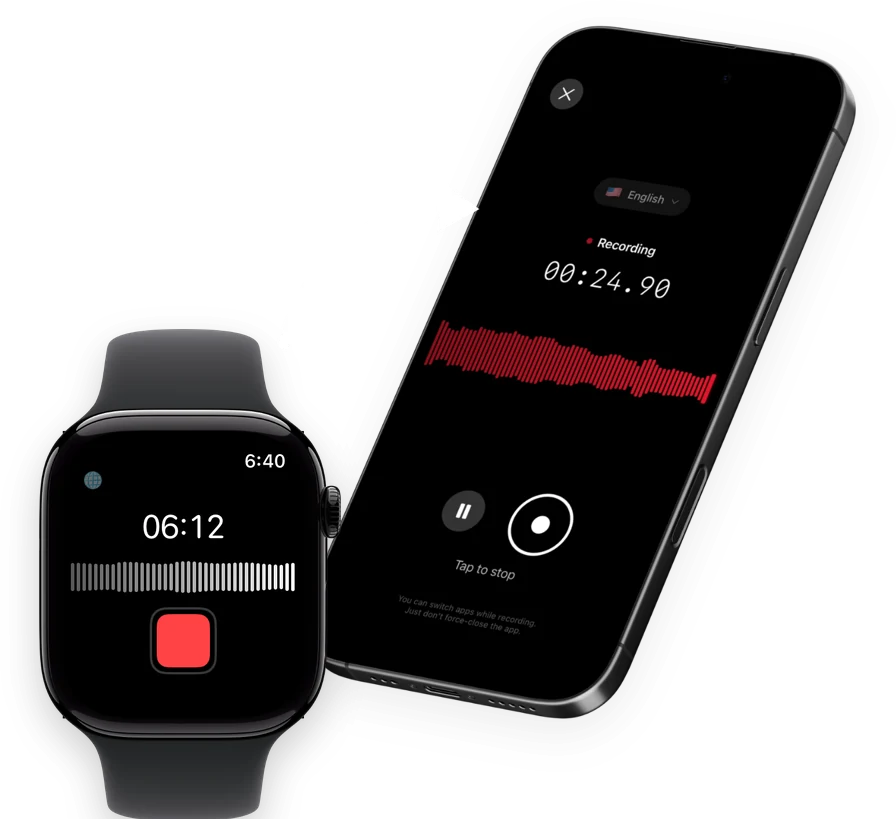
Speakwise is an AI note taker, voice recorder and voice-to-text app for iPhone with an Apple Watch companion app. Tap once on your Watch to start recording, tap again to stop, and the recording syncs to your iPhone, where Speakwise transcribes it, labels each speaker, and writes a summary with action items.
Why Speakwise Stands Out
A raw transcript from a group conversation is hard to read. Without labels, it's one long block of text and you're left guessing who said what. Speakwise's speaker labels, sometimes called speaker diarization, solve that by separating each voice in the recording and attributing lines to the right speaker.
That labeled transcript then feeds into the AI summary, built from templates for meeting notes, interviews, lecture and study notes, and more. So instead of reading through a full transcript to find what mattered, you get the key points and action items pulled out, with the full labeled transcript available if you need to check the exact wording.
Key Features
- One-Tap Recording from Your Wrist: Start a recording on your Apple Watch with one tap, then let it sync to your iPhone automatically.
- Speaker Labels: The transcript separates each voice and shows who said what, useful the moment more than one person is talking.
- 100+ Languages: Transcription covers more than 100 languages, at 95%+ accuracy in good conditions and 92%+ in a noisy room.
- AI Summaries: Every transcript gets a summary built from a template, meetings, interviews, lectures and more, with action items pulled out automatically.
- Long iPhone Sessions: On iPhone, recordings run up to 5 hours in a single session with no daily limit, continuing even with the screen off.
- Records Offline: Audio saves to your iPhone first, then syncs to transcribe once you're back online. Works with AirPods, Bluetooth earbuds and external mics.
- Native Notion Sync: Transcripts and summaries sync directly into Notion, no manual export needed.
Pricing
- Free Trial: Full access to try recording, transcripts and AI summaries
- Pro: Free trial, then a Pro subscription through the App Store
Best For
- Multi-person conversations where knowing who said what actually matters
- Anyone who wants a summary on top of the transcript, not just raw text
- Notion users who want transcripts to sync there automatically
Limitations
- iPhone and Apple Watch only, no Android or desktop app
- The transcript appears once the recording syncs to your iPhone, not on the Watch itself
- Not built for recording phone calls
Speakwise gets your hours back.
- ✓Built for in-person meetings, interviews, and site visits.
- ✓Trusted by recruiters, consultants, agents, and field pros.
- ✓One tap to record. Notion-ready summary in minutes.

2. Just Press Record - Best Free-Forever Transcript
Just Press Record turns a Watch recording into an on-device transcript for a single one-time purchase, with no subscription and no ongoing cost. It's a straightforward option for anyone who wants text without paying every month.
Key Features
- One-tap recording on Apple Watch, works without your iPhone nearby
- On-device transcript in more than 30 languages
- Unlimited recording length
Pricing
$6.99 one-time purchase, no subscription.
Best For
- People who want a transcript without an ongoing subscription
- Long recordings with no time limit
Limitations
- No speaker labels or AI summary
- One flat transcript, with no way to organize it further
3. Speechy - Best On-Device Transcription With Speaker Labels
Speechy transcribes entirely on-device using Apple's own speech recognition, and includes speaker labels, which is unusual for an on-device tool. Because transcription happens on the device itself, it also works offline.
Key Features
- On-device transcription using Apple's built-in speech recognition
- Speaker labels included
- Works offline, since nothing needs to reach a server to transcribe
Pricing
$6.99 per month, $47.99 per year, or a $9.99 one-time option.
Best For
- Transcription where keeping processing on the device matters
- Notes that include more than one speaker
Limitations
- No AI summary or action item extraction
- Smaller user base than the larger note-taking apps
4. Whisper Memos - Best Transcript by Email
Whisper Memos records on your Apple Watch, then sends a cleaned-up written transcript to your inbox using cloud-based AI transcription. Its Meeting Mode assigns real names to different speakers rather than generic labels.
Key Features
- Records on the wrist and emails a transcribed recap automatically
- Meeting Mode labels speakers by name
- Recordings run up to 90 minutes each, with no daily limit
Pricing
$9.99 per month, or $59.99 per year.
Best For
- People who prefer reading transcripts in email over inside an app
- Conversations with a small number of named speakers
Limitations
- Transcription happens in the cloud, not on the device
- No native Notion or notes-app sync
5. Cleft Notes - Best Offline-First Transcription Workflow
Cleft Notes records fully offline on the Apple Watch, queuing the recording locally if your iPhone is out of range, then transcribes it on your iPhone once the recording syncs.
Key Features
- Fully offline recording on the Watch, with automatic local queuing
- Transcription happens on your iPhone once the recording syncs
- AI summary generated alongside the transcript
Pricing
Free with in-app purchases; Cleft Plus costs $6.99 per month or $39.99 per year.
Best For
- Recording and transcribing in places with a weak or no connection
- People who think through ideas out loud and want them written down
Limitations
- Fewer summary templates than a dedicated meeting-notes app
- Best suited to one or two speakers rather than a large group
How to Choose the Best Transcription App for Apple Watch
- Decide if you need speaker labels. A one-person voice note doesn't need them. A conversation with more than one voice is much easier to read with speaker labels, which is where Speakwise and Speechy stand out.
- Check where transcription happens. Speechy and Just Press Record transcribe on-device. Whisper Memos and Speakwise transcribe after the recording syncs from your Watch to your iPhone. Neither approach is wrong, but it changes when the text is actually ready.
- Think about how you'll read the result. Whisper Memos sends a written recap to your email. The others keep the transcript inside the app itself, with Speakwise adding a summary on top.
- Match accuracy needs to your audio conditions. A quiet room gives every app here a cleaner result. If you regularly record in noisy places, look for a stated accuracy range, like Speakwise's 95%+ in good conditions and 92%+ in a noisy room, rather than a vague promise.
- Weigh subscription against one-time cost. Just Press Record is a strong value if all you need is text. A subscription earns its cost if you also want a summary and action items done for you.
Our main guide to the best transcription apps for iPhone covers the wider field beyond just Apple Watch. If you want to understand more about how speaker labels actually work, see our explainer on what speaker diarization is, and for a deeper look at diarization accuracy across tools, the best AI notetakers with speaker diarization goes further into that comparison.
Frequently Asked Questions
Does Apple Watch have a transcription app?
Apple Watch doesn't produce a transcript on its own. Apple's built-in Voice Memos app records and plays audio on the Watch, but has no transcription feature in any current watchOS version. Third-party apps like Speakwise, Just Press Record, Speechy, Whisper Memos and Cleft Notes all solve this by recording on the Watch and transcribing the result once it syncs to your iPhone.
What is the best transcription app for Apple Watch?
Speakwise is the strongest overall choice. It records from your Apple Watch, syncs to your iPhone, and returns a transcript with speaker labels and an AI summary. If you want a plain transcript with no ongoing subscription, Just Press Record is a solid, lower-cost option.
Can an Apple Watch transcription app tell different speakers apart?
Yes, some can. Speakwise and Speechy both add speaker labels to the transcript, which is sometimes called speaker diarization, so a conversation with more than one voice reads as a labeled exchange rather than one unbroken block of text. Just Press Record and Cleft Notes produce a transcript without separating speakers.
Does Apple Watch transcription work offline?
Recording works offline on every app in this guide, since the Watch's microphone doesn't need a connection to capture audio. The transcription step itself varies. Speechy transcribes on-device and works fully offline. Speakwise, Whisper Memos and Cleft Notes need your recording to sync to your iPhone before the transcript is generated, so the sync step needs a connection even though recording doesn't.
Just Press Record has an Apple Watch transcript feature. Is it accurate?
Just Press Record's on-device transcript works across more than 30 languages and runs entirely on the device, with no subscription required. It produces a plain transcript with no speaker labels or AI summary. For most quiet, single-speaker recordings it holds up well, though accuracy on any transcription tool drops in a noisy room or with several people talking at once.
Final Verdict
Just Press Record is the strongest choice if all you want is a free-forever transcript with no subscription, and Speechy is worth a look if keeping transcription on-device matters to you.
For most people, Speakwise is the best overall transcription app for Apple Watch. It's the only one here that adds speaker labels and a full AI summary on top of the transcript, so a recording from your wrist comes back as something you can actually act on.
Download Speakwise from the App Store and get a labeled transcript from your next Apple Watch recording.
🎯 4.9★ App Store Rating | 📱 Built for iOS
