Best Otter Alternative for Apple Watch (2027)
TL;DR
The best Otter alternative for Apple Watch in 2027 is Speakwise. The iPhone app starts and stops recording from your wrist, since Otter has no Watch app, with a 7-day free trial. Just Press Record suits a one-time purchase, and Granola suits teams on Mac.
Used by recruiters, executives, consultants, and more.
Best Otter Alternative for Apple Watch in 2027
If your phone is in your bag, Otter cannot help you, since it has no Apple Watch app and never has. That gap sends people looking for an Otter alternative for Apple Watch, one with the record button on the wrist instead of locked inside a phone-only app. If you mainly take video calls at a desk, see our Otter alternatives roundup instead.
Best Otter Alternative for Apple Watch at a Glance (2027)
The best Otter alternative for Apple Watch in 2026 is Speakwise, which starts and stops recording with one tap on your wrist and syncs the recording to your iPhone for transcription and an AI summary. Four other apps also record natively on the Watch and make solid alternatives depending on what you need.
- Speakwise - Best overall Otter alternative for Apple Watch (one-tap wrist recording, syncs to your iPhone for a transcript and AI summary)
- Just Press Record - Best one-time purchase, no subscription ever
- Granola - Best for teams already using Granola on Mac
- Whisper Memos - Best for cloud transcription with speaker labels
- Cleft Notes - Best for recording when your iPhone is out of range
Speakwise is the only app on this list built around an AI summary and speaker labels after every recording, which is the closest match to what Otter does on desktop, just started from your wrist instead.
1. Speakwise - Best Overall Otter Alternative for Apple Watch
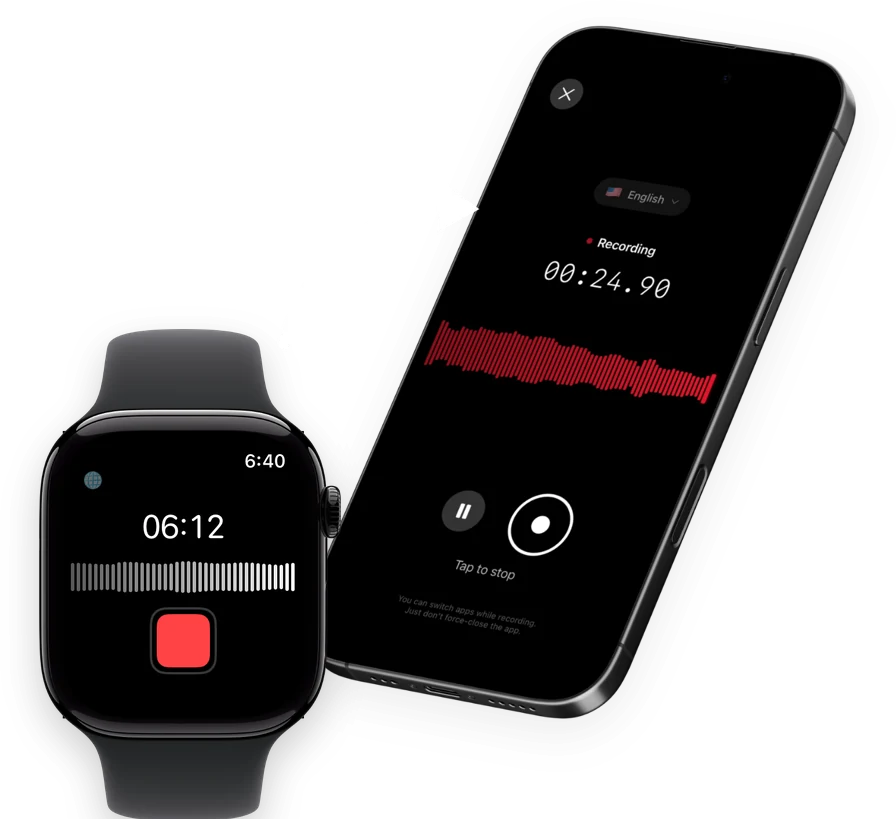
Speakwise is an AI note taker, voice recorder, and voice-to-text app for iPhone with an Apple Watch companion app, something Otter has never shipped. You start and stop a recording from your wrist with one tap, and the recording syncs to your iPhone, where it is transcribed and summarized. Transcription covers 100+ languages at 95%+ accuracy in optimal conditions, and every recording comes back with speaker labels and an AI summary with action items. For anyone who wants the record button on their wrist, not buried inside a phone-only app, Speakwise closes the exact gap that sends people looking for an Otter alternative for Apple Watch.
Why Speakwise Stands Out
Otter was built for desktop browsers and video calls. It has never added an Apple Watch app, so if a conversation starts and your phone is out of reach, you simply cannot record with Otter.
Speakwise flips that around. Tap the button on your Watch face and it starts capturing audio right there. Once your Watch and iPhone reconnect, the recording syncs over automatically, gets transcribed, and comes back as a summary with the key points and action items pulled out.
That wrist-first workflow is the biggest reason people switch. It also keeps the part of Otter people actually rely on: a transcript that shows who said what, not just one long wall of text.
Key Features
- One-tap recording from your Apple Watch: Start and stop a recording right from your wrist, no need to touch your iPhone.
- Automatic sync to your iPhone: Once your Watch and iPhone reconnect, the recording moves over on its own and gets transcribed and summarized.
- Speaker identification: Group conversations come back labeled by speaker, so you know who said what without replaying the audio.
- 100+ language transcription: 95%+ accuracy in optimal conditions, 92%+ in noisy rooms.
- AI summary templates: Meeting notes and actions, interview notes, lecture and study notes, and more, so the output reads like a finished document, not raw text.
- Native Notion sync: Transcripts and summaries sync directly to Notion.
Pricing
- Free Trial: Free to download with a free trial
- Pro: Free trial, then Pro subscription through the App Store
Best For
- Otter users who want to start recording from their wrist
- Conversations where your iPhone is not always within reach
- Multilingual meetings and interviews
- Anyone who wants speaker labels and a summary after every recording
Limitations
- iPhone and Apple Watch only, no Android or desktop app
- No live meeting bot for Zoom or Teams the way Otter has
- Transcription happens after the recording syncs to your iPhone, not on the Watch itself
Speakwise gets your hours back.
- ✓Built for in-person meetings, interviews, and site visits.
- ✓Trusted by recruiters, consultants, agents, and field pros.
- ✓One tap to record. Notion-ready summary in minutes.

2. Just Press Record - Best One-Time Purchase Alternative
Just Press Record is a minimalist recorder built for Apple devices, including a real, standalone Apple Watch app. It records straight to the Watch's own microphone, with no iPhone required to start or stop, and it has done this since long before most competitors added a Watch app at all.
Key Features
- One-tap recording directly on Apple Watch, iPhone, iPad, and Mac
- On-device transcription across devices in 30+ languages
- Unlimited recording length, no daily caps
- iCloud sync keeps recordings available on every device
Pricing
- One-time purchase: $6.99, no subscription
Best For
- Personal voice notes and quick reminders
- Anyone who wants to avoid a subscription entirely
Limitations
- No AI summary or action item extraction
- No speaker identification for group conversations
- Not built for structured meeting notes the way Otter or Speakwise are
3. Granola - Best for Teams Already on Granola for Mac
Granola is a well-known meeting notes brand on Mac and web that added a native Apple Watch app in July 2026. The Watch app can record even when your iPhone is not nearby, though note generation still needs an internet connection to reach Granola's servers.
Key Features
- Native Apple Watch app that records without requiring your iPhone close by
- Highlights, decisions, and action items generated once the recording syncs
- Familiar Granola note format for teams that already use it on Mac
- Works alongside your existing Granola account and history
Pricing
- Basic: free, limited meeting history
- Business: $14/user/month, unlimited history and integrations
- Enterprise: $35/user/month
Best For
- Existing Granola users who want their Watch to double as a recorder
- Teams already standardized on Granola for meeting notes
Limitations
- Note generation requires an internet connection, even though recording is offline-capable
- Speaker identification on the Watch app is not documented
- A newer Watch app than most of the dedicated recorders on this list
4. Whisper Memos - Best for Cloud Transcription With Speaker Labels
Whisper Memos records on the Apple Watch and sends every recording through a cloud transcription model, with a Meeting Mode that assigns speaker names to a multi-person conversation. It is one of the more actively updated apps in this space.
Key Features
- Native Apple Watch recording, with the app's own description claiming standalone recording away from your iPhone
- Choice of cloud transcription models for the transcript
- Meeting Mode with speaker name labels
- Recordings sync to your iPhone automatically
Pricing
- Monthly: $9.99
- Yearly: $59.99
Best For
- Users who want a say in which transcription model processes their audio
- Multi-speaker meetings that need clear speaker labels
Limitations
- Transcription is cloud-only, with no on-device option
- 90-minute limit per single recording
- No native Notion sync
5. Cleft Notes - Best for Recording When Your iPhone Is Out of Range
Cleft Notes is built for people who think out loud, and its Apple Watch app is explicit about working fully offline. According to its own user guide, the Watch app records even with your iPhone out of range, queues the recording locally, and transfers it automatically once your phone is reachable again.
Key Features
- Records fully offline on the Watch, even with your iPhone left behind
- Recordings queue locally and transfer once your iPhone is back in range
- Transcription and AI summary happen on your iPhone after the transfer
- Designed around quick capture for scattered thoughts and ideas
Pricing
- Free with in-app purchases
- Cleft Plus: $6.99/month or $39.99/year
Best For
- Recording when you leave your iPhone at your desk or in another room
- People who capture short ideas throughout the day
Limitations
- Speaker identification is not documented
- Smaller rating base than more established apps in this list
- Some recording length limits are not clearly published
How to Choose the Best Otter Alternative for Apple Watch
- Decide if you need wrist-only recording. If your phone is always nearby, a Watch remote is enough. If it is not, you need an app built to record independently, like Speakwise or Cleft Notes.
- Check whether you need speaker labels. Group meetings and interviews are far more useful with a transcript that shows who said what.
- Subscription or one-time purchase. Just Press Record is a single $6.99 payment. The others are subscriptions, similar to Otter.
- Confirm how the recording gets to your iPhone. Every app on this list depends on your Watch and iPhone reconnecting to move the audio over. None of them stream a live transcript straight to the Watch face. If your meetings happen mostly on your phone rather than your wrist, our best Otter alternatives for iPhone roundup covers more ground.
- Look at what happens after the sync. A raw transcript is a good start. An AI summary with action items saves the most time.
Frequently Asked Questions
What is the best Otter alternative for Apple Watch in 2027?
Speakwise is the best Otter alternative for Apple Watch in 2026. It lets you start and stop a recording with one tap on your wrist, then syncs the recording to your iPhone, where it is transcribed in 100+ languages and turned into an AI summary with speaker labels and action items. Otter has never shipped a Watch app, so any of the apps in this list beat it for wrist-first recording.
Does Otter.ai work on Apple Watch?
No. Otter.ai's App Store listing does not include Apple Watch compatibility, and Otter has never announced a Watch app. You can use Otter from your iPhone or a desktop browser, but there is no way to start or control an Otter recording from your wrist.
How does a recording get from my Apple Watch to my iPhone?
It depends on the app, but the pattern is the same. You record on the Watch, and once the Watch and iPhone reconnect, the recording transfers over automatically. Apple's own Voice Memos does this through iCloud sync. Speakwise's Watch app syncs the recording to your iPhone the same way, where it gets transcribed and summarized.
Is there a free Otter alternative for Apple Watch?
Granola and Cleft Notes both offer free tiers with paid upgrades. Speakwise offers a free trial with full access before you need a Pro subscription through the App Store. Just Press Record is not free, but its $6.99 one-time price is lower than a single month of most subscriptions.
Can I get an AI summary from a recording made on my Apple Watch?
Yes, with the right app. Speakwise, Granola, Cleft Notes, and Whisper Memos all generate some form of AI summary once the recording syncs to your iPhone. Just Press Record does not, it focuses on recording and transcription only, with no summary step.
Final Verdict
Otter is a strong tool for desktop video calls, but it was never built for the wrist. If starting a recording from your Apple Watch matters to you, none of the apps in this list have that gap.
Speakwise comes closest to replacing what people actually like about Otter: a clean transcript with speaker labels and a summary you can act on, just started with one tap on your wrist instead of a phone-only app. Just Press Record is the simplest and cheapest option if you only need a plain recording. Cleft Notes and Granola both handle recording when your iPhone is out of range.
Download Speakwise from the App Store and start your next recording from your wrist instead of reaching for your phone.
🎯 4.9★ App Store Rating | 📱 Built for iOS
