Pricing verified: August 28, 2026 by Speakwise Team
How to Take Meeting Minutes (2027 Guide + Template)
TL;DR
To take meeting minutes, open Speakwise on your iPhone and record the meeting instead of typing while people talk. The Meeting notes & actions template writes the decisions and action items automatically, ready to send for approval. Try it with a 7-day free trial.
Used by recruiters, executives, consultants, and more.
How to Take Meeting Minutes (2027 Guide + Template)
How to take meeting minutes comes down to three stages: prepare before the meeting, capture facts during it, and write up decisions right after. Good minutes record what was decided and who owns each follow-up, not a word-for-word transcript. Speakwise can shorten the last stage: record the meeting, then let its Meeting notes & actions template draft the decisions and action items for you to check.
How to Take Meeting Minutes: Quick Steps
To take meeting minutes, prepare an agenda before the meeting, record attendance and every decision during it, then write and share a clean draft within a day.
- Prepare an agenda and a minutes template before the meeting starts.
- Note the date, location, attendees and any apologies as people arrive.
- Write down each agenda item's decision, motion and vote as it happens, not the discussion.
- Record who owns each action item and its due date.
- Turn your notes, or a recording, into a clean draft within 24 hours.
- Send the draft for approval and file it once it is approved.
What Should You Prepare Before the Meeting?
Good minutes start before anyone sits down. Prepare an agenda that lists each topic in order, and build your minutes template around it so you only need to fill in blanks during the meeting. Confirm who is chairing and who is taking minutes, since the two roles rarely work well combined. Pull up the previous meeting's minutes so you can note their approval as the first agenda item.
If your organization votes on formal motions, open the standing rules or bylaws beforehand. Knowing the quorum requirement in advance means you can note whether the meeting had one before any vote is recorded as valid.
What Do You Write Down During the Meeting?
During the meeting, write down facts, not conversation. Start with the date, start and end time, location or call link, the chair's name, and who attended and who sent apologies. Note the meeting type, whether it is a regular, special or annual meeting. For each agenda item, record the topic, the decision reached, and any documents referenced.
Skip the back-and-forth debate and side comments. Minutes are the official record of what was decided, not a transcript of what was said. If a report was given, summarize its conclusion in one line rather than repeating it in full.
How Do You Record Motions and Votes in Board Meeting Minutes?
For a formal board meeting, each motion needs its own line: who made the motion, who seconded it, the exact wording of the motion, and the vote count or whether it passed by consent. Note abstentions and any recorded no vote if a member asks for one.
Skip the arguments members made for or against the motion. Record the outcome, not the debate that led to it. This structure matters because minutes are often the only record that a decision was properly made, so an incomplete motion entry can create real problems later if the decision is ever challenged. If your board records its meetings to help with this step, our guide to the best AI app for board meeting notes covers tools built around exactly this format.
What Is the Difference Between Meeting Minutes and Notes?
Meeting notes are personal and informal, written however helps you remember what happened. Meeting minutes are the organization's official record, written in a consistent format, approved by the group, and kept on file.
Notes can include your own reminders and half-formed ideas. Minutes stick to facts: attendance, decisions, motions and action items. If your organization needs an official record for compliance, audits or future reference, you need minutes, not notes. Many people write notes during the meeting and turn them into formal minutes afterward, which is exactly the gap a recording and an AI summary can close.
What Is the Easiest Way to Turn a Recording Into Meeting Minutes?
The fastest way is to record the meeting with everyone's knowledge and consent, then let an AI summary do the first pass at organizing decisions and action items. Tell attendees you are recording before you start.
With Speakwise, you record the meeting on iPhone, then pick the Meeting notes & actions summary template, which covers the discussion, decisions and action items in a summary you can read in a minute. You can rename Speaker 1 and Speaker 2 to real names so the transcript and summary read cleanly, then export the result to Word or PDF, or send a share link to the group. The draft is still yours to check and edit before anyone calls it final, the same review step covered in our guide to turning AI recordings into meeting minutes. Speaker identification is not included in every plan. When you start your free trial, pick the plan that includes it.
What Does a Basic Meeting Minutes Template Look Like?
Use this outline for almost any meeting. Copy it into a document before your next meeting and fill in the blanks as you go.
MEETING MINUTES

Organization/Team:
Meeting type: (regular / special / board / committee)
Date:
Time started:      Time ended:
Location / call link:
Chair:
Minutes taker:

Attendees:
Apologies (absent):
Quorum met: Yes / No

1. Approval of previous minutes
   - Approved as written / Approved with changes: [note changes]

2. Agenda item:
   - Discussion summary (one line):
   - Decision:
   - Motion (if applicable): Moved by ___, seconded by ___
   - Vote: For ___  Against ___  Abstain ___ (Passed / Failed)

3. Agenda item:
   - Decision:

Action items:
- [Task]   Owner: ___   Due: ___
- [Task]   Owner: ___   Due: ___

Next meeting: [date]
Adjourned: [time]
How the Best Recording Apps Compare for Meeting Minutes
Whether you write minutes by hand or start from a recording, the right app should make the second half of the job faster. Here is how four options compare for turning a meeting into a clean, approvable record.
| Feature | Speakwise | Otter.ai | Voice Memos | Fellow |
|---|---|---|---|---|
| Best For | Recording any in-person or hybrid meeting | Virtual meetings with a bot in the call | Free basic recording, no summary | In-person meeting recording built into a broader agenda and notes tool |
| Records In Person | Yes, one tap on iPhone | Yes, via the mobile app | Yes | Yes, via the mobile app |
| Minutes-Style Summary | Meeting notes & actions template with key points and action items | General AI summary, not minutes-specific | None | AI summary and action items after the recording |
| Offline Recording | Records offline, transcribes when you are back online | Records offline, but transcription needs an upload once you reconnect | Yes, including a plain transcript on iPhone 12 or later, in a few languages | Not stated by Fellow |
| AI Summaries | After the recording, with key points and action items | Yes | No | Yes |
| Transcription Accuracy | 95%+ in optimal audio conditions, 92%+ in noisy rooms with several speakers | Not published | Not published | Not published |
| Languages | 100+ with automatic detection | 6 languages (English, Spanish, French, German, Japanese, Chinese) | English, Spanish, Portuguese, Italian, French, German, Japanese, Korean and Chinese (iPhone 12+) | 90+ with automatic detection |
| Export for Minutes | Word, PDF, share link | PDF, plain text export | Share the audio or plain transcript | PDF export, syncs to Slack and project tools |
| Pricing | 7-day free trial ($0.00), then from $69.99/yr (about $5.83/mo) | Free up to 300 min/month; Pro from $8.33/month billed annually ($16.99 monthly) | Free, built into iPhone | Free plan (5 AI notes and recordings, lifetime); Team from $7/month billed annually ($11 monthly) |
For anyone who owes the group a set of minutes, Speakwise stands out because it is built to record the meeting itself and hand you a decisions-and-action-items draft in the same app, ready to edit and send for approval.
How to Get Started With Speakwise for Meeting Minutes
- Tell the group you are recording: Before you hit record, tell everyone in the room or on the call and get their OK. This is good practice for every meeting, not just ones with strict compliance rules.
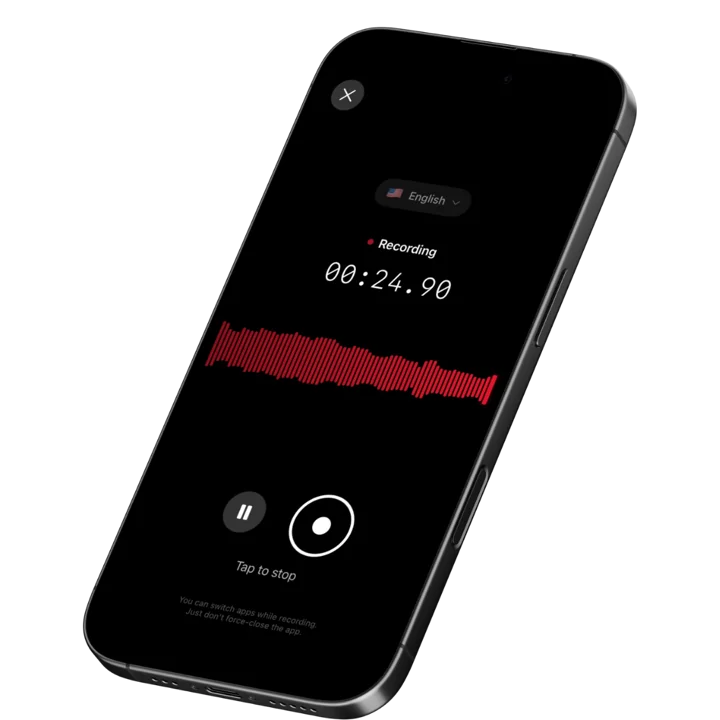
- Record the meeting on your iPhone: Open Speakwise and start recording with one tap, or hands-free from the Action Button or Control Center. It keeps recording with the screen off, so you can set the phone down and run the meeting.
- Pick the Meeting notes & actions template: After the recording ends, choose this template so the summary covers the discussion, decisions and action items, ready for you to add owners and due dates as you review it.
- Rename speakers and check the draft: Rename Speaker 1 and Speaker 2 to the real names in the room, then read through the transcript and summary. Fix anything the AI missed before you call it final.
- Export and send for approval: Export the minutes to Word or PDF, or send a share link to the group, then file the approved version with your other records, the same last step covered in our guide to automatic meeting minutes apps.
Frequently Asked Questions
How do you take minutes at a meeting?
You take minutes by writing down the meeting's facts, not the conversation. Note the date, time, location, attendees and apologies first. Then record each agenda item's decision, any motion with who moved and seconded it and the vote, and every action item with an owner and a due date. Skip word-for-word debate and personal opinions. Many people record the meeting with everyone's knowledge, then use an AI summary like Speakwise's Meeting notes & actions template to get a first draft, which they check and edit before sharing it for approval.
Is it legal to record a meeting so you can write the minutes afterward?
In most places, recording is fine as long as you tell people you are doing it. Rules vary by state and country, and some require everyone in the conversation to consent, not just the person doing the recording. Some organizations also add their own recording policy in the bylaws or employee handbook. The safest approach anywhere is to announce that you are recording at the start of the meeting and get a clear OK before you continue. This guide is not legal advice, so check your own local rules or bylaws if you are unsure.
What should meeting minutes include?
Meeting minutes should include the date, time, location, the chair's name, who attended and who sent apologies, whether a quorum was present, and the approval of the previous minutes. For each agenda item, note the decision reached and any motion with who moved and seconded it and the vote count. Finish with a list of action items, each with an owner and a due date, and the date of the next meeting. Leave out the discussion itself and any personal opinions, since minutes record what was decided, not what was said.
Can AI take meeting minutes for me?
AI can produce a strong first draft, but it should not be the final word. Record the meeting with everyone's OK, then an app like Speakwise can turn the audio into a summary with key points and action items using a template built for meeting notes. You still need to check the draft for accuracy, add any motion wording or vote counts the summary missed, and get it approved the way your organization normally approves minutes. Think of AI as the tool that removes the typing, not the person who signs off on the record.
Is Speakwise or Otter.ai better for meeting minutes?
Speakwise is built to record the in-person meeting itself, on your iPhone, and hand you a decisions-and-action-items draft afterward using its Meeting notes & actions template. Otter.ai is built around virtual meetings, joining Zoom, Google Meet or Teams calls to record and transcribe them, though its mobile app can also record in person. If most of your meetings happen in a room, Speakwise fits that workflow directly. Otter.ai is built around video calls on Zoom, Google Meet or Teams.
Final Verdict
Meeting minutes do not need to be complicated. Prepare before the meeting, capture facts and not conversation during it, and turn your notes into a clean, approved record within a day. The template above works for almost any meeting, formal or informal.
The slowest part of the old process was always the write-up after the meeting ends. Recording the meeting with everyone's OK and letting Speakwise's Meeting notes & actions template sort decisions and action items removes most of that time, while you keep full control over the final wording before you send it for approval.
Whatever tool you use, the goal stays the same: a short, accurate record that tells anyone who was not in the room exactly what was decided and who is doing what next.
Download Speakwise from the App Store and turn your next meeting recording into a minutes draft you only have to check and approve.
Speakwise offers a 7-day free trial, so you can try the Meeting notes & actions template on your very next meeting.

🎯 4.9★ App Store Rating | 📱 Built for iOS
